
Hi!
This is related to my thread where I have been receiving windows prompts that my SSD is failing. But decided to open new topic since it involves initializing it
http://www.sevenforums.com/hardware...-appears-always-but-not-listed-diskdrive.html
I tried several programs to check the health of my SSD and they say it's in perfect health which confuses me.
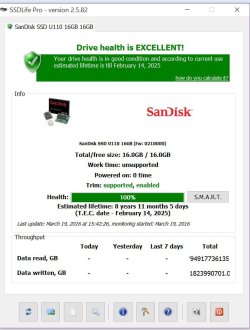
This is from SSD life pro which says my SSD is 100% health but noticed that why it says Powered on 0 times which means was never used?
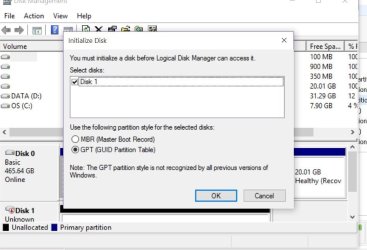
So I try to go to run and type diskmgmt.msc and I get this prompt that I need to initialize it. From previous thread my ssd is sandisk u110 16 GB is just for caching to load programs faster. I am new to this and would like your input. If I initialize it should I choose MBR or GPT?
Edit: My OS is loaded using HDD and the SSD was just for cache purposes.
This is related to my thread where I have been receiving windows prompts that my SSD is failing. But decided to open new topic since it involves initializing it
http://www.sevenforums.com/hardware...-appears-always-but-not-listed-diskdrive.html
I tried several programs to check the health of my SSD and they say it's in perfect health which confuses me.
This is from SSD life pro which says my SSD is 100% health but noticed that why it says Powered on 0 times which means was never used?
So I try to go to run and type diskmgmt.msc and I get this prompt that I need to initialize it. From previous thread my ssd is sandisk u110 16 GB is just for caching to load programs faster. I am new to this and would like your input. If I initialize it should I choose MBR or GPT?
Edit: My OS is loaded using HDD and the SSD was just for cache purposes.
Attachments
Last edited:
My Computer
- OS
- Windows 7


