- Local time
- 10:49 PM
- Messages
- 541
Hello guys.
I changed my SSD OCZ Vertex 2 with SSD Intel Series 330 60 GB. I installed Windows 7 Ultimate x64, AHCI was already in BIOS as enabled.
So far so good, i installed all the drivers, programs, etc. Everything runs smooth and nice.
The cache folder for Mozilla Firefox ( my default browser ) is on the D partition, which is an hard drive, same story for the swap.
I disabled the System Restore, Defragmentation, Superfetch as well...
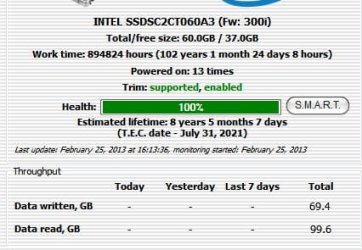
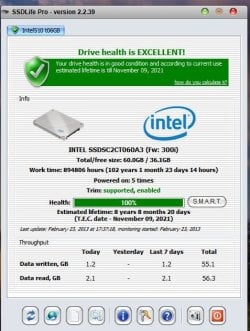
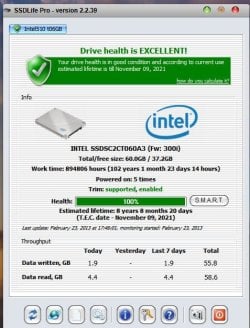
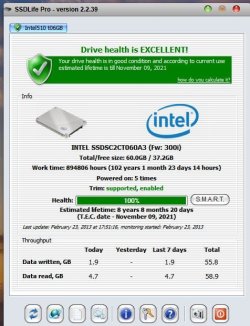
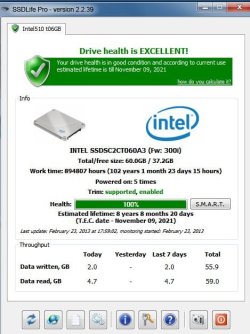
I checked with the program SSD Life Pro just to see some details. After less than 2 hours i have already
those values ( read / write ) as in the attached images.
The print screens are made at a very short period of time between each other.
I only surfed the web with Mozilla Firefox.
Could you explain it to me, please, why is there already 55 / 59 GB ?
Is something wrong with the program SSD Life Pro ?
Can you give me some tips, please ?
Thank you.
I changed my SSD OCZ Vertex 2 with SSD Intel Series 330 60 GB. I installed Windows 7 Ultimate x64, AHCI was already in BIOS as enabled.
So far so good, i installed all the drivers, programs, etc. Everything runs smooth and nice.
The cache folder for Mozilla Firefox ( my default browser ) is on the D partition, which is an hard drive, same story for the swap.
I disabled the System Restore, Defragmentation, Superfetch as well...
I checked with the program SSD Life Pro just to see some details. After less than 2 hours i have already
those values ( read / write ) as in the attached images.
The print screens are made at a very short period of time between each other.
I only surfed the web with Mozilla Firefox.
Could you explain it to me, please, why is there already 55 / 59 GB ?
Is something wrong with the program SSD Life Pro ?
Can you give me some tips, please ?
Thank you.
Attachments
My Computer
- Computer type
- PC/Desktop
- OS
- Windows 7 Ultimate x64
- CPU
- Intel7 4790K
- Motherboard
- Gigabyte GA-Z97X UD5H
- Memory
- 8 GB DDR3
- Graphics Card(s)
- GTX 980Ti G1
- Sound Card
- SoundBlaster X-FI XtremeGamer
- Monitor(s) Displays
- Samsung UE40JU6550 UHD
- Screen Resolution
- 3840 X 2160
- Hard Drives
- 1 SSD Intel 330
2 x Western Digital 6400 AAKS
1 x Western Digital 3200 AAKS
- PSU
- Corsair 750W
- Case
- Cooler Master HAF 922