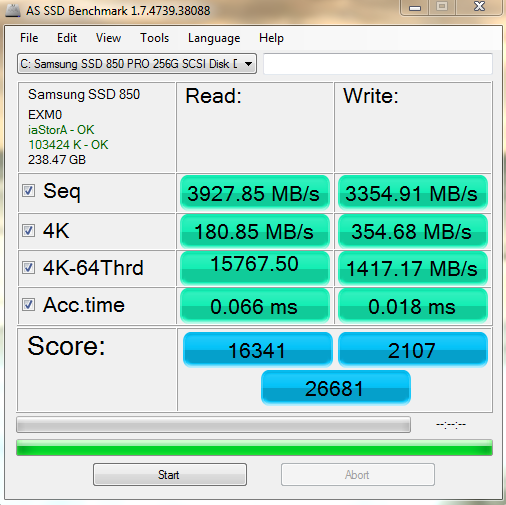
Computer Specs:
Gigabyte Z77-DS3H (Intel Core i5-3570K CPU @ 3.40GHz)
8.00GB Dual-Channel DDR3 @ 667MHz
Windows 7 Ultimate 64-bit SP1
NVIDIA GeForce GTX 560
238GB Samsung SSD 850 PRO 256GB ATA Device (SSD)
931GB Western Digital WDC WD10EALX-009BA0 ATA Device (SATA)
931GB Seagate Backup+ BK USB Device (USB (SATA))
The title explains most of it, I'm not sure where to start, new to the forums, and somewhat experienced with computers.

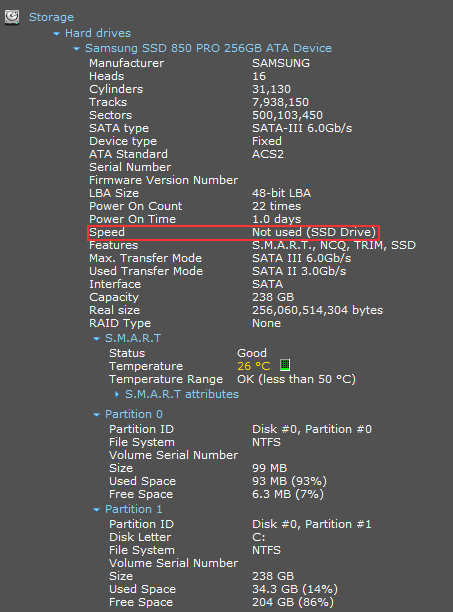
I'm in AHCI mode..when I restart computer, "DEL" to go into BIOS mode, I go to boot option #1 and boot option #2 and I don't see Samsung SSD 850 PRO 256GB ATA Device. What happened was, I took it to a tech to install the SSD and he added it to the computer physically, installed programs or whatever he did, I got it back and I tried to enable ACHI mode, kept getting blue screen, so I decided to click "repair windows installation" and...it system restored to the point where it's as if he just placed an SSD in the computer and said "here you go" I tried reinstalling it myself, reformatted windows, added windows to SSD. I'm loaded from SSD manually.

Hope someone knows how to fix this..I've wasted $70 for the installation, rather try to fix this myself (support from the internet) for future references. Thanks.
Edit: I've been up until 7am since 12/24/14. So yes, I've been googling for hours.
Gigabyte Z77-DS3H (Intel Core i5-3570K CPU @ 3.40GHz)
8.00GB Dual-Channel DDR3 @ 667MHz
Windows 7 Ultimate 64-bit SP1
NVIDIA GeForce GTX 560
238GB Samsung SSD 850 PRO 256GB ATA Device (SSD)
931GB Western Digital WDC WD10EALX-009BA0 ATA Device (SATA)
931GB Seagate Backup+ BK USB Device (USB (SATA))
The title explains most of it, I'm not sure where to start, new to the forums, and somewhat experienced with computers.
I'm in AHCI mode..when I restart computer, "DEL" to go into BIOS mode, I go to boot option #1 and boot option #2 and I don't see Samsung SSD 850 PRO 256GB ATA Device. What happened was, I took it to a tech to install the SSD and he added it to the computer physically, installed programs or whatever he did, I got it back and I tried to enable ACHI mode, kept getting blue screen, so I decided to click "repair windows installation" and...it system restored to the point where it's as if he just placed an SSD in the computer and said "here you go" I tried reinstalling it myself, reformatted windows, added windows to SSD. I'm loaded from SSD manually.
Hope someone knows how to fix this..I've wasted $70 for the installation, rather try to fix this myself (support from the internet) for future references. Thanks.
Edit: I've been up until 7am since 12/24/14. So yes, I've been googling for hours.
My Computer
- Computer type
- PC/Desktop
- Computer Manufacturer/Model Number
- Custom build
- OS
- Windows 7 Ultimate x64
- CPU
- Intel Core i5-3570K CPU @ 3.40GHz
- Motherboard
- Gigabyte
- Memory
- 8GB
- Graphics Card(s)
- NVIDIA GeForce GTX 560
- Screen Resolution
- 1920x1080
- Hard Drives
- Samsung SSD 850 PRO 256GB ATA Device
WDC WD10EALX-009BA0 ATA Device
Seagate Backup+ BK USB Device
- Mouse
- Logitech G500s
- Antivirus
- Microsoft Security Essentials
- Browser
- Mozilla Firefox