Solved ssd problems

pmk

New member
Local time
9:48 PM
Messages
23
Location
Amsterdam
First of all I want to apologise for the mistakes that I have obviously been making due to the fact that I am new on this site.
How can I remove posts that have been answered?
I have the following problem with my ssd disk.
I probably bought it too small anyway, it is a VERTEX III (120 Gb.)
Untill the beginning of this week I had used up half the storage capacity, which means that I had 56 Gb left from the 111 available Gb.
I have not installed any new programs lately, the only thing is that somebody helped me to recover an overlay problem.
The icons on my desktop all showed the internet explorer picture, but this problem is now solved, although I have got this arrow stuck to the icon picture.
However I suddenly only have 49,5 Gb. of free space left, which I find quite a lot to just vanish.....
Can any one please help and does it help to include a screenshot of for instance my RAM shown in Speccy as I heard somebody mention on this site?
Thanks in advance for any given advice and sorry if my english is not quite sufficient, but this is not my native language.
Greetings, Peter

My e-mail address is:Removed for your safety ;)
 
Last edited:

My Computer

OS
windows 7 (64 bit)
First of all I want to apologise for the mistakes that I have obviously been making due to the fact that I am new on this site.
How can I remove posts that have been answered?
I have the following problem with my ssd disk.
I probably bought it too small anyway, it is a VERTEX III (120 Gb.)
Untill the beginning of this week I had used up half the storage capacity, which means that I had 56 Gb left from the 111 available Gb.
I have not installed any new programs lately, the only thing is that somebody helped me to recover an overlay problem.
The icons on my desktop all showed the internet explorer picture, but this problem is now solved, although I have got this arrow stuck to the icon picture.
However I suddenly only have 49,5 Gb. of free space left, which I find quite a lot to just vanish.....
Can any one please help and does it help to include a screenshot of for instance my RAM shown in Speccy as I heard somebody mention on this site?
Thanks in advance for any given advice and sorry if my english is not quite sufficient, but this is not my native language.
Greetings, Peter

Are you using a 3rd party backup on your system? Generally unexpected decrease in drive space is due to a backup. Please post back.

HTH
 
Last edited by a moderator:

My Computer

Computer type
PC/Desktop
Computer Manufacturer/Model Number
Custom Built
OS
Windows 7 Professional x64
CPU
Intel i5 quad processor
Motherboard
DP67BG
Memory
16 GB
Graphics Card(s)
Radeon HD 5770
Sound Card
Realtek High Definition Audio
Monitor(s) Displays
Samsung SyncMaster
Screen Resolution
1920X1080
Hard Drives
WD 2TB (SATA Internal)
WD 1TB (USB External)
PSU
Corsair GS800
Case
Tower (Generic)
Cooling
3 Internal Fans
Keyboard
MS Wireless
Mouse
MS Optical Wired
Internet Speed
54 mbps
Antivirus
Emsisoft
Browser
IE-Version 9, Palemoon-Version 24.2.0
What you NEVER want to do is post your email address, it can cause a lot of spam for you.
Edit your Post and remove it asap.
I see Barman58 removed the address for you.

You can mark your previous threads as "Solved" if the issue(s) are fixed.

You should fill in your System Specs.
Do you have a laptop and the SSD is the only storage device (no HD's possible)?

A 120 GB SSD is large enough for most people.
Do you store all your data on the SSD?
What programs do you have installed on the SSD?

Most people put the OS and programs on an SSD, and data is stored an a HD.
If you're a gamer, are you installing games on the SSD?

You can try free programs such as WinDirStat and TreeSize to more easily see where space is being used.

WinDirStat - Windows Directory Statistics
TreeSize Free - Quickly Scan Directory Sizes and Find Space Hogs
 

My Computer

Computer type
PC/Desktop
Computer Manufacturer/Model Number
home built
OS
Multi-Boot W7_Pro_x64 W8.1_Pro_x64 W10_Pro_x64 +Linux_VMs +Chromium_VM
CPU
AMD Athlon II x4 620
Motherboard
Gigabyte GA-MA785G-UD3H
Memory
6GB GSkill DDR2 800
Graphics Card(s)
AMD 4670 GPU + AMD 4200 IGP
Sound Card
on board Realtek ALC889A
Monitor(s) Displays
RCA 40" LCD TV, Insignia 32" LCD TV, HP 15" LCD monitor
Screen Resolution
1680 x 1050
Hard Drives
OCZ Vertex 3 120GB,
Samsung F3 1TB (3),
Several others - WD, Seagate, Hitachi, ...
PSU
Corsair 500 W
Case
Rosewill mid tower
Cooling
CM 90mm rifle
Keyboard
Gyration wireless, Logitech wireless, Dell USB wired
Mouse
Gyration wireless, Logitech wireless, V7 USB wired
Internet Speed
Spectrum - 100Mbps D / 10Mbps U
Antivirus
Avast, MBAM3, EMET, WinPatrol
Browser
Pale Moon, Firefox, IE
Other Info
2 multi-boot PC's
Mainly HTPC/Office/Gen purpose (no gaming).
Trendnet USB KVM.
LG DVD burner/Blue Ray Player.
Tray system for removable SATA backup drives.

Not currently OCd, under-volted.
I use Hybrid sleep, rarely re-boot or shutdown.

Hauppauge HD-PVR, Avermedia PCIe TV Tuner, Hauppauge PCI TV Tuner.
RE:

Thanks for warning me for my stupid mistake (entering my e-mail address)!
I only have windows and my program files on the Vertex III ssd disk.
I have a PC
I'll send a screenshot of the various programs installed on my ssd disk.
All my data are on the D:// disk which is a WD 2 TB disk.
As a back up disk I also have another 2 Tb WD.
I don't have any gaming programs on my pc.
I just downloaded WinDirStat but have not installed or used it yet.
As a back up program I have Acronis installed.
I hope I answered your questions sufficiently and am very thankful for your help.
Greetins, Peter
If you need any more screen shots, please let me know.
 

Attachments

My Computer

OS
windows 7 (64 bit)
Thanks for warning me for my stupid mistake (entering my e-mail address)!
I only have windows and my program files on the Vertex III ssd disk.
I have a PC
I'll send a screenshot of the various programs installed on my ssd disk.
All my data are on the D:// disk which is a WD 2 TB disk.
As a back up disk I also have another 2 Tb WD.
I don't have any gaming programs on my pc.
I just downloaded WinDirStat but have not installed or used it yet.
As a back up program I have Acronis installed.
I hope I answered your questions sufficiently and am very thankful for your help.
Greetins, Peter
If you need any more screen shots, please let me know.

Since you have Acronis installed, the backups created by that program can consume a large amount of space as I noted in my first post. I see that DavidW7ncus has already suggested using a couple of different programs that will provide stats on directory size which helps in locating large files.

Please post back your progress.
 

My Computer

Computer type
PC/Desktop
Computer Manufacturer/Model Number
Custom Built
OS
Windows 7 Professional x64
CPU
Intel i5 quad processor
Motherboard
DP67BG
Memory
16 GB
Graphics Card(s)
Radeon HD 5770
Sound Card
Realtek High Definition Audio
Monitor(s) Displays
Samsung SyncMaster
Screen Resolution
1920X1080
Hard Drives
WD 2TB (SATA Internal)
WD 1TB (USB External)
PSU
Corsair GS800
Case
Tower (Generic)
Cooling
3 Internal Fans
Keyboard
MS Wireless
Mouse
MS Optical Wired
Internet Speed
54 mbps
Antivirus
Emsisoft
Browser
IE-Version 9, Palemoon-Version 24.2.0
To resolve your space problem, you can do 2 things:

1. Get rid of the hiberfile. The command is powercfg -h off. Then reduce the pagefile to 2GB

2. Have a look whether you do not have too many restore points in your shadowstorage. The command is:

vssadmin list shadowstorage.

Look for the number under Allocated and Maximum.

If that is more than 5 or 10GB, you should reduce the size. The command is:

Vssadmin Resize ShadowStorage /For=C: /On=C: /MaxSize=5GB.

Now that would set it to 5GB. If you want to different size, change the number. Figure 500MB to 1GB per restore point.
 

My Computer

Computer Manufacturer/Model Number
HP, Dell, Gateway, Toshiba - 4 laptops and 2 desktops
OS
Vista, Windows7, Mint Mate, Zorin, Windows 8
CPU
from 1.6GHz Duo to i7
Monitor(s) Displays
2x HP w2207
Hard Drives
5x HDD, 7x SSD, 12x Externals
Keyboard
with trackball - no mices
Mouse
Trackball mice
Internet Speed
DSL 6000
Thanks for warning me for my stupid mistake (entering my e-mail address)!
I only have windows and my program files on the Vertex III ssd disk.
I have a PC
I'll send a screenshot of the various programs installed on my ssd disk.
All my data are on the D:// disk which is a WD 2 TB disk.
As a back up disk I also have another 2 Tb WD.
I don't have any gaming programs on my pc.
I just downloaded WinDirStat but have not installed or used it yet.
As a back up program I have Acronis installed.
I hope I answered your questions sufficiently and am very thankful for your help.
Greetins, Peter
If you need any more screen shots, please let me know.

Since you have Acronis installed, the backups created by that program can consume a large amount of space as I noted in my first post. I see that DavidW7ncus has already suggested using a couple of different programs that will provide stats on directory size which helps in locating large files.

Please post back your progress.
yes, but the back ups created by acronis all go to my disk D://
 

My Computer

OS
windows 7 (64 bit)
Thanks for warning me for my stupid mistake (entering my e-mail address)!
I only have windows and my program files on the Vertex III ssd disk.
I have a PC
I'll send a screenshot of the various programs installed on my ssd disk.
All my data are on the D:// disk which is a WD 2 TB disk.
As a back up disk I also have another 2 Tb WD.
I don't have any gaming programs on my pc.
I just downloaded WinDirStat but have not installed or used it yet.
As a back up program I have Acronis installed.
I hope I answered your questions sufficiently and am very thankful for your help.
Greetins, Peter
If you need any more screen shots, please let me know.

Since you have Acronis installed, the backups created by that program can consume a large amount of space as I noted in my first post. I see that DavidW7ncus has already suggested using a couple of different programs that will provide stats on directory size which helps in locating large files.

Please post back your progress.
yes, but the back ups created by acronis all go to my disk D://

Sorry, didn't catch that in your updated post. So, that shoots down the concept of backup usage.
 

My Computer

Computer type
PC/Desktop
Computer Manufacturer/Model Number
Custom Built
OS
Windows 7 Professional x64
CPU
Intel i5 quad processor
Motherboard
DP67BG
Memory
16 GB
Graphics Card(s)
Radeon HD 5770
Sound Card
Realtek High Definition Audio
Monitor(s) Displays
Samsung SyncMaster
Screen Resolution
1920X1080
Hard Drives
WD 2TB (SATA Internal)
WD 1TB (USB External)
PSU
Corsair GS800
Case
Tower (Generic)
Cooling
3 Internal Fans
Keyboard
MS Wireless
Mouse
MS Optical Wired
Internet Speed
54 mbps
Antivirus
Emsisoft
Browser
IE-Version 9, Palemoon-Version 24.2.0
Waiting to see the WinDirStat screenshot to give us the picture.

Your SSD should be plenty large for OS, programs, System Managed paging file and Hiberfil if you want to use the modern suspend function.
 
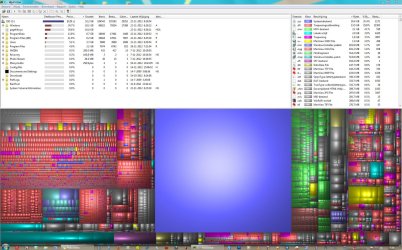
windirstat

Hallo Gregrocker,
Thanks for wantin to help.
First of all, is this the windirstat screenshot you wanted, or do you need the whole picture?
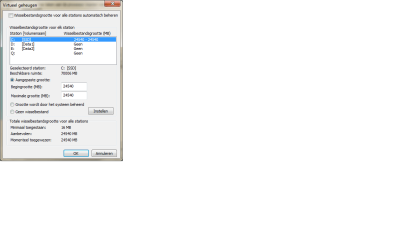
I am also sending you my RAM situation and how my pagefile is organised, if that helps.
My system restore was switched off from the begininning powercfg -h off.
All my data like documents and photoshop stuff go to my D:// disk.
I keep on loosing space and now have 48,5, Gb left without installing any new programs.
 

Attachments

My Computer

OS
windows 7 (64 bit)
Looks like you've set your Paging File to 24.5 gb which is way too high since the System only sets an amount approx equal to your physical RAM. This is why I don't recommend messing with it since this function is perfected in Win7.

If I were you I would tick the Box for System Managed Size, highlight C drive, then check the Box to Automatically Manage, click OK and Apply.

Once you see what size is then allocated at the bottom of the Virtual Memory box, let us know if you think it's more than you can afford on such a large SSD.

Unless the SSD fills up I would also not sacrifice the modern Hibernate function if you wish to use it to save your work when you walk away for an extended time.

Before I would sacrifice vital vital System Functions I would have all data linked from a HDD, then if SSD gets full reinstall lesser-used programs to HD or buy a larger SSD.
 
Hi Greg (is that your real name?)
Thanks so much for your maill.
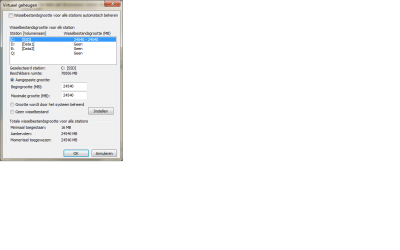
I changed the virtual memory setting as you advised and immediately gained ....13 Gb on my ssd disk.
I'll send you the new screenshot and perhaps you could look if this is how I can leave it.
I'll also send you a complete screenshot of my windirstat.
Are there any programs on my list that you would advise me to transfer to my D disk?
I don't quite understand what you mean with the 2 last sentences in you mail.
Especially the last one:
Unless the SSD fills up I would also not sacrifice the modern Hibernate function if you wish to use it to save your work when you walk away for an extended time.

Before I would sacrifice vital vital System Functions I would have all data linked from a HDD, then if SSD gets full reinstall lesser-used programs to HD or buy a larger SSD.

Should I reinsytall systemrestore, which has always been switced off so far?
Thanks again for all yur trouble and greetings from a very cold Amsterdam.
 

Attachments

My Computer

OS
windows 7 (64 bit)
You want System Restore as your first line of defense in case of catastrophic problems. Let the System set its size as well and don't reduce it unless absolutely necessary. System Protection - Change Disk Space Usage

I like the Hibernate function so I can walk away from my PC and not have to worry about saving my work, so I don't encourage others to sacrifice it since there's no need.

Make sure all of your data is in User folders you set up on your HDD and then link to the related Library - Include a Folder - Windows 7 Forums.

If you get low disk warning on the SSD, uninstall lesser used programs and then reinstall them to the HDD.
 
Last edited:
Looking at the specs.doc in post #4, I think pmk does have 16 GB RAM.

I doubt a 16 GB pagefile is really needed, so I would manage the size myself with a 1 GB minimum and 8 GB maximum.
This should allow creating DMP files if ever needed, and allow programs that do want to use it to not cause errors.

For Hibernate the default size is 75% of RAM.
It can be adjusted down to 50% of RAM.

The Page File (pagefile.sys) can be moved to a different drive/partition than the C: partition.
The Hibernate File (hiberfil.sys) can NOT be moved to a different drive/partition than the C: partition.

I see the value in Restore Points, but I prefer System Backup Images for a more reliable restore if needed.
I use both, a Backup Image is a full partition backup/restore, a Restore Point is NOT.
 

My Computer

Computer type
PC/Desktop
Computer Manufacturer/Model Number
home built
OS
Multi-Boot W7_Pro_x64 W8.1_Pro_x64 W10_Pro_x64 +Linux_VMs +Chromium_VM
CPU
AMD Athlon II x4 620
Motherboard
Gigabyte GA-MA785G-UD3H
Memory
6GB GSkill DDR2 800
Graphics Card(s)
AMD 4670 GPU + AMD 4200 IGP
Sound Card
on board Realtek ALC889A
Monitor(s) Displays
RCA 40" LCD TV, Insignia 32" LCD TV, HP 15" LCD monitor
Screen Resolution
1680 x 1050
Hard Drives
OCZ Vertex 3 120GB,
Samsung F3 1TB (3),
Several others - WD, Seagate, Hitachi, ...
PSU
Corsair 500 W
Case
Rosewill mid tower
Cooling
CM 90mm rifle
Keyboard
Gyration wireless, Logitech wireless, Dell USB wired
Mouse
Gyration wireless, Logitech wireless, V7 USB wired
Internet Speed
Spectrum - 100Mbps D / 10Mbps U
Antivirus
Avast, MBAM3, EMET, WinPatrol
Browser
Pale Moon, Firefox, IE
Other Info
2 multi-boot PC's
Mainly HTPC/Office/Gen purpose (no gaming).
Trendnet USB KVM.
LG DVD burner/Blue Ray Player.
Tray system for removable SATA backup drives.

Not currently OCd, under-volted.
I use Hybrid sleep, rarely re-boot or shutdown.

Hauppauge HD-PVR, Avermedia PCIe TV Tuner, Hauppauge PCI TV Tuner.
David, does the page file also benefit from the faster speed on SSD under most circumstances? Is it even used much with 16gb RAM so that it matters where it is?
 
That is a question that has been talked about in other threads I've seen here.
I believe IF the pagefile is used an SSD should help with faster performance.

In my testing I've never seen the pagefile used or the size increase with 4-8 GB RAM.
Some of my systems are set to a min 200 MB pagefile...the min required for a small DMP.

From what I've read some programs will always use the pagefile, but i haven't seen that or have those programs.
So for me, manually setting the size works best.

I've been using this approach for a long time without issues on multiple systems.
I do periodically check the size to keep an eye on it and see if it has increased, but not as much as I did at first...
 

My Computer

Computer type
PC/Desktop
Computer Manufacturer/Model Number
home built
OS
Multi-Boot W7_Pro_x64 W8.1_Pro_x64 W10_Pro_x64 +Linux_VMs +Chromium_VM
CPU
AMD Athlon II x4 620
Motherboard
Gigabyte GA-MA785G-UD3H
Memory
6GB GSkill DDR2 800
Graphics Card(s)
AMD 4670 GPU + AMD 4200 IGP
Sound Card
on board Realtek ALC889A
Monitor(s) Displays
RCA 40" LCD TV, Insignia 32" LCD TV, HP 15" LCD monitor
Screen Resolution
1680 x 1050
Hard Drives
OCZ Vertex 3 120GB,
Samsung F3 1TB (3),
Several others - WD, Seagate, Hitachi, ...
PSU
Corsair 500 W
Case
Rosewill mid tower
Cooling
CM 90mm rifle
Keyboard
Gyration wireless, Logitech wireless, Dell USB wired
Mouse
Gyration wireless, Logitech wireless, V7 USB wired
Internet Speed
Spectrum - 100Mbps D / 10Mbps U
Antivirus
Avast, MBAM3, EMET, WinPatrol
Browser
Pale Moon, Firefox, IE
Other Info
2 multi-boot PC's
Mainly HTPC/Office/Gen purpose (no gaming).
Trendnet USB KVM.
LG DVD burner/Blue Ray Player.
Tray system for removable SATA backup drives.

Not currently OCd, under-volted.
I use Hybrid sleep, rarely re-boot or shutdown.

Hauppauge HD-PVR, Avermedia PCIe TV Tuner, Hauppauge PCI TV Tuner.
When I installed my OSes, each in a 60GB partition (Vista on the first SSD and 7 & 8 in equal partitions on the second SSD), the pagefiles (PF) were setup so that Vista placed it on the first HDD whereas 7 & 8 placed it into the OS partitions. As I like consistency across my OSes, and for drive letters to represent what is on the partition, I made some changes. In all OSes, I initially disabled the PF to allow me to reassign the drive letters. I then created a partition 1.5X the amount of RAM (16GB RAM, therefore partition 24GB) on one of my HDDs, labelled it P and then placed the PF on it (always rebooting to ensure that changes were kept). All these were System Managed. In 7 & 8, I also placed a fixed 1GB PF in the OS partition.

My SSD/HDD drive partitions:

SSDs:

C > Current running OS.
D,E > Other OSes (not running).

HDDs:

P > Paging File
W > Wallpapers
U > Users
M > Media
 

My Computer

Computer type
PC/Desktop
Computer Manufacturer/Model Number
Dwarf Dwf/11/2012 r09/2013
OS
Windows 8.1 Pro RTM x64
CPU
Intel Core-i5-3570K 4-core @ 3.4GHz (Ivy Bridge) (OC 4.4GHz)
Motherboard
ASRock Z77 Extreme4-M
Memory
4 x 4GB DDR3-1600 Corsair Vengeance CMZ8GX3M2A1600C9B (16GB)
Graphics Card(s)
MSI GeForce GTX770 Gaming OC 2GB
Sound Card
Realtek High Definition on board solution (ALC 898)
Monitor(s) Displays
ViewSonic VA1912w Widescreen (VGA)
Screen Resolution
1440x900
Hard Drives
OCZ Agility 3 SSD 120GB SATA III x2 (RAID 0)
Samsung HD501LJ 500GB SATA II x2
Hitachi HDS721010CLA332 1TB SATA II
Iomega 1.5TB Ext USB 2.0
WD 2.0TB Ext USB 3.0
PSU
XFX Pro Series 850W Semi-Modular
Case
Gigabyte IF233
Cooling
1 x 120mm Front Inlet 1 x 120mm Rear Exhaust
Keyboard
Microsoft Comfort Curve Keyboard 3000 (USB)
Mouse
Microsoft Comfort Mouse 3000 for Business (USB)
Internet Speed
NetGear DG834Gv3 ADSL Modem/Router (Ethernet) ~4.0 Mb/s (O2)
Antivirus
Avast! 8.0.1497
Browser
IE 11
Other Info
Optical Drive: HL-DT-ST BD-RE BH10LS30 SATA Bluray
Lexmark S305 Printer/Scanner/Copier (USB)
WEI Score: 8.1/8.1/8.5/8.5/8.25
Asus Eee PC 1011PX Netbook (Windows 7 x86 Starter)
When I installed my OSes, each in a 60GB partition (Vista on the first SSD and 7 & 8 in equal partitions on the second SSD), the pagefiles (PF) were setup so that Vista placed it on the first HDD whereas 7 & 8 placed it into the OS partitions.

Did you have an SSD and a HDD connected when you installed Vista (and 7/8)?

I always only have one SSD or HD connected when I install an OS.
 

My Computer

Computer type
PC/Desktop
Computer Manufacturer/Model Number
home built
OS
Multi-Boot W7_Pro_x64 W8.1_Pro_x64 W10_Pro_x64 +Linux_VMs +Chromium_VM
CPU
AMD Athlon II x4 620
Motherboard
Gigabyte GA-MA785G-UD3H
Memory
6GB GSkill DDR2 800
Graphics Card(s)
AMD 4670 GPU + AMD 4200 IGP
Sound Card
on board Realtek ALC889A
Monitor(s) Displays
RCA 40" LCD TV, Insignia 32" LCD TV, HP 15" LCD monitor
Screen Resolution
1680 x 1050
Hard Drives
OCZ Vertex 3 120GB,
Samsung F3 1TB (3),
Several others - WD, Seagate, Hitachi, ...
PSU
Corsair 500 W
Case
Rosewill mid tower
Cooling
CM 90mm rifle
Keyboard
Gyration wireless, Logitech wireless, Dell USB wired
Mouse
Gyration wireless, Logitech wireless, V7 USB wired
Internet Speed
Spectrum - 100Mbps D / 10Mbps U
Antivirus
Avast, MBAM3, EMET, WinPatrol
Browser
Pale Moon, Firefox, IE
Other Info
2 multi-boot PC's
Mainly HTPC/Office/Gen purpose (no gaming).
Trendnet USB KVM.
LG DVD burner/Blue Ray Player.
Tray system for removable SATA backup drives.

Not currently OCd, under-volted.
I use Hybrid sleep, rarely re-boot or shutdown.

Hauppauge HD-PVR, Avermedia PCIe TV Tuner, Hauppauge PCI TV Tuner.
David, does the page file also benefit from the faster speed on SSD under most circumstances? Is it even used much with 16gb RAM so that it matters where it is?
Greg, with 16GB of RAM, the pagefile will never be used. Those hard faults you see in e.g. Resource Monitor, are fake faults. Someone is only using the paging algorithm to get his bits into RAM. That's why I always reduce the pagefile to 2GB - some even 1GB.
 

My Computer

Computer Manufacturer/Model Number
HP, Dell, Gateway, Toshiba - 4 laptops and 2 desktops
OS
Vista, Windows7, Mint Mate, Zorin, Windows 8
CPU
from 1.6GHz Duo to i7
Monitor(s) Displays
2x HP w2207
Hard Drives
5x HDD, 7x SSD, 12x Externals
Keyboard
with trackball - no mices
Mouse
Trackball mice
Internet Speed
DSL 6000
Hi Greg,
After the last message I just read concerning turnining my pagefile down to 2, or even 1 Gb. I don't quite know what to do.
In case I would have to change, how would it have to look?
I am enclosing the situation as it is now, once again.
My question probably sounds stupid, but I have no knowledge or experience on this matter whatsoever.
Thanks, Peter
Did the screenshot of windirstat make any sense?
Greetings, Peter
 

Attachments

My Computer

OS
windows 7 (64 bit)
Back
Top