Solved ssd problems

You can try Wolfgang's suggestion for 2gb or wait for additional opinions. As I said I use System Managed but I've not had that much RAM before.

It's clear from the WinDirStat screenshot that the Page File was the space hog. I'd go ahead and install my programs and see how much space is left, then decide about the rest.
 
Hi Greg,
After the last message I just read concerning turnining my pagefile down to 2, or even 1 Gb. I don't quite know what to do.
In case I would have to change, how would it have to look?

See if this tutorial explains this for you:
Virtual Memory Paging File - Change - Vista Forums

See # 11 in the tutorial and screen prints below # 15
11. To Have a Custom Paging File Size for the Selected Drive
 

My Computer

Computer type
PC/Desktop
Computer Manufacturer/Model Number
home built
OS
Multi-Boot W7_Pro_x64 W8.1_Pro_x64 W10_Pro_x64 +Linux_VMs +Chromium_VM
CPU
AMD Athlon II x4 620
Motherboard
Gigabyte GA-MA785G-UD3H
Memory
6GB GSkill DDR2 800
Graphics Card(s)
AMD 4670 GPU + AMD 4200 IGP
Sound Card
on board Realtek ALC889A
Monitor(s) Displays
RCA 40" LCD TV, Insignia 32" LCD TV, HP 15" LCD monitor
Screen Resolution
1680 x 1050
Hard Drives
OCZ Vertex 3 120GB,
Samsung F3 1TB (3),
Several others - WD, Seagate, Hitachi, ...
PSU
Corsair 500 W
Case
Rosewill mid tower
Cooling
CM 90mm rifle
Keyboard
Gyration wireless, Logitech wireless, Dell USB wired
Mouse
Gyration wireless, Logitech wireless, V7 USB wired
Internet Speed
Spectrum - 100Mbps D / 10Mbps U
Antivirus
Avast, MBAM3, EMET, WinPatrol
Browser
Pale Moon, Firefox, IE
Other Info
2 multi-boot PC's
Mainly HTPC/Office/Gen purpose (no gaming).
Trendnet USB KVM.
LG DVD burner/Blue Ray Player.
Tray system for removable SATA backup drives.

Not currently OCd, under-volted.
I use Hybrid sleep, rarely re-boot or shutdown.

Hauppauge HD-PVR, Avermedia PCIe TV Tuner, Hauppauge PCI TV Tuner.
Hi Greg,
As you suggested, I would like to give it a try to change my pagefilessetting to 2Mb.
If this shoul make little or even no difference, I can always go back to the situation like it is now without causing any damage, can't I?
I'll send you a screenshot as how it is now, perhaps you could tell me what I would have to enter in the new situation, behind BEGIN SIZE and MAXIMUM SIZE ?
The capacity of my SSD disk is back to about 50% right now, after the changed setting you advised me to make, which is a huge difference.
Thanks again for that :) !!
How low should the capacity go, to decide to exchange the SSD drive for a larger one?
I hardly ever install new programs any more, so I don't really expect problems there.
Greetings and have a nice weekend, Peter
 

My Computer

OS
windows 7 (64 bit)
Have you installed your programs yet to see how the size on chip looks then?
 
yes, after having installed all my programs I get the situation that I have about 57 Gb free from the 111Gb
 

My Computer

OS
windows 7 (64 bit)
Then there's no reason to mess with your page file until it starts tightening up, right?

In fact I would turn Hibernate back on and apportion even more for System Restore points.

No sense in skimping on System features if you have half of the SSD free.
 
Hallo Greg,
Is it advisable to deselect "The contents and properties of the file in this map may be indexed" ?
Greetings, Peter
 

Attachments

My Computer

OS
windows 7 (64 bit)
moving pagefile from ssd disk

Is it always a good idea to move my pagefile to another disk and not keep it on my ssd drive where windows and all my other programs are installed?
What are the benefits and how do I proceed?
Thanks, Peter
 

Attachments

My Computer

OS
windows 7 (64 bit)
Is it always a good idea to move my pagefile to another disk and not keep it on my ssd drive where windows and all my other programs are installed?
What are the benefits and how do I proceed?
Thanks, Peter

Hello Peter,

Unless you were going to move the page file to another equally fast SSD, you would be better off keeping the page file on the SSD. If you move it to a slower HDD instead of on the faster SSD, then that's only going to hurt your computer's performance.

Hope this helps, :)
Shawn
 
Last edited:

My Computer

Computer type
PC/Desktop
Computer Manufacturer/Model Number
Self built custom
OS
64-bit Windows 11 Pro for Workstations
CPU
Intel i7-8700K OC'd to 5 GHz
Motherboard
ASUS ROG Maximus XI Formula Z390
Memory
64 GB (4x16GB) G.SKILL TridentZ RGB DDR4 3600 MHz
Graphics Card(s)
ASUS ROG-STRIX-GTX1080TI-O11G-GAMING
Sound Card
Integrated
Monitor(s) Displays
2 x Samsung Odyssey G7 27"
Screen Resolution
2560x1440
Hard Drives
1TB Samsung 990 PRO M.2,
4TB Samsung 990 PRO PRO M.2,
TerraMaster F8 SSD Plus NAS
PSU
Seasonic Prime Titanium 850W
Case
Thermaltake Core P3
Cooling
Corsair Hydro H115i
Keyboard
Logitech wireless K800
Mouse
Logitech MX Master 4
Internet Speed
2 Gb/s Download and 100 Mb/s Upload
Antivirus
Malwarebyte Anti-Malware Premium
Browser
Google Chrome
Other Info
Logitech Z625 speaker system,
Logitech BRIO 4K Pro webcam,
HP Color LaserJet Pro MFP M477fdn,
APC SMART-UPS RT 1000 XL - SURT1000XLI,
Galaxy S23 Plus phone
I have mine set up so that I have a fixed page file of 1GB on the current OS partition, which is one of my SSDs. I also have a system-managed page file on a dedicated partition of one of my HDDs. Since I have 16GB of RAM, it is unlikely that my page file will be called upon much, but if and when it is (some programs still expect a page file to exist, even if they don't end up using it), the faster portion on the SSD will be called into action first, with the slower HDD portion only being utilised if required.
 

My Computer

Computer type
PC/Desktop
Computer Manufacturer/Model Number
Dwarf Dwf/11/2012 r09/2013
OS
Windows 8.1 Pro RTM x64
CPU
Intel Core-i5-3570K 4-core @ 3.4GHz (Ivy Bridge) (OC 4.4GHz)
Motherboard
ASRock Z77 Extreme4-M
Memory
4 x 4GB DDR3-1600 Corsair Vengeance CMZ8GX3M2A1600C9B (16GB)
Graphics Card(s)
MSI GeForce GTX770 Gaming OC 2GB
Sound Card
Realtek High Definition on board solution (ALC 898)
Monitor(s) Displays
ViewSonic VA1912w Widescreen (VGA)
Screen Resolution
1440x900
Hard Drives
OCZ Agility 3 SSD 120GB SATA III x2 (RAID 0)
Samsung HD501LJ 500GB SATA II x2
Hitachi HDS721010CLA332 1TB SATA II
Iomega 1.5TB Ext USB 2.0
WD 2.0TB Ext USB 3.0
PSU
XFX Pro Series 850W Semi-Modular
Case
Gigabyte IF233
Cooling
1 x 120mm Front Inlet 1 x 120mm Rear Exhaust
Keyboard
Microsoft Comfort Curve Keyboard 3000 (USB)
Mouse
Microsoft Comfort Mouse 3000 for Business (USB)
Internet Speed
NetGear DG834Gv3 ADSL Modem/Router (Ethernet) ~4.0 Mb/s (O2)
Antivirus
Avast! 8.0.1497
Browser
IE 11
Other Info
Optical Drive: HL-DT-ST BD-RE BH10LS30 SATA Bluray
Lexmark S305 Printer/Scanner/Copier (USB)
WEI Score: 8.1/8.1/8.5/8.5/8.25
Asus Eee PC 1011PX Netbook (Windows 7 x86 Starter)
Thanks, so in my case also having 16 Gb of ram, would I be safe safe changing the system managed situation into a fixed file of for instance 2 Gb.
Would I benefit from this and would it not slow down my system, or would I do better to leave the system managed condition as it is ?
Do I have to enter 2 Gb for the minimun and also 2 Gb for the maximum?
Thanks and gretingspeter
 

My Computer

OS
windows 7 (64 bit)
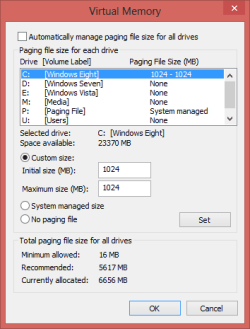
This perhaps illustrates better what I have. Note that the system-managed page file on drive P is a common file that is used by all 3 OSes. Each OS does have its own fixed page file on the OS partition, as shown here. So, whichever OS I boot into will show a fixed page file in the C partition, plus that in the dedicated P partition.

Capture.PNG
 

My Computer

Computer type
PC/Desktop
Computer Manufacturer/Model Number
Dwarf Dwf/11/2012 r09/2013
OS
Windows 8.1 Pro RTM x64
CPU
Intel Core-i5-3570K 4-core @ 3.4GHz (Ivy Bridge) (OC 4.4GHz)
Motherboard
ASRock Z77 Extreme4-M
Memory
4 x 4GB DDR3-1600 Corsair Vengeance CMZ8GX3M2A1600C9B (16GB)
Graphics Card(s)
MSI GeForce GTX770 Gaming OC 2GB
Sound Card
Realtek High Definition on board solution (ALC 898)
Monitor(s) Displays
ViewSonic VA1912w Widescreen (VGA)
Screen Resolution
1440x900
Hard Drives
OCZ Agility 3 SSD 120GB SATA III x2 (RAID 0)
Samsung HD501LJ 500GB SATA II x2
Hitachi HDS721010CLA332 1TB SATA II
Iomega 1.5TB Ext USB 2.0
WD 2.0TB Ext USB 3.0
PSU
XFX Pro Series 850W Semi-Modular
Case
Gigabyte IF233
Cooling
1 x 120mm Front Inlet 1 x 120mm Rear Exhaust
Keyboard
Microsoft Comfort Curve Keyboard 3000 (USB)
Mouse
Microsoft Comfort Mouse 3000 for Business (USB)
Internet Speed
NetGear DG834Gv3 ADSL Modem/Router (Ethernet) ~4.0 Mb/s (O2)
Antivirus
Avast! 8.0.1497
Browser
IE 11
Other Info
Optical Drive: HL-DT-ST BD-RE BH10LS30 SATA Bluray
Lexmark S305 Printer/Scanner/Copier (USB)
WEI Score: 8.1/8.1/8.5/8.5/8.25
Asus Eee PC 1011PX Netbook (Windows 7 x86 Starter)
Thanks for your reply, but it does not really help me much, as my situation is completely different.
I ONLY run windows 7 so don't need to consider making a pagefile for for instance vista and the rest.
What I actually only would want to know is:
If I should change from what I have of which I am enclosing the screenshot, is it best to leave it on the c:// (ssd drive) and if I want to enter 2Gb do I have to fill in 2000Mb, or as it is officially 2048 Mb.
Do I have to enter the same amount of Mb for the beginsize and the Max size?
I realise that I probably am asking stupid questions in your eyes, but this is really a completely new matter for me.
Thanks anyway and greetings, Peter -
 

Attachments

My Computer

OS
windows 7 (64 bit)
Set the minimum size to 2048
Set the maximum size to 4096
You can leave it on the C: drive as you have enough space.

With 16 GB Ram you will probably never really use the pagefile.
If you ever do have problems it can always be changed.

I have a Win 7 32 Bit system with 4 GB Ram.
The pagefile min size is 200 MB and max size is 4096.
I've run it this way for years without errors and Windows never increased the size to more than the 200 MB minimum.

I don't run CAD, Photoshop, etc. and always have 10-20 programs open.
I don't run 100+ programs at the same time.
 

My Computer

Computer type
PC/Desktop
Computer Manufacturer/Model Number
home built
OS
Multi-Boot W7_Pro_x64 W8.1_Pro_x64 W10_Pro_x64 +Linux_VMs +Chromium_VM
CPU
AMD Athlon II x4 620
Motherboard
Gigabyte GA-MA785G-UD3H
Memory
6GB GSkill DDR2 800
Graphics Card(s)
AMD 4670 GPU + AMD 4200 IGP
Sound Card
on board Realtek ALC889A
Monitor(s) Displays
RCA 40" LCD TV, Insignia 32" LCD TV, HP 15" LCD monitor
Screen Resolution
1680 x 1050
Hard Drives
OCZ Vertex 3 120GB,
Samsung F3 1TB (3),
Several others - WD, Seagate, Hitachi, ...
PSU
Corsair 500 W
Case
Rosewill mid tower
Cooling
CM 90mm rifle
Keyboard
Gyration wireless, Logitech wireless, Dell USB wired
Mouse
Gyration wireless, Logitech wireless, V7 USB wired
Internet Speed
Spectrum - 100Mbps D / 10Mbps U
Antivirus
Avast, MBAM3, EMET, WinPatrol
Browser
Pale Moon, Firefox, IE
Other Info
2 multi-boot PC's
Mainly HTPC/Office/Gen purpose (no gaming).
Trendnet USB KVM.
LG DVD burner/Blue Ray Player.
Tray system for removable SATA backup drives.

Not currently OCd, under-volted.
I use Hybrid sleep, rarely re-boot or shutdown.

Hauppauge HD-PVR, Avermedia PCIe TV Tuner, Hauppauge PCI TV Tuner.
Hi Peter,
Not a bother at all!

It sounds like you tested pushing your system and Ram beyond what you normally do.
That's cool, and a good way to test what will work for you.
There is no "One size fits all" answer...

Can you post a screen print of Task Manager when you are using all those programs.
That should help show how your memory is used in a worst case situation.

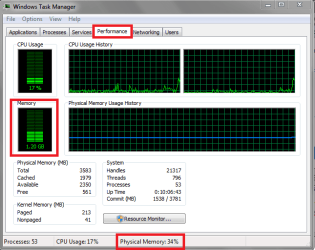
Here is a screen print of a 32 Bit Win 7 system with 4 GB Ram with MY NORMAL usage - I still have plenty of Physical Ram available.

TMmem01.PNG
 

My Computer

Computer type
PC/Desktop
Computer Manufacturer/Model Number
home built
OS
Multi-Boot W7_Pro_x64 W8.1_Pro_x64 W10_Pro_x64 +Linux_VMs +Chromium_VM
CPU
AMD Athlon II x4 620
Motherboard
Gigabyte GA-MA785G-UD3H
Memory
6GB GSkill DDR2 800
Graphics Card(s)
AMD 4670 GPU + AMD 4200 IGP
Sound Card
on board Realtek ALC889A
Monitor(s) Displays
RCA 40" LCD TV, Insignia 32" LCD TV, HP 15" LCD monitor
Screen Resolution
1680 x 1050
Hard Drives
OCZ Vertex 3 120GB,
Samsung F3 1TB (3),
Several others - WD, Seagate, Hitachi, ...
PSU
Corsair 500 W
Case
Rosewill mid tower
Cooling
CM 90mm rifle
Keyboard
Gyration wireless, Logitech wireless, Dell USB wired
Mouse
Gyration wireless, Logitech wireless, V7 USB wired
Internet Speed
Spectrum - 100Mbps D / 10Mbps U
Antivirus
Avast, MBAM3, EMET, WinPatrol
Browser
Pale Moon, Firefox, IE
Other Info
2 multi-boot PC's
Mainly HTPC/Office/Gen purpose (no gaming).
Trendnet USB KVM.
LG DVD burner/Blue Ray Player.
Tray system for removable SATA backup drives.

Not currently OCd, under-volted.
I use Hybrid sleep, rarely re-boot or shutdown.

Hauppauge HD-PVR, Avermedia PCIe TV Tuner, Hauppauge PCI TV Tuner.
I never turn off the pagefile.
Some programs expect it to be there, even if it isn't really needed.
If the system does crash, a pagefile is needed to capture the Dump file for troubleshooting.
I never set the min below 200 MB, I believe that is the min needed to capture a mini Dump for a BSOD.
 

My Computer

Computer type
PC/Desktop
Computer Manufacturer/Model Number
home built
OS
Multi-Boot W7_Pro_x64 W8.1_Pro_x64 W10_Pro_x64 +Linux_VMs +Chromium_VM
CPU
AMD Athlon II x4 620
Motherboard
Gigabyte GA-MA785G-UD3H
Memory
6GB GSkill DDR2 800
Graphics Card(s)
AMD 4670 GPU + AMD 4200 IGP
Sound Card
on board Realtek ALC889A
Monitor(s) Displays
RCA 40" LCD TV, Insignia 32" LCD TV, HP 15" LCD monitor
Screen Resolution
1680 x 1050
Hard Drives
OCZ Vertex 3 120GB,
Samsung F3 1TB (3),
Several others - WD, Seagate, Hitachi, ...
PSU
Corsair 500 W
Case
Rosewill mid tower
Cooling
CM 90mm rifle
Keyboard
Gyration wireless, Logitech wireless, Dell USB wired
Mouse
Gyration wireless, Logitech wireless, V7 USB wired
Internet Speed
Spectrum - 100Mbps D / 10Mbps U
Antivirus
Avast, MBAM3, EMET, WinPatrol
Browser
Pale Moon, Firefox, IE
Other Info
2 multi-boot PC's
Mainly HTPC/Office/Gen purpose (no gaming).
Trendnet USB KVM.
LG DVD burner/Blue Ray Player.
Tray system for removable SATA backup drives.

Not currently OCd, under-volted.
I use Hybrid sleep, rarely re-boot or shutdown.

Hauppauge HD-PVR, Avermedia PCIe TV Tuner, Hauppauge PCI TV Tuner.
Back
Top