Solved SSD slow boot up time

Slothalicious

New member
Local time
2:03 PM
Messages
26
Hello,
Recently my computer has been booting up really slow for some reason. It's been taking about 1 minute on average. I have had AHCI turned on since I installed windows and I have enabled TRIM. I have also tried unplugging my Hard drives and just having the SSD plugged in but it is still really slow. The part that takes the longest is the Welcome screen and then sometimes after that it just gives me a black screen with the cursor for about 10 seconds after the welcome screen.
I benchmarked it using AS SSD benchmark below.
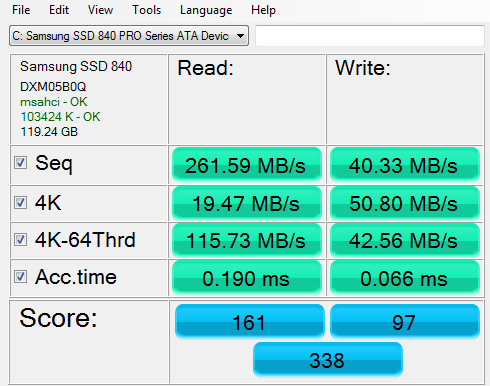
ri19VjO.png

What can I do?
Thanks,
Lachy
 

My Computer

Computer type
PC/Desktop
Computer Manufacturer/Model Number
Custom Build
OS
Windows 7 Ultimate x64
CPU
Intel Core i7 4770
Motherboard
Asus Z87-C
Memory
8GB DDR3
Graphics Card(s)
Gigabyte R9 290 Windforce 3X 4GB
Monitor(s) Displays
Asus VE247H 23.5" / Dell S2209W 21"
Screen Resolution
1920x1080
Hard Drives
Samsung 840 Pro 128GB Solid State Drive
640GB SATA Hard drive
PSU
700W Cooler Master
Case
Zalman Z11
Cooling
Stock Cooler
Keyboard
Razer Blackwidow 2013
Mouse
Razer Mamba 2012
Internet Speed
5mbps/0.8mbps
Browser
Google Chrome

My Computer

Computer type
PC/Desktop
Computer Manufacturer/Model Number
Golden Mk. I.4
OS
Windows 10 Pro x64 ; Xubuntu x64
CPU
Intel i7 860 @ 2.80 GHz O/C'ed to 4.0GHz
Motherboard
Gigabyte P55A-UD3R Rev.1. Award BIOS F13
Memory
16GB Corsair Vengance DDR3 @ 661 MHz Dual Channel (9-9-9-24)
Graphics Card(s)
EVGA NVidia GTX 560 1024MB
Sound Card
Realtek Integrated
Monitor(s) Displays
Dual Samsung SyncMaster 2494HS
Screen Resolution
1920*1080 and 1920*1080
Hard Drives
1*Samsung 840 EVO 120GB SSD;
1*OCZ Vertex 2 60GB SSD;
2*Samsung F3 SpinPoint 1TB in RAID0;
1*Samsung F1 SpinPoint 1TB;
2*Western Digital 1TB External USB 3.0
1*Western Digital 500GB External USB 3.0
1*Seagate 500GB External USB 2.0
PSU
Thermaltake ToughPower QFan 750W
Case
Thermaltake Element S VK60001W2Z
Cooling
Corsair H60 Water Cooling, 2*230mm and 2*80mm case fans
Keyboard
Logitech G110
Mouse
Logitech MX518
A common reason for slow booting is the system timing out waiting for drivers to load. Boot Logging helps to track which aren't loading, or sometimes the driver requires several tries to load.
 

My Computer

Computer Manufacturer/Model Number
HP Media Center
OS
Windows 7 32 bit
CPU
AMD 5200+ dual core
Memory
2 GB
Graphics Card(s)
NVidia GeForce 6150SE 128 MB
Monitor(s) Displays
CRT
Screen Resolution
1280x1024
Hard Drives
500 GB Sata internal :

SIIG USB 3.0 docking stations w/WD Caviar Black 6 Gb/s drives
Keyboard
PS/2
Mouse
PS/2 Wheel Mouse
Other Info
SIIG USB 3.0 PCIexpress card.

My Computer

Computer type
PC/Desktop
Computer Manufacturer/Model Number
Custom Build
OS
Windows 7 Ultimate x64
CPU
Intel Core i7 4770
Motherboard
Asus Z87-C
Memory
8GB DDR3
Graphics Card(s)
Gigabyte R9 290 Windforce 3X 4GB
Monitor(s) Displays
Asus VE247H 23.5" / Dell S2209W 21"
Screen Resolution
1920x1080
Hard Drives
Samsung 840 Pro 128GB Solid State Drive
640GB SATA Hard drive
PSU
700W Cooler Master
Case
Zalman Z11
Cooling
Stock Cooler
Keyboard
Razer Blackwidow 2013
Mouse
Razer Mamba 2012
Internet Speed
5mbps/0.8mbps
Browser
Google Chrome
Sometimes its the anti-malware software updating/performing a background scan. It depends what you are using.

You could also determine if there are any system file corruptions causing the issue:

1. Click Start
orb.png

2. In the search box, type cmd
3. In the list that appears, right-click on cmd.exe and choose Run as administrator
4. In the command window that opens, type sfc /scannow and hit enter.

Report the output from the command window once it finishes.

More detail: http://www.sevenforums.com/tutorials/1538-sfc-scannow-command-system-file-checker.html
 

My Computer

Computer type
PC/Desktop
Computer Manufacturer/Model Number
Golden Mk. I.4
OS
Windows 10 Pro x64 ; Xubuntu x64
CPU
Intel i7 860 @ 2.80 GHz O/C'ed to 4.0GHz
Motherboard
Gigabyte P55A-UD3R Rev.1. Award BIOS F13
Memory
16GB Corsair Vengance DDR3 @ 661 MHz Dual Channel (9-9-9-24)
Graphics Card(s)
EVGA NVidia GTX 560 1024MB
Sound Card
Realtek Integrated
Monitor(s) Displays
Dual Samsung SyncMaster 2494HS
Screen Resolution
1920*1080 and 1920*1080
Hard Drives
1*Samsung 840 EVO 120GB SSD;
1*OCZ Vertex 2 60GB SSD;
2*Samsung F3 SpinPoint 1TB in RAID0;
1*Samsung F1 SpinPoint 1TB;
2*Western Digital 1TB External USB 3.0
1*Western Digital 500GB External USB 3.0
1*Seagate 500GB External USB 2.0
PSU
Thermaltake ToughPower QFan 750W
Case
Thermaltake Element S VK60001W2Z
Cooling
Corsair H60 Water Cooling, 2*230mm and 2*80mm case fans
Keyboard
Logitech G110
Mouse
Logitech MX518
Sometimes its the anti-malware software updating/performing a background scan. It depends what you are using.

You could also determine if there are any system file corruptions causing the issue:

1. Click Start
orb.png

2. In the search box, type cmd
3. In the list that appears, right-click on cmd.exe and choose Run as administrator
4. In the command window that opens, type sfc /scannow and hit enter.

Report the output from the command window once it finishes.

More detail: http://www.sevenforums.com/tutorials/1538-sfc-scannow-command-system-file-checker.html

A common reason for slow booting is the system timing out waiting for drivers to load. Boot Logging helps to track which aren't loading, or sometimes the driver requires several tries to load.
I just tried a sfc /scannow but it didn't find any corruptions. I did the boot log with a clean startup and I will put it down below.

Code:
" Service Pack 112 29 2013 10:13:39.610
Loaded driver \SystemRoot\system32\ntoskrnl.exe
Loaded driver \SystemRoot\system32\hal.dll
Loaded driver \SystemRoot\system32\kdcom.dll
Loaded driver \SystemRoot\system32\mcupdate_GenuineIntel.dll
Loaded driver \SystemRoot\system32\PSHED.dll
Loaded driver \SystemRoot\system32\CLFS.SYS
Loaded driver \SystemRoot\system32\CI.dll
Loaded driver \SystemRoot\system32\drivers\Wdf01000.sys
Loaded driver \SystemRoot\system32\drivers\WDFLDR.SYS
Loaded driver \SystemRoot\system32\drivers\ACPI.sys
Loaded driver \SystemRoot\system32\drivers\WMILIB.SYS
Loaded driver \SystemRoot\system32\drivers\msisadrv.sys
Loaded driver \SystemRoot\system32\drivers\pci.sys
Loaded driver \SystemRoot\system32\drivers\vdrvroot.sys
Loaded driver \SystemRoot\System32\drivers\partmgr.sys
Loaded driver \SystemRoot\system32\drivers\volmgr.sys
Loaded driver \SystemRoot\System32\drivers\volmgrx.sys
Loaded driver \SystemRoot\system32\drivers\pciide.sys
Loaded driver \SystemRoot\system32\drivers\PCIIDEX.SYS
Loaded driver \SystemRoot\System32\drivers\mountmgr.sys
Loaded driver \SystemRoot\system32\drivers\atapi.sys
Loaded driver \SystemRoot\system32\drivers\ataport.SYS
Loaded driver \SystemRoot\system32\drivers\msahci.sys
Loaded driver \SystemRoot\system32\drivers\amdxata.sys
Loaded driver \SystemRoot\system32\drivers\fltmgr.sys
Loaded driver \SystemRoot\system32\drivers\fileinfo.sys
Loaded driver \SystemRoot\System32\Drivers\Ntfs.sys
Loaded driver \SystemRoot\System32\Drivers\msrpc.sys
Loaded driver \SystemRoot\System32\Drivers\ksecdd.sys
Loaded driver \SystemRoot\System32\Drivers\cng.sys
Loaded driver \SystemRoot\System32\drivers\pcw.sys
Loaded driver \SystemRoot\System32\Drivers\Fs_Rec.sys
Loaded driver \SystemRoot\system32\drivers\ndis.sys
Loaded driver \SystemRoot\system32\drivers\NETIO.SYS
Loaded driver \SystemRoot\system32\drivers\aswNdis2.sys
Loaded driver \SystemRoot\System32\Drivers\ksecpkg.sys
Loaded driver \SystemRoot\System32\drivers\tcpip.sys
Loaded driver \SystemRoot\System32\drivers\fwpkclnt.sys
Loaded driver \SystemRoot\system32\DRIVERS\aswNdis.sys
Loaded driver \SystemRoot\system32\drivers\vmstorfl.sys
Loaded driver \SystemRoot\system32\drivers\volsnap.sys
Loaded driver \SystemRoot\System32\Drivers\spldr.sys
Loaded driver \SystemRoot\system32\drivers\RzFilter.sys
Loaded driver \SystemRoot\system32\drivers\HIDPARSE.SYS
Loaded driver \SystemRoot\System32\drivers\rdyboost.sys
Loaded driver \SystemRoot\System32\Drivers\mup.sys
Loaded driver \SystemRoot\System32\drivers\hwpolicy.sys
Loaded driver \SystemRoot\System32\DRIVERS\fvevol.sys
Loaded driver \SystemRoot\system32\drivers\disk.sys
Loaded driver \SystemRoot\system32\drivers\CLASSPNP.SYS
Loaded driver \SystemRoot\System32\Drivers\aswVmm.sys
Loaded driver \SystemRoot\System32\Drivers\aswRvrt.sys
Did not load driver \SystemRoot\system32\drivers\aswNdis2.sys
Loaded driver \SystemRoot\system32\DRIVERS\cdrom.sys
Loaded driver \SystemRoot\System32\Drivers\aswSnx.SYS
Loaded driver \SystemRoot\System32\Drivers\Null.SYS
Loaded driver \SystemRoot\System32\Drivers\Beep.SYS
Loaded driver \SystemRoot\System32\Drivers\aswKbd.SYS
Loaded driver \SystemRoot\System32\drivers\vga.sys
Loaded driver \SystemRoot\System32\DRIVERS\RDPCDD.sys
Loaded driver \SystemRoot\system32\drivers\rdpencdd.sys
Loaded driver \SystemRoot\system32\drivers\rdprefmp.sys
Loaded driver \SystemRoot\System32\Drivers\Msfs.SYS
Loaded driver \SystemRoot\System32\Drivers\Npfs.SYS
Loaded driver \SystemRoot\system32\DRIVERS\tdx.sys
Loaded driver \??\C:\Windows\system32\drivers\aswFW.sys
Loaded driver \SystemRoot\System32\Drivers\aswTdi.SYS
Loaded driver \SystemRoot\system32\drivers\afd.sys
Loaded driver \SystemRoot\System32\Drivers\aswrdr2.sys
Loaded driver \SystemRoot\System32\DRIVERS\netbt.sys
Loaded driver \SystemRoot\system32\DRIVERS\wfplwf.sys
Loaded driver \SystemRoot\system32\DRIVERS\pacer.sys
Loaded driver \SystemRoot\system32\DRIVERS\netbios.sys
Loaded driver \SystemRoot\system32\DRIVERS\wanarp.sys
Loaded driver \SystemRoot\System32\drivers\truecrypt.sys
Loaded driver \SystemRoot\system32\DRIVERS\termdd.sys
Loaded driver \SystemRoot\system32\DRIVERS\rdbss.sys
Loaded driver \SystemRoot\system32\drivers\nsiproxy.sys
Loaded driver \SystemRoot\system32\DRIVERS\mssmbios.sys
Loaded driver \SystemRoot\System32\Drivers\ElbyCDIO.sys
Loaded driver \SystemRoot\System32\drivers\discache.sys
Loaded driver \SystemRoot\system32\drivers\csc.sys
Loaded driver \SystemRoot\System32\Drivers\dfsc.sys
Loaded driver \SystemRoot\system32\DRIVERS\blbdrive.sys
Loaded driver \SystemRoot\System32\Drivers\aswSP.SYS
Loaded driver \SystemRoot\system32\DRIVERS\tunnel.sys
Loaded driver \SystemRoot\system32\DRIVERS\intelppm.sys
Loaded driver \SystemRoot\System32\drivers\dxgkrnl.sys
Loaded driver \??\C:\Windows\system32\drivers\RzDxgk.sys
Did not load driver \SystemRoot\System32\drivers\dxgkrnl.sys
Loaded driver \SystemRoot\system32\DRIVERS\nvlddmkm.sys
Loaded driver \SystemRoot\system32\DRIVERS\HDAudBus.sys
Loaded driver \SystemRoot\system32\DRIVERS\usbuhci.sys
Loaded driver \SystemRoot\system32\DRIVERS\usbehci.sys
Loaded driver \SystemRoot\system32\DRIVERS\Rt64win7.sys
Loaded driver \SystemRoot\system32\DRIVERS\1394ohci.sys
Loaded driver \SystemRoot\system32\DRIVERS\wmiacpi.sys
Loaded driver \SystemRoot\system32\DRIVERS\CompositeBus.sys
Loaded driver \SystemRoot\system32\DRIVERS\AgileVpn.sys
Loaded driver \SystemRoot\system32\DRIVERS\rasl2tp.sys
Loaded driver \SystemRoot\system32\DRIVERS\ndistapi.sys
Loaded driver \SystemRoot\system32\DRIVERS\ndiswan.sys
Loaded driver \SystemRoot\system32\DRIVERS\raspppoe.sys
Loaded driver \SystemRoot\system32\DRIVERS\raspptp.sys
Loaded driver \SystemRoot\system32\DRIVERS\rassstp.sys
Loaded driver \SystemRoot\system32\DRIVERS\hamachi.sys
Loaded driver \SystemRoot\system32\DRIVERS\rdpbus.sys
Loaded driver \SystemRoot\system32\DRIVERS\kbdclass.sys
Loaded driver \SystemRoot\system32\DRIVERS\mouclass.sys
Loaded driver \SystemRoot\system32\DRIVERS\VClone.sys
Loaded driver \SystemRoot\system32\DRIVERS\swenum.sys
Loaded driver \SystemRoot\system32\DRIVERS\circlass.sys
Loaded driver \SystemRoot\system32\DRIVERS\umbus.sys
Loaded driver \SystemRoot\system32\drivers\nvvad64v.sys
Loaded driver \SystemRoot\system32\drivers\ksthunk.sys
Did not load driver \SystemRoot\System32\drivers\vga.sys
Loaded driver \SystemRoot\system32\DRIVERS\usbhub.sys
Loaded driver \SystemRoot\System32\Drivers\NDProxy.SYS
Did not load driver \SystemRoot\System32\Drivers\NDProxy.SYS
Loaded driver \SystemRoot\system32\drivers\nvhda64v.sys
Loaded driver \SystemRoot\system32\drivers\HdAudio.sys
Loaded driver \SystemRoot\system32\DRIVERS\usbccgp.sys
Loaded driver \SystemRoot\system32\DRIVERS\hidusb.sys
Loaded driver \SystemRoot\system32\DRIVERS\rzendpt.sys
Loaded driver \SystemRoot\system32\DRIVERS\kbdhid.sys
Loaded driver \SystemRoot\system32\DRIVERS\rzudd.sys
Loaded driver \SystemRoot\system32\DRIVERS\mouhid.sys
Loaded driver \SystemRoot\system32\DRIVERS\monitor.sys
Loaded driver \SystemRoot\System32\Drivers\npusbio_x64.sys
Loaded driver \SystemRoot\system32\drivers\luafv.sys
Loaded driver \??\C:\Windows\system32\drivers\aswMonFlt.sys
Loaded driver \SystemRoot\System32\Drivers\usbvideo.sys
Loaded driver \SystemRoot\system32\drivers\usbaudio.sys
Loaded driver \SystemRoot\system32\DRIVERS\USBSTOR.SYS
Loaded driver \SystemRoot\System32\Drivers\aswFsBlk.SYS
Loaded driver \SystemRoot\system32\drivers\WudfPf.sys
Loaded driver \SystemRoot\system32\DRIVERS\lltdio.sys
Loaded driver \SystemRoot\system32\DRIVERS\rspndr.sys
Loaded driver \SystemRoot\system32\DRIVERS\usbcir.sys
Loaded driver \SystemRoot\system32\drivers\HTTP.sys
Loaded driver \SystemRoot\system32\DRIVERS\bowser.sys
Loaded driver \SystemRoot\System32\drivers\mpsdrv.sys
Loaded driver \SystemRoot\system32\DRIVERS\mrxsmb.sys
Loaded driver \SystemRoot\system32\DRIVERS\mrxsmb10.sys
Loaded driver \SystemRoot\system32\DRIVERS\mrxsmb20.sys
Loaded driver \SystemRoot\system32\drivers\peauth.sys
Loaded driver \SystemRoot\System32\Drivers\secdrv.SYS
Loaded driver \SystemRoot\System32\DRIVERS\srvnet.sys
Loaded driver \SystemRoot\System32\drivers\tcpipreg.sys
Loaded driver \SystemRoot\System32\DRIVERS\srv2.sys
Loaded driver \SystemRoot\System32\DRIVERS\srv.sys
Did not load driver \SystemRoot\System32\DRIVERS\srv.sys
Loaded driver \SystemRoot\system32\drivers\ksaud.sys
Loaded driver \SystemRoot\system32\DRIVERS\hidir.sys
Loaded driver \SystemRoot\system32\DRIVERS\WUDFRd.sys"

Is there anything unusual there?
Thanks,
Lachy
 
Last edited by a moderator:

My Computer

Computer type
PC/Desktop
Computer Manufacturer/Model Number
Custom Build
OS
Windows 7 Ultimate x64
CPU
Intel Core i7 4770
Motherboard
Asus Z87-C
Memory
8GB DDR3
Graphics Card(s)
Gigabyte R9 290 Windforce 3X 4GB
Monitor(s) Displays
Asus VE247H 23.5" / Dell S2209W 21"
Screen Resolution
1920x1080
Hard Drives
Samsung 840 Pro 128GB Solid State Drive
640GB SATA Hard drive
PSU
700W Cooler Master
Case
Zalman Z11
Cooling
Stock Cooler
Keyboard
Razer Blackwidow 2013
Mouse
Razer Mamba 2012
Internet Speed
5mbps/0.8mbps
Browser
Google Chrome
What anti-malware software are you using? Avast?

Is the system fully encrypted using TrueCrypt?
 

My Computer

Computer type
PC/Desktop
Computer Manufacturer/Model Number
Golden Mk. I.4
OS
Windows 10 Pro x64 ; Xubuntu x64
CPU
Intel i7 860 @ 2.80 GHz O/C'ed to 4.0GHz
Motherboard
Gigabyte P55A-UD3R Rev.1. Award BIOS F13
Memory
16GB Corsair Vengance DDR3 @ 661 MHz Dual Channel (9-9-9-24)
Graphics Card(s)
EVGA NVidia GTX 560 1024MB
Sound Card
Realtek Integrated
Monitor(s) Displays
Dual Samsung SyncMaster 2494HS
Screen Resolution
1920*1080 and 1920*1080
Hard Drives
1*Samsung 840 EVO 120GB SSD;
1*OCZ Vertex 2 60GB SSD;
2*Samsung F3 SpinPoint 1TB in RAID0;
1*Samsung F1 SpinPoint 1TB;
2*Western Digital 1TB External USB 3.0
1*Western Digital 500GB External USB 3.0
1*Seagate 500GB External USB 2.0
PSU
Thermaltake ToughPower QFan 750W
Case
Thermaltake Element S VK60001W2Z
Cooling
Corsair H60 Water Cooling, 2*230mm and 2*80mm case fans
Keyboard
Logitech G110
Mouse
Logitech MX518
What anti-malware software are you using? Avast?

Is the system fully encrypted using TrueCrypt?
Yes I am using Avast.
No the system is not encrypted with Truecrypt. Although my disconnected hard drive was but it messed up so I formatted it.
 

My Computer

Computer type
PC/Desktop
Computer Manufacturer/Model Number
Custom Build
OS
Windows 7 Ultimate x64
CPU
Intel Core i7 4770
Motherboard
Asus Z87-C
Memory
8GB DDR3
Graphics Card(s)
Gigabyte R9 290 Windforce 3X 4GB
Monitor(s) Displays
Asus VE247H 23.5" / Dell S2209W 21"
Screen Resolution
1920x1080
Hard Drives
Samsung 840 Pro 128GB Solid State Drive
640GB SATA Hard drive
PSU
700W Cooler Master
Case
Zalman Z11
Cooling
Stock Cooler
Keyboard
Razer Blackwidow 2013
Mouse
Razer Mamba 2012
Internet Speed
5mbps/0.8mbps
Browser
Google Chrome

My Computer

Computer type
PC/Desktop
Computer Manufacturer/Model Number
Golden Mk. I.4
OS
Windows 10 Pro x64 ; Xubuntu x64
CPU
Intel i7 860 @ 2.80 GHz O/C'ed to 4.0GHz
Motherboard
Gigabyte P55A-UD3R Rev.1. Award BIOS F13
Memory
16GB Corsair Vengance DDR3 @ 661 MHz Dual Channel (9-9-9-24)
Graphics Card(s)
EVGA NVidia GTX 560 1024MB
Sound Card
Realtek Integrated
Monitor(s) Displays
Dual Samsung SyncMaster 2494HS
Screen Resolution
1920*1080 and 1920*1080
Hard Drives
1*Samsung 840 EVO 120GB SSD;
1*OCZ Vertex 2 60GB SSD;
2*Samsung F3 SpinPoint 1TB in RAID0;
1*Samsung F1 SpinPoint 1TB;
2*Western Digital 1TB External USB 3.0
1*Western Digital 500GB External USB 3.0
1*Seagate 500GB External USB 2.0
PSU
Thermaltake ToughPower QFan 750W
Case
Thermaltake Element S VK60001W2Z
Cooling
Corsair H60 Water Cooling, 2*230mm and 2*80mm case fans
Keyboard
Logitech G110
Mouse
Logitech MX518

My Computer

Computer type
PC/Desktop
Computer Manufacturer/Model Number
Custom Build
OS
Windows 7 Ultimate x64
CPU
Intel Core i7 4770
Motherboard
Asus Z87-C
Memory
8GB DDR3
Graphics Card(s)
Gigabyte R9 290 Windforce 3X 4GB
Monitor(s) Displays
Asus VE247H 23.5" / Dell S2209W 21"
Screen Resolution
1920x1080
Hard Drives
Samsung 840 Pro 128GB Solid State Drive
640GB SATA Hard drive
PSU
700W Cooler Master
Case
Zalman Z11
Cooling
Stock Cooler
Keyboard
Razer Blackwidow 2013
Mouse
Razer Mamba 2012
Internet Speed
5mbps/0.8mbps
Browser
Google Chrome
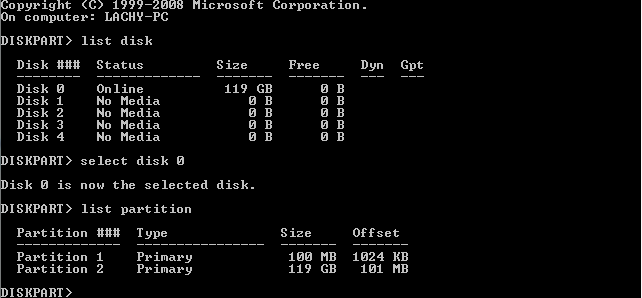
Offset 101MB x 1024 = 103424 / 4 = 25856

Thats OK. There is no misalignment.

Can you post some screen capture images of your Startup items from MSCONFIG please?
 

My Computer

Computer type
PC/Desktop
Computer Manufacturer/Model Number
Golden Mk. I.4
OS
Windows 10 Pro x64 ; Xubuntu x64
CPU
Intel i7 860 @ 2.80 GHz O/C'ed to 4.0GHz
Motherboard
Gigabyte P55A-UD3R Rev.1. Award BIOS F13
Memory
16GB Corsair Vengance DDR3 @ 661 MHz Dual Channel (9-9-9-24)
Graphics Card(s)
EVGA NVidia GTX 560 1024MB
Sound Card
Realtek Integrated
Monitor(s) Displays
Dual Samsung SyncMaster 2494HS
Screen Resolution
1920*1080 and 1920*1080
Hard Drives
1*Samsung 840 EVO 120GB SSD;
1*OCZ Vertex 2 60GB SSD;
2*Samsung F3 SpinPoint 1TB in RAID0;
1*Samsung F1 SpinPoint 1TB;
2*Western Digital 1TB External USB 3.0
1*Western Digital 500GB External USB 3.0
1*Seagate 500GB External USB 2.0
PSU
Thermaltake ToughPower QFan 750W
Case
Thermaltake Element S VK60001W2Z
Cooling
Corsair H60 Water Cooling, 2*230mm and 2*80mm case fans
Keyboard
Logitech G110
Mouse
Logitech MX518
Offset 101MB x 1024 = 103424 / 4 = 25856

Thats OK. There is no misalignment.

Can you post some screen capture images of your Startup items from MSCONFIG please?
Usually these would all be ticked but I've left the clean boot on.
Here are the images from the startup tab,
imgur: the simple image sharer
Thanks,
 

My Computer

Computer type
PC/Desktop
Computer Manufacturer/Model Number
Custom Build
OS
Windows 7 Ultimate x64
CPU
Intel Core i7 4770
Motherboard
Asus Z87-C
Memory
8GB DDR3
Graphics Card(s)
Gigabyte R9 290 Windforce 3X 4GB
Monitor(s) Displays
Asus VE247H 23.5" / Dell S2209W 21"
Screen Resolution
1920x1080
Hard Drives
Samsung 840 Pro 128GB Solid State Drive
640GB SATA Hard drive
PSU
700W Cooler Master
Case
Zalman Z11
Cooling
Stock Cooler
Keyboard
Razer Blackwidow 2013
Mouse
Razer Mamba 2012
Internet Speed
5mbps/0.8mbps
Browser
Google Chrome
Can you post a picture of Disk Management plse.
 

My Computer

Computer Manufacturer/Model Number
HP, Dell, Gateway, Toshiba - 4 laptops and 2 desktops
OS
Vista, Windows7, Mint Mate, Zorin, Windows 8
CPU
from 1.6GHz Duo to i7
Monitor(s) Displays
2x HP w2207
Hard Drives
5x HDD, 7x SSD, 12x Externals
Keyboard
with trackball - no mices
Mouse
Trackball mice
Internet Speed
DSL 6000
Can you post a picture of Disk Management plse.
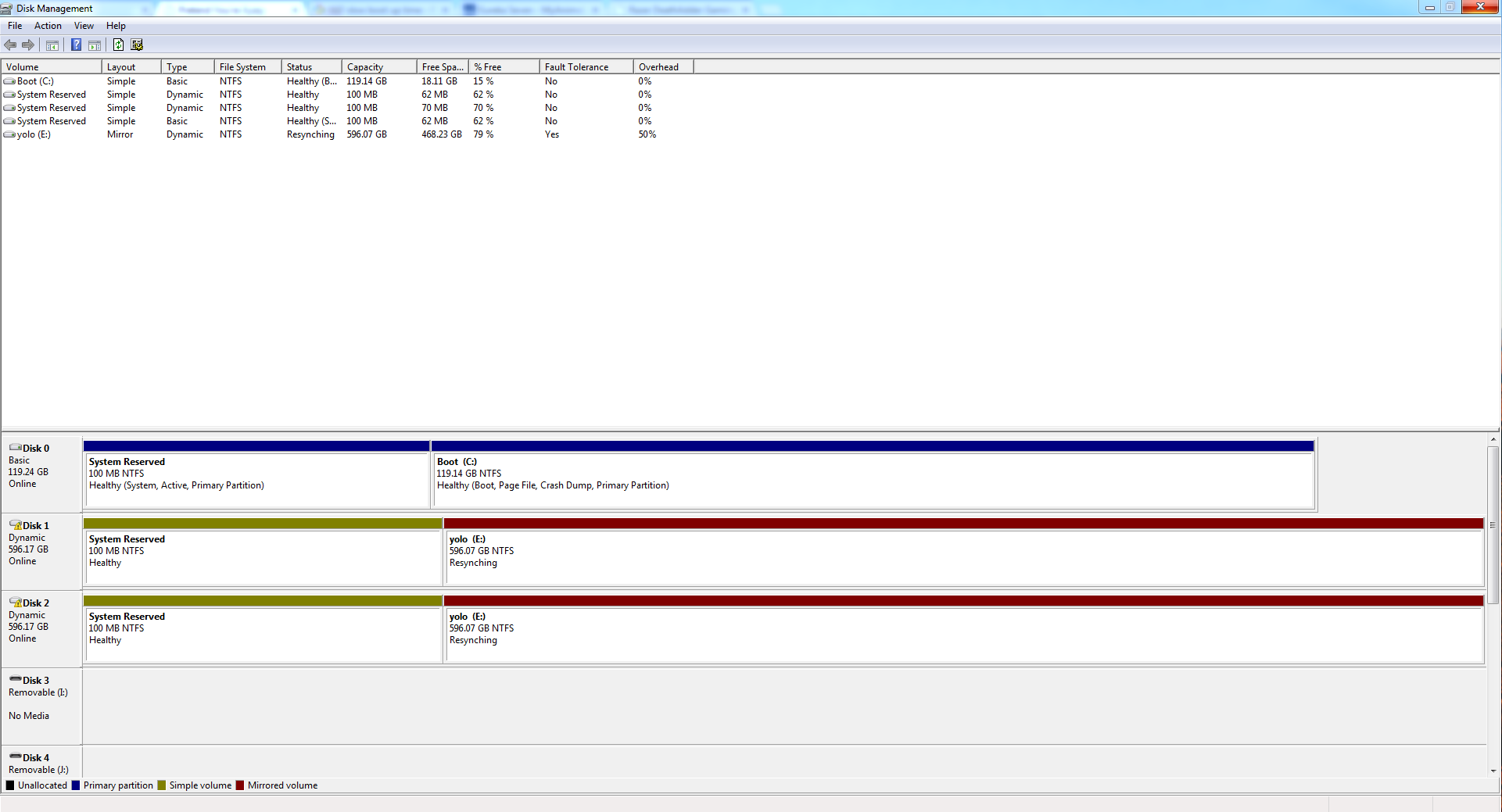
I unplugged the hard drives that were in RAID mirroring and now they're resynching apparently.
Here is disk management:
stFcQlS.png
 

My Computer

Computer type
PC/Desktop
Computer Manufacturer/Model Number
Custom Build
OS
Windows 7 Ultimate x64
CPU
Intel Core i7 4770
Motherboard
Asus Z87-C
Memory
8GB DDR3
Graphics Card(s)
Gigabyte R9 290 Windforce 3X 4GB
Monitor(s) Displays
Asus VE247H 23.5" / Dell S2209W 21"
Screen Resolution
1920x1080
Hard Drives
Samsung 840 Pro 128GB Solid State Drive
640GB SATA Hard drive
PSU
700W Cooler Master
Case
Zalman Z11
Cooling
Stock Cooler
Keyboard
Razer Blackwidow 2013
Mouse
Razer Mamba 2012
Internet Speed
5mbps/0.8mbps
Browser
Google Chrome
Hmm, the disks seems to be OK. Apparently the OS was on the array at one time. The lost 100MB partitions on the array are no harm done because they are deactivated.

I wanted to look at the DM because often the bootmgr has landed on a HDD which slows the boot down. But that is not the case here. DM wise you are clean.
 

My Computer

Computer Manufacturer/Model Number
HP, Dell, Gateway, Toshiba - 4 laptops and 2 desktops
OS
Vista, Windows7, Mint Mate, Zorin, Windows 8
CPU
from 1.6GHz Duo to i7
Monitor(s) Displays
2x HP w2207
Hard Drives
5x HDD, 7x SSD, 12x Externals
Keyboard
with trackball - no mices
Mouse
Trackball mice
Internet Speed
DSL 6000
AS SSD shows you're using msahci SATA driver, that could cause a slow down in general. See if you can find the Intel SATA driver/chipset driver for you system.
 

My Computer

Computer type
PC/Desktop
Computer Manufacturer/Model Number
Home Built Desktop By DataTech
OS
Windows 7 Ultimate X64 SP1
CPU
Intel i5-2550K, Differing ~4.4-4.8GHz No built in GPU
Motherboard
ASUS P8Z68-V PRO/GEN3
Memory
16GB G.Skill Sniper 1866MHz @ 2133MHz 2x8GB
Graphics Card(s)
ASUS GTX650TIB-DC2OC-2GD5, (650TI Boost)
Sound Card
Onboard Realtek 5-1
Monitor(s) Displays
Samsung P2570HD
Screen Resolution
1920x1080
Hard Drives
Samsung 840 Pro 256GB SSD for OS, 500GB Seagate Constellation (Enterprise drive) for Data
PSU
Corsair HX650W
Case
Inwin Dragon Rider
Cooling
Hyper 212 EVO w/two Noctua fans, push-pull, @1300 RPM
Keyboard
E-Z Eyes, bright yellow keys with large characters
Mouse
steelseries SENSEI Laser Pro Gaming
Internet Speed
48-51Mbs Mbs down, 11 Mbs up Xfinity Cable
Antivirus
Norton Internet Security 2013
Browser
IE 10, Opera, Pale Moon if needed
Other Info
4 case fans, LG BluRay-RE, ASUS DVD-RW, Mr. Fusion power supply, 1.21 gigawatts.

My Computer

Computer type
PC/Desktop
Computer Manufacturer/Model Number
Custom Build
OS
Windows 7 Ultimate x64
CPU
Intel Core i7 4770
Motherboard
Asus Z87-C
Memory
8GB DDR3
Graphics Card(s)
Gigabyte R9 290 Windforce 3X 4GB
Monitor(s) Displays
Asus VE247H 23.5" / Dell S2209W 21"
Screen Resolution
1920x1080
Hard Drives
Samsung 840 Pro 128GB Solid State Drive
640GB SATA Hard drive
PSU
700W Cooler Master
Case
Zalman Z11
Cooling
Stock Cooler
Keyboard
Razer Blackwidow 2013
Mouse
Razer Mamba 2012
Internet Speed
5mbps/0.8mbps
Browser
Google Chrome
Try this one, If it doesn't apply the machine will say so. Driver Details | Dell US


Also see that the SSD is connected on the SATA_1 or SATA_0 port, it should be
labeled on the motherboard.
Never mind, I see from the DM snip it is correct as Disk 0.
 

My Computer

Computer type
PC/Desktop
Computer Manufacturer/Model Number
Home Built Desktop By DataTech
OS
Windows 7 Ultimate X64 SP1
CPU
Intel i5-2550K, Differing ~4.4-4.8GHz No built in GPU
Motherboard
ASUS P8Z68-V PRO/GEN3
Memory
16GB G.Skill Sniper 1866MHz @ 2133MHz 2x8GB
Graphics Card(s)
ASUS GTX650TIB-DC2OC-2GD5, (650TI Boost)
Sound Card
Onboard Realtek 5-1
Monitor(s) Displays
Samsung P2570HD
Screen Resolution
1920x1080
Hard Drives
Samsung 840 Pro 256GB SSD for OS, 500GB Seagate Constellation (Enterprise drive) for Data
PSU
Corsair HX650W
Case
Inwin Dragon Rider
Cooling
Hyper 212 EVO w/two Noctua fans, push-pull, @1300 RPM
Keyboard
E-Z Eyes, bright yellow keys with large characters
Mouse
steelseries SENSEI Laser Pro Gaming
Internet Speed
48-51Mbs Mbs down, 11 Mbs up Xfinity Cable
Antivirus
Norton Internet Security 2013
Browser
IE 10, Opera, Pale Moon if needed
Other Info
4 case fans, LG BluRay-RE, ASUS DVD-RW, Mr. Fusion power supply, 1.21 gigawatts.
Try this one, If it doesn't apply the machine will say so. Driver Details | Dell US


Also see that the SSD is connected on the SATA_1 or SATA_0 port, it should be
labeled on the motherboard.
Never mind, I see from the DM snip it is correct as Disk 0.
Thank you! It passes that screen much faster now. Although on the Intel Rapid Storage technology application it says the drive is in port 3, and the other 2 drives are in 2 and 4? Is that the fine?
 

My Computer

Computer type
PC/Desktop
Computer Manufacturer/Model Number
Custom Build
OS
Windows 7 Ultimate x64
CPU
Intel Core i7 4770
Motherboard
Asus Z87-C
Memory
8GB DDR3
Graphics Card(s)
Gigabyte R9 290 Windforce 3X 4GB
Monitor(s) Displays
Asus VE247H 23.5" / Dell S2209W 21"
Screen Resolution
1920x1080
Hard Drives
Samsung 840 Pro 128GB Solid State Drive
640GB SATA Hard drive
PSU
700W Cooler Master
Case
Zalman Z11
Cooling
Stock Cooler
Keyboard
Razer Blackwidow 2013
Mouse
Razer Mamba 2012
Internet Speed
5mbps/0.8mbps
Browser
Google Chrome
It is fine if the SSD still is listed as Disk 0 in DM.
 

My Computer

Computer type
PC/Desktop
Computer Manufacturer/Model Number
Home Built Desktop By DataTech
OS
Windows 7 Ultimate X64 SP1
CPU
Intel i5-2550K, Differing ~4.4-4.8GHz No built in GPU
Motherboard
ASUS P8Z68-V PRO/GEN3
Memory
16GB G.Skill Sniper 1866MHz @ 2133MHz 2x8GB
Graphics Card(s)
ASUS GTX650TIB-DC2OC-2GD5, (650TI Boost)
Sound Card
Onboard Realtek 5-1
Monitor(s) Displays
Samsung P2570HD
Screen Resolution
1920x1080
Hard Drives
Samsung 840 Pro 256GB SSD for OS, 500GB Seagate Constellation (Enterprise drive) for Data
PSU
Corsair HX650W
Case
Inwin Dragon Rider
Cooling
Hyper 212 EVO w/two Noctua fans, push-pull, @1300 RPM
Keyboard
E-Z Eyes, bright yellow keys with large characters
Mouse
steelseries SENSEI Laser Pro Gaming
Internet Speed
48-51Mbs Mbs down, 11 Mbs up Xfinity Cable
Antivirus
Norton Internet Security 2013
Browser
IE 10, Opera, Pale Moon if needed
Other Info
4 case fans, LG BluRay-RE, ASUS DVD-RW, Mr. Fusion power supply, 1.21 gigawatts.
Back
Top