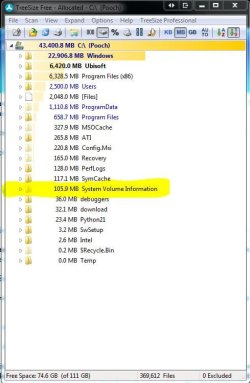
Solved SSD space is disappearing. Troublshooted almost everything already.

Edit: Out of curiosity, is TRIM something that should already be enabled by default for SSD's or would users always need to enable this manually? I'm just asking because if the former, no way I would have known how to disable it, even if by mistake! :)
Yes Windows normally enables it, but mistakes happen :)
I think I notice that you are running tree size in normal mode, could you confirm this and run it as admin? maybe paste a snip of both? and then do the same again tomorrow if this is still not solved.

A general notation:

If this was a system file, hidden file, or folder related issue, we would see this from all the disk storage readers we've been using. Instead, what these programs are showing is that my files and folders are remaining static in size while my free space is magically disappearing into the abyss.

Yeah I am still not convinced that it is not a reporting error. I have read on the net that others have also experienced this same problem, but have also found no answers
 

My Computer My Computer

At a glance

Windows 7 Ultimate x64Intel Core i7-2600K16 GB G Skill F3-10666 CL9D-4GBRLATI Radeon HD 6870
Computer Manufacturer/Model Number
Something I threw together
OS
Windows 7 Ultimate x64
CPU
Intel Core i7-2600K
Motherboard
Asus P8P67
Memory
16 GB G Skill F3-10666 CL9D-4GBRL
Graphics Card(s)
ATI Radeon HD 6870
Sound Card
ATI Radeon HDMI / Realtek ALC892
Monitor(s) Displays
2 x 22" standard monitors / LG32LC56v TV to watch films
Screen Resolution
1920 x1080
Hard Drives
2 x OCZ Vertex2 111.79GB
3 x Samsung103SJ
1 x Samsung103UJ
1 x WD3200BEVT
1 x Hitachi5K320-160
PSU
Thermaltake Toughpower Cable Management 750W
Case
Antec 300
Cooling
Noctua NH-U12P SE2 and 5 120mm Case fans
Keyboard
Microsoft Comfort Curve Keyboard 2000
Mouse
Hama M3110 / Logitech M305
Internet Speed
16000
Other Info
I have also used Fedora, Suse, Ubuntu Linux
And all other Windows from 95 to date except ME
Hi,

I'm not sure if this is a solution to the problem, but perhaps it can help you monitor what is going on:

Download, install and try this FREE version of SSDLife. Screenshots on the wepage suggest it can monitor the read/write daily, so perhaps this might help you track down the issue.

Regards,
Golden

I've installed it, however I'm not getting the read/write numbers at the bottom like in their screenshot. It appears it's an option that only comes with the full version. It is reading the drive and shows the health status of being at 100% though.

Edit: Out of curiosity, is TRIM something that should already be enabled by default for SSD's or would users always need to enable this manually? I'm just asking because if the former, no way I would have known how to disable it, even if by mistake! :)
Yes Windows normally enables it, but mistakes happen :)
I think I notice that you are running tree size in normal mode, could you confirm this and run it as admin? maybe paste a snip of both? and then do the same again tomorrow if this is still not solved.

A general notation:

If this was a system file, hidden file, or folder related issue, we would see this from all the disk storage readers we've been using. Instead, what these programs are showing is that my files and folders are remaining static in size while my free space is magically disappearing into the abyss.

Yeah I am still not convinced that it is not a reporting error. I have read on the net that others have also experienced this same problem, but have also found no answers

I have actually been running Treesize File as administrator each and every time I use it.

I hope there is an answer for this. This is really frustrating and it completely sucks! I'll give this as long as my drive can go until it withers down to dangerous levels and then I'll have no choice but to format. If that doesn't work, definitely chucking/replacing this drive.
 

My Computer My Computer

At a glance

Windows 7 Professional 64 bitIntel i5-2500k2 x 4GB G-Skill ripsawGeForce Evga 460 1GB
OS
Windows 7 Professional 64 bit
CPU
Intel i5-2500k
Motherboard
ASrock p67 extreme 4
Memory
2 x 4GB G-Skill ripsaw
Graphics Card(s)
GeForce Evga 460 1GB
Hard Drives
Crucial M4 SSD 64GB &
Samsung SATA III 1TB
PSU
Corsair 650TX
Cooling
Cooler Master N520
I might suggest that you check and make sure your SSD is aligned. Windows will normally create the proper alignment, but as has been stated before, mistakes do happen. SSD alignment.
 

My Computers My Computers

  • At a glance

    Windows 11 ProRyzen 9 5900X32GB G Skill DDR4-3600EVGA RTX 3080 FTW 3 Ultra
    Computer type
    PC/Desktop
    Computer Manufacturer/Model Number
    ALWAYS UNDER CONSTRUCTION
    OS
    Windows 11 Pro
    CPU
    Ryzen 9 5900X
    Motherboard
    Asus X570 Crosshair Viii Hero
    Memory
    32GB G Skill DDR4-3600
    Graphics Card(s)
    EVGA RTX 3080 FTW 3 Ultra
    Sound Card
    On Board/Sennheiser PC37X Headset
    Monitor(s) Displays
    3 X Asus 27"
    Screen Resolution
    2560x1440
    Hard Drives
    2 X 1 TB NVME drives
    PSU
    EVGA 850
    Case
    Phanteks Eclipse P400A
    Cooling
    EVGA 280 AIO
    Keyboard
    Logitech G510s/ Logitech G13
    Mouse
    Logitech G502
    Internet Speed
    24/1
    Antivirus
    ESET/MBAM Pro/SAS Pro
    Browser
    Chrome/ Firefox/ Edge
  • At a glance

    Windows 11 ProIntel Ultra 9 288V32 GB LPDDR5X 8533
    Computer type
    Laptop
    System Manufacturer/Model Number
    Dell 16 Plus
    OS
    Windows 11 Pro
    CPU
    Intel Ultra 9 288V
    Memory
    32 GB LPDDR5X 8533
    Monitor(s) Displays
    16" Mini-LED HDR600 Touch 90 Hz
    Screen Resolution
    2560X1600
    Hard Drives
    1 TB NVME
I've installed it, however I'm not getting the read/write numbers at the bottom like in their screenshot. It appears it's an option that only comes with the full version. It is reading the drive and shows the health status of being at 100% though...
It takes a few days for that information to appear since the program has to see what usage the drive gets over a longer period of time. I upgraded my SSD over the weekend and it hasn't shown up for me yet.
 

My Computer My Computer

At a glance

Main - Windows 7 Pro SP1 64-Bit; 2nd - Window...Main - Core i7 2600K; 2nd - Core i7 920Main - 16GB Corsair Vengeance; 2nd - 12GB Cor...Main - XFX Radeon 6870 1GB; 2nd - XFX Radeon ...
Computer Manufacturer/Model Number
Self
OS
Main - Windows 7 Pro SP1 64-Bit; 2nd - Windows Server 2008 R2
CPU
Main - Core i7 2600K; 2nd - Core i7 920
Motherboard
Main - Asus P8Z68-V Pro/Gen3; 2nd - Gigabyte GA-EX58-UDR3
Memory
Main - 16GB Corsair Vengeance; 2nd - 12GB Corsair Vengeance
Graphics Card(s)
Main - XFX Radeon 6870 1GB; 2nd - XFX Radeon 4870 1GB
Sound Card
Both: Onboard Realtek Azalia
Monitor(s) Displays
Main - Hann 25" + I-INC 25" + Acer 23"; 2nd - Upgrading Soon
Screen Resolution
Main - 1920x1080 (All Three Monitors); 2nd - Upgrading Soon
Hard Drives
Main - (1) Crucial M4 128GB (Boot)
Main - (1) Seagate 2TB 64MB Cache (Data)
Main - (1) Seagate 2TB 64MB Cache (Data Backup)
2nd - (1) Intel X25-M SSD 80GB (Boot)
2nd - (3) Seagate 1TB 32MB Cache (Data Backup)
2nd - (1) Seagate 320GB (Because)
PSU
Main - OCZ 600W Modular; 2nd - OCZ 600W
Case
Main - Thermaltake Element G; 2nd - NZXT something or other
Cooling
Main - Corsair H80; 2nd - Prolimatech Megahalems
Keyboard
Main - Razer Reclusa; 2nd - Old MS Keyboard
Mouse
Main - Logitech MX Revolution; 2nd - Old MS Mouse
Internet Speed
20Mbps Time-Warner Cable
I might suggest that you check and make sure your SSD is aligned. Windows will normally create the proper alignment, but as has been stated before, mistakes do happen. SSD alignment.

I ran the alignment verification steps and all is well on that end. This sounded like it could have been the culprit and got a little excited, but alas, it wasn't :cry:.

Appreciate the help!

I've installed it, however I'm not getting the read/write numbers at the bottom like in their screenshot. It appears it's an option that only comes with the full version. It is reading the drive and shows the health status of being at 100% though...
It takes a few days for that information to appear since the program has to see what usage the drive gets over a longer period of time. I upgraded my SSD over the weekend and it hasn't shown up for me yet.

Ahhh, gotcha, I'll keep an eye on it after a few days.... if my drive is still alive by then.

I reckon there's about a week of life left on this drive before it gets dangerously low.

Pleaseeeeee if there is some guru out there that knows what's goin on I'm all ears :D.


byebyedrive.jpg
 

My Computer My Computer

At a glance

Windows 7 Professional 64 bitIntel i5-2500k2 x 4GB G-Skill ripsawGeForce Evga 460 1GB
OS
Windows 7 Professional 64 bit
CPU
Intel i5-2500k
Motherboard
ASrock p67 extreme 4
Memory
2 x 4GB G-Skill ripsaw
Graphics Card(s)
GeForce Evga 460 1GB
Hard Drives
Crucial M4 SSD 64GB &
Samsung SATA III 1TB
PSU
Corsair 650TX
Cooling
Cooler Master N520
I have actually been running Treesize File as administrator each and every time I use it.

Curious left is mine and right is yours I wonder what is causing the difference?

Capture.JPG Capture1.JPG

I know you said you have been here but bear with me and go through it.

I have borrowed this from here; Reclaiming disk space from “system volume information” « Thoughts On The Spot

1. To see the space allocated and used for System Volume Information:
- Open Command Prompt with “Run as Administrator” option
- Type in: vssadmin list shadowstorage
- You will see Used Space, Allocated Space and Maximum Space for SVI
2. To see the restore information stored therein:
- Use in the same console command: vssadmin list shadows
3. To resize the maximum allocated space:
- Type in command: vssadmin resize shadowstorage /on=[here add the drive letter]: /For=[here add the drive letter]: /Maxsize=[here add the maximum size]
- E.g., vssadmin resize shadowstorage /on=C: /For=C: /Maxsize=4GB
- You will see a prompt confirming resize done
- You can check the status again using the command discussed in point 1 above
4. Just to get rid of the space already consumed, but sticking to the same size of max-size as before:
- Do actions as per point 3 to set the max-size t, say, 1GB
- If you check now, most likely you’ll see that used space is now 0KB
- Do the resize again and set it back to what it was before
- Check your disk space availability in Windows Explorer, you should see the reclaim is done!


I hope there is an answer for this. This is really frustrating and it completely sucks! I'll give this as long as my drive can go until it withers down to dangerous levels and then I'll have no choice but to format. If that doesn't work, definitely chucking/replacing this drive.

I believe you that it is frustrating but I am hoping we can sort this before you feel the need to use extreme measures.
 

My Computer My Computer

At a glance

Windows 7 Ultimate x64Intel Core i7-2600K16 GB G Skill F3-10666 CL9D-4GBRLATI Radeon HD 6870
Computer Manufacturer/Model Number
Something I threw together
OS
Windows 7 Ultimate x64
CPU
Intel Core i7-2600K
Motherboard
Asus P8P67
Memory
16 GB G Skill F3-10666 CL9D-4GBRL
Graphics Card(s)
ATI Radeon HD 6870
Sound Card
ATI Radeon HDMI / Realtek ALC892
Monitor(s) Displays
2 x 22" standard monitors / LG32LC56v TV to watch films
Screen Resolution
1920 x1080
Hard Drives
2 x OCZ Vertex2 111.79GB
3 x Samsung103SJ
1 x Samsung103UJ
1 x WD3200BEVT
1 x Hitachi5K320-160
PSU
Thermaltake Toughpower Cable Management 750W
Case
Antec 300
Cooling
Noctua NH-U12P SE2 and 5 120mm Case fans
Keyboard
Microsoft Comfort Curve Keyboard 2000
Mouse
Hama M3110 / Logitech M305
Internet Speed
16000
Other Info
I have also used Fedora, Suse, Ubuntu Linux
And all other Windows from 95 to date except ME
I would appreciate it if you could post snips of your findings from the above post.
 

My Computer My Computer

At a glance

Windows 7 Ultimate x64Intel Core i7-2600K16 GB G Skill F3-10666 CL9D-4GBRLATI Radeon HD 6870
Computer Manufacturer/Model Number
Something I threw together
OS
Windows 7 Ultimate x64
CPU
Intel Core i7-2600K
Motherboard
Asus P8P67
Memory
16 GB G Skill F3-10666 CL9D-4GBRL
Graphics Card(s)
ATI Radeon HD 6870
Sound Card
ATI Radeon HDMI / Realtek ALC892
Monitor(s) Displays
2 x 22" standard monitors / LG32LC56v TV to watch films
Screen Resolution
1920 x1080
Hard Drives
2 x OCZ Vertex2 111.79GB
3 x Samsung103SJ
1 x Samsung103UJ
1 x WD3200BEVT
1 x Hitachi5K320-160
PSU
Thermaltake Toughpower Cable Management 750W
Case
Antec 300
Cooling
Noctua NH-U12P SE2 and 5 120mm Case fans
Keyboard
Microsoft Comfort Curve Keyboard 2000
Mouse
Hama M3110 / Logitech M305
Internet Speed
16000
Other Info
I have also used Fedora, Suse, Ubuntu Linux
And all other Windows from 95 to date except ME
I would appreciate it if you could post snips of your findings from the above post.

Here we go, I just followed each point step by step, so sorry if I keyed something in wrong.

cmdprompt.jpg
 

My Computer My Computer

At a glance

Windows 7 Professional 64 bitIntel i5-2500k2 x 4GB G-Skill ripsawGeForce Evga 460 1GB
OS
Windows 7 Professional 64 bit
CPU
Intel i5-2500k
Motherboard
ASrock p67 extreme 4
Memory
2 x 4GB G-Skill ripsaw
Graphics Card(s)
GeForce Evga 460 1GB
Hard Drives
Crucial M4 SSD 64GB &
Samsung SATA III 1TB
PSU
Corsair 650TX
Cooling
Cooler Master N520
Ok Shadow storage has allocated 448mb space so this is not the problem, if you want to reclaim this you will probably have to set it under 448mb, when you did it you used the example 4GB which is now the maximum size. I recommend setting it back to 610mb.
 

My Computer My Computer

At a glance

Windows 7 Ultimate x64Intel Core i7-2600K16 GB G Skill F3-10666 CL9D-4GBRLATI Radeon HD 6870
Computer Manufacturer/Model Number
Something I threw together
OS
Windows 7 Ultimate x64
CPU
Intel Core i7-2600K
Motherboard
Asus P8P67
Memory
16 GB G Skill F3-10666 CL9D-4GBRL
Graphics Card(s)
ATI Radeon HD 6870
Sound Card
ATI Radeon HDMI / Realtek ALC892
Monitor(s) Displays
2 x 22" standard monitors / LG32LC56v TV to watch films
Screen Resolution
1920 x1080
Hard Drives
2 x OCZ Vertex2 111.79GB
3 x Samsung103SJ
1 x Samsung103UJ
1 x WD3200BEVT
1 x Hitachi5K320-160
PSU
Thermaltake Toughpower Cable Management 750W
Case
Antec 300
Cooling
Noctua NH-U12P SE2 and 5 120mm Case fans
Keyboard
Microsoft Comfort Curve Keyboard 2000
Mouse
Hama M3110 / Logitech M305
Internet Speed
16000
Other Info
I have also used Fedora, Suse, Ubuntu Linux
And all other Windows from 95 to date except ME
Ok Shadow storage has allocated 448mb space so this is not the problem, if you want to reclaim this you will probably have to set it under 448mb, when you did it you used the example 4GB which is now the maximum size. I recommend setting it back to 610mb.

Got it, thanks.
 

My Computer My Computer

At a glance

Windows 7 Professional 64 bitIntel i5-2500k2 x 4GB G-Skill ripsawGeForce Evga 460 1GB
OS
Windows 7 Professional 64 bit
CPU
Intel i5-2500k
Motherboard
ASrock p67 extreme 4
Memory
2 x 4GB G-Skill ripsaw
Graphics Card(s)
GeForce Evga 460 1GB
Hard Drives
Crucial M4 SSD 64GB &
Samsung SATA III 1TB
PSU
Corsair 650TX
Cooling
Cooler Master N520
Ok I am officially stumped on this one, the only things I can think of is to make an image and transfer it to a HDD to see if the shrinkage continues, if it does you will know it is not the SSD and I personally do not believe it is. You could then factory reset the SSD and then try again with a new install.
I have toyed with the idea of doing a http://www.sevenforums.com/tutorials/3413-repair-install.html?ltr=R as this appears to be a windows problem but if that does not work you are just wasting time I will leave that decision to you. added to this if the problem does turn out to be a virus you are just keeping it on the drive.
 

My Computer My Computer

At a glance

Windows 7 Ultimate x64Intel Core i7-2600K16 GB G Skill F3-10666 CL9D-4GBRLATI Radeon HD 6870
Computer Manufacturer/Model Number
Something I threw together
OS
Windows 7 Ultimate x64
CPU
Intel Core i7-2600K
Motherboard
Asus P8P67
Memory
16 GB G Skill F3-10666 CL9D-4GBRL
Graphics Card(s)
ATI Radeon HD 6870
Sound Card
ATI Radeon HDMI / Realtek ALC892
Monitor(s) Displays
2 x 22" standard monitors / LG32LC56v TV to watch films
Screen Resolution
1920 x1080
Hard Drives
2 x OCZ Vertex2 111.79GB
3 x Samsung103SJ
1 x Samsung103UJ
1 x WD3200BEVT
1 x Hitachi5K320-160
PSU
Thermaltake Toughpower Cable Management 750W
Case
Antec 300
Cooling
Noctua NH-U12P SE2 and 5 120mm Case fans
Keyboard
Microsoft Comfort Curve Keyboard 2000
Mouse
Hama M3110 / Logitech M305
Internet Speed
16000
Other Info
I have also used Fedora, Suse, Ubuntu Linux
And all other Windows from 95 to date except ME
Ok I am officially stumped on this one, the only things I can think of is to make an image and transfer it to a HDD to see if the shrinkage continues, if it does you will know it is not the SSD and I personally do not believe it is. You could then factory reset the SSD and then try again with a new install.
I have toyed with the idea of doing a http://www.sevenforums.com/tutorials/3413-repair-install.html?ltr=R as this appears to be a windows problem but if that does not work you are just wasting time I will leave that decision to you. added to this if the problem does turn out to be a virus you are just keeping it on the drive.

I'll give this a few more days and then I'm throwing in the towel. I'll format and start over from square one.

I really appreciate all the help everyone!
 

My Computer My Computer

At a glance

Windows 7 Professional 64 bitIntel i5-2500k2 x 4GB G-Skill ripsawGeForce Evga 460 1GB
OS
Windows 7 Professional 64 bit
CPU
Intel i5-2500k
Motherboard
ASrock p67 extreme 4
Memory
2 x 4GB G-Skill ripsaw
Graphics Card(s)
GeForce Evga 460 1GB
Hard Drives
Crucial M4 SSD 64GB &
Samsung SATA III 1TB
PSU
Corsair 650TX
Cooling
Cooler Master N520
I haven't abandoned you by the way. I am watching. I thought pooch had it with trim/garbage collecting. I am stumped as well, it is completely odd to say the least. A Guy
 

My Computer My Computer

At a glance

Windows 10 Home x64INTEL Core i5-750 Quad-Core 3.37GHzHyperX Fury Black Series 8GB (2 x 4GB) 1866MhzEVGA GeForce GTX 750 Superclocked 1GB 128-Bit...
Computer type
PC/Desktop
OS
Windows 10 Home x64
CPU
INTEL Core i5-750 Quad-Core 3.37GHz
Motherboard
ASUS P7P55D
Memory
HyperX Fury Black Series 8GB (2 x 4GB) 1866Mhz
Graphics Card(s)
EVGA GeForce GTX 750 Superclocked 1GB 128-Bit GDDR5
Monitor(s) Displays
LG 32MA68HY 32" IPS
Screen Resolution
1920 x 1080
Hard Drives
Samsung 840 Evo 120GB, SEAGATE 500GB Barracuda® 7200.12, SATA 3 Gb/s, 7200 RPM, 16MB cache
PSU
ANTEC TruePower New TP-550, 80 PLUS, 550W
Case
ANTEC Three Hundred Illusion
Cooling
COOLER MASTER Hyper 212 Plus, 4 x 120mm 1 x 140mm Noctua's
Internet Speed
85 + Mbps
Antivirus
Avast
Browser
Vivaldi
I haven't abandoned you by the way. I am watching. I thought pooch had it with trim/garbage collecting. I am stumped as well, it is completely odd to say the least. A Guy

Thanks for the help!
 

My Computer My Computer

At a glance

Windows 7 Professional 64 bitIntel i5-2500k2 x 4GB G-Skill ripsawGeForce Evga 460 1GB
OS
Windows 7 Professional 64 bit
CPU
Intel i5-2500k
Motherboard
ASrock p67 extreme 4
Memory
2 x 4GB G-Skill ripsaw
Graphics Card(s)
GeForce Evga 460 1GB
Hard Drives
Crucial M4 SSD 64GB &
Samsung SATA III 1TB
PSU
Corsair 650TX
Cooling
Cooler Master N520
A Guy, do you think it could help if he made an image of his drive with a program like Macrium, then mounted the backup image, he could go through it and see if he can find or change something that will solve the problem?
 

My Computers My Computers

  • At a glance

    Windows 11 ProRyzen 9 5900X32GB G Skill DDR4-3600EVGA RTX 3080 FTW 3 Ultra
    Computer type
    PC/Desktop
    Computer Manufacturer/Model Number
    ALWAYS UNDER CONSTRUCTION
    OS
    Windows 11 Pro
    CPU
    Ryzen 9 5900X
    Motherboard
    Asus X570 Crosshair Viii Hero
    Memory
    32GB G Skill DDR4-3600
    Graphics Card(s)
    EVGA RTX 3080 FTW 3 Ultra
    Sound Card
    On Board/Sennheiser PC37X Headset
    Monitor(s) Displays
    3 X Asus 27"
    Screen Resolution
    2560x1440
    Hard Drives
    2 X 1 TB NVME drives
    PSU
    EVGA 850
    Case
    Phanteks Eclipse P400A
    Cooling
    EVGA 280 AIO
    Keyboard
    Logitech G510s/ Logitech G13
    Mouse
    Logitech G502
    Internet Speed
    24/1
    Antivirus
    ESET/MBAM Pro/SAS Pro
    Browser
    Chrome/ Firefox/ Edge
  • At a glance

    Windows 11 ProIntel Ultra 9 288V32 GB LPDDR5X 8533
    Computer type
    Laptop
    System Manufacturer/Model Number
    Dell 16 Plus
    OS
    Windows 11 Pro
    CPU
    Intel Ultra 9 288V
    Memory
    32 GB LPDDR5X 8533
    Monitor(s) Displays
    16" Mini-LED HDR600 Touch 90 Hz
    Screen Resolution
    2560X1600
    Hard Drives
    1 TB NVME
This is probably something better to be asked for later, but what do you guys think the chances are that this is something hardware related? If I format it and see the same thing happening, then what? Warranty? RMA will take forever and I sure as heck don't want to be without an ssd for a month! Then again, if that's the last resort, I suppose there's no choice eh?
 

My Computer My Computer

At a glance

Windows 7 Professional 64 bitIntel i5-2500k2 x 4GB G-Skill ripsawGeForce Evga 460 1GB
OS
Windows 7 Professional 64 bit
CPU
Intel i5-2500k
Motherboard
ASrock p67 extreme 4
Memory
2 x 4GB G-Skill ripsaw
Graphics Card(s)
GeForce Evga 460 1GB
Hard Drives
Crucial M4 SSD 64GB &
Samsung SATA III 1TB
PSU
Corsair 650TX
Cooling
Cooler Master N520
If he made an image, or even started to, and left the compression off, it should show him what the size of the backup will be. If it is the same as the used space he has. I'd say make an image, then restore it to the boot drive. That "should" leave him with all his free space back.

If however the imaging program tells him the size of backup will be everything but his current free space!!! I believe this is a good idea. He would need a 2nd hard drive to back up to, but by restoring that image to his SSD, it should then just be the correct used space. Then monitor to see if it starts growing again :shock:

A Guy
 

My Computer My Computer

At a glance

Windows 10 Home x64INTEL Core i5-750 Quad-Core 3.37GHzHyperX Fury Black Series 8GB (2 x 4GB) 1866MhzEVGA GeForce GTX 750 Superclocked 1GB 128-Bit...
Computer type
PC/Desktop
OS
Windows 10 Home x64
CPU
INTEL Core i5-750 Quad-Core 3.37GHz
Motherboard
ASUS P7P55D
Memory
HyperX Fury Black Series 8GB (2 x 4GB) 1866Mhz
Graphics Card(s)
EVGA GeForce GTX 750 Superclocked 1GB 128-Bit GDDR5
Monitor(s) Displays
LG 32MA68HY 32" IPS
Screen Resolution
1920 x 1080
Hard Drives
Samsung 840 Evo 120GB, SEAGATE 500GB Barracuda® 7200.12, SATA 3 Gb/s, 7200 RPM, 16MB cache
PSU
ANTEC TruePower New TP-550, 80 PLUS, 550W
Case
ANTEC Three Hundred Illusion
Cooling
COOLER MASTER Hyper 212 Plus, 4 x 120mm 1 x 140mm Noctua's
Internet Speed
85 + Mbps
Antivirus
Avast
Browser
Vivaldi
I'll leave that part up to you and Pooch. I was just thinking about the image. I;m almost convinced it is not a hardware problem. If it were, he should see the total size of the SSD shrink. That is not happening. I happen to have 2 of the same SSDs he has. And have seen no issues with mine. Some imaging programs or anti virus programs do things like build files in different locations. I had an issue once with Acronis that did some things simiar. Some AV programs do also. I am also not totally convinced that it is not a virus. You and Pooch know more about this stuff than me, but i have tried to go over all the things that can cause this. The SSD out of alignment would, trim not enabled would, A software program would, or a virus would. I have never seen Windows do anything similar to this. i have installed Windows 7 at least 100 times, and never seen this issue. But a hardware issue I do not believe would do this. The typical hardware issue on an SSD is you lose total size of the disk space, not free space. Something is taking over that disk. If you reinstall, I would recommend a secure erase and a clean install. those are just my thoughts.
 
Last edited:

My Computers My Computers

  • At a glance

    Windows 11 ProRyzen 9 5900X32GB G Skill DDR4-3600EVGA RTX 3080 FTW 3 Ultra
    Computer type
    PC/Desktop
    Computer Manufacturer/Model Number
    ALWAYS UNDER CONSTRUCTION
    OS
    Windows 11 Pro
    CPU
    Ryzen 9 5900X
    Motherboard
    Asus X570 Crosshair Viii Hero
    Memory
    32GB G Skill DDR4-3600
    Graphics Card(s)
    EVGA RTX 3080 FTW 3 Ultra
    Sound Card
    On Board/Sennheiser PC37X Headset
    Monitor(s) Displays
    3 X Asus 27"
    Screen Resolution
    2560x1440
    Hard Drives
    2 X 1 TB NVME drives
    PSU
    EVGA 850
    Case
    Phanteks Eclipse P400A
    Cooling
    EVGA 280 AIO
    Keyboard
    Logitech G510s/ Logitech G13
    Mouse
    Logitech G502
    Internet Speed
    24/1
    Antivirus
    ESET/MBAM Pro/SAS Pro
    Browser
    Chrome/ Firefox/ Edge
  • At a glance

    Windows 11 ProIntel Ultra 9 288V32 GB LPDDR5X 8533
    Computer type
    Laptop
    System Manufacturer/Model Number
    Dell 16 Plus
    OS
    Windows 11 Pro
    CPU
    Intel Ultra 9 288V
    Memory
    32 GB LPDDR5X 8533
    Monitor(s) Displays
    16" Mini-LED HDR600 Touch 90 Hz
    Screen Resolution
    2560X1600
    Hard Drives
    1 TB NVME
Here is a program you may find useful in our situation. WinDir Stat if you have not used it already.
 

My Computers My Computers

  • At a glance

    Windows 11 ProRyzen 9 5900X32GB G Skill DDR4-3600EVGA RTX 3080 FTW 3 Ultra
    Computer type
    PC/Desktop
    Computer Manufacturer/Model Number
    ALWAYS UNDER CONSTRUCTION
    OS
    Windows 11 Pro
    CPU
    Ryzen 9 5900X
    Motherboard
    Asus X570 Crosshair Viii Hero
    Memory
    32GB G Skill DDR4-3600
    Graphics Card(s)
    EVGA RTX 3080 FTW 3 Ultra
    Sound Card
    On Board/Sennheiser PC37X Headset
    Monitor(s) Displays
    3 X Asus 27"
    Screen Resolution
    2560x1440
    Hard Drives
    2 X 1 TB NVME drives
    PSU
    EVGA 850
    Case
    Phanteks Eclipse P400A
    Cooling
    EVGA 280 AIO
    Keyboard
    Logitech G510s/ Logitech G13
    Mouse
    Logitech G502
    Internet Speed
    24/1
    Antivirus
    ESET/MBAM Pro/SAS Pro
    Browser
    Chrome/ Firefox/ Edge
  • At a glance

    Windows 11 ProIntel Ultra 9 288V32 GB LPDDR5X 8533
    Computer type
    Laptop
    System Manufacturer/Model Number
    Dell 16 Plus
    OS
    Windows 11 Pro
    CPU
    Intel Ultra 9 288V
    Memory
    32 GB LPDDR5X 8533
    Monitor(s) Displays
    16" Mini-LED HDR600 Touch 90 Hz
    Screen Resolution
    2560X1600
    Hard Drives
    1 TB NVME

My Computer My Computer

At a glance

Windows 7 Professional 64 bitIntel i5-2500k2 x 4GB G-Skill ripsawGeForce Evga 460 1GB
OS
Windows 7 Professional 64 bit
CPU
Intel i5-2500k
Motherboard
ASrock p67 extreme 4
Memory
2 x 4GB G-Skill ripsaw
Graphics Card(s)
GeForce Evga 460 1GB
Hard Drives
Crucial M4 SSD 64GB &
Samsung SATA III 1TB
PSU
Corsair 650TX
Cooling
Cooler Master N520
Back
Top