Solved SSD stopped working properly

marcl

New member
Member
Local time
3:47 AM
Messages
53
Location
United Kingdom
I have an issue with my SanDisk 120gb SSD that has stopped working properly.

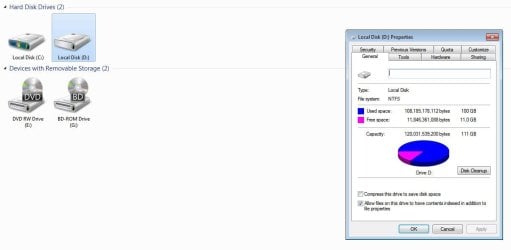
Bit of background - it is not my windows drive, BIOS recognises it fine as does device manager. My computer sees it and I can open it and see the root folders (no sub folders and no files) but all the folders are empty. If I click on properties, the used space and free space is accurately shown and it shows the drive contains 100GB of data which is right.

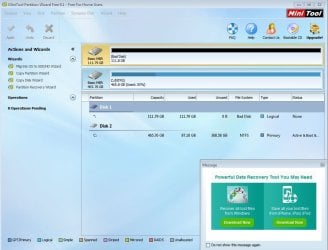
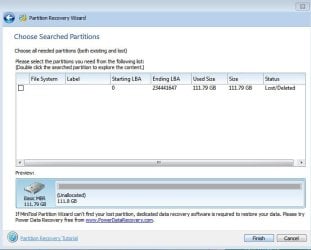
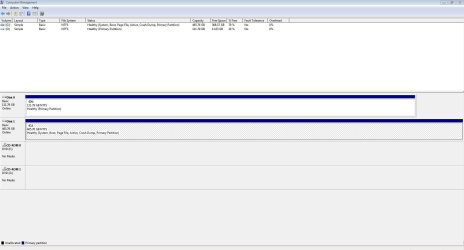
Disk manager shows it as healthy although not active? If I right click and mark as active it says cannot find the file specified. Minitool partition wizard shows it as a "bad disk" under file system and if I try to recover partition it shows the partition status as lost/damaged but when I try to recover nothing happens. Any ideas anyone?
 

My Computer

Computer type
PC/Desktop
OS
windows 7 ultimate sp1 64bit

My Computer

Computer type
PC/Desktop
Computer Manufacturer/Model Number
custom build
OS
Windows 7 Professional 64bit
CPU
Intel i7-5960X
Motherboard
EVGA X99 Classified
Memory
64GB Corsair Dominator 2400MHz
Graphics Card(s)
3 EVGA GTX980's
Sound Card
on board
Monitor(s) Displays
3 Dell E2715H 27"
Screen Resolution
1920x1080 (5760x1080)
Hard Drives
Samsung 950 Pro 1TB M.2 SSD,
Western Digital Black 2TB HDD's x5
Western Digital Black 1TB HDD's x3
PSU
Corsair AX1200i
Case
Corsair 750D
Cooling
Corsair H110i GT
Keyboard
Corsair K70
Mouse
Corsair M45
Internet Speed
250 down/10 up
Antivirus
Microsoft Security Essentials
Browser
IE 11, Google Chrome
I have just tried the SanDisk tool and it doesn't detect the drive. Furthermore, trying to scan for the drive on the SanDisk tool makes it disappear from Windows explorer and device manager all together. I have to shut down and restart again for the drive to show up.
 

My Computer

Computer type
PC/Desktop
OS
windows 7 ultimate sp1 64bit
Is this an external or internal drive?
Can you see the drive in BIOS?
You can use a Linux Live CD and see if the files are accessible or the drive is really dead.
 

My Computer

Computer type
PC/Desktop
Computer Manufacturer/Model Number
custom build
OS
Windows 7 Professional 64bit
CPU
Intel i7-5960X
Motherboard
EVGA X99 Classified
Memory
64GB Corsair Dominator 2400MHz
Graphics Card(s)
3 EVGA GTX980's
Sound Card
on board
Monitor(s) Displays
3 Dell E2715H 27"
Screen Resolution
1920x1080 (5760x1080)
Hard Drives
Samsung 950 Pro 1TB M.2 SSD,
Western Digital Black 2TB HDD's x5
Western Digital Black 1TB HDD's x3
PSU
Corsair AX1200i
Case
Corsair 750D
Cooling
Corsair H110i GT
Keyboard
Corsair K70
Mouse
Corsair M45
Internet Speed
250 down/10 up
Antivirus
Microsoft Security Essentials
Browser
IE 11, Google Chrome
Hi Havoc

Thanks for your help so far.


It is an internal drive.

Yes I can see the drive in the BIOS, no issue. I can see it in device manager and my computer with no issue as well. I can even open the drive in my computer and see the root folders but they are all empty.

I have tried using Easy Recovery essentials CD which I believe is a Linux based system but I may be wrong? Easy recovery essentials didn't detect the drive at all. Would you recommend another piece of software?
 

My Computer

Computer type
PC/Desktop
OS
windows 7 ultimate sp1 64bit
Do a check disk. On a CMD window type chkdsk x: /f Replace X: with your SSD drive letter.
 

My Computers

System One System Two

  • Computer type
    PC/Desktop
    Computer Manufacturer/Model Number
    custom build
    OS
    Windows 7 HP 64
    CPU
    i5 6600K - 800MHz to 4200MHz
    Motherboard
    GA-Z170-HD3P
    Memory
    4+4G GSkill DDR4 3000
    Graphics Card(s)
    IG - Intel 530
    Monitor(s) Displays
    Samsung 226BW
    Screen Resolution
    1680x1050
    Hard Drives
    (1) -1 SM951 – 128GB M.2 AHCI PCIe SSD drive for Windows 7 and Lubuntu
    (2) -1 WD SATA 3 - 1T for Data
    (3) -1 WD SATA 3 - 1T for backup
    PSU
    Thermaltake 450W TR2 gold
    Keyboard
    Old and good Chicony mechanical keyboard
    Mouse
    Logitech mX performance - 9 buttons (had to disable some)
    Internet Speed
    500Mb/s
    Browser
    Firefox 64
    Other Info
    TinyWall firewall
  • Computer type
    Laptop
    System Manufacturer/Model Number
    Asus Q550LF
    OS
    Windows 7 Pro
    CPU
    i7-4500U 800MHz to 3.0GHz
    Motherboard
    Asus Q550LF
    Memory
    (4+4)G DDR3 1600
    Graphics Card(s)
    IG intel 4400 + NVIDIA GeForce GT 745M
    Sound Card
    Realtek
    Monitor(s) Displays
    LG Display LP156WF4-SPH1
    Screen Resolution
    1920 x 1080
    Hard Drives
    BX500 120G SSD for Windows and programs +
    1T HDD for data
    Internet Speed
    500 Mb/s
    Browser
    Firefox
    Other Info
    TinyWall firewall
Hi Megahertz

Upon trying the check disk I receive the following message - The type of file system is RAW. It is not possible to run chkdsk for RAW drives.

Is it possible my NTFS master file table is corrupted? Windows can see 100GB of data on the drive so I think the data is still there!
 

My Computer

Computer type
PC/Desktop
OS
windows 7 ultimate sp1 64bit

My Computers

System One System Two

  • Computer type
    PC/Desktop
    Computer Manufacturer/Model Number
    custom build
    OS
    Windows 7 HP 64
    CPU
    i5 6600K - 800MHz to 4200MHz
    Motherboard
    GA-Z170-HD3P
    Memory
    4+4G GSkill DDR4 3000
    Graphics Card(s)
    IG - Intel 530
    Monitor(s) Displays
    Samsung 226BW
    Screen Resolution
    1680x1050
    Hard Drives
    (1) -1 SM951 – 128GB M.2 AHCI PCIe SSD drive for Windows 7 and Lubuntu
    (2) -1 WD SATA 3 - 1T for Data
    (3) -1 WD SATA 3 - 1T for backup
    PSU
    Thermaltake 450W TR2 gold
    Keyboard
    Old and good Chicony mechanical keyboard
    Mouse
    Logitech mX performance - 9 buttons (had to disable some)
    Internet Speed
    500Mb/s
    Browser
    Firefox 64
    Other Info
    TinyWall firewall
  • Computer type
    Laptop
    System Manufacturer/Model Number
    Asus Q550LF
    OS
    Windows 7 Pro
    CPU
    i7-4500U 800MHz to 3.0GHz
    Motherboard
    Asus Q550LF
    Memory
    (4+4)G DDR3 1600
    Graphics Card(s)
    IG intel 4400 + NVIDIA GeForce GT 745M
    Sound Card
    Realtek
    Monitor(s) Displays
    LG Display LP156WF4-SPH1
    Screen Resolution
    1920 x 1080
    Hard Drives
    BX500 120G SSD for Windows and programs +
    1T HDD for data
    Internet Speed
    500 Mb/s
    Browser
    Firefox
    Other Info
    TinyWall firewall

My Computer

Computer type
PC/Desktop
Computer Manufacturer/Model Number
Custom Build
OS
Win 7 Ultimate 64 bit
CPU
Intel i7-3930K
Motherboard
ASUS P9X79 WS
Memory
Kingston HyperX Genesis 32GB Kit (8x4GB Modules) 1600MHz DDR
Graphics Card(s)
MSI R7850 Twin Frozr 2GD5/OC Radeon HD 7850 2GB 256-bit GDDR
Sound Card
Asus Xonar Essence STX
Monitor(s) Displays
3x Asus VG248QE 24", Vizio 32" TV
Screen Resolution
1920 x 1080, ?
Hard Drives
Samsung 128GB 840 Pro SSD (1),
Samsung 4TB 850 EVO SSDs (4)
Samsung 4TB 850 EVO SSDs (16) external backup drives used in 2.5" hot swap bays in the computer.
PSU
Corsair HX750w
Case
Antec Two Hundred v2 (modified)
Cooling
Cooler Master GeminII S524 120mm (fan replaced with a 140mm)
Keyboard
Logitech G510s
Mouse
Logitech M525 (two in use)
Internet Speed
=< 32Mbps down, 8Mbps up
Antivirus
AVAST!, MBAM, SAS, Spybot S&D (all but MBAM free) Glary Util
Browser
IE11
Other Info
LSI 9211-8i HBA card (8 SATA III ports), 2.5" & 3.5" Hot Swap Bays, HooToo HT-CR001 PCI-E to USB 3.0 Internal Hub + 6 Slot Card Reader, and LG Model CH12LS28 BD-ROM Optical Drive. Also, ScanSnap S1500 ADF duplexing scanner, Canon 9000F flat bed scanner, Corsair SP2500 2.1 speakers, Samsung CLP 415nw laser color printer, Cyberpower PP2200SW UPS
Thanks guys, I will reach out to Jumanji
 

My Computer

Computer type
PC/Desktop
OS
windows 7 ultimate sp1 64bit
OMLF!!!!!!! ( Oh, My Lady Fitzerald :D) I am avalanched - a mass of snow, ice, and rocks falling rapidly down a mountainside. Noun turned into a verb - & Shakespeare must be turning in his grave!
OK marcl, saw your PM only this morning. Late wake up and everything late except jumanji - not yet late jumanji ! Usually if SSD is mentioned I don't even read that thread/post for I have had no encounters with that beast. But then this seems to be a data recovery problem and so the same old principles should apply and so the same old jumanji ! :)

Anyway you will be sleeping now. So I shall take a breather and then come back before you rise to the sun.
 
Last edited:

My Computer

OS
Windows 7 Home Premium 32 bit
Hi Jumanji!

Yes this is definitely a data recovery problem! I think the partition table is damaged and lost so the drive is just a whole lot of raw data 0 and 1's:D. I tried a chkdsk /f as mentioned earlier but chkdsk sees it as a raw drive so won't touch it.
 

My Computer

Computer type
PC/Desktop
OS
windows 7 ultimate sp1 64bit
OK, You came to know that your SSD is RAW only when you tried to run chkdsk on it as advised by MHz07. Partition Recovery was not possible.Partition Wizard shows it as Bad Disk. Now let me see it in pictures.

1. Post a screenshot of Windows Disk Management. Please adhere to the guidelines here Disk Management - Post a Screen Capture Image ( Hide Console Tree, Action Pane and adjust the vertical seperators in the Disk List and horizontal separator above the Disk map so that we get a full picture with all the information visible) After taking the screenshots Cancel and Close PW. You may have to rerun it again if need be.

2. Used space in Properties shows as 100 GB. Post a screenshot.

3. a)Post a screenshot of the drives as seen by Partition Wizard - the very first screen when you launch Partition Wizard. b)And then rerun Partition Recovery Wizard, Quick Scan and post a screenshot of Partitions found Window ( which you say you found it lost/deleted/damaged)

4. Upload the screenshots to Seven Forum servers ( and not to any third party server). Screenshots and Files - Upload and Post in Seven Forums

It is too early to say whether the MFT has become corrupt but most likely so. We will try to check on it as we proceed step by step. It is going to be a slow process considering the Time zone difference and also that I am a slow snail. So be patient. No need to be in a hurry. While we are on this job, do not try any other program or software. During the gaps between the posts just relax and do other things.
 

My Computer

OS
Windows 7 Home Premium 32 bit
I will get these screenshots for you this evening when I am home from work.
 

My Computer

Computer type
PC/Desktop
OS
windows 7 ultimate sp1 64bit
No problem. Take your time. Do it when you have time to spare.

Also Let me know the exact model Number of your SanDisk SSD. Do you know whether it is TRIM enabled? How old is your SSD? Older SSDs didn't have the TRIM feature. Newer ones do have it and take the Windows 7 command for a clean non-recoverable wipe whenever files are deleted to maximise performance but data gone with the winds. .

[In case of TRIM enabled SSDs deletion of partition table that happened for whatever reason immediately deletes all data in one stroke ( most probably writes zeros)( unlike in HDDs where only the file index is removed and data will still be there.That data will be lost only when overwritten by fresh data.)]

So the next crucial step will be to find out the status of the partition table and check whether there is any data at all beyond sector 2048.
 
Last edited:

My Computer

OS
Windows 7 Home Premium 32 bit
Could depend on which sector the partition begins and how old the drive is/when it was partitioned.

(Mainly posting here just to subscribe to updates, interested in the result...)
 

My Computer

Computer type
Laptop
Computer Manufacturer/Model Number
Medion
OS
Windows 10 x64
CPU
Intel i5 4210M
Motherboard
N/A
Memory
6GB DDRIII
Graphics Card(s)
Intel HD4600/Nvidia GeForce 825M
Monitor(s) Displays
15.6"
Screen Resolution
1366x768
Hard Drives
Samsung EVO 850 500GB
PSU
N/A
Case
N/A
Cooling
N/A
Keyboard
N/A
Mouse
N/A
Internet Speed
13Mbps (actual)
Antivirus
N/A
Browser
Firefox ;)
Jumanji,

Screenshots as requested.

Model Number is SDSSDX120GG25

It is at least 4-5 years old I think. I ran the fsutil behaviour query on CMD prompt and TRIM is enabled on Windows 7. Not sure if this drive supports TRIM.

Edit- Some extra information, not sure if it is relevant but I am pretty sure that my ssd D: drive stopped working just after I ran a o&o NAME defrag on my HDD C: drive. Probably more of a coincidence I guess??
 

Attachments

  • Disk Management.JPG
    Disk Management.JPG
    114.7 KB · Views: 5
  • Free Space.JPG
    Free Space.JPG
    52.1 KB · Views: 2
  • PW1.JPG
    PW1.JPG
    85.6 KB · Views: 2
  • PW2.JPG
    PW2.JPG
    47 KB · Views: 19
Last edited:

My Computer

Computer type
PC/Desktop
OS
windows 7 ultimate sp1 64bit
OK, I have seen all the data presented by you but will not jump to any conclusions now.

Please download, install and run Getdataback simple Data Recovery Free v 3.00 English (8.80MB) from Data Recovery Software Products - Runtime Software Products

Scan your 120GB SSD drive and check whether it shows all your folders/files. Post a screenshot. If the folders/Files are shown you can right click on it,open and preview the files.

( The free demo version can only show your files and allow you to preview the files to check their integrity. You won't be able to copy the files unless you buy a license. We are using it here only to see if the folders or files are seen. If seen, we will use some other free version to get the data. In the event that no free software is able to retrieve the data , then and only then we will throw up our hands and ask you to buy that. There are many cases in which that happened.)
 

My Computer

OS
Windows 7 Home Premium 32 bit
No good unfortunately.

It doesn't detect the drive, it only detects my mechanical HDD
 

My Computer

Computer type
PC/Desktop
OS
windows 7 ultimate sp1 64bit
Generally if other Data recovery software cannot see the drive, no DIY data recovery is possible.That is obvious.

Yet we can try two other software hoping that those will find your drive. Let me try to examine your drive with Bootice. If it sees your drive then we will examine sector 0 ( The MBR sector) and sector 63 and sector 2048 that generally hold the volume boot record.

If your system is 64bit, download BOOTICEx64 v1.332 from here 【BOOTICE v1.3.3.2: 功能强大的启动维护工具】-子逸轩 Extract the *.rar to the same downloads folder. It will be a single BOOTICEx64.exe file. Run it and check whether it shows your drive. If it shows select it > Sector Edit. Post the screenshots of sector 0, 63 and 2048.

Using bootice: Post #7 here: Lost partitions!

NOTE: You will not be saving any sector. Just go to Sector 0, Sector 63 and Sector 2048 and take a screenshot. Then close the sector map window and Exit bootice

I am keeping my fingers crossed.
 

My Computer

OS
Windows 7 Home Premium 32 bit
Back
Top