Standard VGA Graphics adapter causing startup and resolution issues

uzi123

New member
Local time
6:46 PM
Messages
17
Hi guys,

I'm having a very strange issue on my fathers computer. He has a Packard Bell imediaS3810 with W7. It has no graphics card, just the standard VGA.

It has worked fine for the last three years. However, last week it kept getting a blue screen related to the graphics adapter and would take ages to start up (it would hang at Starting Windows). It would work fine in safe mode, but in normal operation I noticed that in Device Manager the Graphics part has a yellow exclamation mark, even though it had the latest drivers.

I did a fresh reinstall of W7, and on the defauly VGA drivers, the computer works fine on 2006 standard gfx driver, but the resolution is not correct, it's very zoomed in. Even when I list all modes the correct resolution is not available.

When I update the driver to the 2013 one via Device Manager and restart, the computer hangs at "Starting Windows" again, but would launch fine with Safe Mode. I then have to roll back the driver to 2006 and deal with the zoomed in screen!

Would really appreciate some help, as this is something my dad can't resolve himself.

Thanks!
 

My Computer

Computer type
PC/Desktop
Computer Manufacturer/Model Number
Packard Bell
OS
Home Premium 64bit
Hi Welcome to Seven ... I think you have an Intel GPU .. So i suggest you Download the Intel Driver Utility .. It is in the Link below ..

Intel® Driver Update Utility
 

My Computer

Computer Manufacturer/Model Number
W530-3630QM1
OS
windows 7 home 64bit
CPU
INTEL-CORE I7
Memory
16GB
Hard Drives
750GB
Browser
Chrome
Maxie,

Thank you for your response!

I have tried the Intel Driver utility, however it always just hangs on Analyzing Computer when I try using Chrome. Tried Firefox too but still the same issue.
 

My Computer

Computer type
PC/Desktop
Computer Manufacturer/Model Number
Packard Bell
OS
Home Premium 64bit
I looked on the Packard Bell Website .. But I could not find your Model to determine which GPU your Computer has .. I think it is either 2000 or 3000 ...
 

My Computer

Computer Manufacturer/Model Number
W530-3630QM1
OS
windows 7 home 64bit
CPU
INTEL-CORE I7
Memory
16GB
Hard Drives
750GB
Browser
Chrome
On the Packard Bell site, the Product is listed as an iMeda PT.U5H-PV.U5H

Talk about long winded! The newest Intel driver they have is from 2010.

I have downloaded the driver you mentioned, but it didn't work. The system takes at least 20min to start up, and then when it does in device manager the Intel Graphics Adapter has a yellow exclamation mark which when I click in to it says “Windows has stopped this device because it has reported problems. (Code 43)” Also, my correct resolution still isn't available.

Seems like anything newer than the 2006 drivers kill my system. It's strange because it was working fine up til a few weeks ago with the latest drivers (2013 I assume as that is what Device Manager finds now).

It just seems like such a strange problem. A part of me thinks it may be a virus, but I've wiped it clean!
 

My Computer

Computer type
PC/Desktop
Computer Manufacturer/Model Number
Packard Bell
OS
Home Premium 64bit
I picked that Driver because i thought for certain it would work .. If you go back to the old Driver does the error code still appear ? I will do a bit more research and see what i can find for you ...
 

My Computer

Computer Manufacturer/Model Number
W530-3630QM1
OS
windows 7 home 64bit
CPU
INTEL-CORE I7
Memory
16GB
Hard Drives
750GB
Browser
Chrome
Nope, no error codes with the 2006 driver. The driver you linked to doesn't show the error/exclamation mark when I run in safe mode.

It is certainly a very strange issue. Really annoying. I wouldn't have minded as much if it was on my PC, but it's my dads and it's difficult for me to get to his often to troubleshoot!

Thanks for your help so far Maxie; appreciate it.
 

My Computer

Computer type
PC/Desktop
Computer Manufacturer/Model Number
Packard Bell
OS
Home Premium 64bit
Try this then Download the Intel Chipset Driver from the Packard Bell Website .. Then Download the Graphics Driver from there .... That just might work ...
 

My Computer

Computer Manufacturer/Model Number
W530-3630QM1
OS
windows 7 home 64bit
CPU
INTEL-CORE I7
Memory
16GB
Hard Drives
750GB
Browser
Chrome
Just downloaded the Intel Chipset driver and installed it (took a few seconds which seemed way too fast) and then installed the PB driver from there, still the same stuff long boot etc...

I will try updating the one you linked to direct from Intel from the already installed PB 2010 one.
 
Last edited:

My Computer

Computer type
PC/Desktop
Computer Manufacturer/Model Number
Packard Bell
OS
Home Premium 64bit
If that one does not work roll back to the 2006 Driver and tell me how long it takes to boot please
 

My Computer

Computer Manufacturer/Model Number
W530-3630QM1
OS
windows 7 home 64bit
CPU
INTEL-CORE I7
Memory
16GB
Hard Drives
750GB
Browser
Chrome
So that didn't work either. Same issues. Though something I noticed, when updating the driver and looking at compatible Intel drivers, they have different labels:

2006 (Default) Standard VGA Graphics Adapter
2010 (PB Site) Intel (R) Graphics Media Accelerator HD
2012 Intel (R) HD Graphics 0.15.10.2622
2013 Intel (R) HD Graphics 0.15.10.2993

This could just be labeling over the years though.

Takes around a minute to boot on the 2006 driver.

Maxie, do you have any idea why the error doesn't come up in Safe mode?

What are the chances the driver issue is virus related, and the resolution is monitor related. There's no other monitor I can test but I doubt it'd be that anyway.
 

My Computer

Computer type
PC/Desktop
Computer Manufacturer/Model Number
Packard Bell
OS
Home Premium 64bit

My Computer

Computer Manufacturer/Model Number
W530-3630QM1
OS
windows 7 home 64bit
CPU
INTEL-CORE I7
Memory
16GB
Hard Drives
750GB
Browser
Chrome
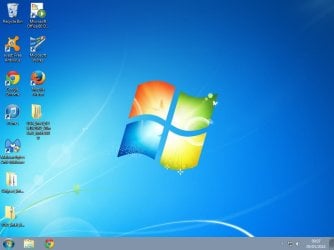
Morning,

Please find screenshot of desktop attached.

Cheers
 

Attachments

  • Desktop.jpg
    Desktop.jpg
    49.1 KB · Views: 1

My Computer

Computer type
PC/Desktop
Computer Manufacturer/Model Number
Packard Bell
OS
Home Premium 64bit

My Computer

Computer Manufacturer/Model Number
W530-3630QM1
OS
windows 7 home 64bit
CPU
INTEL-CORE I7
Memory
16GB
Hard Drives
750GB
Browser
Chrome
I install Intel Chipset Device Software from your link, but it seems like nothing happens at all; is it actually loading a driver of some sort, as it is very quick?
 

My Computer

Computer type
PC/Desktop
Computer Manufacturer/Model Number
Packard Bell
OS
Home Premium 64bit
Hi there Lets see what Version you have Installed ..


Type regedit in the start search box

Once in the Registry Editor expand "HKEY_LOCAL_MACHINE"

Next Expand "SOFTWARE"

Next Expand "INTEL"


Click on "Infinst"

On the right hand side of the screen you will see which Version
 

My Computer

Computer Manufacturer/Model Number
W530-3630QM1
OS
windows 7 home 64bit
CPU
INTEL-CORE I7
Memory
16GB
Hard Drives
750GB
Browser
Chrome
9.4.0.1026 which from Google is the latest one you linked to.
 

My Computer

Computer type
PC/Desktop
Computer Manufacturer/Model Number
Packard Bell
OS
Home Premium 64bit
And that is the Version which gives you errors ? .. What Antivirus programs are you using ?
 

My Computer

Computer Manufacturer/Model Number
W530-3630QM1
OS
windows 7 home 64bit
CPU
INTEL-CORE I7
Memory
16GB
Hard Drives
750GB
Browser
Chrome
And that is the Version which gives you errors ? .. What Antivirus programs are you using ?

Yep, that's the version giving me errors. Using Avast Basic. Shall I try uninstalling that and proceeding?
 

My Computer

Computer type
PC/Desktop
Computer Manufacturer/Model Number
Packard Bell
OS
Home Premium 64bit
Back
Top