Start>Computer>Windows Explorer Unresponsive with Green Loading Bar

Quick meta-question: no one uses Windows 7 anymore? Everyone has moved on to 10?

Windows 7 is still the most widely used OS.

Market Share - W7 Up, W10 Flat, XP Down

396982d1488673153-market-share-w7-up-w10-flat-xp-down-market-share-os-2017-03-05-2-month-bar-chart.png
 

My Computer My Computer

Computer type
PC/Desktop
OS
Windows 7 Professional x64 SP1
Hi Torchwood,

The thing is, when I restart my computer, everything is fine. Windows Explorer gets broken after I do a couple of file searches across the system...

The reason it gets fixed every time I reboot is, I use light virtualization, such as Shadow Defender. No other customization I know of *, did I mention it gets fixed with every reboot, and gets broken after a few searches?

Are we closer to the solution to my problem? thanks, I appreciate you all!

* And I use TrueCrypt volumes.
 
Last edited:

My Computer My Computer

Computer type
PC/Desktop
OS
Windows 7 Home Premium 32 bit
Hi Torchwood,

The thing is, when I restart my computer, everything is fine. Windows Explorer gets broken after I do a couple of file searches across the system...

The reason it gets fixed every time I reboot is, I use light virtualization, such as Shadow Defender. No other customization I know of *, did I mention it gets fixed with every reboot, and gets broken after a few searches?

Are we closer to the solution to my problem? thanks, I appreciate you all!

* And I use TrueCrypt volumes.

Maybe this is the clue. Maybe not.
 

My Computer My Computer

Computer type
PC/Desktop
OS
Windows 7 Home Premium 32 bit
Hi Torchwood,

The thing is, when I restart my computer, everything is fine. Windows Explorer gets broken after I do a couple of file searches across the system...

The reason it gets fixed every time I reboot is, I use light virtualization, such as Shadow Defender. No other customization I know of *, did I mention it gets fixed with every reboot, and gets broken after a few searches?

Are we closer to the solution to my problem? thanks, I appreciate you all!

* And I use TrueCrypt volumes.

What do you mean by "Windows Explorer gets broken" ?

Do you mean the same problem as the title of this thread or do you mean explorer crashes?

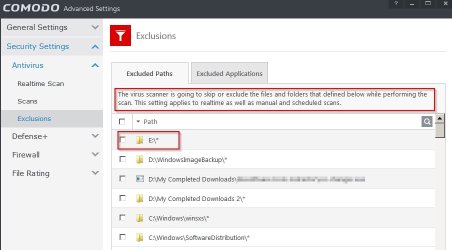
Anyway try setting your AV to exclude any external drives or Truecrypt volumes from real time on access file scanning.

COMODO Advanced Settings.jpg

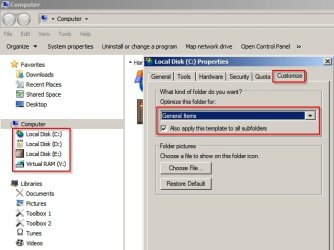
Also try turning off Automatic Folder Type Discovery.

Option 2 in this tutorial:


Then double check properties for each drive and make sure that General Items is selected for all folders and subfolders.

Local Disk (C_) Properties.jpg

See if that helps.
 

My Computer My Computer

Computer type
Laptop
Computer Manufacturer/Model Number
ASUS
OS
Microsoft Windows 7 Home Premium 64-bit 7601 Multiprocessor Free Service Pack 1
CPU
AMD C-60 APU with Radeon(tm) HD Graphics
Motherboard
ASUSTeK COMPUTER INC. X501U
Memory
4.00 GB
Graphics Card(s)
AMD Radeon HD 6290 Graphics
Sound Card
(1) AMD High Definition Audio Device (2) Realtek High Defi
Screen Resolution
1366 x 768 x 32 bits (4294967296 colors) @ 60 Hz
Hard Drives
Hitachi HTS545050A7E380 SATA Disk Device
Antivirus
Comodo CIS & FW, SecureAplus App Whitelisting, Threatfire
Browser
Cyberfox 64bit, Opera 64bit, Airfox
Other Info
Spy-The-Spy, HitmanPro.Alert, Norton Connect Safe, MJRegWatcher, BitDefender TrafficLight, Voodoo Shield, Zemana AntiMalware
Thanks Callender,

I'm going to try it! Now I'm on another, working, machine.
 

My Computer My Computer

Computer type
PC/Desktop
OS
Windows 7 Home Premium 32 bit
Back
Top