Start Menu - All Programs - "Sort All Programs Menu By Name" Issues

miketurn1234

New member
Member
Local time
5:11 PM
Messages
84
Start Menu - All Programs - "Sort All Programs Menu By Name" Issues

It seems that the issues I am dealing with appear to happen when I turn off (uncheck) the setting - "Sort All Programs Menu By Name"

Say in my "all programs" section I have the following items....

Code:
Program A (launcher)
Program B (launcher)
Program C (launcher)

Accessories (Folder)
Games (Folder)
Folder Created By Me (Folder)

ISSUE #1

Sometimes when I go into the "all programs" section, none of the "launcher" files can be seen, just folders

ISSUE #2
If I drag Program A launcher to the bottom of the list, it makes a copy of the Program A launcher and randomly the "Games" folder in the middle, will disappear. Maybe this is because Windows does not want you to put program files below folders?

My initial goal was to be able to make the folders in the "all programs" section appear at the top of the list, which apparently there is no way to do this, if you manually move the folders to the top, upon reboot, Windows automatically puts those folders back at the bottom of the list! I have created a separate post looking for a solution to this, but no responses.


When I turn the "Sort All Programs Menu By Name" setting back on, it fixes the glitches, but then re-orders the items alphabetically again.


The only other information I have to share is the path locations, which I have read about, but am a little confused still.
C:\ProgramData\Microsoft\Windows\Start Menu\Programs
Contains
Accessories (Folder)
Administrative Tools (Folder - which has files in it)
Games (Folder)
Program A
Program B

C:\Users\<USERNAME>\AppData\Roaming\Microsoft\Windows\Start Menu\Programs
Contains
Accessories (Folder)
Administrative Tools (Folder - NO files in it)
Folder Created By Me (Folder)
Program C

My computer only has one user which is me, should I stick to a specific path location (one of the above two)?

I don't have any customization type programs on my system at the moment, but I have been messing around a little with turning some features on and off, but I don't think anything that would be causing this.

Anyways, if anyone has any information they could share that would be great.
Thank You
 

My Computer

Computer type
PC/Desktop
OS
Windows 7 Professional
Hello Mike mate I am not real sure of what it is you want the All programs to look like and frankly I don't go messing in there because it is fine as it is but if you have and if you can remember roughly when you started to play with those settings and want it to be as original then try a system restore.

But let us know just what it is you want the All programs to look like.
 

My Computer

Computer type
PC/Desktop
Computer Manufacturer/Model Number
Own build (new) Desk1 / Asus ROG Win 7 / Desk2 1st build
OS
Desk1 7 Home Prem / Desk2 10 Pro / Main lap Asus ROG 10 Pro 2 laptop Toshiba 7 Pro Asus P2520 7 & 10
CPU
Desk1 i5 3750K / Laptop i7 GTX 860M / Desk2 i5 2500
Motherboard
Desk1 Asus P877-V / Desk2 Gigabyte H67 UD3H / Laptop ?
Memory
Desk1 8GB (1866) / Desk2 16GB (1333) / Laptop 8Gb DDR3
Graphics Card(s)
Desk 1& 2NVidia GTX 650 & Laptops on board Intel
Sound Card
Desk 1 & 2 -XONAR DG Realtek High Def audio Laptop
Monitor(s) Displays
Desk 1 Benq HD 2450 / Desk2 Philips 24" / Laptop 17.5"
Screen Resolution
1920x1080 D1 & D2 & Laptop 1
Hard Drives
Desk1 Samsung 120GB 830 SSD
Asus ROG 256GB 850 Pro SSD
Desk2 Samsung 840 256 SSD
Toshiba 120GB EVO
PSU
Desk 1 Corsair HX 1050/ Laptop ? / Desk 2 Corsair HX 650
Case
Desk 1 Cooler HAF XM ? Toshiba laptop / Desk2 Coolermaster
Cooling
Fans on all Desk1 -2 Desk2 - all Coolermasters 5 Laptop ?
Keyboard
Desk 1 MS Sidewinder X6 Desk 2 MS Sidewinder X 4
Mouse
Desk 1&2 - Gigabyte MS 900 gamer - laptop - Logitec wireless
Internet Speed
ADSL2+
Other Info
One other Desktop (tester) and spare Toshba laptop both with SSD's
Running Kaspersky 2016 ISS on all machines config'd identically
Logitec audio stereo systems on each machine (x3)
Canon MG5250MFC
Router/modem TP-Link running WPA2SK
@ICIT2LOL
Thank you for your response.
I basically was just testing some stuff out so I setup a machine with Windows 7 64Bit Professional SP1 with no updates.

It isn't a big deal, but I was just trying to make the folders appear at the top of the "all programs" list, and have program launchers (.exe) to appear at the bottom. I also wanted to be able to sort the folders and program launchers in a non-alphabetical order.

I tried the same thing on another computer that I didn't change any settings on, and it does the exact same thing.
The only setting that I did change was turning off "Sort All Programs Menu By Name".
That is the setting that causes the issues mentioned in my original post, when I turn that setting back on everything works well, you just lose the ability to sort manually.

I imagine that folders at the top of "all programs" is just not something that Windows 7 was at all programmed to do, but the fact that it has a setting to turn off alphabetical order, means that at least that should work properly.

Again, not a big deal at all, but I just seems odd that something like that does not work.
Not sure if a specific update fixed this, and that is why others aren't experiencing this as well?

In the end I am going to have to do what I expected I was going to have to do before creating this thread, and that is to not turn the alphabetical setting off.

Thank you again
 

My Computer

Computer type
PC/Desktop
OS
Windows 7 Professional
No worries Mike you would think it would be possible to list programs on order that you want alpha or but type etc etc but it seems that these days anything in Windows is becoming so pre ordained whether you like t or not is a fact of life.

For example in 10 All programs they have hung onto the annoying 8 type app panel look I think what has spoilt computing to a greater amount than anything is that the revolution if that is the right way of terming it is the inception and application that has crept in with mobile devices ie smart phones and IPhones. Gone are the days where one could configure ones own system to their own tastes.

I use 10 a bit these days but only because there seems to be no real alternative as Linux also seems so convoluted to me relying on command prompt style methods of moving around in the OS. Having said that I will say the Linux based OS's are good at retrieving data form crashed Windows machines.

For me a lot of the enjoyment has been taken out of computing and increasingly so if one wants to build a personalised machine as the components makers ie Intel in conjunction with the software manufacturers ie Microsoft making it difficult to use anything else than Intel and Microsoft products.
I am not sure what the motive is but can have a stab at it all being financially and to and extent a power controlled world because if you don't follow what they dictate then you are left with nothing apart from those OS's that like Linux who operate on very different methods.
 

My Computer

Computer type
PC/Desktop
Computer Manufacturer/Model Number
Own build (new) Desk1 / Asus ROG Win 7 / Desk2 1st build
OS
Desk1 7 Home Prem / Desk2 10 Pro / Main lap Asus ROG 10 Pro 2 laptop Toshiba 7 Pro Asus P2520 7 & 10
CPU
Desk1 i5 3750K / Laptop i7 GTX 860M / Desk2 i5 2500
Motherboard
Desk1 Asus P877-V / Desk2 Gigabyte H67 UD3H / Laptop ?
Memory
Desk1 8GB (1866) / Desk2 16GB (1333) / Laptop 8Gb DDR3
Graphics Card(s)
Desk 1& 2NVidia GTX 650 & Laptops on board Intel
Sound Card
Desk 1 & 2 -XONAR DG Realtek High Def audio Laptop
Monitor(s) Displays
Desk 1 Benq HD 2450 / Desk2 Philips 24" / Laptop 17.5"
Screen Resolution
1920x1080 D1 & D2 & Laptop 1
Hard Drives
Desk1 Samsung 120GB 830 SSD
Asus ROG 256GB 850 Pro SSD
Desk2 Samsung 840 256 SSD
Toshiba 120GB EVO
PSU
Desk 1 Corsair HX 1050/ Laptop ? / Desk 2 Corsair HX 650
Case
Desk 1 Cooler HAF XM ? Toshiba laptop / Desk2 Coolermaster
Cooling
Fans on all Desk1 -2 Desk2 - all Coolermasters 5 Laptop ?
Keyboard
Desk 1 MS Sidewinder X6 Desk 2 MS Sidewinder X 4
Mouse
Desk 1&2 - Gigabyte MS 900 gamer - laptop - Logitec wireless
Internet Speed
ADSL2+
Other Info
One other Desktop (tester) and spare Toshba laptop both with SSD's
Running Kaspersky 2016 ISS on all machines config'd identically
Logitec audio stereo systems on each machine (x3)
Canon MG5250MFC
Router/modem TP-Link running WPA2SK
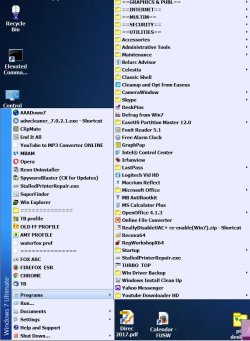
Download Classic Shell and remake the Start Menu , Taskbar and Win Explorer any way you want. It supersedes Win's illogical menu. I have my own system. Above the commands I have the programs I use most often, next column is all the rest. With a few exceptions, I mix folders and files alphabetically.
 

Attachments

  • start menu.jpg
    start menu.jpg
    134.8 KB · Views: 0

My Computer

Computer type
PC/Desktop
Computer Manufacturer/Model Number
HP p6-2020t
OS
Win 7 Ult 64-bit
CPU
G620 2.6GHZ Pentium R
Memory
6 GB
Monitor(s) Displays
25" HPLV2311
Screen Resolution
1920 x 1200
Hard Drives
1 SATA, 1 exterior SATA
Case
HP
Cooling
PSU
Antivirus
Glasswire
Browser
Waterfox; Firefox; Chrome for work
Other Info
Firewall--Glasswire
Similar specs in Gateway DX4200
Verizon FIOS Wired network

1 other Win7 computer-- has SSD
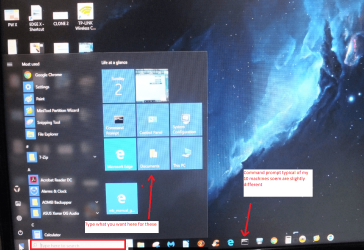
hmm very nice Mike but again it is a personal thing eh? just as in 10 I use nmy own Start menu.
 

Attachments

  • 10 START.PNG
    10 START.PNG
    1.3 MB · Views: 0

My Computer

Computer type
PC/Desktop
Computer Manufacturer/Model Number
Own build (new) Desk1 / Asus ROG Win 7 / Desk2 1st build
OS
Desk1 7 Home Prem / Desk2 10 Pro / Main lap Asus ROG 10 Pro 2 laptop Toshiba 7 Pro Asus P2520 7 & 10
CPU
Desk1 i5 3750K / Laptop i7 GTX 860M / Desk2 i5 2500
Motherboard
Desk1 Asus P877-V / Desk2 Gigabyte H67 UD3H / Laptop ?
Memory
Desk1 8GB (1866) / Desk2 16GB (1333) / Laptop 8Gb DDR3
Graphics Card(s)
Desk 1& 2NVidia GTX 650 & Laptops on board Intel
Sound Card
Desk 1 & 2 -XONAR DG Realtek High Def audio Laptop
Monitor(s) Displays
Desk 1 Benq HD 2450 / Desk2 Philips 24" / Laptop 17.5"
Screen Resolution
1920x1080 D1 & D2 & Laptop 1
Hard Drives
Desk1 Samsung 120GB 830 SSD
Asus ROG 256GB 850 Pro SSD
Desk2 Samsung 840 256 SSD
Toshiba 120GB EVO
PSU
Desk 1 Corsair HX 1050/ Laptop ? / Desk 2 Corsair HX 650
Case
Desk 1 Cooler HAF XM ? Toshiba laptop / Desk2 Coolermaster
Cooling
Fans on all Desk1 -2 Desk2 - all Coolermasters 5 Laptop ?
Keyboard
Desk 1 MS Sidewinder X6 Desk 2 MS Sidewinder X 4
Mouse
Desk 1&2 - Gigabyte MS 900 gamer - laptop - Logitec wireless
Internet Speed
ADSL2+
Other Info
One other Desktop (tester) and spare Toshba laptop both with SSD's
Running Kaspersky 2016 ISS on all machines config'd identically
Logitec audio stereo systems on each machine (x3)
Canon MG5250MFC
Router/modem TP-Link running WPA2SK
It is a matter of taste, but the built-in menu doesn't give you many choices. I didn't use it in XP either.

I think Classic Shell works with 7, 8 and 10. They have their own site, and even their own forums:

Classic Shell.net
 

My Computer

Computer type
PC/Desktop
Computer Manufacturer/Model Number
HP p6-2020t
OS
Win 7 Ult 64-bit
CPU
G620 2.6GHZ Pentium R
Memory
6 GB
Monitor(s) Displays
25" HPLV2311
Screen Resolution
1920 x 1200
Hard Drives
1 SATA, 1 exterior SATA
Case
HP
Cooling
PSU
Antivirus
Glasswire
Browser
Waterfox; Firefox; Chrome for work
Other Info
Firewall--Glasswire
Similar specs in Gateway DX4200
Verizon FIOS Wired network

1 other Win7 computer-- has SSD
Thank you guys for all the responses, debating whether I want to go that route, but I totally forgot about Classic Shell and its abilities to edit the Start Menu, I remember a long time ago I messed around with this program when I was trying to alter Windows Explorer.
 

My Computer

Computer type
PC/Desktop
OS
Windows 7 Professional
Yep Mike you have a few options and if you ever get to 10 - it is actually getting a little more usable now I found that instead of using something like Classic Shell it was easy just to make your Start menu yourself as in my pic and I find i just use it as per 7 Start up menu. What I don't like about it in particular is the system comes with a lot of bloat like simplistic games that really take some believing they would throw at adults and others you would use in a fit.

If you are interested in making the machine a tad more usable have a look at this yo may have already found this tutorial .

USING OPTIMISE TUTORIAL
Just a little something that will make your machine a little faster and more efficient is this Optimize Windows 7 - Windows 7 Help Forums
It is my bible when installing an OS on my machines and also when I am fixing friends and family machines too.
Now if you go through it slowly you will find lots of tweaks and they are all really thoroughly done by the authour Brink a fellow who is in my mind brilliant and if you need to ask questions he is just the most obliging person around.
The other thing is that you may lose some of the "bling" such as transparency (you don't have to I find it unnecessary) and all the tweaks are reversible.
If you do get stuck just post back in that tutorial and you will get help. Another bonus using this tutorial is that it helps you find your way around your machine and Windows 7!
Just one tip I would say you start with is do this Registry - Backup and Restore - Windows 7 Help Forums do this and it will save you a lot of grief if you are ever doing things in the registry and even if you don't it is a good back up to have if your system ever gets corrupted.
(pretyped to save time)
 

My Computer

Computer type
PC/Desktop
Computer Manufacturer/Model Number
Own build (new) Desk1 / Asus ROG Win 7 / Desk2 1st build
OS
Desk1 7 Home Prem / Desk2 10 Pro / Main lap Asus ROG 10 Pro 2 laptop Toshiba 7 Pro Asus P2520 7 & 10
CPU
Desk1 i5 3750K / Laptop i7 GTX 860M / Desk2 i5 2500
Motherboard
Desk1 Asus P877-V / Desk2 Gigabyte H67 UD3H / Laptop ?
Memory
Desk1 8GB (1866) / Desk2 16GB (1333) / Laptop 8Gb DDR3
Graphics Card(s)
Desk 1& 2NVidia GTX 650 & Laptops on board Intel
Sound Card
Desk 1 & 2 -XONAR DG Realtek High Def audio Laptop
Monitor(s) Displays
Desk 1 Benq HD 2450 / Desk2 Philips 24" / Laptop 17.5"
Screen Resolution
1920x1080 D1 & D2 & Laptop 1
Hard Drives
Desk1 Samsung 120GB 830 SSD
Asus ROG 256GB 850 Pro SSD
Desk2 Samsung 840 256 SSD
Toshiba 120GB EVO
PSU
Desk 1 Corsair HX 1050/ Laptop ? / Desk 2 Corsair HX 650
Case
Desk 1 Cooler HAF XM ? Toshiba laptop / Desk2 Coolermaster
Cooling
Fans on all Desk1 -2 Desk2 - all Coolermasters 5 Laptop ?
Keyboard
Desk 1 MS Sidewinder X6 Desk 2 MS Sidewinder X 4
Mouse
Desk 1&2 - Gigabyte MS 900 gamer - laptop - Logitec wireless
Internet Speed
ADSL2+
Other Info
One other Desktop (tester) and spare Toshba laptop both with SSD's
Running Kaspersky 2016 ISS on all machines config'd identically
Logitec audio stereo systems on each machine (x3)
Canon MG5250MFC
Router/modem TP-Link running WPA2SK
... What I don't like about it in particular is the system comes with a lot of bloat like simplistic games that really take some believing they would throw at adults and others you would use in a fit...
.../QUOTE]

I just toss out anything in the Start Menu some things I don't like or will never use. They're only shortcuts. And I also found it helpful to put Classic Shell into my Startup folder. You can see in my illustration that it's highly personalized.

And yes, before 7 I also made the StartMenu to my liking.
 

My Computer

Computer type
PC/Desktop
Computer Manufacturer/Model Number
HP p6-2020t
OS
Win 7 Ult 64-bit
CPU
G620 2.6GHZ Pentium R
Memory
6 GB
Monitor(s) Displays
25" HPLV2311
Screen Resolution
1920 x 1200
Hard Drives
1 SATA, 1 exterior SATA
Case
HP
Cooling
PSU
Antivirus
Glasswire
Browser
Waterfox; Firefox; Chrome for work
Other Info
Firewall--Glasswire
Similar specs in Gateway DX4200
Verizon FIOS Wired network

1 other Win7 computer-- has SSD
Thanks again for the responses
ICIT2LOL
Thanks for the links, I have looked through tons of websites regarding optimization, the link you mention looks familiar, I probably came across it when I wasn't as in to optimizing my system and just skimmed it. Now that I am more interested, I looked through that link and it is a great resource as you mention. I have come across many of these, a couple new ones to add to my list from Brink and a few that other members mention throughout the thread. I will have to give some of these more in depth ones a try, with caution of course :)

Thanks Again
 

My Computer

Computer type
PC/Desktop
OS
Windows 7 Professional
Yep look you are pretty safe with the optimise tutorial and what I do on my machines is back up the registry after a clean install or buying/building new one just in case I happen to hit a wrong key or value and it is then so easy the merge back the original registry.
Registry - Backup and Restore - Windows 7 Help Forums
 

My Computer

Computer type
PC/Desktop
Computer Manufacturer/Model Number
Own build (new) Desk1 / Asus ROG Win 7 / Desk2 1st build
OS
Desk1 7 Home Prem / Desk2 10 Pro / Main lap Asus ROG 10 Pro 2 laptop Toshiba 7 Pro Asus P2520 7 & 10
CPU
Desk1 i5 3750K / Laptop i7 GTX 860M / Desk2 i5 2500
Motherboard
Desk1 Asus P877-V / Desk2 Gigabyte H67 UD3H / Laptop ?
Memory
Desk1 8GB (1866) / Desk2 16GB (1333) / Laptop 8Gb DDR3
Graphics Card(s)
Desk 1& 2NVidia GTX 650 & Laptops on board Intel
Sound Card
Desk 1 & 2 -XONAR DG Realtek High Def audio Laptop
Monitor(s) Displays
Desk 1 Benq HD 2450 / Desk2 Philips 24" / Laptop 17.5"
Screen Resolution
1920x1080 D1 & D2 & Laptop 1
Hard Drives
Desk1 Samsung 120GB 830 SSD
Asus ROG 256GB 850 Pro SSD
Desk2 Samsung 840 256 SSD
Toshiba 120GB EVO
PSU
Desk 1 Corsair HX 1050/ Laptop ? / Desk 2 Corsair HX 650
Case
Desk 1 Cooler HAF XM ? Toshiba laptop / Desk2 Coolermaster
Cooling
Fans on all Desk1 -2 Desk2 - all Coolermasters 5 Laptop ?
Keyboard
Desk 1 MS Sidewinder X6 Desk 2 MS Sidewinder X 4
Mouse
Desk 1&2 - Gigabyte MS 900 gamer - laptop - Logitec wireless
Internet Speed
ADSL2+
Other Info
One other Desktop (tester) and spare Toshba laptop both with SSD's
Running Kaspersky 2016 ISS on all machines config'd identically
Logitec audio stereo systems on each machine (x3)
Canon MG5250MFC
Router/modem TP-Link running WPA2SK
Back
Top