Start Menu Button - Change

How to Change the Start Menu Button in Windows 7

   Information
This will show you how to change the Start Menu button orb in Windows 7 32-bit and 64-bit.
   Warning
REMEMBER TO BACK UP EXPLORER.EXE!


Here's How:

For custom made start buttons, and further information, please visit this thread: http://www.sevenforums.com/customization/2002-custom-themes-icons-start-buttons-92.html

   Information
The explorer.exe you want to edit is:

C:\Windows\explorer.exe

and not C:\Windows\SysWOW64\explorer.exe (for those running x64)

And for those who use the larger DPI's i.e 125% , 150% you need to change:

6806 - 66 x 198
6807 - 81 x 243
6808 - 106 x 318


NOTE: The start orb replacement always HAS to look like this:
1 orb: Orb when not in use (when not clicked or mouseover'ed)
2 orb: mouseover
3 orb: When start orb is clicked
2u9ka5w.jpg

1. Download Restorator (Shareware) (Restorator 2007 Resource Editor - Restorator - Bome Software)

2. Take ownership of the whole Windows folder (see these links for more info: Take Ownership of file - Vista Forums and http://www.sevenforums.com/tutorials/1911-take-ownership-shortcut.html)

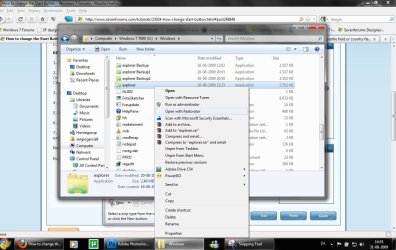
3. Open explorer.exe with restorator
1.jpg

2.jpg
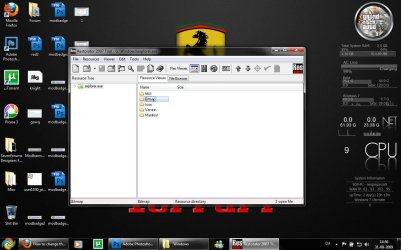
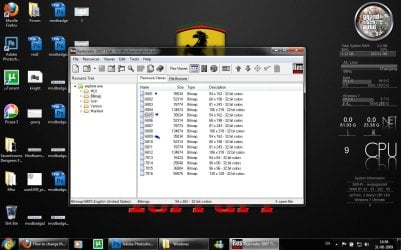
4. Go to the folder called "Bitmap"
3.jpg
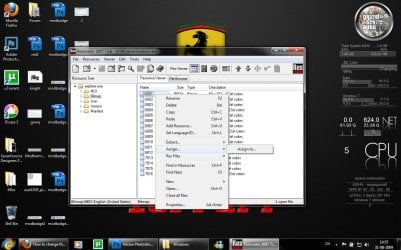
5. Replace 6801.bmp, 6805.bmp, and 6809.bmp (as seen on the picture, you will need to right click and click assign, and then click assign to, then select your file.)
4.jpg

5.jpg
6. Go to "file" and Save as explorer.exe on your desktop

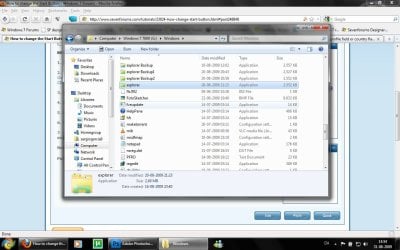
7. Go to the windows folder and rename explorer.exe to explorer.exe.bak and then copy-paste the new explorer, Kill the process in task manager and start it again.
Now you have a new start button! :D

Please comment, if you have something to say :)


Last edited by a moderator:
thanks man, great stuff...

it was kinda weird when the "take ownership" of windows folder command took about 5-7 minutes to complete, but everything went smooth after ;)
 

My Computer

Computer type
PC/Desktop
Computer Manufacturer/Model Number
2015 Home Made with Great Performance
OS
Windows 8.1 x64 Enterprise
CPU
i5 4690K
Motherboard
Gigabyte GA-Z87X-UD5H
Memory
Corsair 16 GB DDR3 2000Mhz
Graphics Card(s)
Asus GTX760 2GB 256bit
Sound Card
Realtek OnBoard
Monitor(s) Displays
Samsung SyncMaster SA350 + LG 42LA660S
Screen Resolution
1920x1080 Full HD
Hard Drives
1x 640GB Western Digital SATA
1x 4TB Western Digital Green SATA
3x 2TB Western Digital Caviar Green RS SATA
1x 3TB Western Digital Caviar Green SATA
1x 128GB Corsair Force Red SSD
PSU
Corsair CX 600W
Case
Nexus Prominent 5
Cooling
CPU: Artic Cooler Freezer 13 + 5x120mm Case Fans @ 700RPM
Keyboard
Microsoft Wired Keyboard 600
Mouse
Microsoft Wireless Mobile Mouse 1000
Internet Speed
FO 1 Gbit/s
Antivirus
ESET / Malwarebytes
Browser
Opera / Chrome
Other Info
- Fan Controller Aerocool X-Vision 5
- 1x 1TB Hitachi DeskPlus External USB
- 1x 1TB Western Digital Passport External USB3
that 5 minutes transfer of ownership made me really nervous, too. What I now have a question about it transfering it BACK to TrustedInstaller. As in the instructions noted here, we were to transfer ownership for the entire c:windows. In the broad tutorial that outlines how to do this, it notes that you should switch it back to TrustedInstaller when done.

Do we do it for the WHOLE c:windows (as in switch the ownership back to TrustedInstaller for c:windows and all subfolders as that option allows you to check a box to do?) Will this mess with other things that we should of had ownership for in the first place? If it does, then can we just leave the ownership in our name?

ETA: Okay.. I just changed it all to TrustedInstaller (figure I can change it back if needed). But I have now noticed that my Microsoft 2007 icons (as well as many others) are gone :( related? Perhaps.

ETA2: Why i believe it is. I had managed to get some of the icons back by reinstalling the programs. After which I changed ownership -- again -- (So I could play with the login screen windows brand) and POOF! the icons of the ones I fixed are gone again.

Unless someone recommends otherwise, I think I'm just going to leave the ownership for c:windows in my name.
 
Last edited:

My Computer

Computer Manufacturer/Model Number
HP Pav 2270us, Persario F700, Acer a true fightn' machine
OS
Win7 Ult. 32; Win7 Home Prem 64, WinXP On Life Support
Other Info
It's pretty?
If anyone is STILL have probs with the whole "trusted installer" crap, here's what i did and it worked fine, and i have a wicked new start button >=D

1. go to your HD and open C or D or whatever your using, then on the 'windows' folder, right click> properties> security.

2. Go to ADVANCED, take ownership of the entire FOLDER from trusted installer to your user or admin.

3. Once you've taken ownership of that, switch across to the "permissions" tab in that same window, then click "change permissions" and it should now let you edit the permissions so that you can have full control.

Save that. i got some warning about lessening windows security, blahblah, click okay.

4.once youve clicked okay on that, your back to the properties window. You should now have full control [but if it doesnt show up, dont worry cause it didnt for mine and still allowed me full access and control]

5. If its still not working, i believe i went into the actual C> windows folder, and edited permissions DIRECTLY for the 'explorer', aka repeat above for the 'explorer' file.

good luck!
 

My Computer

OS
Windows 7 Ultimate x86 [32 bit]
thanks alot. I have a question. Is it supposed to bring up a list going rrereeallly fast in a command promp when you select take ownership? It's been like 2 min and its still going:confused:
 

My Computer

Computer Manufacturer/Model Number
HP
OS
Windows 7 RC
CPU
AMD Turion 64 X2 2.0Ghz
Memory
3Gb DDR2
Graphics Card(s)
Nvidia GeforceGo 7150M
Monitor(s) Displays
HD 14.1 inch widescreen and 21 inch dual monitors
Hard Drives
1 250Gb 5400Rpm HD
yes, that's fine..it takes about 5-10 minutes to complete the whole action
 

My Computer

Computer type
PC/Desktop
Computer Manufacturer/Model Number
2015 Home Made with Great Performance
OS
Windows 8.1 x64 Enterprise
CPU
i5 4690K
Motherboard
Gigabyte GA-Z87X-UD5H
Memory
Corsair 16 GB DDR3 2000Mhz
Graphics Card(s)
Asus GTX760 2GB 256bit
Sound Card
Realtek OnBoard
Monitor(s) Displays
Samsung SyncMaster SA350 + LG 42LA660S
Screen Resolution
1920x1080 Full HD
Hard Drives
1x 640GB Western Digital SATA
1x 4TB Western Digital Green SATA
3x 2TB Western Digital Caviar Green RS SATA
1x 3TB Western Digital Caviar Green SATA
1x 128GB Corsair Force Red SSD
PSU
Corsair CX 600W
Case
Nexus Prominent 5
Cooling
CPU: Artic Cooler Freezer 13 + 5x120mm Case Fans @ 700RPM
Keyboard
Microsoft Wired Keyboard 600
Mouse
Microsoft Wireless Mobile Mouse 1000
Internet Speed
FO 1 Gbit/s
Antivirus
ESET / Malwarebytes
Browser
Opera / Chrome
Other Info
- Fan Controller Aerocool X-Vision 5
- 1x 1TB Hitachi DeskPlus External USB
- 1x 1TB Western Digital Passport External USB3
So NO ONE else is having the icon issue I noted above? Also, I have noticed that now when I try to uninstall certain programs, I now get an annoying "The Feature you are trying to use is on a network resource that is unavailable.

Click OK to try again, or enter an alternate path to a folder containing the installation package 'INSERT PROGRAM NAME HERE.msi' in the box below"

And a search for that file comes up with nothing on the PC.
 

My Computer

Computer Manufacturer/Model Number
HP Pav 2270us, Persario F700, Acer a true fightn' machine
OS
Win7 Ult. 32; Win7 Home Prem 64, WinXP On Life Support
Other Info
It's pretty?
So NO ONE else is having the icon issue I noted above? Also, I have noticed that now when I try to uninstall certain programs, I now get an annoying "The Feature you are trying to use is on a network resource that is unavailable.

Click OK to try again, or enter an alternate path to a folder containing the installation package 'INSERT PROGRAM NAME HERE.msi' in the box below"

And a search for that file comes up with nothing on the PC.

its pretty simple; if your having problems with taking ownership of the whole of C drive then dont, its not necessary. Re my above post and note all you need to change ownership is the C:/Windows and C:/windows/explorer itself. change the rest back and try it as above; worked perfectly for me
 

My Computer

OS
Windows 7 Ultimate x86 [32 bit]
Hi Sergiogarcia

Was wondering about that tuto if the orb must have an alpha channel to display properly because I had some issues making them without it ( no display , artefacts etc ) ?

you don't mention it
 

My Computer

OS
Win 7 x64
Ahhh! My screen looks like this the whole time - where have I gone wrong?

Capture.JPG
 

My Computer

Computer Manufacturer/Model Number
Compaq Presario F700
OS
Windows 7 x32
CPU
AMD Turion 64 Mobile TK-53
Motherboard
Quanta 30EA
Memory
DDR2 - 2048 Mbytes
Graphics Card(s)
NVIDIA GeForce 7000M/nForce 610M
Sound Card
?
Monitor(s) Displays
Normal Laptop Screen
Hard Drives
?
PSU
?
Case
?
Cooling
?
So NO ONE else is having the icon issue I noted above? Also, I have noticed that now when I try to uninstall certain programs, I now get an annoying "The Feature you are trying to use is on a network resource that is unavailable.

Click OK to try again, or enter an alternate path to a folder containing the installation package 'INSERT PROGRAM NAME HERE.msi' in the box below"

And a search for that file comes up with nothing on the PC.

its pretty simple; if your having problems with taking ownership of the whole of C drive then dont, its not necessary. Re my above post and note all you need to change ownership is the C:/Windows and C:/windows/explorer itself. change the rest back and try it as above; worked perfectly for me

I may have not been clear as taking ownership was never the problem; it was what happened to my computer right AFTER I did so.

I had zero problems taking ownership of C:/Windows and C:/windows/explorer itself (and adding a new nifty start button). I also had zero problems switching it all back to trustedinstaller, and vice versa.

The problem is that once I DID take ownership of c:/windows, icons for all microsoft programs, adobe reader 9, google earth, some pre-installed bloatware from HP went missing. Bigger problem is that I could no longer uninstall HP bloatware, nor was I able to uninstall items like Google Earth unless I reinstalled it first because of whatever this message means:

"The Feature you are trying to use is on a network resource that is unavailable.

Click OK to try again, or enter an alternate path to a folder containing the installation package 'INSERT PROGRAM NAME HERE.msi' in the box below"

Trying to switch back to 'trustedinstaller' was no help.

While many of the program this is a minor annoyance of having to reinstall in order to get the icons back or to be able to actually uninstall it, I don't have the luxury of doing this with all the programs that are having this issue.
 

My Computer

Computer Manufacturer/Model Number
HP Pav 2270us, Persario F700, Acer a true fightn' machine
OS
Win7 Ult. 32; Win7 Home Prem 64, WinXP On Life Support
Other Info
It's pretty?

Attachments

My Computer

Computer type
PC/Desktop
Computer Manufacturer/Model Number
2015 Home Made with Great Performance
OS
Windows 8.1 x64 Enterprise
CPU
i5 4690K
Motherboard
Gigabyte GA-Z87X-UD5H
Memory
Corsair 16 GB DDR3 2000Mhz
Graphics Card(s)
Asus GTX760 2GB 256bit
Sound Card
Realtek OnBoard
Monitor(s) Displays
Samsung SyncMaster SA350 + LG 42LA660S
Screen Resolution
1920x1080 Full HD
Hard Drives
1x 640GB Western Digital SATA
1x 4TB Western Digital Green SATA
3x 2TB Western Digital Caviar Green RS SATA
1x 3TB Western Digital Caviar Green SATA
1x 128GB Corsair Force Red SSD
PSU
Corsair CX 600W
Case
Nexus Prominent 5
Cooling
CPU: Artic Cooler Freezer 13 + 5x120mm Case Fans @ 700RPM
Keyboard
Microsoft Wired Keyboard 600
Mouse
Microsoft Wireless Mobile Mouse 1000
Internet Speed
FO 1 Gbit/s
Antivirus
ESET / Malwarebytes
Browser
Opera / Chrome
Other Info
- Fan Controller Aerocool X-Vision 5
- 1x 1TB Hitachi DeskPlus External USB
- 1x 1TB Western Digital Passport External USB3
thanks, ur rep's going up!
 

My Computer

Computer Manufacturer/Model Number
Compaq Presario F700
OS
Windows 7 x32
CPU
AMD Turion 64 Mobile TK-53
Motherboard
Quanta 30EA
Memory
DDR2 - 2048 Mbytes
Graphics Card(s)
NVIDIA GeForce 7000M/nForce 610M
Sound Card
?
Monitor(s) Displays
Normal Laptop Screen
Hard Drives
?
PSU
?
Case
?
Cooling
?
you're welcome guys, glad i could help you ;)
 

My Computer

Computer type
PC/Desktop
Computer Manufacturer/Model Number
2015 Home Made with Great Performance
OS
Windows 8.1 x64 Enterprise
CPU
i5 4690K
Motherboard
Gigabyte GA-Z87X-UD5H
Memory
Corsair 16 GB DDR3 2000Mhz
Graphics Card(s)
Asus GTX760 2GB 256bit
Sound Card
Realtek OnBoard
Monitor(s) Displays
Samsung SyncMaster SA350 + LG 42LA660S
Screen Resolution
1920x1080 Full HD
Hard Drives
1x 640GB Western Digital SATA
1x 4TB Western Digital Green SATA
3x 2TB Western Digital Caviar Green RS SATA
1x 3TB Western Digital Caviar Green SATA
1x 128GB Corsair Force Red SSD
PSU
Corsair CX 600W
Case
Nexus Prominent 5
Cooling
CPU: Artic Cooler Freezer 13 + 5x120mm Case Fans @ 700RPM
Keyboard
Microsoft Wired Keyboard 600
Mouse
Microsoft Wireless Mobile Mouse 1000
Internet Speed
FO 1 Gbit/s
Antivirus
ESET / Malwarebytes
Browser
Opera / Chrome
Other Info
- Fan Controller Aerocool X-Vision 5
- 1x 1TB Hitachi DeskPlus External USB
- 1x 1TB Western Digital Passport External USB3
Eureka!

I appreciate the help that from those who were willing to do so!
Think i have found the root of my problem, and probably "TheCuriosity"s also...

Ehemm...

The trail version of restorator 2007 linked 2 from the tutorial works fine. ;)

No need to trudge off looking for a full version, you'll likely just end up finding a headache and a restore.
 

My Computer

OS
Seven
oh oh! What was it? Do you have any suggestions?
 

My Computer

Computer Manufacturer/Model Number
HP Pav 2270us, Persario F700, Acer a true fightn' machine
OS
Win7 Ult. 32; Win7 Home Prem 64, WinXP On Life Support
Other Info
It's pretty?
Make sure your using the right "Restorator 2007", or try re-downloading it from a different source. I was having the same problem, until i re-downloaded it from the link provided in the walk through and it worked fine, making sure to open it as administrator. Also, when i was having the problem your having i noticed it started as soon as the file was opened with that version of restorator
 

My Computer

OS
Seven
Ah.. but my issue occurs when I am changing ownership, not when I am using Restorator 2007. Is the mere fact that I may have a corrupt version of Restorator 2007 cause this?
 
Last edited:

My Computer

Computer Manufacturer/Model Number
HP Pav 2270us, Persario F700, Acer a true fightn' machine
OS
Win7 Ult. 32; Win7 Home Prem 64, WinXP On Life Support
Other Info
It's pretty?
Don't see that as it seeing it is not executing... I am assuming that you do have an administrator account? Have you tried turning uac down?
 

My Computer

OS
Seven
Ok can someone upload red fusion start buttons please>>>
 

My Computer

Computer Manufacturer/Model Number
Samsung NP530U4B-S02IN
OS
Windows® 8 Pro (64-bit)
CPU
Intel® Core™ i5 Processor 2467M (1.60GHz, 3MB L3 Cache)
Motherboard
Samsung Electronics
Memory
6GB DDR3 System Memory at 1,333MHz (on BD 4GB + 2GB x 1)
Graphics Card(s)
AMD Radeon™ HD7550M 1GB DDR3 (Ext. Graphic)
Sound Card
Realtek High Definition Audio
Monitor(s) Displays
35.56cm (14.0) SuperBright 300nit HD LED Display
Screen Resolution
1366x768
Hard Drives
1TB S-ATA II Hard Drive (5400RPM) with ExpressCache 16GB SSD
Internet Speed
sucks
Antivirus
Microsoft Security Essentials
Browser
Google Chrome (Sync enabled)
Back
Top