Start Menu Button - Change

How to Change the Start Menu Button in Windows 7

   Information
This will show you how to change the Start Menu button orb in Windows 7 32-bit and 64-bit.
   Warning
REMEMBER TO BACK UP EXPLORER.EXE!


Here's How:

For custom made start buttons, and further information, please visit this thread: http://www.sevenforums.com/customization/2002-custom-themes-icons-start-buttons-92.html

   Information
The explorer.exe you want to edit is:

C:\Windows\explorer.exe

and not C:\Windows\SysWOW64\explorer.exe (for those running x64)

And for those who use the larger DPI's i.e 125% , 150% you need to change:

6806 - 66 x 198
6807 - 81 x 243
6808 - 106 x 318


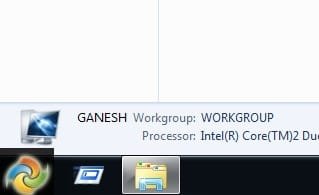
NOTE: The start orb replacement always HAS to look like this:
1 orb: Orb when not in use (when not clicked or mouseover'ed)
2 orb: mouseover
3 orb: When start orb is clicked
2u9ka5w.jpg

1. Download Restorator (Shareware) (Restorator 2007 Resource Editor - Restorator - Bome Software)

2. Take ownership of the whole Windows folder (see these links for more info: Take Ownership of file - Vista Forums and http://www.sevenforums.com/tutorials/1911-take-ownership-shortcut.html)

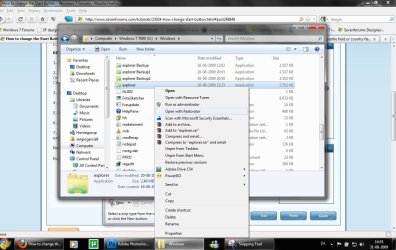
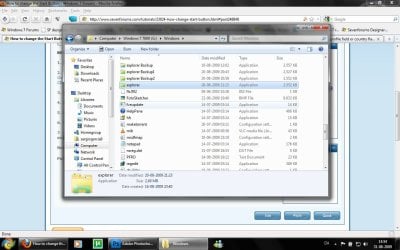
3. Open explorer.exe with restorator
1.jpg

2.jpg
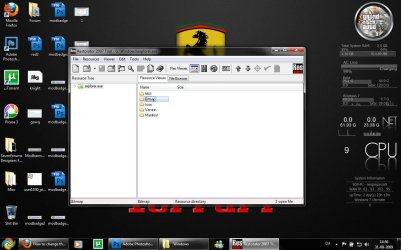
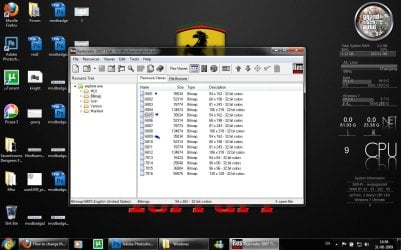
4. Go to the folder called "Bitmap"
3.jpg
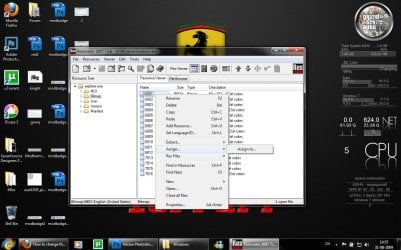
5. Replace 6801.bmp, 6805.bmp, and 6809.bmp (as seen on the picture, you will need to right click and click assign, and then click assign to, then select your file.)
4.jpg

5.jpg
6. Go to "file" and Save as explorer.exe on your desktop

7. Go to the windows folder and rename explorer.exe to explorer.exe.bak and then copy-paste the new explorer, Kill the process in task manager and start it again.
Now you have a new start button! :D

Please comment, if you have something to say :)


Last edited by a moderator:
U only need to take ownership of explorer.exe,not the whole windows folder...I change mine all the time. Always:
1. Take ownership of explorer.exe,then rename it to explorerbak.exe,or explorer2.exe but make sure it's b4 the .exe
2.Make a copy of the explorerbak.exe u just changed
3.Change the copy u just made
4.Change the name of the copy u just modified to explorer.exe
5.Log off and back on....If it buggers up,just change the names back round again.U never have to do a system restore,I never had,and i've done it at least 20 times.
Heres my explorer if anyone wants it,it's one of my favs,made it from an icon.
It's for windows 7 final,I'm not sure if it's the same for earlier versions.Have added a smaller version,and one that smiles(if u can call it that)when u click.
The grey one i didn't do,but i like it and thought i'd share it.(don't have the persons name that designed it or i'd mention,sorry)
Remember they needed to be converted to bmp first(wouldn't let me upload bitmaps).There are plenty of free apps to do it.
Tell me if u like 'em
 

Attachments

  • face2.png
    face2.png
    12.2 KB · Views: 1,824
  • face1.png
    face1.png
    7.9 KB · Views: 1,809
  • 6809big.png
    6809big.png
    11.2 KB · Views: 1,835
  • 6809.png
    6809.png
    3.3 KB · Views: 1,800
  • 6801_6805_6809cust.png
    6801_6805_6809cust.png
    4.2 KB · Views: 1,822
Last edited:

My Computer

Computer Manufacturer/Model Number
Si setup
OS
windows 7 Premium
CPU
AMD phenom quad 9550
Motherboard
asus M3A78 Pro
Memory
4gb 1066
Graphics Card(s)
HD 6850 1GB
Sound Card
Realtek
Monitor(s) Displays
acer 19" flat
Screen Resolution
1440x900
Hard Drives
1 x sataII 1TB samsung F3
Corsair Force GT (55 GB)
PSU
500w
Cooling
3 fans
Keyboard
Microsoft 600
Mouse
Laser Logitech MX 518
Internet Speed
30mb / 3mb
Need help

I've tried, but why at the time could not save the file to change and should be saved with a different name. and after I tried to change the executable file can not be fixed. Anything I can help?
 

My Computer

Computer Manufacturer/Model Number
Biostar
OS
Windows 7
CPU
Inntel Core 2 Duo E7300
Motherboard
Biostar
Memory
! Gb
Graphics Card(s)
Geoforce 7300
Sound Card
Realtek
Monitor(s) Displays
Samsung CRT 17"
Hard Drives
Seagate
PSU
Simbada
Case
simbada
Cooling
Fan Standart
I had an idea, when I changed the theme explorer.exe would be personalized for each subject, and would be in each folder on the subject. This would be possible? Let me explain:

Where changed the theme, explorer.exe, associated with each theme, would be loaded. No need to stay in the Windows folder, but in each folder of the theme, such as C:\ Windows \ Resources \ Themes \ temaABC \ Shell \ explorer.exe

In this way, the file C: \ Windows \ explorer.exe would remain unchanged.

Is there any way I can associate start menu with the theme? :geek:
 

My Computer

OS
Windows Seven
Is there are Particular Sizes For My taskbar or did i do any mistake ?
6


Attachments

  • Untitled.jpg
    Untitled.jpg
    14 KB · Views: 1,694

My Computer

OS
windows 7 Ultimate ☠64
I did everythin said in the tutorial but I stuck by step Seven.

I kill the explorer but, how dus I start it again.
It looks a little bit stupid but I do not find a solution....

This step:

7. Go to the windows folder and rename explorer.exe to explorer.exe.bak and then copy-paste the new explorer, Kill the process in task manager and start it again.
 

My Computer

OS
Windows 7 64Bit
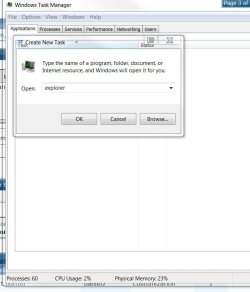
Task manager > File > New Task > explorer


Taskmanager.JPG
 

My Computer

Computer type
PC/Desktop
Computer Manufacturer/Model Number
Systems by SmartEyeball
OS
8 Pro x64
CPU
i7 3770K 4.6GHz
Motherboard
ASUS P8Z77 WS
Memory
16GB G.Skill Trident X 2666mhz
Graphics Card(s)
x2 EVGA 780 Ti Superclocked SLI
Sound Card
SB X-FI Surround 5.1 PRO USB / ATH-AD900 Headphones
Monitor(s) Displays
x3 Dell U2410 / 58" Samsung
Screen Resolution
5760*1200/ 1920*1200
Hard Drives
2x Intel 520 240GB (RAID 0) * 2x WD Caviar Blacks 2TB (RAID 0) * 2TB WD Caviar Black * Sony Optirac DVD
PSU
Silverstone Strider Evolution 1200W
Case
Thermaltake Level 10 GT Snow Edition
Cooling
Noctua NH-D14
Keyboard
Topre Realforce // Ducky Shine MX Black // Filco Ninja TKL
Mouse
Thermaltake Theron (Highly Recommended) + Razer Imperator
Antivirus
MSE
Browser
IE, FF, WaterFox
Other Info
GT Extreme V2 Sim Racing Cockpit + 40" LCD and K/B Mouse stand ▼
Fanatec CSR Elite Wheel + Clubsport V1 Pedals + CSR shifter/7G-H ▼Saitek X52 Pro ▼ TrackIR 5 Pro
Buttkicker v2 Seat Rumbler with Dedicated 5.1 and Sub Woofer attached to frame ▼
=
Bloody Big Grin
is there easy way to change my orb others than this whole process?i really2 want to change it but the process too hard to understand.:confused:
 

My Computer

Computer Manufacturer/Model Number
Acer Aspire 4520
OS
Windows 7 Ultimate x86/Ubuntu 10.10
Memory
2.5 GB
Graphics Card(s)
Nvidia GeForce 7000M
Thanks for this tutorial, i will try to create my own too
 

My Computer

OS
Windows 7
CPU
Intel Quad Core
Motherboard
Intel DG41RQ
Memory
2GB
Graphics Card(s)
Inbuilt
Sound Card
Inbuilt
Monitor(s) Displays
1
Hard Drives
500GB
Case
Zebronics
just a quick question, ima try and figure it out but i would like to know what a good size to make the individual orbs, i get the rest of the tut just need to know what a good start size is before i start making the hover and click versions and @rover3500 those face orbs are wicked man good job......
 

My Computer

OS
win 7
umm sorry.. nm. my mistake.. i responded to a post on page one, didn't realize it was waaaay old..
 

My Computer

OS
Windows 7 Ultimate 64bit
CPU
AMD Opteron 165
Motherboard
DFI Ultra-D
Memory
OCZ 3GB
Graphics Card(s)
ATI Radeon HD3870
Sound Card
Onboard
Monitor(s) Displays
2 x Dell 2405fpw
Hard Drives
WD Raptor 150GB OS Drive *
WD 1TB Storage Drive *
Seagate 640GB Backup Drive
PSU
OCZ Powerstream 520
Case
Antec P180
Cooling
2 x 120mm intake, 2 x 120mm exhaust
Keyboard
Logitech Navigator & Gyration Ultra
Mouse
MX1000 & Gyration Ultra
Internet Speed
8Mbit down / 1Mbit up
sorry if i am dredging up a way old topic, but i have had difficulty following the instructions in the tutorial. Replacing 6801.bmp, 6805.bmp and 6809.bmp does not affect my start button at all, even after restarting. Wondering why, i fiddled around and found that the icons used in ~01, ~05 and ~09 are smaller than the icon for the start menu, and that the correct size bmps are ~02, ~06 and ~10.
If anyone could tell me how to re-size the taskbar so as to use the smaller icon, that would be great.
 

My Computer

Computer Manufacturer/Model Number
Lenovo Thinkpad R500
OS
Windows 7 64bit
CPU
Intel Dore 2 Duo 2.1GHz
Memory
4GB RAM
Graphics Card(s)
ATI Mobility Radeon 128mb intergrated graphics
Monitor(s) Displays
15.4 WSXGA+
Hard Drives
320GB 5400rpm
sorry if i am dredging up a way old topic, but i have had difficulty following the instructions in the tutorial. Replacing 6801.bmp, 6805.bmp and 6809.bmp does not affect my start button at all, even after restarting. Wondering why, i fiddled around and found that the icons used in ~01, ~05 and ~09 are smaller than the icon for the start menu, and that the correct size bmps are ~02, ~06 and ~10.
If anyone could tell me how to re-size the taskbar so as to use the smaller icon, that would be great.

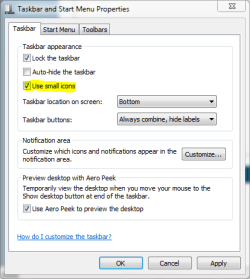
The only way I know how to re-size the taskbar is to select use small icons in properties.
 

Attachments

  • taskbar prop.PNG
    taskbar prop.PNG
    32.3 KB · Views: 282

My Computer

Computer type
PC/Desktop
Computer Manufacturer/Model Number
Self Built
OS
Win 10 Pro x64
CPU
Intel I5-2500K @3.3GHz
Motherboard
Asrock P67 Extreme4
Memory
16GB G.Skill Ripjaws X (4x4GB)
Graphics Card(s)
EVGA GeForce 750 Ti SC 2GB
Sound Card
ASUS Xonar DG 5.1 Channels 24-bit 96KHz PCI Interface Sound
Monitor(s) Displays
auria eq2367
Screen Resolution
1920 x 1080
Hard Drives
250GB Samsung 850 EVO SSD
1TB WD Blue
1TB Hitachi
PSU
SeaSonic X 650W 80 Plus Gold
Case
Corsair Obsidian 750D
Cooling
Corsair H60, Three 140mm case fans
Keyboard
Logitech Wireless Keyboard K520
Mouse
Logitech Wireless Mouse M310
Internet Speed
Wave Broadband ~ 100 dn 5 up
Antivirus
Windows Defender, Malwarebytes Premium
Browser
Edge, IE11, Chrome
Other Info
Laptop specs: HP g7-1365dx /
CPU: AMD A6-3420M APU with Radeon(tm) HD Graphics /
RAM: Crucial 8Gb (2x4Gb) /
SSD: Crucial M4-CT128M4SSD2 ATA Device/ FW 000F /
GFX: AMD Radeon HD 6520G /
OS: Windows 10 Pro x64
Yeah, tried that, but it don't alter the start orb. tried re-sizing the graphics to fit the ~02, ~06 and ~10, bbut it looked weird. will re-try in a sec
 

My Computer

Computer Manufacturer/Model Number
Lenovo Thinkpad R500
OS
Windows 7 64bit
CPU
Intel Dore 2 Duo 2.1GHz
Memory
4GB RAM
Graphics Card(s)
ATI Mobility Radeon 128mb intergrated graphics
Monitor(s) Displays
15.4 WSXGA+
Hard Drives
320GB 5400rpm
Did u see this?
The explorer.exe you want to edit is:

C:\Windows\explorer.exe

and not C:\Windows\SysWOW64\explorer.exe (for those running x64)

And for those who use the larger DPI's i.e 125% , 150% you need to change:

6806 - 66 x 198
6807 - 81 x 243
6808 - 106 x 318

I do it all the time on my windows 7 premium 64 bit and it is definitely 1,5 and 9 that u change.
Only other thing if u have system protection on,it will revert ur explorer.But it will also revert ur patched theme files if that's the case.
Please reply when u sort it so everyone knows what it was.thanx
 

My Computer

Computer Manufacturer/Model Number
Si setup
OS
windows 7 Premium
CPU
AMD phenom quad 9550
Motherboard
asus M3A78 Pro
Memory
4gb 1066
Graphics Card(s)
HD 6850 1GB
Sound Card
Realtek
Monitor(s) Displays
acer 19" flat
Screen Resolution
1440x900
Hard Drives
1 x sataII 1TB samsung F3
Corsair Force GT (55 GB)
PSU
500w
Cooling
3 fans
Keyboard
Microsoft 600
Mouse
Laser Logitech MX 518
Internet Speed
30mb / 3mb
I have tried editing both .../Windows/explorer.exe AND .../Windows/SysWOW64/explorer.exe and replacing the start menu bitmaps (6801.bmp,6805.bmp,6809.bmp) with edited ones. It does nothing at all. I can confirm that the ones that i need to change are ~02, ~06 and ~10, as the bmp's is the resource manager are the correct size, and match the start orb in my dock, and when i change them to an appropriately scaled bmp, and restart explorer.exe, it changes. EDIT: forgot to say, it changes, but often looks strange, probably because i saved them at the wrong bit depth (i am using paint.net). what bit depth shouls i use?

I dont know why, it just does. maybe my taskbar is ... weird.
My system specs are:
Lenovo (IBM) ThinkPad R500
Windows 7 Home Premium 64bit
WSXGA+ TFT 15.4" widescreen
ATI Mobility Radeon 128mb intergrated graphics.

If it is any help, this is a sceenshot of my desktop with the default start orb.

21dn0b4.png
 
Last edited:

My Computer

Computer Manufacturer/Model Number
Lenovo Thinkpad R500
OS
Windows 7 64bit
CPU
Intel Dore 2 Duo 2.1GHz
Memory
4GB RAM
Graphics Card(s)
ATI Mobility Radeon 128mb intergrated graphics
Monitor(s) Displays
15.4 WSXGA+
Hard Drives
320GB 5400rpm
Had Disappearing Icon Issue with Restorator

I had a serious issue with using Restorator which caused me to have to do a complete reinstall. I just found this post on another forum which says that the problem may have been caused by Restorator itself! Be forewarned if you use this program that it might cause serious damage to your system! This post does describe a way to mitigate the problem however - disable shell extension integration in the settings.
 

My Computer

Computer Manufacturer/Model Number
Lenovo Thinkpad Z61p
OS
Windows 7 Ultimate 64 6.1.7600 Build 7600
CPU
Intel Core2 T7200 2.0 GHz
Motherboard
Intel 82801G ICH7 chipset
Memory
3 GB
Graphics Card(s)
Ati Mobility FireGL v5200
restorator works fine, it's the images that are screwing up
 

My Computer

Computer Manufacturer/Model Number
Lenovo Thinkpad R500
OS
Windows 7 64bit
CPU
Intel Dore 2 Duo 2.1GHz
Memory
4GB RAM
Graphics Card(s)
ATI Mobility Radeon 128mb intergrated graphics
Monitor(s) Displays
15.4 WSXGA+
Hard Drives
320GB 5400rpm
Hi,
Great tutorial! I have had my start orb changed for many a month now to the SevenForums theme orb. I put my laptop on the other day, and it had gone back to the default one. I don't think it was installing updates or anything that affected it. The problem is that now my 30 day trial of Restorator 2007 has run out, I cannot change it back...

Any ideas??

Jake

P.S ClockWorkLemon, have you remembered to go into to task manager and end the process explorer.exe, and then restart it again??
 

My Computer

Computer Manufacturer/Model Number
Compaq Presario F700
OS
Windows 7 x32
CPU
AMD Turion 64 Mobile TK-53
Motherboard
Quanta 30EA
Memory
DDR2 - 2048 Mbytes
Graphics Card(s)
NVIDIA GeForce 7000M/nForce 610M
Sound Card
?
Monitor(s) Displays
Normal Laptop Screen
Hard Drives
?
PSU
?
Case
?
Cooling
?
Back
Top