Start Menu Button - Change

How to Change the Start Menu Button in Windows 7

   Information
This will show you how to change the Start Menu button orb in Windows 7 32-bit and 64-bit.
   Warning
REMEMBER TO BACK UP EXPLORER.EXE!


Here's How:

For custom made start buttons, and further information, please visit this thread: http://www.sevenforums.com/customization/2002-custom-themes-icons-start-buttons-92.html

   Information
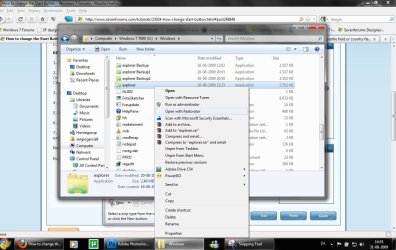
The explorer.exe you want to edit is:

C:\Windows\explorer.exe

and not C:\Windows\SysWOW64\explorer.exe (for those running x64)

And for those who use the larger DPI's i.e 125% , 150% you need to change:

6806 - 66 x 198
6807 - 81 x 243
6808 - 106 x 318


NOTE: The start orb replacement always HAS to look like this:
1 orb: Orb when not in use (when not clicked or mouseover'ed)
2 orb: mouseover
3 orb: When start orb is clicked
2u9ka5w.jpg

1. Download Restorator (Shareware) (Restorator 2007 Resource Editor - Restorator - Bome Software)

2. Take ownership of the whole Windows folder (see these links for more info: Take Ownership of file - Vista Forums and http://www.sevenforums.com/tutorials/1911-take-ownership-shortcut.html)

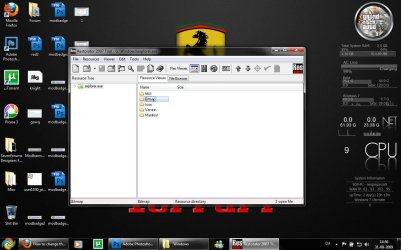
3. Open explorer.exe with restorator
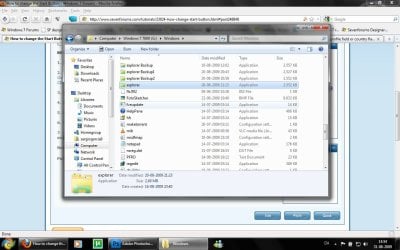
1.jpg

2.jpg
4. Go to the folder called "Bitmap"
3.jpg
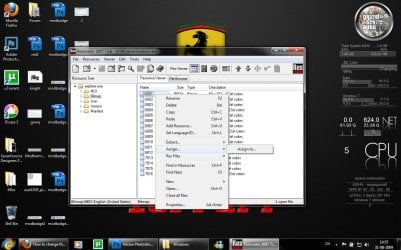
5. Replace 6801.bmp, 6805.bmp, and 6809.bmp (as seen on the picture, you will need to right click and click assign, and then click assign to, then select your file.)
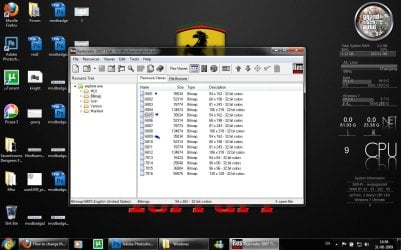
4.jpg

5.jpg
6. Go to "file" and Save as explorer.exe on your desktop

7. Go to the windows folder and rename explorer.exe to explorer.exe.bak and then copy-paste the new explorer, Kill the process in task manager and start it again.
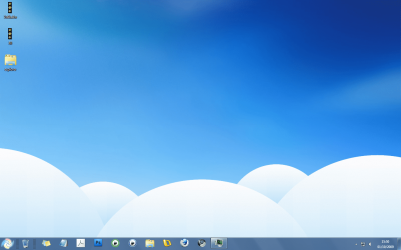
Now you have a new start button! :D

Please comment, if you have something to say :)


Last edited by a moderator:
i am big fan of linkinpark and hitman.
 

My Computer

OS
windows 7
CPU
P4
Motherboard
INTEL 945
Memory
3 GB
Graphics Card(s)
Nvidia 8600
Monitor(s) Displays
Samsung
Screen Resolution
1024x768
Hard Drives
1 TB
Case
CIRCLE
Keyboard
Microsoft
Mouse
SAmsung
Internet Speed
192 KBPS
So what should i add to the tutorial? ;)

Good work mate. Just a few extra details:


Clarify that the explorer.exe you want to edit is:

C:\Windows\explorer.exe

and not C:\Windows\SysWOW64\explorer.exe (for those running x64)


And for those who use the larger DPI's i.e 125% , 150% you need to change:

6806 - 66 x 198
6807 - 81 x 243
6808 - 106 x 318


Lastly, perhaps mention restorator is shareware ;)
 

My Computer

Computer type
PC/Desktop
Computer Manufacturer/Model Number
Systems by SmartEyeball
OS
8 Pro x64
CPU
i7 3770K 4.6GHz
Motherboard
ASUS P8Z77 WS
Memory
16GB G.Skill Trident X 2666mhz
Graphics Card(s)
x2 EVGA 780 Ti Superclocked SLI
Sound Card
SB X-FI Surround 5.1 PRO USB / ATH-AD900 Headphones
Monitor(s) Displays
x3 Dell U2410 / 58" Samsung
Screen Resolution
5760*1200/ 1920*1200
Hard Drives
2x Intel 520 240GB (RAID 0) * 2x WD Caviar Blacks 2TB (RAID 0) * 2TB WD Caviar Black * Sony Optirac DVD
PSU
Silverstone Strider Evolution 1200W
Case
Thermaltake Level 10 GT Snow Edition
Cooling
Noctua NH-D14
Keyboard
Topre Realforce // Ducky Shine MX Black // Filco Ninja TKL
Mouse
Thermaltake Theron (Highly Recommended) + Razer Imperator
Antivirus
MSE
Browser
IE, FF, WaterFox
Other Info
GT Extreme V2 Sim Racing Cockpit + 40" LCD and K/B Mouse stand ▼
Fanatec CSR Elite Wheel + Clubsport V1 Pedals + CSR shifter/7G-H ▼Saitek X52 Pro ▼ TrackIR 5 Pro
Buttkicker v2 Seat Rumbler with Dedicated 5.1 and Sub Woofer attached to frame ▼
=
Bloody Big Grin
So what should i add to the tutorial? ;)

Good work mate. Just a few extra details:


Clarify that the explorer.exe you want to edit is:

C:\Windows\explorer.exe

and not C:\Windows\SysWOW64\explorer.exe (for those running x64)


And for those who use the larger DPI's i.e 125% , 150% you need to change:

6806 - 66 x 198
6807 - 81 x 243
6808 - 106 x 318


Lastly, perhaps mention restorator is shareware ;)
Done ;)
 
So what should i add to the tutorial? ;)

Good work mate. Just a few extra details:


Clarify that the explorer.exe you want to edit is:

C:\Windows\explorer.exe

and not C:\Windows\SysWOW64\explorer.exe (for those running x64)


And for those who use the larger DPI's i.e 125% , 150% you need to change:

6806 - 66 x 198
6807 - 81 x 243
6808 - 106 x 318


Lastly, perhaps mention restorator is shareware ;)

actually it's 30 days trial, i just used it cos i lost my copy of ResHack and also had problems with Anolis Resourcer. I don't know if Restorator will work outside of 30 days.
 

My Computer

OS
Windows 7 Ultimate 64Bit
CPU
AMD Athlon x4 650 3Ghz
Motherboard
ASUS
Memory
4gb
Graphics Card(s)
ATI Radeon 3000 series Onboard
Does anyone know of a tutorial available to make your own start menu button? What are the specifics required? Thanks
 

My Computer

OS
Windows 7 Professional 32-bit
that dose not work for me
my comp sees to undo all the changes, can any one tell me why.
is there a software to do this :mad::cry::(:shock:
 

My Computer

OS
windows 7
A question. :confused:
How do you make a replacement Start Button move as the original one does when you hover the mouse over it or click it to start it ?
Do you need to have 3 different new pictures to replace the 3 in the original Start Button ?
All the best,
Mick C.
 

My Computer

Computer type
PC/Desktop
Computer Manufacturer/Model Number
Arbico i7 PC
OS
Windows 7 Home Premium 64 bit - SP1
CPU
Intel Core i7 920 (2.66GHz 8MB L2 Cache)
Motherboard
Asus P6X58D-E
Memory
6Gb (3 x Kingston 2Gb PC12800 DDR3 1600MHZ)
Graphics Card(s)
ATI Radeon HD 5850 1Gb
Sound Card
AMD HIgh Def HDMI
Monitor(s) Displays
LG 24EB23 Digital
Screen Resolution
1920x1080 (32bit) (60Hz)
Hard Drives
Samsung HD103SJ
Samsung HD5021J
Samsung HD204UI
Samsung M3 External USB 3
PSU
Nexus RX-8500 850w
Case
NZXT Hush Black ATA
Cooling
3 x Xilence Red Wing 120mm Case Fans
Keyboard
Microsoft Wireless Keyboard 6000 v3.0
Mouse
Microsoft Wireless Laser Mouse 6000 v 2.0
Internet Speed
60.0 Mbps Average
Antivirus
Spybot Search & Destroy
Browser
Avant Browser
So I made my own start orb and when I mouse over it, I get a 1 second "dark gray" box around it (ie no transparency) then it fades quickly to transparent and animates to the 'mouseover' orb... its pretty annoying, what did i do wrong to induce this behavior?

FIXED:

In case anyone else has this problem, Apparently i had stray pixels outside of the respective orb areas. I drew a box around the space starting at the bottom pixel of the top orb, and the top pixel of the middle orb and deleted everything in it, then i did the same for the middle->bottom space, and cleaned up above the top one and below the bottom one - this fixed the weird sprite box i was having.

Also, you dont have to worry about cutting off any type of gradient / glow drop offs since the pixes below or above a given orb are clipped by the task bar anyway ;)
 
Last edited:

My Computer

OS
Windows 7
Shareware 30days..

Any other way then useing the "Restorator" don't really want to buy there software for 60 Euros and 20-40 euros pr. update after the 30days.

Edit: Thanks moinmoin on page 4.
 
Last edited:

My Computer

OS
Windows 7 64bit
CPU
Duo2
Motherboard
Nvida
Memory
4Gb
Graphics Card(s)
9600M
Sound Card
Onboard
Great tutorial, however, i'm having a little trouble getting it to display correctly.
I've followed the tutorial correctly (i think).
After i've restarted the explorer process the start button is very bright and i see a blackbox flashing when i hover over it, the taskbar is along the bottom. If i put the taskbar on the right hand side of the screen then it displays fine (all 3 stages).
Any ideas??? :confused:

Capture.PNG
Captureu.PNG
 

My Computer

Computer Manufacturer/Model Number
HP Touchsmart IQ771.uk
OS
Windows 7 Ultimate x64
CPU
AMD Turion(tm) 64 X2 Mobile Technology TL-56
Motherboard
ASUS Pheonix
Memory
3GB Nanya PC2-6400 DDR2-SDRAM SO-DIM (400MHz)
Graphics Card(s)
NVIDIA GeForce Go 7600 256MB GDDR3 SDRAM
Sound Card
High Definition Intergrated NVIDIA MCP51
Monitor(s) Displays
46" Sony Bravia HDTV
Screen Resolution
1600x1200
Hard Drives
1.5TB Samsug
320GB Seagate ST3320820AS - SATA 3Gb/s 8MB
500GB Maxtor Basics STM305003EHD301-RK
Internet Speed
↓6.32 Mb/s ↑0.35 Mb/s ↔26ms
Other Info
BIOS - American Megatrends Inc. 5.07
Ethernet Port - NVIDIA nForce 10/100/1000 Mbps
DVD Drive - TSSTcorp DVDR/RW TS-T632L
Great tutorial, however, i'm having a little trouble getting it to display correctly.
I've followed the tutorial correctly (i think).
After i've restarted the explorer process the start button is very bright and i see a blackbox flashing when i hover over it, the taskbar is along the bottom. If i put the taskbar on the right hand side of the screen then it displays fine (all 3 stages).
Any ideas??? :confused:

View attachment 30062
View attachment 30063
I really dont know why :S

If you feel like giving it a go, here is my modified explorer.exe, with that same start button :geek:
 

Attachments

Great tutorial, however, i'm having a little trouble getting it to display correctly.
I've followed the tutorial correctly (i think).
After i've restarted the explorer process the start button is very bright and i see a blackbox flashing when i hover over it, the taskbar is along the bottom. If i put the taskbar on the right hand side of the screen then it displays fine (all 3 stages).
Any ideas??? :confused:

View attachment 30062
View attachment 30063
I really dont know why :S

If you feel like giving it a go, here is my modified explorer.exe, with that same start button :geek:

Very odd......yours has worked like a charm!. I did check yours against mine to see that i did change the correct files in Explorer and i did!!
Thanks for sharing your Explorer btw. My Taskbar looks awesome now! :D
Here's mine if you wanted to check it ;)
View attachment explorer Backup.zip
 

My Computer

Computer Manufacturer/Model Number
HP Touchsmart IQ771.uk
OS
Windows 7 Ultimate x64
CPU
AMD Turion(tm) 64 X2 Mobile Technology TL-56
Motherboard
ASUS Pheonix
Memory
3GB Nanya PC2-6400 DDR2-SDRAM SO-DIM (400MHz)
Graphics Card(s)
NVIDIA GeForce Go 7600 256MB GDDR3 SDRAM
Sound Card
High Definition Intergrated NVIDIA MCP51
Monitor(s) Displays
46" Sony Bravia HDTV
Screen Resolution
1600x1200
Hard Drives
1.5TB Samsug
320GB Seagate ST3320820AS - SATA 3Gb/s 8MB
500GB Maxtor Basics STM305003EHD301-RK
Internet Speed
↓6.32 Mb/s ↑0.35 Mb/s ↔26ms
Other Info
BIOS - American Megatrends Inc. 5.07
Ethernet Port - NVIDIA nForce 10/100/1000 Mbps
DVD Drive - TSSTcorp DVDR/RW TS-T632L
Great tutorial, however, i'm having a little trouble getting it to display correctly.
I've followed the tutorial correctly (i think).
After i've restarted the explorer process the start button is very bright and i see a blackbox flashing when i hover over it, the taskbar is along the bottom. If i put the taskbar on the right hand side of the screen then it displays fine (all 3 stages).
Any ideas??? :confused:

View attachment 30062
View attachment 30063
I really dont know why :S

If you feel like giving it a go, here is my modified explorer.exe, with that same start button :geek:

Very odd......yours has worked like a charm!. I did check yours against mine to see that i did change the correct files in Explorer and i did!!
Thanks for sharing your Explorer btw. My Taskbar looks awesome now! :D
Here's mine if you wanted to check it ;)
View attachment 30067
Glad you got it to work :)

I will take a look on that explorer ;)

EDIT: Which app did you use to change the pictures in explorer.exe?
 
EDIT: Which app did you use to change the pictures in explorer.exe?
Restorator 2007. Full version. :)
 

My Computer

Computer Manufacturer/Model Number
HP Touchsmart IQ771.uk
OS
Windows 7 Ultimate x64
CPU
AMD Turion(tm) 64 X2 Mobile Technology TL-56
Motherboard
ASUS Pheonix
Memory
3GB Nanya PC2-6400 DDR2-SDRAM SO-DIM (400MHz)
Graphics Card(s)
NVIDIA GeForce Go 7600 256MB GDDR3 SDRAM
Sound Card
High Definition Intergrated NVIDIA MCP51
Monitor(s) Displays
46" Sony Bravia HDTV
Screen Resolution
1600x1200
Hard Drives
1.5TB Samsug
320GB Seagate ST3320820AS - SATA 3Gb/s 8MB
500GB Maxtor Basics STM305003EHD301-RK
Internet Speed
↓6.32 Mb/s ↑0.35 Mb/s ↔26ms
Other Info
BIOS - American Megatrends Inc. 5.07
Ethernet Port - NVIDIA nForce 10/100/1000 Mbps
DVD Drive - TSSTcorp DVDR/RW TS-T632L
I noticed your Explorer is from 7100, i'm running the full version....shouldn't be a problem should it????? :huh:
 

My Computer

Computer Manufacturer/Model Number
HP Touchsmart IQ771.uk
OS
Windows 7 Ultimate x64
CPU
AMD Turion(tm) 64 X2 Mobile Technology TL-56
Motherboard
ASUS Pheonix
Memory
3GB Nanya PC2-6400 DDR2-SDRAM SO-DIM (400MHz)
Graphics Card(s)
NVIDIA GeForce Go 7600 256MB GDDR3 SDRAM
Sound Card
High Definition Intergrated NVIDIA MCP51
Monitor(s) Displays
46" Sony Bravia HDTV
Screen Resolution
1600x1200
Hard Drives
1.5TB Samsug
320GB Seagate ST3320820AS - SATA 3Gb/s 8MB
500GB Maxtor Basics STM305003EHD301-RK
Internet Speed
↓6.32 Mb/s ↑0.35 Mb/s ↔26ms
Other Info
BIOS - American Megatrends Inc. 5.07
Ethernet Port - NVIDIA nForce 10/100/1000 Mbps
DVD Drive - TSSTcorp DVDR/RW TS-T632L
I noticed your Explorer is from 7100, i'm running the full version....shouldn't be a problem should it????? :huh:

I am too :confused: Dont know why its 7100 :S but i downloaded a modified explorer.exe, and replaced the original with it. It might have been from 7100...
There shouldnt be any problems
 
Hi , i have same problem with blackbox flashing :(
With sergiogarcia9's explorer I don't have this problem, work great!
How can I make my Explorer with my own start button ?
I use 7100 Build
 

My Computer

OS
Windows 7 Ultimate x86 Build 7100
CPU
Intel Pentiul Dual Core e6300 2.8 Ghz
Motherboard
ASRock ConRoe 945G-DVI
Memory
2GB DDR2 633
Graphics Card(s)
Nvidia 9400GT
Sound Card
Default Realtek
Monitor(s) Displays
Philips Brilliance 190SW
Screen Resolution
1440x900
Hard Drives
Western Digital 160gb SATA
PSU
Delux 500W 2x cooler
Case
Raidmax Ninja
Keyboard
Delux
Mouse
A4Tech x7 Oscar X-748K
Internet Speed
High
Back
Top