Start Menu Button - Change

How to Change the Start Menu Button in Windows 7

   Information
This will show you how to change the Start Menu button orb in Windows 7 32-bit and 64-bit.
   Warning
REMEMBER TO BACK UP EXPLORER.EXE!


Here's How:

For custom made start buttons, and further information, please visit this thread: http://www.sevenforums.com/customization/2002-custom-themes-icons-start-buttons-92.html

   Information
The explorer.exe you want to edit is:

C:\Windows\explorer.exe

and not C:\Windows\SysWOW64\explorer.exe (for those running x64)

And for those who use the larger DPI's i.e 125% , 150% you need to change:

6806 - 66 x 198
6807 - 81 x 243
6808 - 106 x 318


NOTE: The start orb replacement always HAS to look like this:
1 orb: Orb when not in use (when not clicked or mouseover'ed)
2 orb: mouseover
3 orb: When start orb is clicked
2u9ka5w.jpg

1. Download Restorator (Shareware) (Restorator 2007 Resource Editor - Restorator - Bome Software)

2. Take ownership of the whole Windows folder (see these links for more info: Take Ownership of file - Vista Forums and http://www.sevenforums.com/tutorials/1911-take-ownership-shortcut.html)

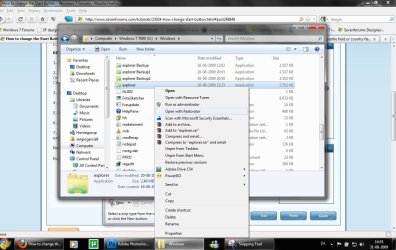
3. Open explorer.exe with restorator
1.jpg

2.jpg
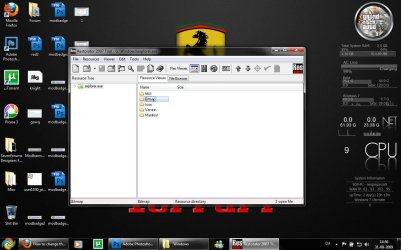
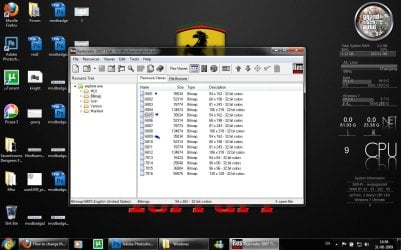
4. Go to the folder called "Bitmap"
3.jpg
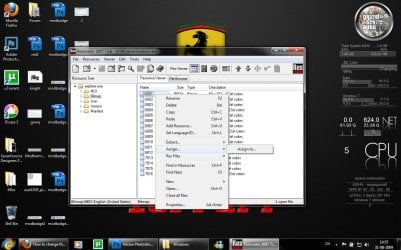
5. Replace 6801.bmp, 6805.bmp, and 6809.bmp (as seen on the picture, you will need to right click and click assign, and then click assign to, then select your file.)
4.jpg

5.jpg
6. Go to "file" and Save as explorer.exe on your desktop

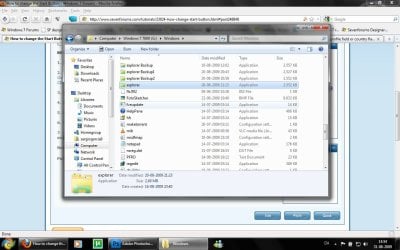
7. Go to the windows folder and rename explorer.exe to explorer.exe.bak and then copy-paste the new explorer, Kill the process in task manager and start it again.
Now you have a new start button! :D

Please comment, if you have something to say :)


Last edited by a moderator:
thanx for the great tutorial

+rep
 

My Computer

Computer Manufacturer/Model Number
Xpredator
OS
windows 7 Ultimate
CPU
i7 3770k 3.50 GHz
Motherboard
Asus Maximus V formula
Memory
G.Skills 8GB DDR 3 1866 MHz
Graphics Card(s)
Nvidia Asus GTX 680
Sound Card
Sounblaster 3D
Monitor(s) Displays
Achieva ShiMian IPSMS
Screen Resolution
2560x1440p
Hard Drives
120 GB SSD Gforce / 3 tb seagate 7200 rpm
PSU
Seasonic 760W ATX 80+ Gold
Case
Xpredator Black Edition
Cooling
Corsair h100
Keyboard
Cybrog v7
Mouse
Cyborg R.A.T 9
Internet Speed
20 mbite
Trouble with changing orb.

I have tried several times to change the bitmaps as explained in the tutorial with both Restorator and Resourcer but I am having issues(Explorer quits working: either will not display anything after application or items in the taskbar say that they have been moved, deleted or renamed and it asks if I want to remove the items). Here are the images I was trying to use. If anyone could tell me what I am doing wrong or if someone could put together a working explorer file I would appreciate it greatly.
 

Attachments

Last edited:

My Computer

Computer Manufacturer/Model Number
Custom Built
OS
win7 ultimate rtm x64
CPU
AMD Phenom 940 AM2+
Motherboard
Asus M3A78-EM
Memory
8GB G-Skill ddr2 800
Graphics Card(s)
Asus EN9600GSO v2
Monitor(s) Displays
Samsung 2233sw
Hard Drives
Seagate ST3500418AS
Cooling
Xigmatek Cobra
What size is the orb supposed to be?
 

My Computer

Computer Manufacturer/Model Number
HP dv7t 1000 CTO
OS
Windows 7 Ultimate 7600 RTM - Windows Server 2008 R2 7600 RTM Dual Boot
CPU
Intel Core Duo
Memory
4 gigs
Graphics Card(s)
NVIDIA 9600 GT
Sound Card
IDT HD Audio
Monitor(s) Displays
Generic 1680x1050
Screen Resolution
1680x1050
Hard Drives
TOSHIBA MK2552GSX ATA Device 320 gigs
Mouse
Synaptics Port Device PS/2
Nevermind.
 

My Computer

Computer Manufacturer/Model Number
HP dv7t 1000 CTO
OS
Windows 7 Ultimate 7600 RTM - Windows Server 2008 R2 7600 RTM Dual Boot
CPU
Intel Core Duo
Memory
4 gigs
Graphics Card(s)
NVIDIA 9600 GT
Sound Card
IDT HD Audio
Monitor(s) Displays
Generic 1680x1050
Screen Resolution
1680x1050
Hard Drives
TOSHIBA MK2552GSX ATA Device 320 gigs
Mouse
Synaptics Port Device PS/2
still having issues

Is there something that needs to be done different for 64 bit versions of Win7? I tried the explorer files that were posted here earlier and I get an error saying "class not registered" and a blank screen?
 

My Computer

Computer Manufacturer/Model Number
Custom Built
OS
win7 ultimate rtm x64
CPU
AMD Phenom 940 AM2+
Motherboard
Asus M3A78-EM
Memory
8GB G-Skill ddr2 800
Graphics Card(s)
Asus EN9600GSO v2
Monitor(s) Displays
Samsung 2233sw
Hard Drives
Seagate ST3500418AS
Cooling
Xigmatek Cobra
Hy

What is that you have on left of your desktop? (like bginfo)

Where i can download and install?

Thanks
 

My Computer

OS
Windows XP
hi im trying to change the name of the explorer but it wont let me.. now what do i do? it just keeps telling me to try again dont ask me for permission or anything
it keeps saying i need permission from trustedinstaller or something..
 

My Computer

OS
windows 7
Explorer.exe

I am having the same problem as Ippy. Do have a few thoughts on what may be going on though.

Noticed that if i enable guest account n hop on that everything works fine, but if i log onto my account i get things like "no such interface supported" and dead links.

Have noticed that TrustedInstaller may have something to do with it. My explorer.exe is owned by trustedinstaller to begin with, after backing up and changing the .exe i have the problem. Possibly the new file does not have privileges for trustedinstaller which blocks the system from using it??

Could the problems be from playing in syswow64 instead of the windows folder?

Hopefully someone knows more about this then me, would like to have a custom orb..very frustrating :mad2:


...Ippy: How do you get your system back to normal? I have only been able to do so with system restore.

.. also, i try giving trustedinstaller privileges but cannot find it on the list

... Should also mention, i have installed DreamScene..
 
Last edited:

My Computer

OS
Seven
As i say in the tutorial it is the explorer.exe in the Windows folder you need to change and not the one in syswow64.
 
Hmm..

I have a 64 bit operating system though:

"and not C:\Windows\SysWOW64\explorer.exe (for those running x64)"

:sarc:
 

My Computer

OS
Seven
Hmmmmm

I tried it with the other explorer also, same results. Currently on my guest account.. gonna start recovery n maybe have a go at it tomorrow... seems like soon as i touch explorer.exe it all goes to hell.. "no such interface" or somethin like that, missing firefox links... all my programs wont open, can only open task manager from ctrl alt del... no fun at allllllll
 

My Computer

OS
Seven
Get back to normal

I am running a dual boot and I change the backup back to the explorer.exe and delete the modified file from vista after running install ownership reg file. Hope that helps. I have found a file that I can change and it works properly, I will try to upload a link later but it is hit and miss as far as which images work :( . I still have not found a consistent solution.
 

My Computer

Computer Manufacturer/Model Number
Custom Built
OS
win7 ultimate rtm x64
CPU
AMD Phenom 940 AM2+
Motherboard
Asus M3A78-EM
Memory
8GB G-Skill ddr2 800
Graphics Card(s)
Asus EN9600GSO v2
Monitor(s) Displays
Samsung 2233sw
Hard Drives
Seagate ST3500418AS
Cooling
Xigmatek Cobra
Dual Boot

I am dual booting linux, have to give that a shot next time.... Wouldn't be the first time ubuntu has saved me.. :confused:


.... "after running install ownership reg file."
are you referring to the "shortcut" to taking ownership? (i have had little luck with)
 

My Computer

OS
Seven
isnt there a program or a script to do this? After all is just an image replacement
 

My Computer

OS
Windows 7 x64 Bit
Duuuuuuude

This is messing with my head. So i basically had the GREAT idea, copy explorer to the desktop.. make my changes.. go into linux... swap the files.. works great cool / doesn't swap them back no biggie.. AND THEEEEN... so i copied the explorer to my desktop.. opened it with restorator... **Poof** go to open photoshop. nothing, hmm maybe task manager "no such interface supported".. ! without even touching the explorer in my windows folder ! ....

so.. any ideas whats going on here?

... maybe something with restorator? any suggestions on an alternative?

.... one more restore and i might just snap.


...... was commenting on a thread earlier that was similar to this.. problems with explorer.exe.. the guy goes on to say that it was a problem with the regs.... maybe the same thing goin on here?


as far as programs go.. if i try to open it directly there are no dice, if i "open something with" a program... works every time) someone hassss to have an idea whats goin on here..
 

My Computer

OS
Seven
Last edited:

My Computer

Computer Manufacturer/Model Number
Acer Aspire M3201
OS
Windows 7 Home Premium
CPU
AMD Phenom X4 Quad 2.30 GHz
Memory
4 GB DDR2
Graphics Card(s)
nVidia GeForce 9500 GS
Sound Card
Realtek HD
Monitor(s) Displays
Dell 1908WFP LCD 18Zoll
Screen Resolution
1440x900@75
Hard Drives
640 GB HDD
Keyboard
Acer
Mouse
Acer
yep. having the same problem with the button for win 64 bit pro. Wont let me alter the name for explorer.exe in windows folder (not syswow)
 

My Computer

Computer Manufacturer/Model Number
home built
OS
win 7
CPU
core duo 6600
Memory
3gb
Graphics Card(s)
geforce 8800 gtx
Monitor(s) Displays
samsung 22inch
PSU
600w
Cooling
liquid
Back
Top