Start Menu Button - Change

How to Change the Start Menu Button in Windows 7

   Information
This will show you how to change the Start Menu button orb in Windows 7 32-bit and 64-bit.
   Warning
REMEMBER TO BACK UP EXPLORER.EXE!


Here's How:

For custom made start buttons, and further information, please visit this thread: http://www.sevenforums.com/customization/2002-custom-themes-icons-start-buttons-92.html

   Information
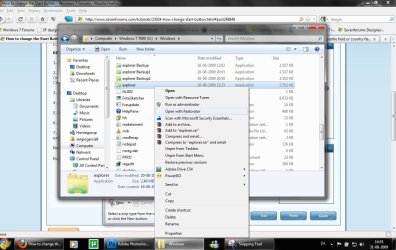
The explorer.exe you want to edit is:

C:\Windows\explorer.exe

and not C:\Windows\SysWOW64\explorer.exe (for those running x64)

And for those who use the larger DPI's i.e 125% , 150% you need to change:

6806 - 66 x 198
6807 - 81 x 243
6808 - 106 x 318


NOTE: The start orb replacement always HAS to look like this:
1 orb: Orb when not in use (when not clicked or mouseover'ed)
2 orb: mouseover
3 orb: When start orb is clicked
2u9ka5w.jpg

1. Download Restorator (Shareware) (Restorator 2007 Resource Editor - Restorator - Bome Software)

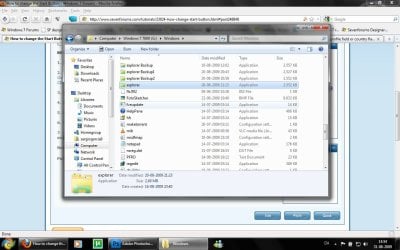
2. Take ownership of the whole Windows folder (see these links for more info: Take Ownership of file - Vista Forums and http://www.sevenforums.com/tutorials/1911-take-ownership-shortcut.html)

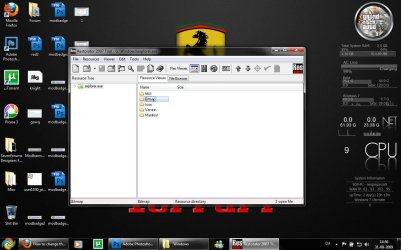
3. Open explorer.exe with restorator
1.jpg

2.jpg
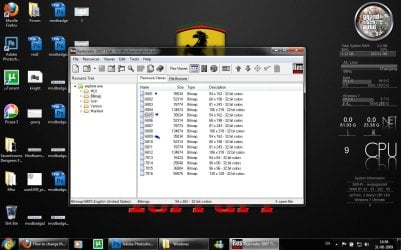
4. Go to the folder called "Bitmap"
3.jpg
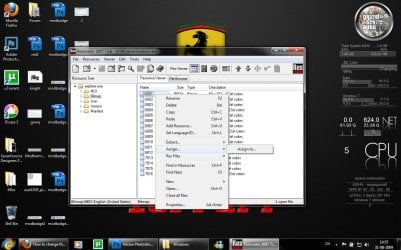
5. Replace 6801.bmp, 6805.bmp, and 6809.bmp (as seen on the picture, you will need to right click and click assign, and then click assign to, then select your file.)
4.jpg

5.jpg
6. Go to "file" and Save as explorer.exe on your desktop

7. Go to the windows folder and rename explorer.exe to explorer.exe.bak and then copy-paste the new explorer, Kill the process in task manager and start it again.
Now you have a new start button! :D

Please comment, if you have something to say :)


Last edited by a moderator:
Hi,
Great tutorial! I have had my start orb changed for many a month now to the SevenForums theme orb. I put my laptop on the other day, and it had gone back to the default one. I don't think it was installing updates or anything that affected it. The problem is that now my 30 day trial of Restorator 2007 has run out, I cannot change it back...

Any ideas??

Jake

P.S ClockWorkLemon, have you remembered to go into to task manager and end the process explorer.exe, and then restart it again??
You can change it with other tool like Resource Tuner ;)
Resource Tuner: Resource Editor for EXE and DLL Resource Files. Edit Icon Resources, Replace Strings, Change Bitmaps.

Also, yes it is because of an update it have been changed
Look here:
http://www.sevenforums.com/windows-...ted-explorer-exe-windows-update-kb977074.html
 
IMO,users who customize windows themes,start buttons etc are creative.They think differently and have mad skills on customizing windows.It's more of a "Eye Candy" thingy.They are very passionate and devoted to their artwork.Should say thanks to them cause they share their artwork...:)
 

My Computer

Computer Manufacturer/Model Number
D3f's Customs
OS
Win 7 Ultimate SP1 x64
CPU
Intel Pentium Dual Core E5300 OC'd @ 3GHz
Motherboard
Asus P5G41-M LE
Memory
Kingston 2x2GB DDR2-800 Dual Channel SDRAM
Graphics Card(s)
Integrated Intel GMA X4500
Sound Card
Realtek 5.1 HD Audio (ALC887)
Monitor(s) Displays
LG Flatron W1943S @ 60Hz
Screen Resolution
1360 x 768
Hard Drives
Internal - WD Caviar Blue 500GB, External - WD My Passport Essential 500GB
PSU
Headway 450w PSU
Case
Pixxo Slim Black mATX Case
Cooling
Stock Cpu Fan, 1 x Top Case Fan
Keyboard
Logitech K120
Mouse
Logitech LS1 Laser Mouse
Internet Speed
17.66Mb/s Down, 0.82Mb/s Up
Other Info
Creative SBS A300 2.1 Speaker System, LG GH22NS50 22x Internal Super-Multi DVD-RW, 2Wire 5012NV Wireless Modem Router
Cant rename explorer.exe

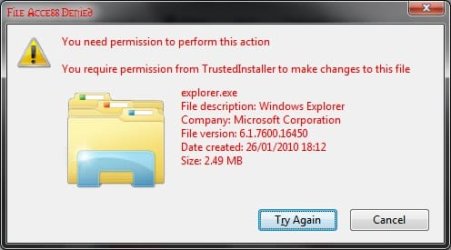
awhile ago, i noticed my start icon changed back to the stupid orb. I couldn't have been that the restorator's trial ran out as that happened long before the icon switch. now when i try to change the name of the C:\Windows\explorer.exe file I get the message below (after clearing warnings and permissions and stuff). this is most annoying >.<

ok, apparently the "take ownership" script doesnt work on the updated explorer.exe and you have to manually do it. grrr
 

Attachments

  • explorerexenamechange.jpg
    explorerexenamechange.jpg
    19.1 KB · Views: 262
Last edited:

My Computer

Computer Manufacturer/Model Number
Toshiba Satellite 350D
OS
Win7 Ultimate Build 7600 RTM
CPU
AMD Turion 64 X2 Mobile Technology TL-60 2.00GHz
Memory
3.00 GB (2.87GB usable)
Graphics Card(s)
ATI Radeon X1250
Sound Card
Realtek High Definition Audio
Monitor(s) Displays
Generic PnP Monitor (Laptop)
Hard Drives
Toshiba MK2546GSX ATA Device
So the problem that I am having is that when I create my own custom orb and I replace explorer.exe with the customized explorer.exe, I notice that the mouseover effect quickly flashes a some black overlap above the startmenu and then it fades back to transparent. If I press the windows key, the black overlay doesn't happen so it must be something in the transition between the three images for the custom start orb.

Someone else had said that the problem was that there might be some pixels that are reaching into the frame for a different portion of the custom orb image (so the mouseover image might have pixels that overlap into the default image). This cannot be the issue, however, because I have tried simply changing the look of images that I know to work and the issue still occurs. Any help?

[EDIT]

clearly Paint.Net just doesn't want to handle the image correctly. I used GIMP and it worked fine if anyone has this problem in the future.
 
Last edited:

My Computer

OS
Windows 7 x64 Professional
NO WAY!
That is the problem that i was having with my bitmaps, and indeed I had been re-sizing them using paint.net.
You are a Savior! XD
 

My Computer

Computer Manufacturer/Model Number
Lenovo Thinkpad R500
OS
Windows 7 64bit
CPU
Intel Dore 2 Duo 2.1GHz
Memory
4GB RAM
Graphics Card(s)
ATI Mobility Radeon 128mb intergrated graphics
Monitor(s) Displays
15.4 WSXGA+
Hard Drives
320GB 5400rpm
For any of y'all looking for ResHacker

Its in the zip :cool:
 

Attachments

My Computer

Computer Manufacturer/Model Number
Toshiba T-135
OS
Windows 7 Ultimate
My Problems With Start Orbs

Ok I figured out the issues with black bars and weird colors. I was creating transparent pngs in photoshop and then converting them over to bmp's. I load them into gimp and photoshop and I did see the alpha channel in the files. So for the most part the files are fine (I can load them up in VB and they look perfect).

So from what I can tell explorer.exe ui doesnt only read the alpha channel. It also paints whats visible by the naked eye.

Ok, so that means anytime an image gets converted from png to bmp (by photoshop, gimp, alpha image convertor and my vb programs.) they dont properly paint everything "black" as it should. What looks perfect as a png looks like crap as a bmp when its converted.

How are you guys creating custom orbs that look good? are you highjacking a ripped copy of the image and drawing on top of that?

If you look at my attachment, the first image is the png, looks good. The second image is how explorer.exe ui wants the image in order for it to work. The last image is the results I get no matter what program I use convert the png to a bitmap. That same third image loads up fine in gimp and im able to see the alpha blended image fine. So I know that gimp properly reads the file.

Any thoughts?
 

Attachments

  • test.jpg
    test.jpg
    49.2 KB · Views: 529

My Computer

OS
Windows 7 Ultimate x86
CPU
amd64
NO WAY!
That is the problem that i was having with my bitmaps, and indeed I had been re-sizing them using paint.net.
You are a Savior! XD

I take it all back. No matter what I do, I have the problem with the design flahing quickly, then fading away... WTF? any help would be AWSMOE :p. By-the-by, i still am plagued by the problem of the start orb. it would seem that my start orb is larger than everyone else's, as I have to modify the 66x198 .bmp for any results. Help on this matter would also be greatly appreciated!:thumbsup:
 

My Computer

Computer Manufacturer/Model Number
Lenovo Thinkpad R500
OS
Windows 7 64bit
CPU
Intel Dore 2 Duo 2.1GHz
Memory
4GB RAM
Graphics Card(s)
ATI Mobility Radeon 128mb intergrated graphics
Monitor(s) Displays
15.4 WSXGA+
Hard Drives
320GB 5400rpm
All this is a thing of the past. Im coding something that will blow everyone away. ANYONE will be able to create PERFECT start orbs.
 

My Computer

OS
Windows 7 Ultimate x86
CPU
amd64
NO WAY!
That is the problem that i was having with my bitmaps, and indeed I had been re-sizing them using paint.net.
You are a Savior! XD

I take it all back. No matter what I do, I have the problem with the design flahing quickly, then fading away... WTF? any help would be AWSMOE :p. By-the-by, i still am plagued by the problem of the start orb. it would seem that my start orb is larger than everyone else's, as I have to modify the 66x198 .bmp for any results. Help on this matter would also be greatly appreciated!:thumbsup:

Send me the image. I can fix it.
 

My Computer

OS
Windows 7 Ultimate x86
CPU
amd64
Thoughts on Changing the Windows Orb

I'm running W7U.

I always keep two user admin accounts on my pc's as a guard against profile corruption and inabiliity to login. It's a thing I learned doing tech support.

I changed my W7U display and system settings from "let Windows decide" to "performance", hoping for a speed increase as my benchmark wasn't gratifying.

This caused the Start Button (SB) to change from an orb to the XP rectangle (XPR) though I didn't know that was the reason. Immediately I started searching, thinking I had done something, for the start button wanting to put the orb back in place. I used the tutorial above as a guide in my search. I also used the trial version of Restorator. I searched the C:\windows\explorer.exe expecting to find my XPR's. They weren't there.

Not finding my start button in C:\windows\explorer.exe caused me to do some further research. I searched the registry, I used Autoruns attempting to monitor changes in the start button. I wasn't clever enough to find the start button in the registry, but I'm certain it could be found using the MSDN.

Anyway I have observed that the orb is only present when using an Aero display theme. Changing to a non-Aero theme changes the SB to an XPR. The actual flag is probably more subtle than the Aero theme itself, being an element common amongst Aero themes.

The SB will be directly affected by shifting display settings from "Windows best" to "performance" OR by changing from an Aero theme to a non-Aero theme.

Additionally while my login was set for performance (XPR button), I changed to user2 which still had default settings. User2 had an orb SB.

Consider that user1 has an XPR while at the same time user2 has an orb. Therefore I think the true location of the orb is not in c:\windows\explorer.exe - recreating that program for every login isn't reasonable.

Storing the SB in the user profile based on current system settings and for use in creation of a user's system task bar would make sense. In a server environment the usage of custom orbs within a roaming profile would prevent the item from being machine dependent.

After benchmarking my system again while in "performance" mode and getting the same "pitiful" result, I restored the use of an Aero theme and have lost interest in the orb.

If someone could parse the user profile, I think the orb would be there.
 

My Computer

Computer Manufacturer/Model Number
TOSH L305D-S5895
OS
W7U
CPU
AMD Turion X2
Motherboard
TL-60?
Memory
3GB
Graphics Card(s)
ATI XT1200
Hard Drives
TOSH MK2546MSX
Thanks Mate,
 

My Computer

OS
Windows 7 Ultimate x86
CPU
Intel Dual Core E2200 2.20GHz
Motherboard
Gigabyte
Memory
3GB DDR2
Graphics Card(s)
ATI Radeon HD 2400 Pro 256MB
Sound Card
Realtek HD Audio
Monitor(s) Displays
LG 17'' WIDESCREEN, FLATRON L177WSB
Screen Resolution
1440 x 900 (Recommended)
Hard Drives
160GB SATA WDC WD1600AAJS-00WAA0 /80GB IDE WDC WD800BB-00JHC0
Internet Speed
0KB lol
My apologies if this has been asked already, but when using the Start Orb Changer, do you still need to take ownership of the entire Windows folder? I have taken ownership of explorer.exe (I was trying to change the orb the other night, no luck though), but this is the first tutorial I've seen suggest taking ownership of the entire folder... :sarc:
 

My Computer

Computer type
PC/Desktop
OS
Win 10 x64 Pro x64 / Ubuntu 15.10 x64
CPU
Intel i7-4960X
Motherboard
Asus Rampage IV Black Edition
Memory
4x8GB Corsair Dominator Platinum @2400MHz 10-12-12-31
Graphics Card(s)
2x MSI GTX780Ti 3GB (SLI)
Sound Card
Onboard SupremeFX (Cirrus Logic CS4398)
Monitor(s) Displays
3x LG Cinema 27" IPS LED (27MP65)
Screen Resolution
[1920x1080]x3
Hard Drives
Crucial M500 120GB, Crucial M500 480GB, Toshiba DT01ACA200 2TB
PSU
CoolerMaster V1000
Case
Corsair Obsidian 750D
Cooling
ThermalTake Water 3.0 Extreme, 4xSP120, 3xAF120
Keyboard
Moshi Luna
Mouse
Logitech G700s / Roccat Tyon
Internet Speed
4Mb uncapped ADSL (Afrihost)
Antivirus
MS Security Essentials
Browser
Chrome... Duh. (:
My apologies if this has been asked already, but when using the Start Orb Changer, do you still need to take ownership of the entire Windows folder? I have taken ownership of explorer.exe (I was trying to change the orb the other night, no luck though), but this is the first tutorial I've seen suggest taking ownership of the entire folder... :sarc:
When using Start Orb Changer there's no need to take ownership. Just run it as administrator.
 

My Computer

Computer Manufacturer/Model Number
tw33k
OS
Windows 7 Ultimate (x64) SP1
CPU
Intel 3770k 4.6GHz
Motherboard
ASUS Maximus V Formula
Memory
8GB (2x 4GB) Crucial Ballistix
Graphics Card(s)
Sapphire 7950 (1060/1600)
Sound Card
On Board Realtek HD Audio
Monitor(s) Displays
27" Acer B273HU (via HDMI)
Screen Resolution
2048 x 1152
Hard Drives
Crucial M4 128GB
2TB WD Black
1TB Samsung F3 SATA
1TB WD Elite External
2TB WD USB 3.0
PSU
Corsair AX750 Gold
Case
Corsair Obsidian 800DW
Cooling
Corsair H100 (2x AP-121/2x UK-3000 push/pull)
Keyboard
Microsoft Wireless 5000
Mouse
Microsoft Wireless 5000
Internet Speed
5mb/s
Other Info
Logitech z-2300 2.1 speakers
Lamptron FC-5 v2
When using Start Orb Changer there's no need to take ownership. Just run it as administrator.
Awesome, that definitely makes things dead simple then. Thanks for the reply.
 

My Computer

Computer type
PC/Desktop
OS
Win 10 x64 Pro x64 / Ubuntu 15.10 x64
CPU
Intel i7-4960X
Motherboard
Asus Rampage IV Black Edition
Memory
4x8GB Corsair Dominator Platinum @2400MHz 10-12-12-31
Graphics Card(s)
2x MSI GTX780Ti 3GB (SLI)
Sound Card
Onboard SupremeFX (Cirrus Logic CS4398)
Monitor(s) Displays
3x LG Cinema 27" IPS LED (27MP65)
Screen Resolution
[1920x1080]x3
Hard Drives
Crucial M500 120GB, Crucial M500 480GB, Toshiba DT01ACA200 2TB
PSU
CoolerMaster V1000
Case
Corsair Obsidian 750D
Cooling
ThermalTake Water 3.0 Extreme, 4xSP120, 3xAF120
Keyboard
Moshi Luna
Mouse
Logitech G700s / Roccat Tyon
Internet Speed
4Mb uncapped ADSL (Afrihost)
Antivirus
MS Security Essentials
Browser
Chrome... Duh. (:
I decided I'd try make my own orb last night, and came up with a pretty decent one, but I have one small problem that I can't figure out. The orb applies perfectly to my taskbar, no issues with size, but when I move the mouse pointer over and back off again, it flashes a black block first and then the image. It only happens between it's passive and rollover states though, if I open the start menu with my keyboard the button changes to the third in the sequence without any black flash.

I noticed that the custom orbs that I downloaded (from here and in the zip file with the changer app) all had a black background, and mine has the same. I created this from a new doc in CS3, so there's no issue with converting from one format to another, and I never had any transparency to begin with.

Could somebody please have a look at see if they could tell me what went wrong? The bitmap is in the attached RAR file.
 

Attachments

My Computer

Computer type
PC/Desktop
OS
Win 10 x64 Pro x64 / Ubuntu 15.10 x64
CPU
Intel i7-4960X
Motherboard
Asus Rampage IV Black Edition
Memory
4x8GB Corsair Dominator Platinum @2400MHz 10-12-12-31
Graphics Card(s)
2x MSI GTX780Ti 3GB (SLI)
Sound Card
Onboard SupremeFX (Cirrus Logic CS4398)
Monitor(s) Displays
3x LG Cinema 27" IPS LED (27MP65)
Screen Resolution
[1920x1080]x3
Hard Drives
Crucial M500 120GB, Crucial M500 480GB, Toshiba DT01ACA200 2TB
PSU
CoolerMaster V1000
Case
Corsair Obsidian 750D
Cooling
ThermalTake Water 3.0 Extreme, 4xSP120, 3xAF120
Keyboard
Moshi Luna
Mouse
Logitech G700s / Roccat Tyon
Internet Speed
4Mb uncapped ADSL (Afrihost)
Antivirus
MS Security Essentials
Browser
Chrome... Duh. (:
I decided I'd try make my own orb last night, and came up with a pretty decent one, but I have one small problem that I can't figure out. The orb applies perfectly to my taskbar, no issues with size, but when I move the mouse pointer over and back off again, it flashes a black block first and then the image. It only happens between it's passive and rollover states though, if I open the start menu with my keyboard the button changes to the third in the sequence without any black flash.

I noticed that the custom orbs that I downloaded (from here and in the zip file with the changer app) all had a black background, and mine has the same. I created this from a new doc in CS3, so there's no issue with converting from one format to another, and I never had any transparency to begin with.

Could somebody please have a look at see if they could tell me what went wrong? The bitmap is in the attached RAR file.

Hi ZaLiTH,
The black box on hover occurs because of a incorrect Alpha channel in the bitmap.
Try this,
http://www.sevenforums.com/customization/65572-how-preserve-alpha-channel-start-orb-bmps.html
 

My Computer

Computer type
Laptop
Computer Manufacturer/Model Number
HP EliteBook 8530w Mobile Workstation
OS
Windows 7 Ultimate x64 (XP, 98SE, 95, 3.11, DOS 7.10 on VM) + Ubuntu 10.04 LTS Lucid Lynx
CPU
Intel Core 2 Duo Processor P8600 (2.40 GHz, 3 MB L2 cache)
Motherboard
Mobile Intel PM45 Express Chipset ICH9M-Enhanced
Memory
4GB 800 MHz DDR2 SDRAM
Graphics Card(s)
ATI Mobility FireGL V5700 with 256 MB
Sound Card
SoundMAX Integrated Digital HD Audio
Monitor(s) Displays
15.4-inch WXGA anti-glare (1280 x 800 resolution)
Screen Resolution
1280 x 800
Hard Drives
500GB + 1TB
Mouse
Synaptics PS/2 Port Touchpad, USB Mouse
Internet Speed
4 Mbps
Antivirus
MSE
Browser
Firefox, Chrome, IE
Other Info
Authentec AES2810 Fingerprint Reader

My Computer

Computer type
PC/Desktop
OS
Win 10 x64 Pro x64 / Ubuntu 15.10 x64
CPU
Intel i7-4960X
Motherboard
Asus Rampage IV Black Edition
Memory
4x8GB Corsair Dominator Platinum @2400MHz 10-12-12-31
Graphics Card(s)
2x MSI GTX780Ti 3GB (SLI)
Sound Card
Onboard SupremeFX (Cirrus Logic CS4398)
Monitor(s) Displays
3x LG Cinema 27" IPS LED (27MP65)
Screen Resolution
[1920x1080]x3
Hard Drives
Crucial M500 120GB, Crucial M500 480GB, Toshiba DT01ACA200 2TB
PSU
CoolerMaster V1000
Case
Corsair Obsidian 750D
Cooling
ThermalTake Water 3.0 Extreme, 4xSP120, 3xAF120
Keyboard
Moshi Luna
Mouse
Logitech G700s / Roccat Tyon
Internet Speed
4Mb uncapped ADSL (Afrihost)
Antivirus
MS Security Essentials
Browser
Chrome... Duh. (:
Back
Top