Start Menu Button - Change

How to Change the Start Menu Button in Windows 7

   Information
This will show you how to change the Start Menu button orb in Windows 7 32-bit and 64-bit.
   Warning
REMEMBER TO BACK UP EXPLORER.EXE!


Here's How:

For custom made start buttons, and further information, please visit this thread: http://www.sevenforums.com/customization/2002-custom-themes-icons-start-buttons-92.html

   Information
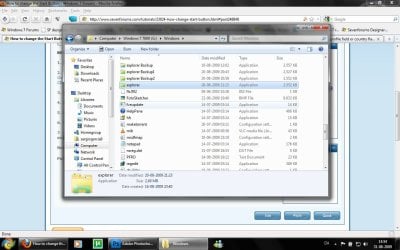
The explorer.exe you want to edit is:

C:\Windows\explorer.exe

and not C:\Windows\SysWOW64\explorer.exe (for those running x64)

And for those who use the larger DPI's i.e 125% , 150% you need to change:

6806 - 66 x 198
6807 - 81 x 243
6808 - 106 x 318


NOTE: The start orb replacement always HAS to look like this:
1 orb: Orb when not in use (when not clicked or mouseover'ed)
2 orb: mouseover
3 orb: When start orb is clicked
2u9ka5w.jpg

1. Download Restorator (Shareware) (Restorator 2007 Resource Editor - Restorator - Bome Software)

2. Take ownership of the whole Windows folder (see these links for more info: Take Ownership of file - Vista Forums and http://www.sevenforums.com/tutorials/1911-take-ownership-shortcut.html)

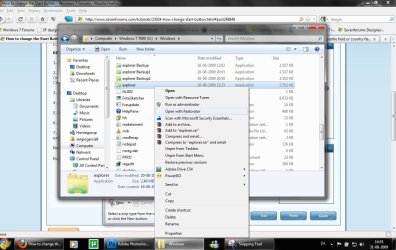
3. Open explorer.exe with restorator
1.jpg

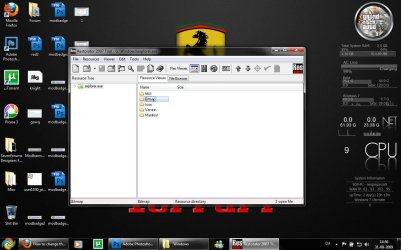
2.jpg
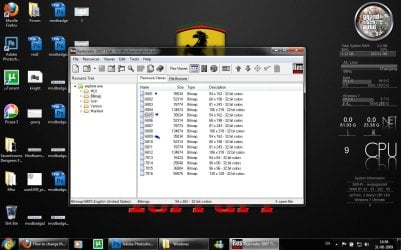
4. Go to the folder called "Bitmap"
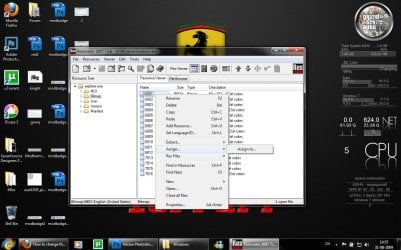
3.jpg
5. Replace 6801.bmp, 6805.bmp, and 6809.bmp (as seen on the picture, you will need to right click and click assign, and then click assign to, then select your file.)
4.jpg

5.jpg
6. Go to "file" and Save as explorer.exe on your desktop

7. Go to the windows folder and rename explorer.exe to explorer.exe.bak and then copy-paste the new explorer, Kill the process in task manager and start it again.
Now you have a new start button! :D

Please comment, if you have something to say :)


Last edited by a moderator:
I have a problem. Ihave two accounts under Win7. One admin and one standard. Admin will not change the orb. The orb changer program shows modified orb, but it is standard orb visible under admin account. Any suggestions? Standard account is ok.
 

My Computer

OS
Win7
I have a problem. Ihave two accounts under Win7. One admin and one standard. Admin will not change the orb. The orb changer program shows modified orb, but it is standard orb visible under admin account. Any suggestions? Standard account is ok.

It's probably because the admin account uses the normal explorer.exe while your usual account uses the edited one? Not sure as I don't know how you edited your files.. That's what I came up with anyway. Hope it helps.
 

My Computer

OS
Windows 7 Ultimate
CPU
Intel Core 2 Duo @2.8GHz
Motherboard
ECS G31
Memory
3GB
Graphics Card(s)
ATi Sapphire 4850 HD 512MB
Hard Drives
500GB
Case
Coolermaster HAF-932
Just started Task Manager, found explorer.exe, right clicked, found file location. It's C:\Windows. And the file highlighted is explorer.exe.
 
Last edited:

My Computer

OS
Win7
Solution found. I have changed DPI under Control Panel\All Control Panel Items\Display. Was 125%, now is 100%.
 

My Computer

OS
Win7
Solution found. I have changed DPI under Control Panel\All Control Panel Items\Display. Was 125%, now is 100%.
Well, that is an interesting one... Thinking about it now I can see why; Win7's explorer.exe contains three different sized Start orb images (you'll see them if you edit it with ResourceHacker), but I think the changer application mentioned in the first post only updated the smaller of the three corresponding to the normal 100% DPI setting.

Anyway, thanks for letting us know what it was. :D
 

My Computer

Computer type
PC/Desktop
OS
Win 10 x64 Pro x64 / Ubuntu 15.10 x64
CPU
Intel i7-4960X
Motherboard
Asus Rampage IV Black Edition
Memory
4x8GB Corsair Dominator Platinum @2400MHz 10-12-12-31
Graphics Card(s)
2x MSI GTX780Ti 3GB (SLI)
Sound Card
Onboard SupremeFX (Cirrus Logic CS4398)
Monitor(s) Displays
3x LG Cinema 27" IPS LED (27MP65)
Screen Resolution
[1920x1080]x3
Hard Drives
Crucial M500 120GB, Crucial M500 480GB, Toshiba DT01ACA200 2TB
PSU
CoolerMaster V1000
Case
Corsair Obsidian 750D
Cooling
ThermalTake Water 3.0 Extreme, 4xSP120, 3xAF120
Keyboard
Moshi Luna
Mouse
Logitech G700s / Roccat Tyon
Internet Speed
4Mb uncapped ADSL (Afrihost)
Antivirus
MS Security Essentials
Browser
Chrome... Duh. (:
So that's what it was! All fixed now, thanks a bunch!
 

My Computer

Computer Manufacturer/Model Number
Lenovo Thinkpad R500
OS
Windows 7 64bit
CPU
Intel Dore 2 Duo 2.1GHz
Memory
4GB RAM
Graphics Card(s)
ATI Mobility Radeon 128mb intergrated graphics
Monitor(s) Displays
15.4 WSXGA+
Hard Drives
320GB 5400rpm
Would someone please make this so that it is usable?

I put it in Photoshop and added a black background and saved it as a BMP but Windows doesn't see it. I must be leaving something out... :(

vczy90.jpg
 

My Computer

OS
Windows 7 Ultimate 64-bit
Would someone please make this so that it is usable?

I put it in Photoshop and added a black background and saved it as a BMP but Windows doesn't see it. I must be leaving something out... :(

vczy90.jpg
What program did you make the orb image in? Could you maybe attach the PSD file in a ZIP file? That'll make it much easier to get it right for you. :)

Otherwise, have a look at this tutorial here: How to Create Custom Start Orb Image, that should help a bit.
 

My Computer

Computer type
PC/Desktop
OS
Win 10 x64 Pro x64 / Ubuntu 15.10 x64
CPU
Intel i7-4960X
Motherboard
Asus Rampage IV Black Edition
Memory
4x8GB Corsair Dominator Platinum @2400MHz 10-12-12-31
Graphics Card(s)
2x MSI GTX780Ti 3GB (SLI)
Sound Card
Onboard SupremeFX (Cirrus Logic CS4398)
Monitor(s) Displays
3x LG Cinema 27" IPS LED (27MP65)
Screen Resolution
[1920x1080]x3
Hard Drives
Crucial M500 120GB, Crucial M500 480GB, Toshiba DT01ACA200 2TB
PSU
CoolerMaster V1000
Case
Corsair Obsidian 750D
Cooling
ThermalTake Water 3.0 Extreme, 4xSP120, 3xAF120
Keyboard
Moshi Luna
Mouse
Logitech G700s / Roccat Tyon
Internet Speed
4Mb uncapped ADSL (Afrihost)
Antivirus
MS Security Essentials
Browser
Chrome... Duh. (:
What program did you make the orb image in? Could you maybe attach the PSD file in a ZIP file? That'll make it much easier to get it right for you. :)

I didn't make it; I found it online just like that. :(
 

My Computer

OS
Windows 7 Ultimate 64-bit
What program did you make the orb image in? Could you maybe attach the PSD file in a ZIP file? That'll make it much easier to get it right for you. :)

I didn't make it; I found it online just like that. :(
Ah... I see. No problem, just means I'll have to play around with getting the button onto a separate layer to the background. ;) No big deal. Let me see what I can do with it.

While I do that though, when you say it didn't want to work, what happened when you tried? Did the button just not change, or did you get any errors...?

Edit: That was actually easier than I though; the image was already a PNG with transparency, so it ended up being dead simple. Try the attached one... The ZIP file contains the BMP that you need to set as the button.
 

Attachments

  • Win 7 Logo.zip
    Win 7 Logo.zip
    8.8 KB · Views: 122
  • Win 7 Logo.png
    Win 7 Logo.png
    8.5 KB · Views: 752

My Computer

Computer type
PC/Desktop
OS
Win 10 x64 Pro x64 / Ubuntu 15.10 x64
CPU
Intel i7-4960X
Motherboard
Asus Rampage IV Black Edition
Memory
4x8GB Corsair Dominator Platinum @2400MHz 10-12-12-31
Graphics Card(s)
2x MSI GTX780Ti 3GB (SLI)
Sound Card
Onboard SupremeFX (Cirrus Logic CS4398)
Monitor(s) Displays
3x LG Cinema 27" IPS LED (27MP65)
Screen Resolution
[1920x1080]x3
Hard Drives
Crucial M500 120GB, Crucial M500 480GB, Toshiba DT01ACA200 2TB
PSU
CoolerMaster V1000
Case
Corsair Obsidian 750D
Cooling
ThermalTake Water 3.0 Extreme, 4xSP120, 3xAF120
Keyboard
Moshi Luna
Mouse
Logitech G700s / Roccat Tyon
Internet Speed
4Mb uncapped ADSL (Afrihost)
Antivirus
MS Security Essentials
Browser
Chrome... Duh. (:
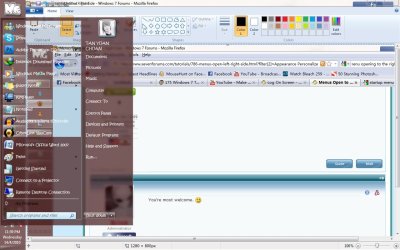
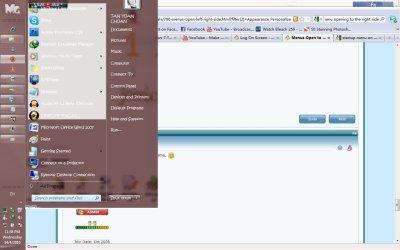
Hi , i do have a question which a bit related to this, when i placed my taskbar on the side (left in this case), is there any way for my startup menu to appear like this..

note: its edited with paint
Untitled1.jpg

instead of this .. (original)

Untitled2.jpg
 

My Computer

OS
window 7
Most likely is a mistake somewhere in your theme, or a fail within Windows. Try rebooting and see if it fixes it ;)
 
i see that my message wasn't made clearly, the theme was set to make the taskbar transparency, as you can in see in the 2nd screenshot, the menu is covering a part of the taskbar, is there any way ( be it script or tutorials) to help my startup menu appearing in screen shot 1, so that it doesn't clash with the taskbar?
 

My Computer

OS
window 7
@ ZaLiTH - that's good to know because i don't always have the time or the patience to wait for the take ownership process that takes a few good 8-10 min
 

My Computer

Computer type
PC/Desktop
Computer Manufacturer/Model Number
2015 Home Made with Great Performance
OS
Windows 8.1 x64 Enterprise
CPU
i5 4690K
Motherboard
Gigabyte GA-Z87X-UD5H
Memory
Corsair 16 GB DDR3 2000Mhz
Graphics Card(s)
Asus GTX760 2GB 256bit
Sound Card
Realtek OnBoard
Monitor(s) Displays
Samsung SyncMaster SA350 + LG 42LA660S
Screen Resolution
1920x1080 Full HD
Hard Drives
1x 640GB Western Digital SATA
1x 4TB Western Digital Green SATA
3x 2TB Western Digital Caviar Green RS SATA
1x 3TB Western Digital Caviar Green SATA
1x 128GB Corsair Force Red SSD
PSU
Corsair CX 600W
Case
Nexus Prominent 5
Cooling
CPU: Artic Cooler Freezer 13 + 5x120mm Case Fans @ 700RPM
Keyboard
Microsoft Wired Keyboard 600
Mouse
Microsoft Wireless Mobile Mouse 1000
Internet Speed
FO 1 Gbit/s
Antivirus
ESET / Malwarebytes
Browser
Opera / Chrome
Other Info
- Fan Controller Aerocool X-Vision 5
- 1x 1TB Hitachi DeskPlus External USB
- 1x 1TB Western Digital Passport External USB3
So I don't know what I did wrong, but when I tried to change the start orb, I couldn't do anything with explorer. I figured a restart would fix it, so I did that, bad idea! Now when I logon all I have is a black screen with the mouse pointer! I can open task manager and whatnot, but I don't know how to get explorer working again. Any help is greatly appreciated.
 

My Computer

OS
Windows 7 Home Premium
So I don't know what I did wrong, but when I tried to change the start orb, I couldn't do anything with explorer. I figured a restart would fix it, so I did that, bad idea! Now when I logon all I have is a black screen with the mouse pointer! I can open task manager and whatnot, but I don't know how to get explorer working again. Any help is greatly appreciated.
I had the exact same problem recently, perhaps the fix I found would help for you as well? All depends on whether or not you can still use Ctrl+Alt+Del to log out of your profile when you hit that black screen.. But try it and see.

It's a bit of a two part thing; here is the process I used initially (link), and I found later I needed to perform one more step to get it working properly (link). Hope that helps a bit...
 

My Computer

Computer type
PC/Desktop
OS
Win 10 x64 Pro x64 / Ubuntu 15.10 x64
CPU
Intel i7-4960X
Motherboard
Asus Rampage IV Black Edition
Memory
4x8GB Corsair Dominator Platinum @2400MHz 10-12-12-31
Graphics Card(s)
2x MSI GTX780Ti 3GB (SLI)
Sound Card
Onboard SupremeFX (Cirrus Logic CS4398)
Monitor(s) Displays
3x LG Cinema 27" IPS LED (27MP65)
Screen Resolution
[1920x1080]x3
Hard Drives
Crucial M500 120GB, Crucial M500 480GB, Toshiba DT01ACA200 2TB
PSU
CoolerMaster V1000
Case
Corsair Obsidian 750D
Cooling
ThermalTake Water 3.0 Extreme, 4xSP120, 3xAF120
Keyboard
Moshi Luna
Mouse
Logitech G700s / Roccat Tyon
Internet Speed
4Mb uncapped ADSL (Afrihost)
Antivirus
MS Security Essentials
Browser
Chrome... Duh. (:
So I don't know what I did wrong, but when I tried to change the start orb, I couldn't do anything with explorer. I figured a restart would fix it, so I did that, bad idea! Now when I logon all I have is a black screen with the mouse pointer! I can open task manager and whatnot, but I don't know how to get explorer working again. Any help is greatly appreciated.
I had the exact same problem recently, perhaps the fix I found would help for you as well? All depends on whether or not you can still use Ctrl+Alt+Del to log out of your profile when you hit that black screen.. But try it and see.

It's a bit of a two part thing; here is the process I used initially (link), and I found later I needed to perform one more step to get it working properly (link). Hope that helps a bit...

Thanks for the help, I was able to get it working again today just after a restore point. I feel like an idiot for not thinking about that sooner. Panicked too early haha.
 

My Computer

OS
Windows 7 Home Premium
Thanks for the help, I was able to get it working again today just after a restore point. I feel like an idiot for not thinking about that sooner. Panicked too early haha.
It happens like that sometimes, for some reason I always seem to go for the most complex solutions first, pretty much expecting the worst.. Guess it's my pessimistic side showing through hey. Anyways, glad you got it sorted.
picture.php
 

My Computer

Computer type
PC/Desktop
OS
Win 10 x64 Pro x64 / Ubuntu 15.10 x64
CPU
Intel i7-4960X
Motherboard
Asus Rampage IV Black Edition
Memory
4x8GB Corsair Dominator Platinum @2400MHz 10-12-12-31
Graphics Card(s)
2x MSI GTX780Ti 3GB (SLI)
Sound Card
Onboard SupremeFX (Cirrus Logic CS4398)
Monitor(s) Displays
3x LG Cinema 27" IPS LED (27MP65)
Screen Resolution
[1920x1080]x3
Hard Drives
Crucial M500 120GB, Crucial M500 480GB, Toshiba DT01ACA200 2TB
PSU
CoolerMaster V1000
Case
Corsair Obsidian 750D
Cooling
ThermalTake Water 3.0 Extreme, 4xSP120, 3xAF120
Keyboard
Moshi Luna
Mouse
Logitech G700s / Roccat Tyon
Internet Speed
4Mb uncapped ADSL (Afrihost)
Antivirus
MS Security Essentials
Browser
Chrome... Duh. (:
Add a beautiful experience Gary

thanks
 

My Computer

Computer Manufacturer/Model Number
ALIENWARE M17x
OS
tata
CPU
Intel® Core™2 Duo T9800
Motherboard
Intel
Memory
6GB DDR3
Graphics Card(s)
Dual NVIDIA® GeForce® GTX 280M, 2GB – SLI
Sound Card
IDT HD Audio
Monitor(s) Displays
17-inch WideUXGA 1920x1200 (1200p)
Hard Drives
256GB Solid State Drive
Back
Top