
Start Menu - Change Height

How to Change the Height of the Windows 7 Start Menu

   Information
This will show you how to increase and decrease the height of the Windows 7 Start Menu without displaying Recently Opened Programs and without Displaying Sub-menus.
   Note
Many users would like to change the height of the Start Menu in Windows 7. There are many reasons for why a user would want this. My personal reason is so that all the programs in the All Programs list of the Start Menu will display without my having to scroll up and down the list.

The problem is that the Start Menu is dynamic and, it would seem, cannot be manually sized. Two existing methods of changing the height of the Start Menu are to 1) display recently opened programs; and 2) display the sub-menus that appear on the right side of the Start Menu, such as Documents, Downloads, and Games.


However, for those who would rather not display recently opened programs and not have some useless sub-menus displayed, a third, more flexible way exists, and this tutorial will cover that method.


Here's How:
1. Right-click on the Start button and select Properties.

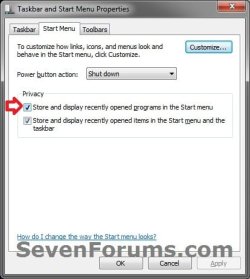
2. In the Start Menu tab under Privacy, check the Store and display recently opened programs in the Start menu box.
Properties-1.jpg
3. Click on the Customize button at the top right corner in the Start Menu tab.

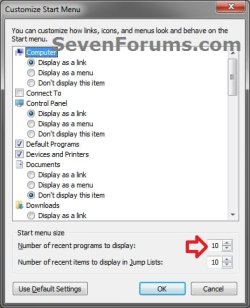
4. Under the Start menu size section on the bottom, change the Number of recent programs to display to a number between 8 and 30, where 8 is a shortest Start Menu and 30 is the tallest (for certain screen resolutions, try a lower number, such as 18).
NOTE: The default number of recent programs to display is 10.
Properties-2.jpg
5. Click on the OK button to save this setting.

6. In the Start Menu tab under Privacy, uncheck Store and display recently opened programs in the Start menu. Click on the Apply button.
NOTE: The trick of how this method of resizing the Start Menu works is that even when the Store and display recently opened programs in the Start menu box is unchecked, Windows still keeps the size of the Start Menu to the last setting of Number of recent programs to display.

7. Click on the Start Menu and look at its current height. If you are fine with the current height, just click the OK button of the Taskbar and Start Menu Properties window. Otherwise, repeat steps 2 to 6 until you arrive at the desired Start Menu height.
Hope this helps,
Victor Ly


Last edited by a moderator:
VicV... Saw this on Twitter and tried it. Worked as said but then I decided it was not what I wanted. So I tried to revert back and I could not get recent programs to come back on. Just remained blank. Not sure what was up with that. Did a system restore (my best friend since Win ME) to get it back. I do like the longer menu size so I bumped up to 15 and left recent ticked. Very nice thanks for the tweak.
Welcome to SevenForums. Thanks for sharing. I look forward to more from you. lm
 

My Computer

Computer Manufacturer/Model Number
Gateway GT5692
OS
Windows 7 Ulti. x64
CPU
AMD Phenom 8450 triple-core 2.10 ghz
Memory
4GB
Graphics Card(s)
ATI Radion HD 3200
Monitor(s) Displays
Gateway FPD1775W
Screen Resolution
1280x720
Hard Drives
465.6613 Gibibytes
mmmmmm
:mad:
 

My Computer

Computer Manufacturer/Model Number
Self Build 64bit
OS
Vista Ult64, Win7600
CPU
Intel Core 2 Quad Q6600 @ 2400 MHz 64bit OS
Motherboard
Asus P5E3 Deluxe WiFi @p 64 bit OS
Memory
4096 MB DDR3-SDRAM
Graphics Card(s)
ATI Radeon HD 3870 Series x2 Crossfired
Sound Card
Realtek on board
Monitor(s) Displays
Samsung SyncMaster - 23 inches
Screen Resolution
1680x1050 pixels at 60 Hz in True Colors
Hard Drives
Hitachi (250 GB)/Samsung 750 GB. /Barracuda 160 GB.
My Book 1 TB external..
PSU
Cooler Master 1000w
Case
Cooler Master Cosmos 1000.
Cooling
Fans and fresh air,
Keyboard
Wireless
Mouse
Wireless
Internet Speed
Never fast enough
Other Info
I use a Magnum.
thanks!

Thanks for the how-to! I've been using Windows 7 for a long while, but this is one thing I hadn't thought of until just a few minutes ago. I was scrolling through my All Programs menu and a light bulb came on. Why is my start menu so short when my screen is so tall???

One thing to note is that 18 is not necessarily the tallest. This depends on your screen resolution height and whether you have "Use large icons" checked in the Customize Start Menu box (not to be confused with "Use small icons" for the taskbar).

To get the most room for your All Programs menu, enable the large icons and set the number of recent programs to 30. Keep in mind that my screen height is 1600 and it reaches about 80% to the top.

Author may want to add this information to the article. Cool stuff! :)

Regarding myzr7's report of recent programs not coming back, it does clear the list when you untick and apply, and your list starts blank when you turn recent programs on again. This behavior seems normal for me. But then another explanation might be that this thread is 2 years old and there really was a bug but they have since patched it. Either way, it's working as expected.
 

My Computer

OS
Windows 7 Professional x64
Thanks for the how-to! I've been using Windows 7 for a long while, but this is one thing I hadn't thought of until just a few minutes ago. I was scrolling through my All Programs menu and a light bulb came on. Why is my start menu so short when my screen is so tall???

One thing to note is that 18 is not necessarily the tallest. This depends on your screen resolution height and whether you have "Use large icons" checked in the Customize Start Menu box (not to be confused with "Use small icons" for the taskbar).

To get the most room for your All Programs menu, enable the large icons and set the number of recent programs to 30. Keep in mind that my screen height is 1600 and it reaches about 80% to the top.

Author may want to add this information to the article. Cool stuff! :)

Regarding myzr7's report of recent programs not coming back, it does clear the list when you untick and apply, and your list starts blank when you turn recent programs on again. This behavior seems normal for me. But then another explanation might be that this thread is 2 years old and there really was a bug but they have since patched it. Either way, it's working as expected.
Thank you very much for your input, GrandPixel. I'm glad to hear that other people have found this useful. As soon as I started using Windows 7, I thought the Start Menu should just be longer so I do not have to scroll down just to access certain programs. It took a bit of tinkering, but I found out on my own and am glad I did!

I've done a minor edit to my post to include the information you provided.

Thanks!
Vic
 

My Computer

Computer Manufacturer/Model Number
Dell Vostro 1500
OS
Windows 7 Professional
CPU
Intel Core2Duo T5270
Memory
3072MB
Graphics Card(s)
nVidia GeForce 8400M GS
Hard Drives
Western Digital 320GB Scorpio Blue SATAII
Mouse
Logitech VX Revolution
Internet Speed
Comcast Performance High Speed Internet
thanks!

obvious solution - but easy to miss
 

My Computer

OS
Windows 7 Enterprise 32 bit
I'm running Win7 Home Premium (OEM installation) on a Lenovo G570. When I right click on the Start orb, there is no "Privacy section". Instead, there are three tabs: Taskbar, Start Menu, and Tool Bars. The Customize link is near the top right of the Start Menu tab. After that, the directions given will apply.
 

My Computer

Computer type
PC/Desktop
Computer Manufacturer/Model Number
Custom Build
OS
Win 7 Ultimate 64 bit
CPU
Intel i7-3930K
Motherboard
ASUS P9X79 WS
Memory
Kingston HyperX Genesis 32GB Kit (8x4GB Modules) 1600MHz DDR
Graphics Card(s)
MSI R7850 Twin Frozr 2GD5/OC Radeon HD 7850 2GB 256-bit GDDR
Sound Card
Asus Xonar Essence STX
Monitor(s) Displays
3x Asus VG248QE 24", Vizio 32" TV
Screen Resolution
1920 x 1080, ?
Hard Drives
Samsung 128GB 840 Pro SSD (1),
Samsung 4TB 850 EVO SSDs (4)
Samsung 4TB 850 EVO SSDs (16) external backup drives used in 2.5" hot swap bays in the computer.
PSU
Corsair HX750w
Case
Antec Two Hundred v2 (modified)
Cooling
Cooler Master GeminII S524 120mm (fan replaced with a 140mm)
Keyboard
Logitech G510s
Mouse
Logitech M525 (two in use)
Internet Speed
=< 32Mbps down, 8Mbps up
Antivirus
AVAST!, MBAM, SAS, Spybot S&D (all but MBAM free) Glary Util
Browser
IE11
Other Info
LSI 9211-8i HBA card (8 SATA III ports), 2.5" & 3.5" Hot Swap Bays, HooToo HT-CR001 PCI-E to USB 3.0 Internal Hub + 6 Slot Card Reader, and LG Model CH12LS28 BD-ROM Optical Drive. Also, ScanSnap S1500 ADF duplexing scanner, Canon 9000F flat bed scanner, Corsair SP2500 2.1 speakers, Samsung CLP 415nw laser color printer, Cyberpower PP2200SW UPS
Back
Top