
Start Menu - Change Number of Recent Programs to Display

How to Change the Number of Recent Programs to Display in Windows 7 Start Menu

   Information
This will show you how to change the number of Recent Programs to display under the Start menu Pin To area line in Windows 7.
   Warning
Recent Programs will need to be turned on in order for the Start menu to display the number of recent programs you specify below.

EXAMPLE: Recent Programs list in Start Menu
Start_menu_Recent_Programs.jpg


OPTION ONE

Through Customize Start Menu Settings


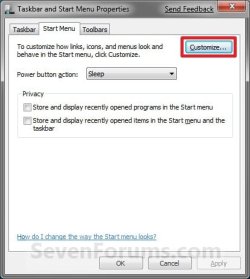
1. Right click on the Start button and click on Properties.

2. Click on the Customize button. (See screenshot below)
Properties-1.jpg
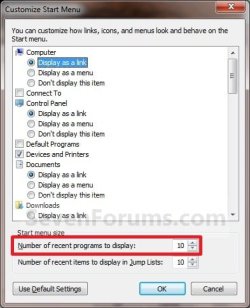
3. Under the Start menu size section at the bottom, change the Number of recent programs to display to a number between 0 and 30. (See screenshot below)
NOTE: The default number to display is 10.
Customize-1.jpg
4. Click on OK. (See screenshot above)

5. Click on OK. (See screenshot below step 2)


OPTION TWO

Manually in Registry Editor


1. Open the Start Menu, type regedit in the search box, then press Enter.

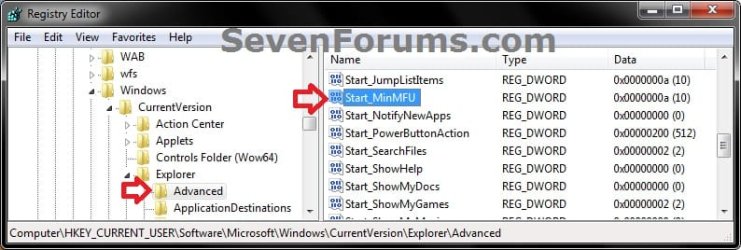
2. In regedit, navigate to: (see screenshot below)
HKEY_CURRENT_USER\Software\Microsoft\Windows\CurrentVersion\Explorer\Advanced
REG-1.jpg
3. In the right pane of Advanced, right click on Start_MinMFU and click on Modify. (see screenshot above)

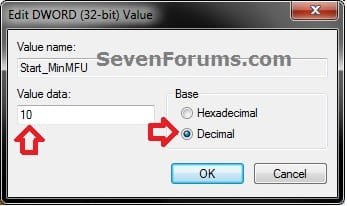
4. Select (dot) Decimal. (see screenshot below)
REG-2.jpg
5. Enter how many (0 to 30) recent programs you want to be displayed in the Start Menu, then click on OK. (see screensho above)
NOTE: The default number to display is 10.

6. Close Regedit.
That's it,
Shawn


Last edited:
Hi, that's a great help - thank you, but my problem is that the number of displayed recent programs is fixed at four, whatever number is entered in the Customize Start Menu area. If I delete one from the list, another recently opened program immediately appears in the list.

I have tried varying the size of icons, varying the number of programs to be displayed from 0 to 30, rebooting, what else should I try??

I hope someone still reads this and can post some ideas.

Thanks :)
 

My Computer My Computer

Computer Manufacturer/Model Number
Self build
OS
Windows 7 Professional 32 bit
CPU
Intel Core i3-2100
Motherboard
Asus P8H61-M LX2
Memory
4GB DDR3 1333
Graphics Card(s)
Geforce 8800GT
Sound Card
onboard
Monitor(s) Displays
LG W2361V
Hard Drives
Samsung 500GB SATA2
PSU
550W - I can't remember the make
Case
Belonged to Belinea o'MAX
Cooling
3 fans (CPU, Graphics card, Case)
Hello Jannoth, and welcome to Seven Forums.

As a test to see if it may just be somthing wrong with your account, create a new administrator account, and see if it still does it in this new user account.
 

My Computer My Computer

Computer type
PC/Desktop
Computer Manufacturer/Model Number
Self built custom
OS
64-bit Windows 11 Pro for Workstations
CPU
Intel i7-8700K OC'd to 5 GHz
Motherboard
ASUS ROG Maximus XI Formula Z390
Memory
64 GB (4x16GB) G.SKILL TridentZ RGB DDR4 3600 MHz
Graphics Card(s)
ASUS ROG-STRIX-GTX1080TI-O11G-GAMING
Sound Card
Integrated
Monitor(s) Displays
2 x Samsung Odyssey G7 27"
Screen Resolution
2560x1440
Hard Drives
1TB Samsung 990 PRO M.2,
4TB Samsung 990 PRO PRO M.2,
TerraMaster F8 SSD Plus NAS
PSU
Seasonic Prime Titanium 850W
Case
Thermaltake Core P3
Cooling
Corsair Hydro H115i
Keyboard
Logitech wireless K800
Mouse
Logitech MX Master 4
Internet Speed
2 Gb/s Download and 100 Mb/s Upload
Antivirus
Malwarebyte Anti-Malware Premium
Browser
Google Chrome
Other Info
Logitech Z625 speaker system,
Logitech BRIO 4K Pro webcam,
HP Color LaserJet Pro MFP M477fdn,
APC SMART-UPS RT 1000 XL - SURT1000XLI,
Galaxy S23 Plus phone
hi, can u increase the maximum to over 30 programs using gpedit.msc?

recently opened programs not jump lists
 

My Computer My Computer

Computer type
PC/Desktop
OS
Windows 7 Ultimate x64
Hello Magnakai,

I'm afraid it appears that 30 is the limit no matter where you set it from.
 

My Computer My Computer

Computer type
PC/Desktop
Computer Manufacturer/Model Number
Self built custom
OS
64-bit Windows 11 Pro for Workstations
CPU
Intel i7-8700K OC'd to 5 GHz
Motherboard
ASUS ROG Maximus XI Formula Z390
Memory
64 GB (4x16GB) G.SKILL TridentZ RGB DDR4 3600 MHz
Graphics Card(s)
ASUS ROG-STRIX-GTX1080TI-O11G-GAMING
Sound Card
Integrated
Monitor(s) Displays
2 x Samsung Odyssey G7 27"
Screen Resolution
2560x1440
Hard Drives
1TB Samsung 990 PRO M.2,
4TB Samsung 990 PRO PRO M.2,
TerraMaster F8 SSD Plus NAS
PSU
Seasonic Prime Titanium 850W
Case
Thermaltake Core P3
Cooling
Corsair Hydro H115i
Keyboard
Logitech wireless K800
Mouse
Logitech MX Master 4
Internet Speed
2 Gb/s Download and 100 Mb/s Upload
Antivirus
Malwarebyte Anti-Malware Premium
Browser
Google Chrome
Other Info
Logitech Z625 speaker system,
Logitech BRIO 4K Pro webcam,
HP Color LaserJet Pro MFP M477fdn,
APC SMART-UPS RT 1000 XL - SURT1000XLI,
Galaxy S23 Plus phone
Back
Top