Solved Start Menu/File Description: Registry Console Tool

dannyb

New member
Local time
9:23 PM
Messages
17
Hello All,

Seasons Greetings!

A quick question: When I type 'reg' in the start menu a picture of a file appears with the name 'reg' at the side.

When I hover over the application is described as the Registry Console Tool.

Whether I then:

- click to open it
- right click and choose open
- right click and choose open as administrator

The command window always flashes open and disappears immediately! Does anyone please know why the console does not stay open?


Thanks.
 

My Computer

Computer Manufacturer/Model Number
Dell Studio XPS 435MT
OS
Windows 7
CPU
Core i7
Memory
6GB
Graphics Card(s)
ATI Readeon
Sound Card
Realtak
Monitor(s) Displays
Dell
Hard Drives
Terrabyte
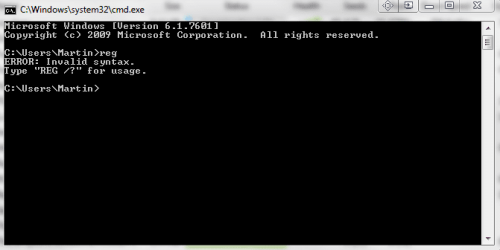
The below screenshot is the output of that command. The reason it disappears straightaway, is because the command runs, throws the below error, and then quits.

the Registry Console Tool is basically what runs when you run those bat files to modify your registry for some reason. Reg by itself doesn't do anything.

May I ask what you are trying to do? You can seriously mess up your computer by messing with the registry, perhaps we can point you to an easier way to accomplish whatever it is you are trying to, or at least tell you whether it's safe.

Capture.PNG
 

My Computer

Computer type
PC/Desktop
Computer Manufacturer/Model Number
Medion Erazer (note to self: insert model number) - with custom additions
OS
Windows 10 Pro x64
CPU
Intel Core i5 7400 @ 3.00GHz
Motherboard
OEM supllied with PC
Memory
8GB 2133Mhz DDR4 (OEM supplied)
Graphics Card(s)
Gygabyte Windforce GTX 1050Ti (Factory Overclocked)
Sound Card
Realtek
Monitor(s) Displays
Acer Al1980 + HKC
Screen Resolution
1360*768(HKC) / 1280*1024(Acer)
Hard Drives
1TB Toshiba
1TB WD Caviar Green
120GB Samsung Evo 840
PSU
OEM supplied (no power rating on case)
Case
OEM Supplied
Cooling
Stock
Keyboard
Logitech Wireless
Mouse
Logitect Wireless
Internet Speed
40Mb/s Down 10Mb/s Up
Antivirus
Defender
Browser
Firefox
Alongside the info above if you wish to run Registry Editor then you will need to type "regedit" into the Start Menu box. Because there is already a Command Console tool called REG it won't return any other results when you type just "reg" into the box.
 

My Computer

Computer Manufacturer/Model Number
Compaq Desktop
OS
Windows 7 Ultimate x64
CPU
AMD Sempron Dual Core
Memory
3GB
Graphics Card(s)
NVIDIA GeForce 6150SE nForce 430
Screen Resolution
1024x768
Hard Drives
150GB Sata
Thank you, so much, for getting back to me and so quickly too.

In brief: I try to keep my PC tidy once a week by running the Norton: registry checker; disk optimization and file clean up.

Then I go the MS Console and check performance and undertake maintenance and another disk clean.

Yesterday, I was looking in my Dell Support centre console, which enables access to system tools in windows 7 through the Dell environment and I was sure that I saw a mention of some 'registry checker'; however, today, I could not find it so I began looking for it on my PC and discovered the 'reg' console not opening issue.

I have just finished a mammoth piece of uni work and I just had the time and thought that I had better have a tidy up as my PC appeared a bit slower.

Now though, I am understanding your concerns, so I shall stop before I cause myself issues.

Thanks - you solved my question; I am grateful.
[FONT=&quot]

[/FONT]
 

My Computer

Computer Manufacturer/Model Number
Dell Studio XPS 435MT
OS
Windows 7
CPU
Core i7
Memory
6GB
Graphics Card(s)
ATI Readeon
Sound Card
Realtak
Monitor(s) Displays
Dell
Hard Drives
Terrabyte
Thanks to all!
 

My Computer

Computer Manufacturer/Model Number
Dell Studio XPS 435MT
OS
Windows 7
CPU
Core i7
Memory
6GB
Graphics Card(s)
ATI Readeon
Sound Card
Realtak
Monitor(s) Displays
Dell
Hard Drives
Terrabyte
Back
Top