Start Menu Programs Disappeared

wvcectech

New member
Local time
1:34 AM
Messages
1
I am running 64 bit version of Windows7 RC. Sometime during the night, the start menu changed. The user picture went back to the default (no big deal) however a lot of programs just went missing. Most of the programs that are missing seem to be 32 bit programs. Example: Outlook 2007 is missing from the start menu, it was previously pinned to the start menu, and a search brings up Microsoft Outlook folders, not the program.


Anyone else having this issue?

Thanks for any help
 

My Computer

OS
windows 7 RC x64
I am running 64 bit version of Windows7 RC. Sometime during the night, the start menu changed. The user picture went back to the default (no big deal) however a lot of programs just went missing. Most of the programs that are missing seem to be 32 bit programs. Example: Outlook 2007 is missing from the start menu, it was previously pinned to the start menu, and a search brings up Microsoft Outlook folders, not the program.


Anyone else having this issue?

Thanks for any help
Hi wvcectech, Welcome to the forum.

No I have not had this problem, have you tried a system restore to see if it helps?
http://www.sevenforums.com/tutorials/700-system-restore.html

Pooch
 

My Computer

Computer Manufacturer/Model Number
Something I threw together
OS
Windows 7 Ultimate x64
CPU
Intel Core i7-2600K
Motherboard
Asus P8P67
Memory
16 GB G Skill F3-10666 CL9D-4GBRL
Graphics Card(s)
ATI Radeon HD 6870
Sound Card
ATI Radeon HDMI / Realtek ALC892
Monitor(s) Displays
2 x 22" standard monitors / LG32LC56v TV to watch films
Screen Resolution
1920 x1080
Hard Drives
2 x OCZ Vertex2 111.79GB
3 x Samsung103SJ
1 x Samsung103UJ
1 x WD3200BEVT
1 x Hitachi5K320-160
PSU
Thermaltake Toughpower Cable Management 750W
Case
Antec 300
Cooling
Noctua NH-U12P SE2 and 5 120mm Case fans
Keyboard
Microsoft Comfort Curve Keyboard 2000
Mouse
Hama M3110 / Logitech M305
Internet Speed
16000
Other Info
I have also used Fedora, Suse, Ubuntu Linux
And all other Windows from 95 to date except ME
i9f it was overnight, Pooch may be on to something - as it might have been and overnight patch (as that would have been late *Tuesday* night and M$ is notorious for Patch Tuesdays)....
 

My Computers

System One System Two

  • Computer type
    PC/Desktop
    Computer Manufacturer/Model Number
    The Beast Model A (homebrew)
    OS
    Windows 11 21H2 Current build
    CPU
    AMD Ryzen 9 3950X
    Motherboard
    MSI MEG X570 GODLIKE
    Memory
    4 * 32 GB - Corsair Vengeance 3600 MHz
    Graphics Card(s)
    EVGA GeForce RTX 3080 Ti XC3 ULTRA GAMING (12G-P5-3955-KR)
    Sound Card
    Realtek® ALC1220 Codec
    Monitor(s) Displays
    2x Eve Spectrum ES07D03 4K Gaming Monitor (Matte) | Eve Spec
    Screen Resolution
    3x 3840 x 2160
    Hard Drives
    3x Samsung 980 Pro NVMe PCIe 4 M.2 2 TB SSD (MZ-V8P2T0B/AM) } 3x Sabrent Rocket NVMe 4.0 1 TB SSD
    PSU
    PC Power & Cooling’s Silencer Series 1050 Watt, 80 Plus Plat
    Case
    Fractal Design Define 7 XL Dark ATX Full Tower Case
    Cooling
    SteelSeries Apex Pro Wired Gaming Keyboard
    Keyboard
    SteelSeries Apex Pro
    Mouse
    Logitech MX Master 3S | MX Master 3 for business
    Internet Speed
    AT&T LightSpeed Gigabit Duplex Ftth
    Antivirus
    Windows Defender + MB 3
    Browser
    Nightly (default) + Firefox (stable),Chrome, Edge
  • Computer type
    PC/Desktop
    System Manufacturer/Model Number
    Dell Latitude E5470
    OS
    ChromeOS Flex Dev Channel (current)
    CPU
    Intel(R) Core(TM) i5-6300U CPU @ 2.40GHz, 2501 Mhz, 2 Core(s), 4 Logical Processor(s)
    Motherboard
    Dell
    Memory
    16 GB
    Graphics Card(s)
    Intel(R) HD Graphics 520
    Sound Card
    Intel(R) HD Graphics 520 + RealTek Audio
    Monitor(s) Displays
    Dell laptop display 15"
    Screen Resolution
    1920 * 1080
    Hard Drives
    Toshiba 128GB M.2 22300 drive
    INTEL Cherryville 520 Series SSDSC2CW180A 180 GB SATA III SSD
    PSU
    Dell
    Case
    Dell
    Cooling
    Dell
    Keyboard
    Dell
    Mouse
    Logitech MX Master 3S (shared w. Sys 1) | Dell TouchPad
    Internet Speed
    AT&T LightSpeed Gigabit Duplex Ftth
im having this problem too. im running win7 rc 32 bit. all the programs in 'all programs' have disappeared, but only in my regular account. i have a separate admin account and the 'all programs' are fine. i even created a new account and they're fine too.

i noticed that in the programs folder, under C:, all the folders had 'hidden' checked under properties. so i unchecked them all, nothing. i took ownership of all the folders, nothing. following some advice i got by googling(spelt right?), i typed this:
regsvr32 /i shell32.dll into a run command, restarted, nothing. i typed it into a command prompt, nothing. i reseted the start menu to it's default settings, nothing. i did a system restore, nothing. i did an earlier system restore, still nothing. finally i did a repair install.............still bloody nothing!:mad:

screenshot:
startmenu.png


what the hell is going on!?
does anyone, ANYONE, know what is going on and how to fix this. it is very frustrating and annoying. will i have to do a clean install? cause i don't want to do that again.
i have to type/search for the program i want to run.
remember im running win7 RC 32bit.


--------------------------------edit/solve-----------------------------------------
ok i've seem to have solved the issue, although i want to to a cold boot just to make sure. i think that some sort of malware was messing around with the desktop.ini(protected system file), so what i did was copied my admin account desktop.ini file to my start menu folder.

 
Last edited:

My Computer

OS
Vista & Win 7
CPU
AMD Turion 64X2
Memory
2GB
Screen Resolution
1280x800
There are too many shortcuts listed in 'all programs' The fix is to delete shortcuts till there are about 15 (I don't know the exact number)

-go to:
C:\ProgramData\Microsoft\Windows\Start Menu\Programs
and/or
C:\ProgramData\Microsoft\Windows\Start Menu

-Delete shortcuts (.lnk) Do not delete the folders.

-Reboot your computer
 

My Computer

OS
Windows 7 64bit
the problem came back. i uninstalled some programs that i don't use anymore and it's working again. i think that there were too many entries in 'all programs'.

i have about 17 shortcuts 'C:\ProgramData\Microsoft\Windows\Start Menu\Programs' and 26 shortcuts in total in the start menu 'all programs'

i think the best solution is a combination of what skoozar suggested and uninstalling unnecessary programs
 

My Computer

OS
Vista & Win 7
CPU
AMD Turion 64X2
Memory
2GB
Screen Resolution
1280x800
the problem came back. i uninstalled some programs that i don't use anymore and it's working again. i think that there were too many entries in 'all programs'.

i have about 17 shortcuts 'C:\ProgramData\Microsoft\Windows\Start Menu\Programs' and 26 shortcuts in total in the start menu 'all programs'

i think the best solution is a combination of what skoozar suggested and uninstalling unnecessary programs

others had same problem. me too.

i found _one_ reasonable attempt... that is: create a "new user" ;-)

there had been _a lot_ of other proposals. that, imho, all lack sustainability.

what _i_ personally do now... is to create sys-restore points b/4 install of any app.

as far as i can say now after some weeks... prob is w the install apps/routines.

just imho. it's rc, 7100, x86.
 

My Computer

Computer Manufacturer/Model Number
ASUS F80Q - Notebook
OS
win 7 rc
CPU
"Merom": Intel(R) Core(TM)2 Duo CPU T5800 @ 2.00GH
Memory
DDR2, 4GB
Graphics Card(s)
Mobile Intel(R) 45 Express
Sound Card
Realtek High Definition Audio
Monitor(s) Displays
Generic 14''
Screen Resolution
1280 x 800 @ 60Hz - Aspect Ratio 16:10
It has been noted on many different news sources, that MS is having the GHOST installs and no log reports seem to be found. I would venture to say I have this weekly. something changes ca be found. If you want to check your log.

X:\Windows\SoftwareDistribution\Reportingevents.log

I am a MUv4 tester so I have not complaints. I simply accept this strange happenings. Remember all this is BETA-Unofficial Testing.
 
There are too many shortcuts listed in 'all programs' The fix is to delete shortcuts till there are about 15 (I don't know the exact number)

-go to:
C:\ProgramData\Microsoft\Windows\Start Menu\Programs
and/or
C:\ProgramData\Microsoft\Windows\Start Menu

-Delete shortcuts (.lnk) Do not delete the folders.

-Reboot your computer

I did that, removing all shorcuts from this two folders then rebooting, and it still doesn't work. I still have the same problem, no programms in my Startmenu.
:(

It's like that since I'm on Windows 7. I made an upgrade from Vista to Windows 7 so, but in Vista I never had this problem.
 

My Computer

OS
Windows 7 Home Premium (in French)
CPU
Inter Core 2 Quad Q6600 @ 2.40GHz (Kentsfield 65nm Techno.)
Motherboard
PEGATRON CORPORATION Benicia (CPU 1)
Memory
3.0GB Dual-Channel DDR2 @ 333MHz 5-5-5-15
Graphics Card(s)
GeForce 8600 GT 512MB
Sound Card
Realtek High Definition Audio
Monitor(s) Displays
ASUS VK266H
Screen Resolution
1920x1200 (Native)
Hard Drives
Seagate ST3500630AS (SATA) 488.39GB
Keyboard
Microsoft® Wired Keyboard 500
Mouse
HP 5189URF (M)
Internet Speed
ADSL Down : 5.66Mb/s - Up: 0.62Mb/s
Hi, still no solution ?
Thanks.
 

My Computer

OS
Windows 7 Home Premium (in French)
CPU
Inter Core 2 Quad Q6600 @ 2.40GHz (Kentsfield 65nm Techno.)
Motherboard
PEGATRON CORPORATION Benicia (CPU 1)
Memory
3.0GB Dual-Channel DDR2 @ 333MHz 5-5-5-15
Graphics Card(s)
GeForce 8600 GT 512MB
Sound Card
Realtek High Definition Audio
Monitor(s) Displays
ASUS VK266H
Screen Resolution
1920x1200 (Native)
Hard Drives
Seagate ST3500630AS (SATA) 488.39GB
Keyboard
Microsoft® Wired Keyboard 500
Mouse
HP 5189URF (M)
Internet Speed
ADSL Down : 5.66Mb/s - Up: 0.62Mb/s
So everyone who make an upgrade from Vista to Seven will have to create a new account (which by the way hasn't solve the problem for me) so that its Start Menu work again ? Great. Thanks anyway.
 

My Computer

OS
Windows 7 Home Premium (in French)
CPU
Inter Core 2 Quad Q6600 @ 2.40GHz (Kentsfield 65nm Techno.)
Motherboard
PEGATRON CORPORATION Benicia (CPU 1)
Memory
3.0GB Dual-Channel DDR2 @ 333MHz 5-5-5-15
Graphics Card(s)
GeForce 8600 GT 512MB
Sound Card
Realtek High Definition Audio
Monitor(s) Displays
ASUS VK266H
Screen Resolution
1920x1200 (Native)
Hard Drives
Seagate ST3500630AS (SATA) 488.39GB
Keyboard
Microsoft® Wired Keyboard 500
Mouse
HP 5189URF (M)
Internet Speed
ADSL Down : 5.66Mb/s - Up: 0.62Mb/s
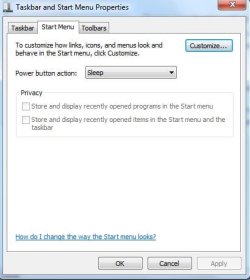
Right-click "All Programs" and UNcheck the two options under "Start Menu" - "Privacy".
 

My Computer

OS
Win 7 RC1
Ok! I'll have to be more specific, because it worked after I unchecked the two options, but after a restart, "All Programs" disappeared again.

The problem appeared after I installed "Microsoft Student with Encarta Premium 2009", witch includes "Learning Essentials for Students" (a program to learn tricks with Office 2007). This "Learning Essentials" is known to be a naughty program, with side-effects. So, I deleted its shortcut from C/ProgramData/Microsoft/Windows/Start Menu/Programs/.

Now, evrething works fine, including "All Programs" from "Start".

P.S.: I think the problem was caused by a special kind of shortcut. I will see...
 

My Computer

OS
Win 7 RC1
Me, again!
You only need to remove enough shortcuts from C/ProgramData/Microsoft/Windows/Start Menu/Programs/. It seems that, in Windows 7 RC1, the number of shortcuts in "All Programs", from "Start", is limited to something just under 100. (You can see "ProgramData" only if you check "Show hidden files, folders and drives", in "Control Panel" - "Folder options" - "View").
 

My Computer

OS
Win 7 RC1
Perhaps a solution...

Hello!
I issued the same strange thing! I fixed it quite fast deleting the last program entry in the Start menu / Programs folder - And I mean the last program that was installed in the computer ...no need to reboot or to modify the registry... nothing!
I hope this will be helpful for you also!
Of course ..you'll have to remember the last installed software... :))
Yours sincerely
P.S: In my case it was Cain&Abel... ;)
Best regards!
Dan
 

My Computer

OS
windows7 64 bit
Local Policy Snafu?

I was mucking about in MANY places using Admin Tools.
For the life of me I cannot remember EVERYPLACE I went.

But i ended up disabling Privacy in the Start Menu and therefore Jump Lists?
Where was I, and how do I get the Privacy Section enabled again?

blonde on blonde???
Catherine
 

Attachments

  • re-enable privacy.jpg
    re-enable privacy.jpg
    22.1 KB · Views: 3,580

My Computer

Computer Manufacturer/Model Number
Specs? I was unaware that computers needed glasses?
OS
Wndows 7 Build 7100
done fooling around....maybe?

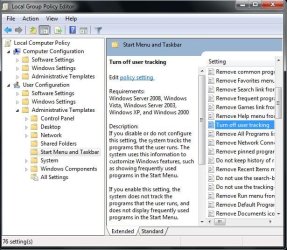
I found it. I was in gpedit.msc.

Local Group Policy Editor.
Administrative Templates
Start Menu and Taskbar.

The policy that I "configured?' was "Turn off user tracking".
I returned it to its default state "Not Configured.
The Privacy option is now enabled.

never mind... :(
Roseanne Rosannadanna
 

Attachments

  • Turn off user tracking.jpg
    Turn off user tracking.jpg
    69.7 KB · Views: 119

My Computer

Computer Manufacturer/Model Number
Specs? I was unaware that computers needed glasses?
OS
Wndows 7 Build 7100
i doubt.

maybe, maybe not.

over last months it happened way too often. & causing effect is _always_ installation of some new software. even recommended software.

so, humbly, by now... i create system-restore point before adding software. if that particular software creates "loss" of start-menu - ...
 

My Computer

Computer Manufacturer/Model Number
ASUS F80Q - Notebook
OS
win 7 rc
CPU
"Merom": Intel(R) Core(TM)2 Duo CPU T5800 @ 2.00GH
Memory
DDR2, 4GB
Graphics Card(s)
Mobile Intel(R) 45 Express
Sound Card
Realtek High Definition Audio
Monitor(s) Displays
Generic 14''
Screen Resolution
1280 x 800 @ 60Hz - Aspect Ratio 16:10
I have found that also, but I have found also that ea time i install a program i reboot, then I no longer have this problem.

Win7 clean install this afternoon, all was fine. installed 3 new programs and nothing appeared and I lost one that was there.
rebooted, one I had lost appeared. installed again #2, rebooted - it showed, installed #3 rebooted ok, installed #4 rebooted ok, so now I reboot after ea install of a new program. No longer loose any thing in start menu.
Win 7 Professional.
 
Me, again!
You only need to remove enough shortcuts from C/ProgramData/Microsoft/Windows/Start Menu/Programs/. It seems that, in Windows 7 RC1, the number of shortcuts in "All Programs", from "Start", is limited to something just under 100. (You can see "ProgramData" only if you check "Show hidden files, folders and drives", in "Control Panel" - "Folder options" - "View").

This is the fix, it worked for me anyway.

Running Win7 RC x64, and yeah all of a sudden it went blank like a post
on the previous page showed. I'm used to having hundreds of things in
there from XP so I just tipped that Windows 7 limit of 100 or so.. it didnt take
many removals for it to come back, no reboot necessary - so thanks surogatu :party:
 

My Computer

OS
Windows 7 RC x64
CPU
Quad Core intel E6660
Motherboard
Giga p35
Memory
4 gig
Graphics Card(s)
gt8600
Sound Card
onboard crap
Monitor(s) Displays
dual 19"
Hard Drives
too many
PSU
650 watt beast
Case
self constructed
Cooling
a ****load
Back
Top