Start Menu Shortcut Program

Download a Shortcut that Opens the Start Menu in Windows

   Information
This Start Menu program acts as a shortcut that will open the Start Menu just as if you had pressed CTRL+ESC in Windows 7 or Vista.
   Note
You can copy and use the Start Menu.exe file below in any user account (administrator or standard) to open the Start Menu in that user account.
   Tip
UAC will need to be turned on for this work.

You can Pin to Taskbar or Pin to Start Menu the Start Menu.exe file, or move where you like for easy use.

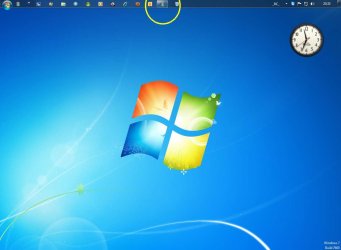
If you moved the taskbar to another screen location (left or right) and you do not like how the Start button (orb) is now at the top of the taskbar, then you can use the free program Start Killer to remove the default Start button (orb). Afterwards, you can place the Start Menu.exe file in a new folder somewhere, unlock the taskbar, pin the new folder to the taskbar as a toolbar, right click on the dotted lines to the left of the new toolbar and uncheck Show Text and Show Titile, click on View and Large Icons, then drag this new Start button toolbar where you like on the taskbar and lock the taskbar.


Here's How:
1. To download the Start Menu program, click on either one of the icons below for the one that you would like to be used for the Start Menu.exe file.
NOTE: If you would prefer a different icon than these, then just post a reply with the ICO or PNG you want attached below. If the other icon is still being displayed after using another one, then rebuilding the icon cache will fix it. :)


2. Click on Save, and save the .zip file to the desktop.

3. Open the .zip file and extract the Start Menu.exe file to the desktop.

4. If you have not already, be sure to turn on UAC to at least the default level. It needs to be turned on to be able to unblock this shortcut to allow it to work.

5. Right click on the Start Menu.exe file, and click on Properties, General tab, and on the Unblock button. (see screenshot below)
NOTE: If you do not have a Unblock button under the General tab, then the file is already unblocked and you can continue on to step 5.
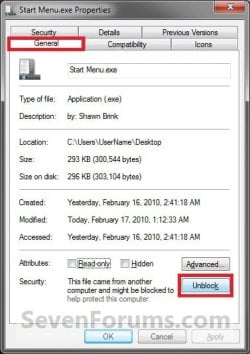
Unblock.jpg
6. Copy the Start Menu.exe file into any user account on the computer, that would like to open the Start Menu with it, and move it to where you like for easy use.
That's it,
Shawn


Attachments

  • Start_Orb.png
    Start_Orb.png
    18 KB · Views: 93,486
  • Start_Menu.png
    Start_Menu.png
    7.4 KB · Views: 35,471
  • Start Menu.zip
    Start Menu.zip
    38.9 KB · Views: 2,077
  • Start Menu_Orb.zip
    Start Menu_Orb.zip
    95 KB · Views: 5,304
Last edited:
Wherever I save startmenu.exe, doubleclick on it never opens my startmenu. However, if pinned to the taskbar, a click on its icon changes its appearance as "activated".
 

My Computer

Computer type
PC/Desktop
OS
Win7 pro 32-bit +SP1 as multiboot with XP and Win8
CPU
AMD Athlon 64 X2 dual core 3800+
Motherboard
A8N
Memory
3 GB
Monitor(s) Displays
2x 1920x1080, 1x Beamer
Internet Speed
100.000 kbps by fiber
Hello Tom, and welcome to Seven Forums.

Strange. A few questions:
  • Did you Unblock (step 4) the EXE file?
  • Do you have any issues running any other EXE on your computer? You can test by running C:\Windows\notepad.exe.
  • Could you post a screenshot of this "activated" appearance that you see?
 

My Computer

Computer type
PC/Desktop
Computer Manufacturer/Model Number
Self built custom
OS
64-bit Windows 11 Pro for Workstations
CPU
Intel i7-8700K OC'd to 5 GHz
Motherboard
ASUS ROG Maximus XI Formula Z390
Memory
64 GB (4x16GB) G.SKILL TridentZ RGB DDR4 3600 MHz
Graphics Card(s)
ASUS ROG-STRIX-GTX1080TI-O11G-GAMING
Sound Card
Integrated
Monitor(s) Displays
2 x Samsung Odyssey G7 27"
Screen Resolution
2560x1440
Hard Drives
1TB Samsung 990 PRO M.2,
4TB Samsung 990 PRO PRO M.2,
TerraMaster F8 SSD Plus NAS
PSU
Seasonic Prime Titanium 850W
Case
Thermaltake Core P3
Cooling
Corsair Hydro H115i
Keyboard
Logitech wireless K800
Mouse
Logitech MX Master 4
Internet Speed
2 Gb/s Download and 100 Mb/s Upload
Antivirus
Malwarebyte Anti-Malware Premium
Browser
Google Chrome
Other Info
Logitech Z625 speaker system,
Logitech BRIO 4K Pro webcam,
HP Color LaserJet Pro MFP M477fdn,
APC SMART-UPS RT 1000 XL - SURT1000XLI,
Galaxy S23 Plus phone
Did you Unblock (step 4) the EXE file?
The option to "Unblock" never appeared, so I did not perform it. Does "unblock" refer to DEP, or to what else? After being started, startmenu.exe is visible in Process Explorer, but vanishes about 5-10 sec later. Other exe files can be executed as they should.There is no virus protection running except Microsoft Essentials.

Many thanks for taking care!
Tom
 

Attachments

  • startmenu-exe-on.jpg
    startmenu-exe-on.jpg
    43.7 KB · Views: 2,176
  • startmenu-exe-on-2.jpg
    startmenu-exe-on-2.jpg
    165.7 KB · Views: 1,950

My Computer

Computer type
PC/Desktop
OS
Win7 pro 32-bit +SP1 as multiboot with XP and Win8
CPU
AMD Athlon 64 X2 dual core 3800+
Motherboard
A8N
Memory
3 GB
Monitor(s) Displays
2x 1920x1080, 1x Beamer
Internet Speed
100.000 kbps by fiber
Kicks,

Unblock in the EXE file's right click properties page is part of UAC. The exe would only appear briefly since it is only runing briefly to act just like you had pressed the CTRL+ESC keys to open the Start Menu. It does not continue to run afterwards.

If you manually press CTRL+ESC on your keyboard, does it open the Start Menu for you?
 

My Computer

Computer type
PC/Desktop
Computer Manufacturer/Model Number
Self built custom
OS
64-bit Windows 11 Pro for Workstations
CPU
Intel i7-8700K OC'd to 5 GHz
Motherboard
ASUS ROG Maximus XI Formula Z390
Memory
64 GB (4x16GB) G.SKILL TridentZ RGB DDR4 3600 MHz
Graphics Card(s)
ASUS ROG-STRIX-GTX1080TI-O11G-GAMING
Sound Card
Integrated
Monitor(s) Displays
2 x Samsung Odyssey G7 27"
Screen Resolution
2560x1440
Hard Drives
1TB Samsung 990 PRO M.2,
4TB Samsung 990 PRO PRO M.2,
TerraMaster F8 SSD Plus NAS
PSU
Seasonic Prime Titanium 850W
Case
Thermaltake Core P3
Cooling
Corsair Hydro H115i
Keyboard
Logitech wireless K800
Mouse
Logitech MX Master 4
Internet Speed
2 Gb/s Download and 100 Mb/s Upload
Antivirus
Malwarebyte Anti-Malware Premium
Browser
Google Chrome
Other Info
Logitech Z625 speaker system,
Logitech BRIO 4K Pro webcam,
HP Color LaserJet Pro MFP M477fdn,
APC SMART-UPS RT 1000 XL - SURT1000XLI,
Galaxy S23 Plus phone
Hello Shawn,

Doesn't work for me. I double click on it but nothing happens. Its already unblocked

Any thoughts ??
Captain
 

My Computer

Computer Manufacturer/Model Number
Samsung NP550P5C-S02IN
OS
Windows 7 Ultimate - 64-bit | Windows 8 Pro - 64-bit
CPU
Intel® Core™ i7 Processor 3,610QM (2.30Hz, 6MB L3 Cach
Memory
8 GB
Graphics Card(s)
NVIDIA® GeForce® GT 650M 2GB Graphics, Optimus™ techno
Sound Card
SoundAlive™ JBL 3 Speakers (With sub-Woofer)
Monitor(s) Displays
39.62cm (15.6) SuperBright 300nit HD+ LED Display
Screen Resolution
1,600 x 900, Anti-Reflective
Hard Drives
1TB S-ATA II Hard Drive (5,400RPM)
Hi Shyam,

Strange that it is already unblocked.

Where did you download it to, and run the EXE from?

Is UAC turned on?

If you manually press CTRL+ESC on your keyboard, does it open the Start Menu for you?
 

My Computer

Computer type
PC/Desktop
Computer Manufacturer/Model Number
Self built custom
OS
64-bit Windows 11 Pro for Workstations
CPU
Intel i7-8700K OC'd to 5 GHz
Motherboard
ASUS ROG Maximus XI Formula Z390
Memory
64 GB (4x16GB) G.SKILL TridentZ RGB DDR4 3600 MHz
Graphics Card(s)
ASUS ROG-STRIX-GTX1080TI-O11G-GAMING
Sound Card
Integrated
Monitor(s) Displays
2 x Samsung Odyssey G7 27"
Screen Resolution
2560x1440
Hard Drives
1TB Samsung 990 PRO M.2,
4TB Samsung 990 PRO PRO M.2,
TerraMaster F8 SSD Plus NAS
PSU
Seasonic Prime Titanium 850W
Case
Thermaltake Core P3
Cooling
Corsair Hydro H115i
Keyboard
Logitech wireless K800
Mouse
Logitech MX Master 4
Internet Speed
2 Gb/s Download and 100 Mb/s Upload
Antivirus
Malwarebyte Anti-Malware Premium
Browser
Google Chrome
Other Info
Logitech Z625 speaker system,
Logitech BRIO 4K Pro webcam,
HP Color LaserJet Pro MFP M477fdn,
APC SMART-UPS RT 1000 XL - SURT1000XLI,
Galaxy S23 Plus phone
Hi Shyam,

Strange that it is already unblocked.

Where did you download it to, and run the EXE from?

Is UAC turned on?

If you manually press CTRL+ESC on your keyboard, does it open the Start Menu for you?

Shawn,

I download it from your Tutorial.
UAC is turned off and YES CTRL + ESC works. I found that really strange that why though of posting it
 

My Computer

Computer Manufacturer/Model Number
Samsung NP550P5C-S02IN
OS
Windows 7 Ultimate - 64-bit | Windows 8 Pro - 64-bit
CPU
Intel® Core™ i7 Processor 3,610QM (2.30Hz, 6MB L3 Cach
Memory
8 GB
Graphics Card(s)
NVIDIA® GeForce® GT 650M 2GB Graphics, Optimus™ techno
Sound Card
SoundAlive™ JBL 3 Speakers (With sub-Woofer)
Monitor(s) Displays
39.62cm (15.6) SuperBright 300nit HD+ LED Display
Screen Resolution
1,600 x 900, Anti-Reflective
Hard Drives
1TB S-ATA II Hard Drive (5,400RPM)
Shyam,

As a test, turn on UAC, restart the computer, and see if it works for you then.

I'm thinking that may be it since you did not have a option to "Unblock" the EXE since you had UAC off. In turn preventing it from running.
 

My Computer

Computer type
PC/Desktop
Computer Manufacturer/Model Number
Self built custom
OS
64-bit Windows 11 Pro for Workstations
CPU
Intel i7-8700K OC'd to 5 GHz
Motherboard
ASUS ROG Maximus XI Formula Z390
Memory
64 GB (4x16GB) G.SKILL TridentZ RGB DDR4 3600 MHz
Graphics Card(s)
ASUS ROG-STRIX-GTX1080TI-O11G-GAMING
Sound Card
Integrated
Monitor(s) Displays
2 x Samsung Odyssey G7 27"
Screen Resolution
2560x1440
Hard Drives
1TB Samsung 990 PRO M.2,
4TB Samsung 990 PRO PRO M.2,
TerraMaster F8 SSD Plus NAS
PSU
Seasonic Prime Titanium 850W
Case
Thermaltake Core P3
Cooling
Corsair Hydro H115i
Keyboard
Logitech wireless K800
Mouse
Logitech MX Master 4
Internet Speed
2 Gb/s Download and 100 Mb/s Upload
Antivirus
Malwarebyte Anti-Malware Premium
Browser
Google Chrome
Other Info
Logitech Z625 speaker system,
Logitech BRIO 4K Pro webcam,
HP Color LaserJet Pro MFP M477fdn,
APC SMART-UPS RT 1000 XL - SURT1000XLI,
Galaxy S23 Plus phone
Shyam,

As a test, turn on UAC, restart the computer, and see if it works for you then.

I'm thinking that may be it since you did not have a option to "Unblock" the EXE since you had UAC off. In turn preventing it from running.

Shawn,

Got it working ... Not sure what happen even turning on UAC didn't make any difference finally opened the Start Menu.exe with Restorator then did a save as then tired it work its a mystery not sure how !! I guess you created it .. Good work !!
 

My Computer

Computer Manufacturer/Model Number
Samsung NP550P5C-S02IN
OS
Windows 7 Ultimate - 64-bit | Windows 8 Pro - 64-bit
CPU
Intel® Core™ i7 Processor 3,610QM (2.30Hz, 6MB L3 Cach
Memory
8 GB
Graphics Card(s)
NVIDIA® GeForce® GT 650M 2GB Graphics, Optimus™ techno
Sound Card
SoundAlive™ JBL 3 Speakers (With sub-Woofer)
Monitor(s) Displays
39.62cm (15.6) SuperBright 300nit HD+ LED Display
Screen Resolution
1,600 x 900, Anti-Reflective
Hard Drives
1TB S-ATA II Hard Drive (5,400RPM)
I tested it with UAC off, and it would not run for me until I turned it on and restarted again.

Where did you save it originally when you downloaded it?
 

My Computer

Computer type
PC/Desktop
Computer Manufacturer/Model Number
Self built custom
OS
64-bit Windows 11 Pro for Workstations
CPU
Intel i7-8700K OC'd to 5 GHz
Motherboard
ASUS ROG Maximus XI Formula Z390
Memory
64 GB (4x16GB) G.SKILL TridentZ RGB DDR4 3600 MHz
Graphics Card(s)
ASUS ROG-STRIX-GTX1080TI-O11G-GAMING
Sound Card
Integrated
Monitor(s) Displays
2 x Samsung Odyssey G7 27"
Screen Resolution
2560x1440
Hard Drives
1TB Samsung 990 PRO M.2,
4TB Samsung 990 PRO PRO M.2,
TerraMaster F8 SSD Plus NAS
PSU
Seasonic Prime Titanium 850W
Case
Thermaltake Core P3
Cooling
Corsair Hydro H115i
Keyboard
Logitech wireless K800
Mouse
Logitech MX Master 4
Internet Speed
2 Gb/s Download and 100 Mb/s Upload
Antivirus
Malwarebyte Anti-Malware Premium
Browser
Google Chrome
Other Info
Logitech Z625 speaker system,
Logitech BRIO 4K Pro webcam,
HP Color LaserJet Pro MFP M477fdn,
APC SMART-UPS RT 1000 XL - SURT1000XLI,
Galaxy S23 Plus phone
I tested it with UAC off, and it would not run for me until I turned it on and restarted again.

Where did you save it originally when you downloaded it?

To the Desktop ..
 

My Computer

Computer Manufacturer/Model Number
Samsung NP550P5C-S02IN
OS
Windows 7 Ultimate - 64-bit | Windows 8 Pro - 64-bit
CPU
Intel® Core™ i7 Processor 3,610QM (2.30Hz, 6MB L3 Cach
Memory
8 GB
Graphics Card(s)
NVIDIA® GeForce® GT 650M 2GB Graphics, Optimus™ techno
Sound Card
SoundAlive™ JBL 3 Speakers (With sub-Woofer)
Monitor(s) Displays
39.62cm (15.6) SuperBright 300nit HD+ LED Display
Screen Resolution
1,600 x 900, Anti-Reflective
Hard Drives
1TB S-ATA II Hard Drive (5,400RPM)
Strange. Let's see how Kicks does after turning on UAC and restarting.
 

My Computer

Computer type
PC/Desktop
Computer Manufacturer/Model Number
Self built custom
OS
64-bit Windows 11 Pro for Workstations
CPU
Intel i7-8700K OC'd to 5 GHz
Motherboard
ASUS ROG Maximus XI Formula Z390
Memory
64 GB (4x16GB) G.SKILL TridentZ RGB DDR4 3600 MHz
Graphics Card(s)
ASUS ROG-STRIX-GTX1080TI-O11G-GAMING
Sound Card
Integrated
Monitor(s) Displays
2 x Samsung Odyssey G7 27"
Screen Resolution
2560x1440
Hard Drives
1TB Samsung 990 PRO M.2,
4TB Samsung 990 PRO PRO M.2,
TerraMaster F8 SSD Plus NAS
PSU
Seasonic Prime Titanium 850W
Case
Thermaltake Core P3
Cooling
Corsair Hydro H115i
Keyboard
Logitech wireless K800
Mouse
Logitech MX Master 4
Internet Speed
2 Gb/s Download and 100 Mb/s Upload
Antivirus
Malwarebyte Anti-Malware Premium
Browser
Google Chrome
Other Info
Logitech Z625 speaker system,
Logitech BRIO 4K Pro webcam,
HP Color LaserJet Pro MFP M477fdn,
APC SMART-UPS RT 1000 XL - SURT1000XLI,
Galaxy S23 Plus phone
Shawn, the Windows key and Ctrl + Esc are working. So I turned on UAC, rebootet, got "unblock", clicked it. Now, Startmenu.exe was working fine. Then I turned off UAC, Startmenu.exe still working. When I rebootet, Startmenu.exe fails as before.

As for the trick of Capt.Jack Sparrow, I did not quite understand what to do.

---
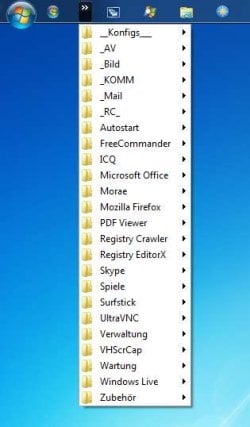
An additional question: Can startmenu.exe be told by a parameter to open All Programs instead? This would be a better solution than my workaraound with a new toolbar in the taskbar (screenshot).
 

Attachments

  • taskbar-allprograms.jpg
    taskbar-allprograms.jpg
    19.8 KB · Views: 439
Last edited:

My Computer

Computer type
PC/Desktop
OS
Win7 pro 32-bit +SP1 as multiboot with XP and Win8
CPU
AMD Athlon 64 X2 dual core 3800+
Motherboard
A8N
Memory
3 GB
Monitor(s) Displays
2x 1920x1080, 1x Beamer
Internet Speed
100.000 kbps by fiber
Kicks,

I'm happy to hear that you got it working with UAC on.


You could pin that folder to the taskbar to have that on the taskbar. You can use on of the hidden folders below.

All Users:
C:\ProgramData\Microsoft\Windows\Start Menu\Programs

Only your user account:
C:\Users\(user-name)\AppData\Roaming\Microsoft\Windows\Start Menu\Programs

Hope this helps,
Shawn
 

My Computer

Computer type
PC/Desktop
Computer Manufacturer/Model Number
Self built custom
OS
64-bit Windows 11 Pro for Workstations
CPU
Intel i7-8700K OC'd to 5 GHz
Motherboard
ASUS ROG Maximus XI Formula Z390
Memory
64 GB (4x16GB) G.SKILL TridentZ RGB DDR4 3600 MHz
Graphics Card(s)
ASUS ROG-STRIX-GTX1080TI-O11G-GAMING
Sound Card
Integrated
Monitor(s) Displays
2 x Samsung Odyssey G7 27"
Screen Resolution
2560x1440
Hard Drives
1TB Samsung 990 PRO M.2,
4TB Samsung 990 PRO PRO M.2,
TerraMaster F8 SSD Plus NAS
PSU
Seasonic Prime Titanium 850W
Case
Thermaltake Core P3
Cooling
Corsair Hydro H115i
Keyboard
Logitech wireless K800
Mouse
Logitech MX Master 4
Internet Speed
2 Gb/s Download and 100 Mb/s Upload
Antivirus
Malwarebyte Anti-Malware Premium
Browser
Google Chrome
Other Info
Logitech Z625 speaker system,
Logitech BRIO 4K Pro webcam,
HP Color LaserJet Pro MFP M477fdn,
APC SMART-UPS RT 1000 XL - SURT1000XLI,
Galaxy S23 Plus phone
Strange. Let's see how Kicks does after turning on UAC and restarting.

Hello Shawn,

Any idea why its happening if UAC is turned off ??
 

My Computer

Computer Manufacturer/Model Number
Samsung NP550P5C-S02IN
OS
Windows 7 Ultimate - 64-bit | Windows 8 Pro - 64-bit
CPU
Intel® Core™ i7 Processor 3,610QM (2.30Hz, 6MB L3 Cach
Memory
8 GB
Graphics Card(s)
NVIDIA® GeForce® GT 650M 2GB Graphics, Optimus™ techno
Sound Card
SoundAlive™ JBL 3 Speakers (With sub-Woofer)
Monitor(s) Displays
39.62cm (15.6) SuperBright 300nit HD+ LED Display
Screen Resolution
1,600 x 900, Anti-Reflective
Hard Drives
1TB S-ATA II Hard Drive (5,400RPM)
Working on the issue. :)
 

My Computer

Computer type
PC/Desktop
Computer Manufacturer/Model Number
Self built custom
OS
64-bit Windows 11 Pro for Workstations
CPU
Intel i7-8700K OC'd to 5 GHz
Motherboard
ASUS ROG Maximus XI Formula Z390
Memory
64 GB (4x16GB) G.SKILL TridentZ RGB DDR4 3600 MHz
Graphics Card(s)
ASUS ROG-STRIX-GTX1080TI-O11G-GAMING
Sound Card
Integrated
Monitor(s) Displays
2 x Samsung Odyssey G7 27"
Screen Resolution
2560x1440
Hard Drives
1TB Samsung 990 PRO M.2,
4TB Samsung 990 PRO PRO M.2,
TerraMaster F8 SSD Plus NAS
PSU
Seasonic Prime Titanium 850W
Case
Thermaltake Core P3
Cooling
Corsair Hydro H115i
Keyboard
Logitech wireless K800
Mouse
Logitech MX Master 4
Internet Speed
2 Gb/s Download and 100 Mb/s Upload
Antivirus
Malwarebyte Anti-Malware Premium
Browser
Google Chrome
Other Info
Logitech Z625 speaker system,
Logitech BRIO 4K Pro webcam,
HP Color LaserJet Pro MFP M477fdn,
APC SMART-UPS RT 1000 XL - SURT1000XLI,
Galaxy S23 Plus phone
Did we ever get this fixed? I too have UAC off, no unblock & no response other than the taskbar icon briefly turning to active.
 

My Computer

Computer Manufacturer/Model Number
HP Touchsmart IQ771.uk
OS
Windows 7 Ultimate x64
CPU
AMD Turion(tm) 64 X2 Mobile Technology TL-56
Motherboard
ASUS Pheonix
Memory
3GB Nanya PC2-6400 DDR2-SDRAM SO-DIM (400MHz)
Graphics Card(s)
NVIDIA GeForce Go 7600 256MB GDDR3 SDRAM
Sound Card
High Definition Intergrated NVIDIA MCP51
Monitor(s) Displays
46" Sony Bravia HDTV
Screen Resolution
1600x1200
Hard Drives
1.5TB Samsug
320GB Seagate ST3320820AS - SATA 3Gb/s 8MB
500GB Maxtor Basics STM305003EHD301-RK
Internet Speed
↓6.32 Mb/s ↑0.35 Mb/s ↔26ms
Other Info
BIOS - American Megatrends Inc. 5.07
Ethernet Port - NVIDIA nForce 10/100/1000 Mbps
DVD Drive - TSSTcorp DVDR/RW TS-T632L
Hello Stu,

No, UAC will still need to be turned on first to be able to unblock the shortcut for it to properly work.
 

My Computer

Computer type
PC/Desktop
Computer Manufacturer/Model Number
Self built custom
OS
64-bit Windows 11 Pro for Workstations
CPU
Intel i7-8700K OC'd to 5 GHz
Motherboard
ASUS ROG Maximus XI Formula Z390
Memory
64 GB (4x16GB) G.SKILL TridentZ RGB DDR4 3600 MHz
Graphics Card(s)
ASUS ROG-STRIX-GTX1080TI-O11G-GAMING
Sound Card
Integrated
Monitor(s) Displays
2 x Samsung Odyssey G7 27"
Screen Resolution
2560x1440
Hard Drives
1TB Samsung 990 PRO M.2,
4TB Samsung 990 PRO PRO M.2,
TerraMaster F8 SSD Plus NAS
PSU
Seasonic Prime Titanium 850W
Case
Thermaltake Core P3
Cooling
Corsair Hydro H115i
Keyboard
Logitech wireless K800
Mouse
Logitech MX Master 4
Internet Speed
2 Gb/s Download and 100 Mb/s Upload
Antivirus
Malwarebyte Anti-Malware Premium
Browser
Google Chrome
Other Info
Logitech Z625 speaker system,
Logitech BRIO 4K Pro webcam,
HP Color LaserJet Pro MFP M477fdn,
APC SMART-UPS RT 1000 XL - SURT1000XLI,
Galaxy S23 Plus phone
Help

For the life of me, I've tried several times and I cannot make the origninal orb go away. Should I be able to do this
 

My Computer

OS
Windows 7 64 bit
Back
Top