Start Menu Strangeness

Magnakai

New member
Member
VIP
Local time
11:24 PM
Messages
160
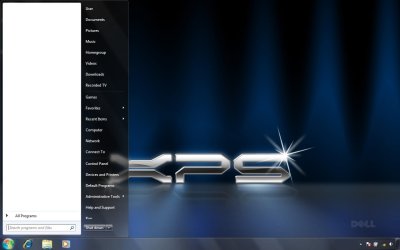
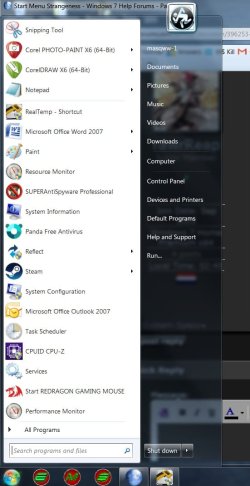
not sure if anyone noticed this before. if, u have a lot of default start menu options or set customize programs/jump lists to 30/60 in the task bar, and somehow removed ur user pic/frame, ur start menu behaves in a strange way ... BUT only the 1st time u activate the start button every startup. the start menu does not reach all the way up to the top. there will be a small gap from the top. but on the second time and subsequent times, it maximizes to fullscreen. This appears to be per startup.

could be because of aero theme, and user pic/frame had been removed.
have tested with both aero snap on/off. also no difference if task bar was auto-hidden, or locked.

Figure 1 the 1st time after boot
screen1.jpg


Figure 2 subsequent times.
screen2.jpg

does anyone know how to fix this so it reaches the top every time?

* just realized that this does not only occur once per startup. if u select a different theme at personalization, the first time will be like that too.
 
Last edited:

My Computer

Computer type
PC/Desktop
OS
Windows 7 Ultimate x64
How does it act if you change the screen resolution?
 

My Computer

Computer type
PC/Desktop
Computer Manufacturer/Model Number
Hp
OS
Windows 7 64 bit Professional
CPU
AMD A 8
Motherboard
Amd
Memory
16gb
Graphics Card(s)
On board
Hard Drives
Se agate 1 tv
Antivirus
Security
Clearly because in the 2nd picture, "Run" is being added, this causes the menu to go up a little more. ;P
 

My Computer

Computer type
PC/Desktop
OS
Windows 7 Home Premium x64
Hi,
Your User picture is not even seen
Mine is all the way up set at 16 recent program if you notice set at 16 it really shows 20 recent programs :)
But my user pictures clearly shows up and is at the very top of the monitor
I'm on a custom dpi at 120%
start menu list 16 shows 20.jpg
 

My Computer

Computer type
PC/Desktop
Computer Manufacturer/Model Number
Custom assembled by me :}
OS
Win-7-Pro64bit 7-H-Prem-64bit
CPU
i7-5930K 2nd i9-9940x both water blocked VRM's too
Motherboard
ASUS SABERTOOTH X99 2nd ASUS x299 Apex
Memory
Trident-z 3200C14 2nd Trident-z 3600C16
Graphics Card(s)
EVGA 1080ti ftw3 2nd Titan Xp both water blocked
Sound Card
Built-in Realtek
Monitor(s) Displays
1-AOC G2460PG 24"G-Sync 144Hz/ 2nd 1-ASUS VG248QE 24" 144Hz
Screen Resolution
1920 x 1080 144Hz
Hard Drives
2-Samsung M.2 Evo & Evo Plus
2-Samsung 850 EVO 500GB SSD's/ 3-2.5 W.D. Black 1tb-&3-1tb/3-3.5 WD Black 1tb hdd's
PSU
EVGA SuperNOVA 1000-P2 2nd 1200-P2
Case
2-Corsair Obsidian Series 450D Black ATX Mid Tower
Cooling
Custom water loops
Keyboard
Logitech G710+/ 2nd Logitech G910
Mouse
2-RedDragon M901 Perdition 16400 dpi Gaming mouse = wired
Internet Speed
Comcast Ping 19ms 89.31mbps download speed 6.12mbps upload
Antivirus
Malwarebytes Pro/ Superantispyware Pro
Browser
FireFox & Pale moon
Other Info
2nd ASUS X299 Apex/Intel i9-9940x with Custom water loop/7H-Prem-x64/Corsair 450D case/Ram Trident-z 3600C16 4x8gb / Samsung970Evo plus 500gb SSD/Dual ssd EZ swap evo/PSU EVGA SuperNova 1200w-P2 80+Platinum/GPU Titan Xp /8-ML-140 on push-pull on 2-280GTX rads
Hi, thanks all for the responses.

i have only tested with native resolution 1280 x 800 (16:10 screen). i will try to lower it cflusflwfl, if i get the chance to work on that pc later.

no rawrReap, i took the screenies a few minutes apart, and i did not customize start menu/task bar in-between, in any way. the "Run" (below Help and Support) was already in the first screenshot, just that you can't see it and no scroll bar appears to allow me to scroll down. yes, like i inferred in the first post, i customized programs/jump lists to 30/60 in the task bar, ticked all the options i could, removed my user pic/frame, and my start menu behaves in this strange way.

i further tested, if i were to set my taskbar to the top orientation, i can squeeze in 17 programs max on the left side. 18th & subsequent programs you can still fit in, but they won't show. u can't access them. when u start to remove the top ones off, the 18th and subsequent ones begin to flush up, that's how i know they are indeed there. i'm talking about pinned quick launch shortcuts, haven't tested recent programs. but shouldn't be any different since the icon sizes are the same.

now i'm thinking it is pretty obvious that the height of the gap is equal to the remaining portion of my aero user portrait (with frame) which sticks out over the edge of the menu, had it not been removed ... so this accounts for the size of the gap. what i don't understand is why only on the second and subsequent times i activate the start button, it pushes up to max height (until the next restart/logon). the first time i activate my start button it always shows as in figure 1, ie. with gap. or is there a way i can make it static? either way- with gap or no.

note that setting my taskbar to the top orientation ends the strange resizing behavior. my desktop would appear as in Figure 1 all the time, at maxed fixed size, but with a bit of pattern 'disfigurement' on the body of the menu (first time only). very sry, don't know how else to describe it except 'disfigurement'.
 
Last edited:

My Computer

Computer type
PC/Desktop
OS
Windows 7 Ultimate x64
Back
Top