Start Orb won't change.

DanFriday

New member
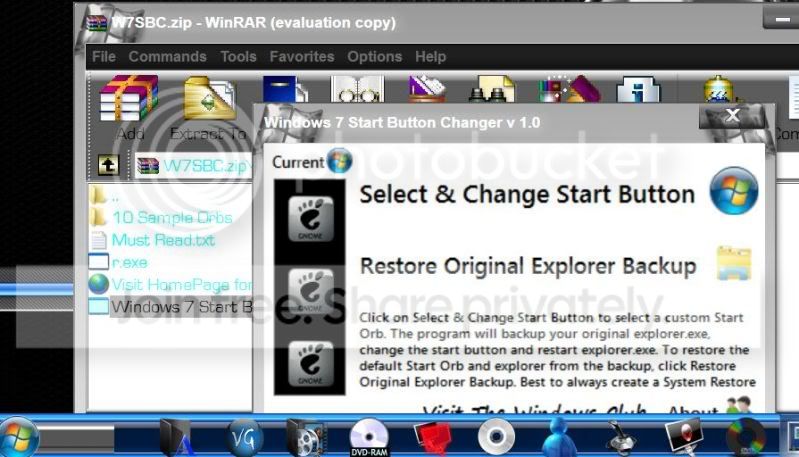
I've tried several times to change the start orb and it wont change. I added the r .exe to its folder as in instructions and it still wont change. The screen does flicker when I click on an orb file as if its changing it, but its still the original orb. Any ideas???
starorb.jpg
 

My Computer

Computer Manufacturer/Model Number
HP Pavillion- p6331-p
OS
Windows 7 (64bit)
CPU
AMD Athlon II X4 630 2.8 GHz
Motherboard
Foxconn: H-Rs780-uATX
Memory
8.00GB DDR3-SDRAM (1333 MHz) ( Max allowed-16GB)
Graphics Card(s)
ATI Radeon HD 4200
Sound Card
Realtek High Def Audio
Monitor(s) Displays
HP 20" high Def Widescreen
Screen Resolution
1600x 900
Hard Drives
Seagate ST3750528AS- 700 GB
Keyboard
Logitech EX110 Cordless
Mouse
Logitech LX Laser Cordless
Internet Speed
25/25

My Computer

Computer Manufacturer/Model Number
Sony Vaio FZ21Z
OS
Windows 7 Ultimate x64 ®™
CPU
Intel Core 2 Duo (2.2 GHz)
Motherboard
Sony (Intel Chipset)
Memory
2x 2GB Corsair (667 MHz)
Graphics Card(s)
NVIDIA 8600M GS (256MB)
Sound Card
Sigmatel
Monitor(s) Displays
15.4" TFT X-Black
Screen Resolution
1280x800
Hard Drives
Western Digital 300GB Scorpio Black (7200rpm)
Mouse
Logitech Anywhere MX
Internet Speed
Sky 5MB
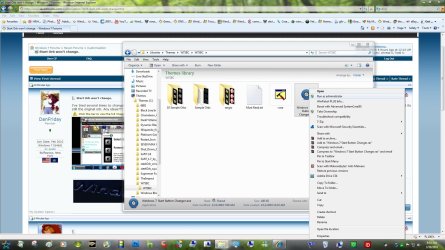
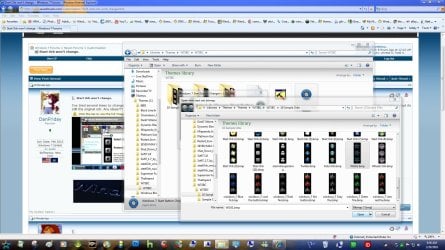
Did you Run as Admin? Here's the screens I get when I'm changing orbs, No problems.
 

Attachments

  • start orb.jpg
    start orb.jpg
    501.1 KB · Views: 227
  • start orb 2.jpg
    start orb 2.jpg
    571.5 KB · Views: 220

My Computer

Computer type
PC/Desktop
Computer Manufacturer/Model Number
Self Built
OS
Win 10 Pro x64
CPU
Intel I5-2500K @3.3GHz
Motherboard
Asrock P67 Extreme4
Memory
16GB G.Skill Ripjaws X (4x4GB)
Graphics Card(s)
EVGA GeForce 750 Ti SC 2GB
Sound Card
ASUS Xonar DG 5.1 Channels 24-bit 96KHz PCI Interface Sound
Monitor(s) Displays
auria eq2367
Screen Resolution
1920 x 1080
Hard Drives
250GB Samsung 850 EVO SSD
1TB WD Blue
1TB Hitachi
PSU
SeaSonic X 650W 80 Plus Gold
Case
Corsair Obsidian 750D
Cooling
Corsair H60, Three 140mm case fans
Keyboard
Logitech Wireless Keyboard K520
Mouse
Logitech Wireless Mouse M310
Internet Speed
Wave Broadband ~ 100 dn 5 up
Antivirus
Windows Defender, Malwarebytes Premium
Browser
Edge, IE11, Chrome
Other Info
Laptop specs: HP g7-1365dx /
CPU: AMD A6-3420M APU with Radeon(tm) HD Graphics /
RAM: Crucial 8Gb (2x4Gb) /
SSD: Crucial M4-CT128M4SSD2 ATA Device/ FW 000F /
GFX: AMD Radeon HD 6520G /
OS: Windows 10 Pro x64
As derekimo said, try running as Administrator.
 

My Computer

Computer type
PC/Desktop
Computer Manufacturer/Model Number
Custom built
OS
Windows 8 Pro 64-bit
CPU
Intel Core i7 950 @4.4GHz
Motherboard
EVGA 131-GT-E767
Memory
12GB DDR3 1333MHz @1400 (9-9-9-24)
Graphics Card(s)
2x AMD Radeon HD 6770
Sound Card
Sound Blaster Audigy
Monitor(s) Displays
Acer S231HL + Acer E19T5W
Screen Resolution
1920x1080 + 1440x900
Hard Drives
128GB Samsung 840 Pro
1TB Seagate Barracuda 7200RPM 64mb
500GB Seagate Barracuda 7200RPM 16mb
PSU
Corsair GS800
Case
Custom-made
Cooling
CM Hyper212+, lots of fans
Keyboard
NMB RT8255C+
Mouse
Func MS-3
Internet Speed
30/1.5
Antivirus
Microsoft Security Essentials/Spybot SD/Malwarebytes
Browser
Google Chrome
Other Info
Onkyo TX-27 receiver & two Realistic Optimus T100s.
Did you Run as Admin? Here's the screens I get when I'm changing orbs, No problems.

Yep, tried that. Still not working. grrrrrrrrrr
 

My Computer

Computer Manufacturer/Model Number
HP Pavillion- p6331-p
OS
Windows 7 (64bit)
CPU
AMD Athlon II X4 630 2.8 GHz
Motherboard
Foxconn: H-Rs780-uATX
Memory
8.00GB DDR3-SDRAM (1333 MHz) ( Max allowed-16GB)
Graphics Card(s)
ATI Radeon HD 4200
Sound Card
Realtek High Def Audio
Monitor(s) Displays
HP 20" high Def Widescreen
Screen Resolution
1600x 900
Hard Drives
Seagate ST3750528AS- 700 GB
Keyboard
Logitech EX110 Cordless
Mouse
Logitech LX Laser Cordless
Internet Speed
25/25
Did you Run as Admin? Here's the screens I get when I'm changing orbs, No problems.

Yep, tried that. Still not working. grrrrrrrrrr

Is it showing some message ? Then go to devart and download the program again. Dont forget to extract them all in a same file, and then create a shortcut of the .exe to the desktop.

Inform what happend then. :)
 

My Computer

Computer type
PC/Desktop
Computer Manufacturer/Model Number
Self Assembled
OS
Microsoft Windows 10 Pro Insider Preview 64-bit
CPU
Intel(R) Core(TM) i3-4130 CPU @ 3.40GHz
Motherboard
Gigabyte Technology Co., Ltd. B85M-D3H
Memory
Corsair Vengence 4GB x2 (8.00GB Dual-Channel DDR3 @ 798MHz)
Graphics Card(s)
2047MB GeForce GTS 450 (ZOTAC International)
Sound Card
Onboard (Realtek High Definition Audio)
Monitor(s) Displays
LG Flatron E2040T
Screen Resolution
1600x900
Hard Drives
Western Digital 1 TB
Seagate 500 GB
PSU
Corsair VS550
Case
Cooler Master K380
Cooling
Cooler Master Seidon 120V Plus
Keyboard
Logitech MK260r
Mouse
Logitech MK260r
Internet Speed
PMPL Broadband
Antivirus
Windows Defender + MBAM
Browser
Firefox
Other Info
Dell Studio 15" Laptop

My Computer

Computer Manufacturer/Model Number
Toshiba Satellite A135S4487
OS
Windows 7 Ultimate (32-bit)
CPU
Intel Mobile Core 2 Duo T5500 @ 1.66 GHz
Motherboard
Intel i945GM Chipset
Memory
2.0GB Dual Channel DDR2 @ 266 MHz 4-4-4-12
Graphics Card(s)
Mobile Intel 945 Express Chipset Family
Sound Card
Realtek High Definition Audio
Monitor(s) Displays
Generic PnP Monitor, Samsung 46" LCD
Screen Resolution
1280 x 800, 1920 x 1080
Hard Drives
100GB Hitachi ATA Device (IDE)
120GB Western Digital USB
250GB External USB
Keyboard
Microsoft Wireless Comfort Keyboard 5000
Mouse
Microsoft Wireless Mouse 5000
Internet Speed
DSL

My Computer

Computer Manufacturer/Model Number
HP Pavillion- p6331-p
OS
Windows 7 (64bit)
CPU
AMD Athlon II X4 630 2.8 GHz
Motherboard
Foxconn: H-Rs780-uATX
Memory
8.00GB DDR3-SDRAM (1333 MHz) ( Max allowed-16GB)
Graphics Card(s)
ATI Radeon HD 4200
Sound Card
Realtek High Def Audio
Monitor(s) Displays
HP 20" high Def Widescreen
Screen Resolution
1600x 900
Hard Drives
Seagate ST3750528AS- 700 GB
Keyboard
Logitech EX110 Cordless
Mouse
Logitech LX Laser Cordless
Internet Speed
25/25
Anyone have any idea what the problem might be?
 

My Computer

Computer Manufacturer/Model Number
HP Pavillion- p6331-p
OS
Windows 7 (64bit)
CPU
AMD Athlon II X4 630 2.8 GHz
Motherboard
Foxconn: H-Rs780-uATX
Memory
8.00GB DDR3-SDRAM (1333 MHz) ( Max allowed-16GB)
Graphics Card(s)
ATI Radeon HD 4200
Sound Card
Realtek High Def Audio
Monitor(s) Displays
HP 20" high Def Widescreen
Screen Resolution
1600x 900
Hard Drives
Seagate ST3750528AS- 700 GB
Keyboard
Logitech EX110 Cordless
Mouse
Logitech LX Laser Cordless
Internet Speed
25/25
Anyone have any idea what the problem might be?

Looking at your screenshot above, Where is the folder with the button changer at on your computer?
 

My Computer

Computer type
PC/Desktop
Computer Manufacturer/Model Number
Self Built
OS
Win 10 Pro x64
CPU
Intel I5-2500K @3.3GHz
Motherboard
Asrock P67 Extreme4
Memory
16GB G.Skill Ripjaws X (4x4GB)
Graphics Card(s)
EVGA GeForce 750 Ti SC 2GB
Sound Card
ASUS Xonar DG 5.1 Channels 24-bit 96KHz PCI Interface Sound
Monitor(s) Displays
auria eq2367
Screen Resolution
1920 x 1080
Hard Drives
250GB Samsung 850 EVO SSD
1TB WD Blue
1TB Hitachi
PSU
SeaSonic X 650W 80 Plus Gold
Case
Corsair Obsidian 750D
Cooling
Corsair H60, Three 140mm case fans
Keyboard
Logitech Wireless Keyboard K520
Mouse
Logitech Wireless Mouse M310
Internet Speed
Wave Broadband ~ 100 dn 5 up
Antivirus
Windows Defender, Malwarebytes Premium
Browser
Edge, IE11, Chrome
Other Info
Laptop specs: HP g7-1365dx /
CPU: AMD A6-3420M APU with Radeon(tm) HD Graphics /
RAM: Crucial 8Gb (2x4Gb) /
SSD: Crucial M4-CT128M4SSD2 ATA Device/ FW 000F /
GFX: AMD Radeon HD 6520G /
OS: Windows 10 Pro x64
Good eye derekimo. Looks like OP is running from inside winrar. That won't work.
 

My Computer

Computer Manufacturer/Model Number
Toshiba Satellite A135S4487
OS
Windows 7 Ultimate (32-bit)
CPU
Intel Mobile Core 2 Duo T5500 @ 1.66 GHz
Motherboard
Intel i945GM Chipset
Memory
2.0GB Dual Channel DDR2 @ 266 MHz 4-4-4-12
Graphics Card(s)
Mobile Intel 945 Express Chipset Family
Sound Card
Realtek High Definition Audio
Monitor(s) Displays
Generic PnP Monitor, Samsung 46" LCD
Screen Resolution
1280 x 800, 1920 x 1080
Hard Drives
100GB Hitachi ATA Device (IDE)
120GB Western Digital USB
250GB External USB
Keyboard
Microsoft Wireless Comfort Keyboard 5000
Mouse
Microsoft Wireless Mouse 5000
Internet Speed
DSL
Good eye derekimo. Looks like OP is running from inside winrar. That won't work.

That's what it looked like to me, I can't understand why it doesn't work for him.:huh:
 

My Computer

Computer type
PC/Desktop
Computer Manufacturer/Model Number
Self Built
OS
Win 10 Pro x64
CPU
Intel I5-2500K @3.3GHz
Motherboard
Asrock P67 Extreme4
Memory
16GB G.Skill Ripjaws X (4x4GB)
Graphics Card(s)
EVGA GeForce 750 Ti SC 2GB
Sound Card
ASUS Xonar DG 5.1 Channels 24-bit 96KHz PCI Interface Sound
Monitor(s) Displays
auria eq2367
Screen Resolution
1920 x 1080
Hard Drives
250GB Samsung 850 EVO SSD
1TB WD Blue
1TB Hitachi
PSU
SeaSonic X 650W 80 Plus Gold
Case
Corsair Obsidian 750D
Cooling
Corsair H60, Three 140mm case fans
Keyboard
Logitech Wireless Keyboard K520
Mouse
Logitech Wireless Mouse M310
Internet Speed
Wave Broadband ~ 100 dn 5 up
Antivirus
Windows Defender, Malwarebytes Premium
Browser
Edge, IE11, Chrome
Other Info
Laptop specs: HP g7-1365dx /
CPU: AMD A6-3420M APU with Radeon(tm) HD Graphics /
RAM: Crucial 8Gb (2x4Gb) /
SSD: Crucial M4-CT128M4SSD2 ATA Device/ FW 000F /
GFX: AMD Radeon HD 6520G /
OS: Windows 10 Pro x64
It won't work because the program requires "r.exe" (Resource Hacker, just renamed) in order to edit Explorer. You need r.exe and the start orb changer program in the same directory for it to work.

EDIT: Just re-read. Sorry. :p -slaps head-

Still dunno why it wouldn't work. Did you try extracting everything? Including the example orbs folder and the website link?
 

My Computer

Computer type
PC/Desktop
Computer Manufacturer/Model Number
Custom built
OS
Windows 8 Pro 64-bit
CPU
Intel Core i7 950 @4.4GHz
Motherboard
EVGA 131-GT-E767
Memory
12GB DDR3 1333MHz @1400 (9-9-9-24)
Graphics Card(s)
2x AMD Radeon HD 6770
Sound Card
Sound Blaster Audigy
Monitor(s) Displays
Acer S231HL + Acer E19T5W
Screen Resolution
1920x1080 + 1440x900
Hard Drives
128GB Samsung 840 Pro
1TB Seagate Barracuda 7200RPM 64mb
500GB Seagate Barracuda 7200RPM 16mb
PSU
Corsair GS800
Case
Custom-made
Cooling
CM Hyper212+, lots of fans
Keyboard
NMB RT8255C+
Mouse
Func MS-3
Internet Speed
30/1.5
Antivirus
Microsoft Security Essentials/Spybot SD/Malwarebytes
Browser
Google Chrome
Other Info
Onkyo TX-27 receiver & two Realistic Optimus T100s.

My Computer

Computer type
PC/Desktop
Computer Manufacturer/Model Number
Self Built
OS
Win 10 Pro x64
CPU
Intel I5-2500K @3.3GHz
Motherboard
Asrock P67 Extreme4
Memory
16GB G.Skill Ripjaws X (4x4GB)
Graphics Card(s)
EVGA GeForce 750 Ti SC 2GB
Sound Card
ASUS Xonar DG 5.1 Channels 24-bit 96KHz PCI Interface Sound
Monitor(s) Displays
auria eq2367
Screen Resolution
1920 x 1080
Hard Drives
250GB Samsung 850 EVO SSD
1TB WD Blue
1TB Hitachi
PSU
SeaSonic X 650W 80 Plus Gold
Case
Corsair Obsidian 750D
Cooling
Corsair H60, Three 140mm case fans
Keyboard
Logitech Wireless Keyboard K520
Mouse
Logitech Wireless Mouse M310
Internet Speed
Wave Broadband ~ 100 dn 5 up
Antivirus
Windows Defender, Malwarebytes Premium
Browser
Edge, IE11, Chrome
Other Info
Laptop specs: HP g7-1365dx /
CPU: AMD A6-3420M APU with Radeon(tm) HD Graphics /
RAM: Crucial 8Gb (2x4Gb) /
SSD: Crucial M4-CT128M4SSD2 ATA Device/ FW 000F /
GFX: AMD Radeon HD 6520G /
OS: Windows 10 Pro x64

My Computer

Computer Manufacturer/Model Number
HP Pavillion- p6331-p
OS
Windows 7 (64bit)
CPU
AMD Athlon II X4 630 2.8 GHz
Motherboard
Foxconn: H-Rs780-uATX
Memory
8.00GB DDR3-SDRAM (1333 MHz) ( Max allowed-16GB)
Graphics Card(s)
ATI Radeon HD 4200
Sound Card
Realtek High Def Audio
Monitor(s) Displays
HP 20" high Def Widescreen
Screen Resolution
1600x 900
Hard Drives
Seagate ST3750528AS- 700 GB
Keyboard
Logitech EX110 Cordless
Mouse
Logitech LX Laser Cordless
Internet Speed
25/25
I don't know if this makes a difference but do you have a custom theme or windowblinds installed? Does your taskbar disappear and then come back?
 

My Computer

Computer type
PC/Desktop
Computer Manufacturer/Model Number
Self Built
OS
Win 10 Pro x64
CPU
Intel I5-2500K @3.3GHz
Motherboard
Asrock P67 Extreme4
Memory
16GB G.Skill Ripjaws X (4x4GB)
Graphics Card(s)
EVGA GeForce 750 Ti SC 2GB
Sound Card
ASUS Xonar DG 5.1 Channels 24-bit 96KHz PCI Interface Sound
Monitor(s) Displays
auria eq2367
Screen Resolution
1920 x 1080
Hard Drives
250GB Samsung 850 EVO SSD
1TB WD Blue
1TB Hitachi
PSU
SeaSonic X 650W 80 Plus Gold
Case
Corsair Obsidian 750D
Cooling
Corsair H60, Three 140mm case fans
Keyboard
Logitech Wireless Keyboard K520
Mouse
Logitech Wireless Mouse M310
Internet Speed
Wave Broadband ~ 100 dn 5 up
Antivirus
Windows Defender, Malwarebytes Premium
Browser
Edge, IE11, Chrome
Other Info
Laptop specs: HP g7-1365dx /
CPU: AMD A6-3420M APU with Radeon(tm) HD Graphics /
RAM: Crucial 8Gb (2x4Gb) /
SSD: Crucial M4-CT128M4SSD2 ATA Device/ FW 000F /
GFX: AMD Radeon HD 6520G /
OS: Windows 10 Pro x64
I don't know if this makes a difference but do you have a custom theme or windowblinds installed? Does your taskbar disappear and then come back?

Yes, I have a custom theme. My taskbar dosnt disappear but the icons do.
 

My Computer

Computer Manufacturer/Model Number
HP Pavillion- p6331-p
OS
Windows 7 (64bit)
CPU
AMD Athlon II X4 630 2.8 GHz
Motherboard
Foxconn: H-Rs780-uATX
Memory
8.00GB DDR3-SDRAM (1333 MHz) ( Max allowed-16GB)
Graphics Card(s)
ATI Radeon HD 4200
Sound Card
Realtek High Def Audio
Monitor(s) Displays
HP 20" high Def Widescreen
Screen Resolution
1600x 900
Hard Drives
Seagate ST3750528AS- 700 GB
Keyboard
Logitech EX110 Cordless
Mouse
Logitech LX Laser Cordless
Internet Speed
25/25
That's part of the problem, Your taskbar should disappear, that's what changes it by killing explorer and then restarting it.
 

My Computer

Computer type
PC/Desktop
Computer Manufacturer/Model Number
Self Built
OS
Win 10 Pro x64
CPU
Intel I5-2500K @3.3GHz
Motherboard
Asrock P67 Extreme4
Memory
16GB G.Skill Ripjaws X (4x4GB)
Graphics Card(s)
EVGA GeForce 750 Ti SC 2GB
Sound Card
ASUS Xonar DG 5.1 Channels 24-bit 96KHz PCI Interface Sound
Monitor(s) Displays
auria eq2367
Screen Resolution
1920 x 1080
Hard Drives
250GB Samsung 850 EVO SSD
1TB WD Blue
1TB Hitachi
PSU
SeaSonic X 650W 80 Plus Gold
Case
Corsair Obsidian 750D
Cooling
Corsair H60, Three 140mm case fans
Keyboard
Logitech Wireless Keyboard K520
Mouse
Logitech Wireless Mouse M310
Internet Speed
Wave Broadband ~ 100 dn 5 up
Antivirus
Windows Defender, Malwarebytes Premium
Browser
Edge, IE11, Chrome
Other Info
Laptop specs: HP g7-1365dx /
CPU: AMD A6-3420M APU with Radeon(tm) HD Graphics /
RAM: Crucial 8Gb (2x4Gb) /
SSD: Crucial M4-CT128M4SSD2 ATA Device/ FW 000F /
GFX: AMD Radeon HD 6520G /
OS: Windows 10 Pro x64
Thanks everyone for your help. I finally was able to change orb using StartOrbz v1.0a.
 

My Computer

Computer Manufacturer/Model Number
HP Pavillion- p6331-p
OS
Windows 7 (64bit)
CPU
AMD Athlon II X4 630 2.8 GHz
Motherboard
Foxconn: H-Rs780-uATX
Memory
8.00GB DDR3-SDRAM (1333 MHz) ( Max allowed-16GB)
Graphics Card(s)
ATI Radeon HD 4200
Sound Card
Realtek High Def Audio
Monitor(s) Displays
HP 20" high Def Widescreen
Screen Resolution
1600x 900
Hard Drives
Seagate ST3750528AS- 700 GB
Keyboard
Logitech EX110 Cordless
Mouse
Logitech LX Laser Cordless
Internet Speed
25/25
You're Welcome, At least you got it. I would've like to know why the other one didn't work though.
Glad you got it though buddy.
 

My Computer

Computer type
PC/Desktop
Computer Manufacturer/Model Number
Self Built
OS
Win 10 Pro x64
CPU
Intel I5-2500K @3.3GHz
Motherboard
Asrock P67 Extreme4
Memory
16GB G.Skill Ripjaws X (4x4GB)
Graphics Card(s)
EVGA GeForce 750 Ti SC 2GB
Sound Card
ASUS Xonar DG 5.1 Channels 24-bit 96KHz PCI Interface Sound
Monitor(s) Displays
auria eq2367
Screen Resolution
1920 x 1080
Hard Drives
250GB Samsung 850 EVO SSD
1TB WD Blue
1TB Hitachi
PSU
SeaSonic X 650W 80 Plus Gold
Case
Corsair Obsidian 750D
Cooling
Corsair H60, Three 140mm case fans
Keyboard
Logitech Wireless Keyboard K520
Mouse
Logitech Wireless Mouse M310
Internet Speed
Wave Broadband ~ 100 dn 5 up
Antivirus
Windows Defender, Malwarebytes Premium
Browser
Edge, IE11, Chrome
Other Info
Laptop specs: HP g7-1365dx /
CPU: AMD A6-3420M APU with Radeon(tm) HD Graphics /
RAM: Crucial 8Gb (2x4Gb) /
SSD: Crucial M4-CT128M4SSD2 ATA Device/ FW 000F /
GFX: AMD Radeon HD 6520G /
OS: Windows 10 Pro x64
Back
Top