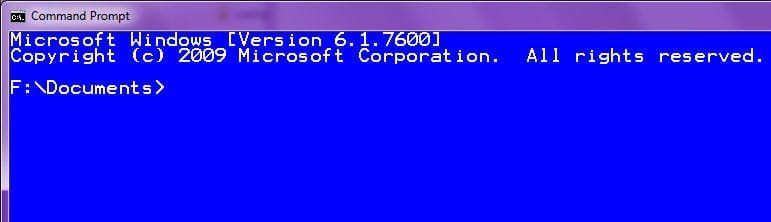
starting folder of CMD.exe

broiyan

New member
Member
VIP
Local time
10:43 AM
Messages
107
Location
Canada
From the start menu, invoking CMD.exe will take me to c:\users\owner.

However, if I right click the start menu icon in order to make a desktop shortcut, the resulting short cut takes me to c:\windows\system32.

Why the inconsistency and how do I fix this?
 

My Computer

Computer Manufacturer/Model Number
mix and match
OS
Windows 7 Professional 64 bit
Motherboard
Asus MA 770 UD3
Memory
4 GB DDR2 1066
Graphics Card(s)
GeForce 8400 DVI and Analog, EGA 8400 Analog
Monitor(s) Displays
2 portrait Samsung 2243, 1 landscape Asus 222
Hard Drives
300 GB
PSU
500 Watt
Case
Antec 500 Sonata III
Keyboard
dasKeyboard USB, the original loud click version
Mouse
Logitech TrackMan Wheel
Internet Speed
DSL
It is the way the file system is set up... what is your preference of start locations?
 

My Computer

Computer Manufacturer/Model Number
SMN-Productions
OS
Windows 7 x86/x64, Server 2008r2, Web Server 2008
CPU
i7 v2 3930K Steping stone 2
Motherboard
ASUS Rampage IV Extreme
Memory
G.SKILL Ripjaws Z Series 32GB
Graphics Card(s)
AMD HD 5770
Monitor(s) Displays
Acer 21" and Samsung 20"
Hard Drives
Patriot Pyro 80GB
PSU
1000 Watt
Case
HAF-X
Cooling
4 Fans
Keyboard
Black Widow Ultimate
If I right click on the Start button (Orb) the only choices I'm given are Properties and Open Windows Explorer. How are you creating a shortcut on the Desktop?

If you right click on the shortcut is there a Target field? If so just add C:\Users\owner after (make sure there is a space before C:).
 

My Computer

Computer type
PC/Desktop
Computer Manufacturer/Model Number
Lenovo IdeaCenter 450
OS
Windows 10 Pro X64
CPU
Intel Quad Core i7-4770 @ 3.4Ghz
Memory
16.0GB PC3-12800 DDR3 SDRAM 1600 MHz
Graphics Card(s)
Intel Integrated HD Graphics
Sound Card
Realtek HD Audio
Monitor(s) Displays
HP 22" LCD
Screen Resolution
1680 x 1050
Hard Drives
250GB Samsung EVO SATA-3 SSD
2TB Seagate ST2000DM001 SATA-2
1.5TB Seagate ST3150041AS SATA
Keyboard
Dell USB
Mouse
Lenovo USB
Internet Speed
Cable via Road Runner 3MB Upload, 30MB Download
Antivirus
Windows Defender, MBAM Pro, MBAE
Browser
Seamonkey
Other Info
UEFI/GPT
PLDS DVD-RW DH16AERSH
Ztruker, sorry, I was just making a brief description of the process for making the shortcut.

I don't right click the start menu orb, rather I go to "search programs and files" and type "cmd" and when the item appears I right click and then select "send to" and "desktop shortcut".

No I don't think I should use the "target" field where I can give it a path.

EDIT: but from the desktop shortcut I can see a "start in". I guess I will just edit that. Sounds a safer way to proceed compared to RegEdit which a quick Google shows is how some people deal with picking the starting folder. There seem to be some warnings on the internet about using RegEdit for this purpose. For my needs, that is, just the short cut there obviously won't be side effects because no commercial software will ever try to use my shortcut.
 
Last edited:

My Computer

Computer Manufacturer/Model Number
mix and match
OS
Windows 7 Professional 64 bit
Motherboard
Asus MA 770 UD3
Memory
4 GB DDR2 1066
Graphics Card(s)
GeForce 8400 DVI and Analog, EGA 8400 Analog
Monitor(s) Displays
2 portrait Samsung 2243, 1 landscape Asus 222
Hard Drives
300 GB
PSU
500 Watt
Case
Antec 500 Sonata III
Keyboard
dasKeyboard USB, the original loud click version
Mouse
Logitech TrackMan Wheel
Internet Speed
DSL
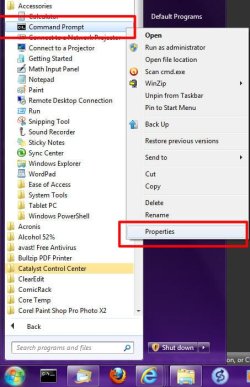
The easiet way to fix this to to modify the shortcut:

1) Click the Start Orb :orb:
2) Click "All Programs"
3) Click "Accessories"
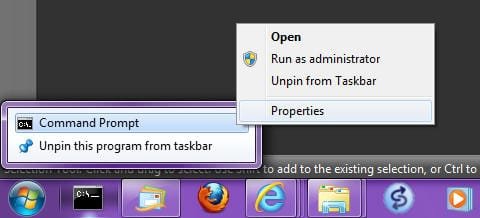
4) Right-click "Command Prompt", then select "Properties":
Image1.jpg

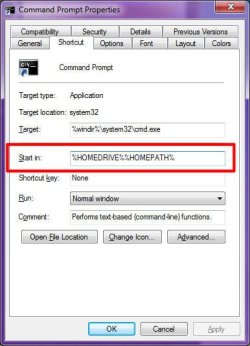
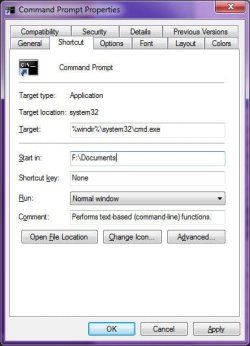
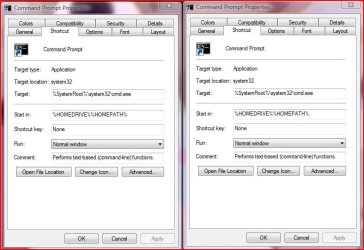
5) In the "Shortcut" tab, change the "Start In" value to something else, which should be a valid path. The default is %HOMEDRIVE%%HOMEPATH%
Image2.jpg Image4.jpg Image5.jpg

6) Click OK


If, like me, you have pinned a Command Prompt icon to the taskbar, the do this:
1) Right-click the pinned icon
2) In the jump list, right-click "Command Prompt"
3) Select Properties:
Image3.jpg
5) In the "Shortcut" tab, change the "Start In" value to something else, which should be a valid path. The default is %HOMEDRIVE%%HOMEPATH%
Image2.jpg Image4.jpg Image5.jpg

6) Click OK
 

My Computer

Computer type
PC/Desktop
Computer Manufacturer/Model Number
Virtual Machine
OS
Windows 7 Professional 32-bit SP1
CPU
AMD A4/A6
Motherboard
Intel Corporation 440BX Desktop Reference Platform
Memory
3.00GB EDO
Graphics Card(s)
VMware SVGA 3D
Sound Card
High Definition Audio Device
Monitor(s) Displays
Generic Non-PnP Monitor on VMware SVGA 3D
Screen Resolution
1440x900
Hard Drives
1 x 60GB VMware Virtual SATA Hard Drive ATA Device
Antivirus
Kaspersky Total Security
I'm not very versed, but my attempt to answer your answer is this:

There is no inconsistency... The program is starting and behaving as it should.

The shortcut is a pointer to the location the program actually resides, C:\Windows\System32.

Running the CMD from the start menu shows you the local user at the prompt who ran the command. However, if you look at the Title Bar of a CMD prompt ran by a local user, it will read C:\Windows\System32\cmd.exe, showing that the program is still being run from C:\Windows\System32.

And the difference in running the prompt as Administrator is that the Title Bar will read Administrator: C:\Windows\System32\cmd.exe, but the prompt still reads: C:\Windows\System32.

In a nutshell, running it from the Start Menu will show the local user who ran it at the prompt, while the shortcut will be is as if you went into the the C:\Windows\System32 folder and ran the cmd.exe from there. In either case, the program is running from the location it is stored: C:\Windows\System32.
 

My Computer

Computer Manufacturer/Model Number
Rig 1
OS
Windows 7 Ultimate x64
CPU
AMD Phenom II X4 940 Black Edition @ 3.4GHz (AM2+)
Motherboard
Gigabyte GA-MA790X-UD4P (AM2+)
Memory
Corsair CM2X4096-8500C5 (4 X 2GB)
Graphics Card(s)
XFX Radeon HD 5770 / Diamond Radeon HD 5770 CrossFireX
Sound Card
Asus Xonar DS (PCI)
Monitor(s) Displays
Samsung SyncMaster 932bw+ (3)
Screen Resolution
4320x900
Hard Drives
OCZ Vertex 2 80 GB - Windows 7 System --
WD Caviar Black 1TB - Music, Movies, Vids, Pics --
WD Caviar Black 640GB - User Profiles & Games --
WD My Book 320GB external
PSU
Corsair CMPSU-750TX
Case
Cooler Master HAF 932
Cooling
Corsair Hydro Series H50
Keyboard
Logitech Desktop Wave
Mouse
Logitech LX8 Laser
Internet Speed
20 down / 2 up
Other Info
LG GGC-H20L Blu-Ray / HDDVD combo --
Hauppauge HVR-1250 --
Silverstone MFP-51 --
Logitech Webcam C600
mpcrsc562

mpcrsc562, there is most definitely an inconsistency but thanks for the reply.

In my query, please understand that "takes me to" means the "the current directory". Nowhere in my query have I referred to the location the program resides for that is not my concern. Others have answered the question to my satisfaction already. Thanks.
 

My Computer

Computer Manufacturer/Model Number
mix and match
OS
Windows 7 Professional 64 bit
Motherboard
Asus MA 770 UD3
Memory
4 GB DDR2 1066
Graphics Card(s)
GeForce 8400 DVI and Analog, EGA 8400 Analog
Monitor(s) Displays
2 portrait Samsung 2243, 1 landscape Asus 222
Hard Drives
300 GB
PSU
500 Watt
Case
Antec 500 Sonata III
Keyboard
dasKeyboard USB, the original loud click version
Mouse
Logitech TrackMan Wheel
Internet Speed
DSL
mpcrsc562, there is most definitely an inconsistency but thanks for the reply.

In my query, please understand that "takes me to" means the "the current directory". Nowhere in my query have I referred to the location the program resides for that is not my concern. Others have answered the question to my satisfaction already. Thanks.

I'm glad others have answered your query to your satisfaction. :)

But, I stand by my word, there was no inconsistency--it is just that running the program and using the shortcut did not provide you with your desired outcome.

The uploaded pics are the property boxes for cmd.exe--one property box from the start menu and the other property box from the desktop shortcut I created. They are exactly the same. You stated "invoking the cmd.exe takes me to..." and that's what it did. When you ran it from the start menu, it took you to the directory of who ran it, C:\Users\Name. A shortcut is different in that it is a pointer to where a program resides on the disk, as I've already stated. So, creating a shortuct of cmd.exe from the start menu icon will give you a starting directory of where the program is: C:\Windows\System32.

It seems you were expecting something different, but running the program from the start menu or from the shortcut did what they were supposed to do. Therefore, no inconsistency.
 

Attachments

  • Capture.JPG
    Capture.JPG
    64.7 KB · Views: 80

My Computer

Computer Manufacturer/Model Number
Rig 1
OS
Windows 7 Ultimate x64
CPU
AMD Phenom II X4 940 Black Edition @ 3.4GHz (AM2+)
Motherboard
Gigabyte GA-MA790X-UD4P (AM2+)
Memory
Corsair CM2X4096-8500C5 (4 X 2GB)
Graphics Card(s)
XFX Radeon HD 5770 / Diamond Radeon HD 5770 CrossFireX
Sound Card
Asus Xonar DS (PCI)
Monitor(s) Displays
Samsung SyncMaster 932bw+ (3)
Screen Resolution
4320x900
Hard Drives
OCZ Vertex 2 80 GB - Windows 7 System --
WD Caviar Black 1TB - Music, Movies, Vids, Pics --
WD Caviar Black 640GB - User Profiles & Games --
WD My Book 320GB external
PSU
Corsair CMPSU-750TX
Case
Cooler Master HAF 932
Cooling
Corsair Hydro Series H50
Keyboard
Logitech Desktop Wave
Mouse
Logitech LX8 Laser
Internet Speed
20 down / 2 up
Other Info
LG GGC-H20L Blu-Ray / HDDVD combo --
Hauppauge HVR-1250 --
Silverstone MFP-51 --
Logitech Webcam C600
^ This is pretty much it. Good explanation, mpcrsc, as the system isn't doing two similar things differently, rather two different things differently.
 

My Computer

OS
XP / Win7 x64 Pro
CPU
Intel Quad-Core Q9450 @ 3.2GHz
Motherboard
Asus P5-E
Memory
2x2GB GSkill DDR2
Graphics Card(s)
NVIDIA GeForce 8600 GTS (EVGA)
Monitor(s) Displays
Dell 2408WFP
Screen Resolution
1920x1200
Back
Top