Startup Repair Infinite Loop Recovery

How to Recover from an Infinitely Looping Startup Repair Loop without Reinstalling Windows

If you've ever experienced a Startup Repair that continously loops and fails to fix the problem of not being able to load windows, even in safe mode, then you'll know that usually the only way to recover from this when System Restore does not work is to do a clean install of Windows.

Until now.

This tutorial will show you how to use the System Recovery Options provided by Windows to recover your system to a working state so that you don't have to risk losing data by performing a clean install.

   Warning
The instructions presented withing this tutorial must be followed correctly, or you can damage your Windows 7 installation even further. This tutorial is designed to help recover from a bad registry that is causing the startup repair loop. You should note that there may still be some issues remaining that cannot be fixed by manually restoring the registry.


Recovering Your System
  1. Boot to the System Recovery Options screen.
    • If Windows automatically opens Startup Repair, and subsequently fails to fix a problem, you can skip ahead to step 4 below.
  2. In the System Recovery Options screen, click Startup Repair:
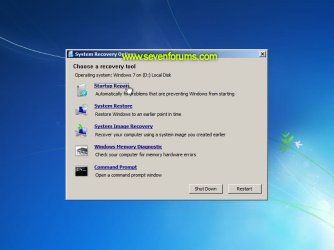
    Image05_startuprepair.jpg


  3. Windows will search for an attempt to repair startup problems:
    Image06_searching.jpg


  4. If startup problems could not be repaired, you will receive the message Windows cannot repair this computer automatically. Click View advanced options for system recovery and support:
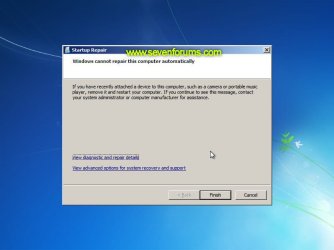
    Image07_cannotfix.jpg


  5. Click View advanced options for system recovery and support, which which bring you back to the main System Recovery Options screen.
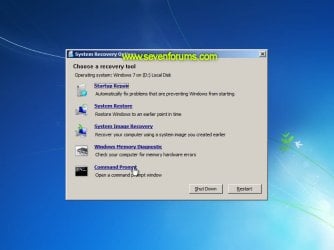
  6. Click Command Prompt:
    Image08_clickcommand.jpg


  7. Command Prompt should open to X:, which is an internal ram disk use by System Repair:
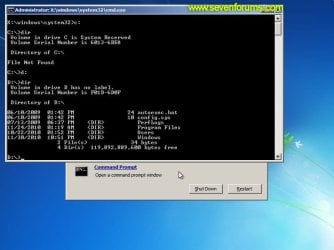
    Image10_changedrive.jpg


  8. Now you need to find your system drive. Depending on how your system is setup, this could be either C: or D:.
    • Type C: and press <ENTER>.
    • Verify that this is your system drive by typing DIR and pressing <ENTER>. If you see the Program Files, Users and Windows folders, then you have found your system drive, and can continue to step 9 below.
    • If the drive is not your system drive, repeat steps I and II above, changing the drive letter to D, E or some other letter until the system drive is located.
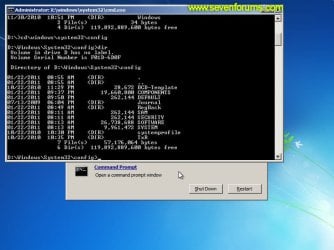
      Image11_chdir_config.jpg

  9. When you have located your Windows system drive, type CD \windows\system32\config and press <ENTER>:
  10. Type DIR and press <ENTER>, and verify that the following files and folders exist in the config folder:
    • RegBack (which is a folder)
    • DEFAULT
    • SAM
    • SECURITY
    • SOFTWARE
    • SYSTEM
      Image11_chdir_config.jpg

  11. Type MD mybackup and press <ENTER> to create a backup folder that you can use incase this procedure does not work as expected.
  12. Type copy *.* mybackup and press <ENTER>.
    • If you are prompted to overwrite existing files, press A to allow all backups to be overwritten.
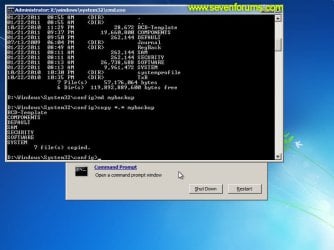
      Image12_mybackup.jpg

  13. Now you need to check if you can use the automatic Windows backups to restore your registry:
    • Type CD RegBack and press <ENTER> to go to the RegBack folder.
    • Type DIR and press <ENTER> to view the contents of the folder. All the following files must exist:
      • The DEFAULT, SAM and SECURITY files should each be about 262,000 bytes in size.
      • The SOFTWARE file should be about 26,000,000 bytes.
      • The SYSTEM file should be about 9,900,000 bytes.
      • The file sizes presented here are approximate estimations, and may vary depending on your system. If any one of them are 0 bytes, then you should stop what you're doing now and seek an alternative method of recovering your system, because Windows cannot function with a 0-byte size registry hive.
    • If the hive files listed in RegBack are ok, then proceed to step 14 of the tutorial.
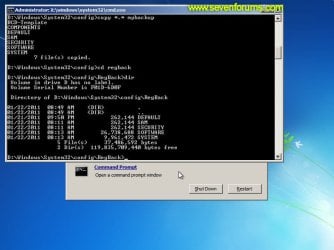
      Image13_checkregback.jpg


  14. Type copy *.* .. and press <ENTER> to copy the backup hive files to \Windows\System32\config.
    • If you are prompted to overwrite existing files, press A to allow all file to be overwritten.
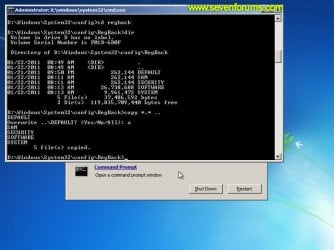
      Image14_copyregback.jpg

  15. Type exit and press <ENTER> to close the command prompt.
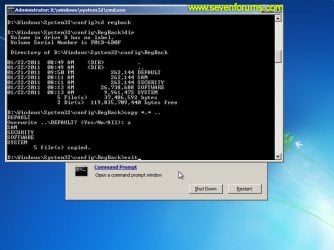
    Image15_exit.jpg


  16. Click the Restart button to reboot your computer. If all goes well, your system will boot normally.
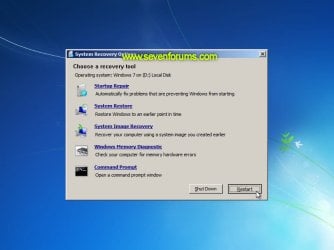
    Image16_restart.jpg
    Image17_working.jpg


Reference Information
This tutorial was made possible after learning how to manualy replace the Windows 7 Registry Hives after reading the Recovering Windows 7 Registry Hives/Files article on Microsoft Technet.


Attachments
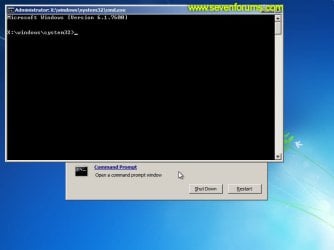
  • Image09_commandprompt.jpg
    Image09_commandprompt.jpg
    26.1 KB · Views: 373
Last edited by a moderator:
Hi Everyone,

As mentioned in step 13, what is the alternative method to use if all the files are 0 bytes.
 

My Computer My Computer

At a glance

Windows 7 Ultimate x64
Computer type
Laptop
Computer Manufacturer/Model Number
dell
OS
Windows 7 Ultimate x64
Hello Vaishnavi, and welcome to Seven Forums.

Usually, you could try these options:

A system restore at boot using a restore point (if available) dated before this happened.

If that fails, then you may need to reinstall Windows 7. :(
 

My Computer My Computer

At a glance

64-bit Windows 11 Pro for WorkstationsIntel i7-8700K OC'd to 5 GHz64 GB (4x16GB) G.SKILL TridentZ RGB DDR4 3600...ASUS ROG-STRIX-GTX1080TI-O11G-GAMING
Computer type
PC/Desktop
Computer Manufacturer/Model Number
Self built custom
OS
64-bit Windows 11 Pro for Workstations
CPU
Intel i7-8700K OC'd to 5 GHz
Motherboard
ASUS ROG Maximus XI Formula Z390
Memory
64 GB (4x16GB) G.SKILL TridentZ RGB DDR4 3600 MHz
Graphics Card(s)
ASUS ROG-STRIX-GTX1080TI-O11G-GAMING
Sound Card
Integrated
Monitor(s) Displays
2 x Samsung Odyssey G7 27"
Screen Resolution
2560x1440
Hard Drives
1TB Samsung 990 PRO M.2,
4TB Samsung 990 PRO PRO M.2,
TerraMaster F8 SSD Plus NAS
PSU
Seasonic Prime Titanium 850W
Case
Thermaltake Core P3
Cooling
Corsair Hydro H115i
Keyboard
Logitech wireless K800
Mouse
Logitech MX Master 4
Internet Speed
2 Gb/s Download and 100 Mb/s Upload
Antivirus
Malwarebyte Anti-Malware Premium
Browser
Google Chrome
Other Info
Logitech Z625 speaker system,
Logitech BRIO 4K Pro webcam,
HP Color LaserJet Pro MFP M477fdn,
APC SMART-UPS RT 1000 XL - SURT1000XLI,
Galaxy S23 Plus phone
Any hope?

I have the startup repair offline issue.

The Problem Signature reads:

Event Name - StartupRepairOffline
01 - 6.1.7600.16385
02 - 6.1.7600.16385
03 - unknown
04 - 21200614
05 - AutoFailover
06 - 58
07 - CorruptFile

OS Version: 6.1.7600.2.0.0.256.1
Locale ID: 1033

Wisely or not, I've done the following:

bootrec.exe /fixmbr
bootsect.exe /nt60 all /force

attrib -h -s E:\boot\BCD

del E:\boot\BCD
bootrec.exe /rebuildbcd


No luck, so I tried;

bootrec.exe /fixmbr
bootsect.exe /nt60 all /force

attrib -h -s D:\boot\BCD

del d:\boot\BCD
bcdedit /createstore D:\boot\bcd.temp
bcdedit.exe /store D:\boot\bcd.temp /create {bootmgr} /d "Windows Boot Manager"
bcdedit.exe /import D:\boot\bcd.temp
bcdedit.exe /set {bootmgr} device partition=D:
bcdedit.exe /timeout 10
attrib -h -s D:\boot\bcd.temp
del D:\boot\bcd.temp
bcdedit.exe /create /d "Microsoft Windows" /application osloader
bcdedit.exe /set {c0dfc4fa-cb21-11dc-81bf-005056c00008} device partition=D:
bcdedit.exe /set {c0dfc4fa-cb21-11dc-81bf-005056c00008} osdevice partition=D:
bcdedit.exe /set {c0dfc4fa-cb21-11dc-81bf-005056c00008} path \Windows\system32\winload.exe
bcdedit.exe /set {c0dfc4fa-cb21-11dc-81bf-005056c00008} systemroot \Windows
bcdedit.exe /displayorder {c0dfc4fa-cb21-11dc-81bf-005056c00008}

Now, I do have a slightly different boot screen. Before this, the "flying windows" did not show on boot. Not it does. However, still going to the startup repair loop.

So I tried this;
http://www.sevenforums.com/tutorials/139576-startup-repair-infinite-loop-recovery.html

No luck...
I've run the Western Dig HD diags and no errors are reported.
I've run Farbar and have the log file, if anybody want to take a peek. It's big though and will take a few posts.

Considering Kaspersky Rescue Disk 10 as a next step, but will not do anything until, I hear back from you guys...

Anybody have any ideas?
 

My Computer My Computer

At a glance

Windows 7 Home 64 bit
Computer type
PC/Desktop
Computer Manufacturer/Model Number
Acer
OS
Windows 7 Home 64 bit
I have tried and failed everything I've found in this thread. Reinstalling windows fixes the issue, but it comes back in a week. Any ideas?
 

My Computer My Computer

At a glance

Windows 7 Home Premium x64
Computer type
PC/Desktop
OS
Windows 7 Home Premium x64
So glad I found this procedure. I was hung in a "do loop" with Startup Repair until I followed this solution. Worked great for me!!! I have recovered my OS and data.... Whooopee! Only took me 11 days of sweat and struggle to find this fix.:mad:
 

My Computer My Computer

At a glance

Windows 7 Pro 64bitIntelCorsaironboard
Computer type
PC/Desktop
Computer Manufacturer/Model Number
Custom
OS
Windows 7 Pro 64bit
CPU
Intel
Motherboard
Intel Executive Series
Memory
Corsair
Graphics Card(s)
onboard
Hard Drives
Seagate
Antivirus
Microsoft Essentials
Browser
IE9
didn't work :(

Hi I'm Duan, I have a custom build PC, windows home premium 32 bit, and I followed every step to the letter space and dot, but when I restart the startup repair screen pops up again... Please help me asap I need the information on my computer urgently, I might lose money if I don't get it on time! Thank you. Duan
 
Last edited:

My Computer My Computer

At a glance

windows7 home premium 32 - bit
Computer type
PC/Desktop
Computer Manufacturer/Model Number
custom built
OS
windows7 home premium 32 - bit

My Computer My Computer

At a glance

64-bit Windows 11 Pro for WorkstationsIntel i7-8700K OC'd to 5 GHz64 GB (4x16GB) G.SKILL TridentZ RGB DDR4 3600...ASUS ROG-STRIX-GTX1080TI-O11G-GAMING
Computer type
PC/Desktop
Computer Manufacturer/Model Number
Self built custom
OS
64-bit Windows 11 Pro for Workstations
CPU
Intel i7-8700K OC'd to 5 GHz
Motherboard
ASUS ROG Maximus XI Formula Z390
Memory
64 GB (4x16GB) G.SKILL TridentZ RGB DDR4 3600 MHz
Graphics Card(s)
ASUS ROG-STRIX-GTX1080TI-O11G-GAMING
Sound Card
Integrated
Monitor(s) Displays
2 x Samsung Odyssey G7 27"
Screen Resolution
2560x1440
Hard Drives
1TB Samsung 990 PRO M.2,
4TB Samsung 990 PRO PRO M.2,
TerraMaster F8 SSD Plus NAS
PSU
Seasonic Prime Titanium 850W
Case
Thermaltake Core P3
Cooling
Corsair Hydro H115i
Keyboard
Logitech wireless K800
Mouse
Logitech MX Master 4
Internet Speed
2 Gb/s Download and 100 Mb/s Upload
Antivirus
Malwarebyte Anti-Malware Premium
Browser
Google Chrome
Other Info
Logitech Z625 speaker system,
Logitech BRIO 4K Pro webcam,
HP Color LaserJet Pro MFP M477fdn,
APC SMART-UPS RT 1000 XL - SURT1000XLI,
Galaxy S23 Plus phone
Cannot Resolve the problem

Hi...
Im facing this problem when i changed my win7 32bit os to 64bit...
I followed your steps..But i have 0 byte that u told in the 13th step..plz can u tell me what is the alternative method???
 

My Computer My Computer

At a glance

Windows 7 Ultimate 32bitIntel i5 3570K4GBGIGABYTE AMD HD7850 2GB OC EDITION
Computer type
PC/Desktop
OS
Windows 7 Ultimate 32bit
CPU
Intel i5 3570K
Motherboard
Intel DB75EN
Memory
4GB
Graphics Card(s)
GIGABYTE AMD HD7850 2GB OC EDITION

My Computer My Computer

At a glance

64-bit Windows 11 Pro for WorkstationsIntel i7-8700K OC'd to 5 GHz64 GB (4x16GB) G.SKILL TridentZ RGB DDR4 3600...ASUS ROG-STRIX-GTX1080TI-O11G-GAMING
Computer type
PC/Desktop
Computer Manufacturer/Model Number
Self built custom
OS
64-bit Windows 11 Pro for Workstations
CPU
Intel i7-8700K OC'd to 5 GHz
Motherboard
ASUS ROG Maximus XI Formula Z390
Memory
64 GB (4x16GB) G.SKILL TridentZ RGB DDR4 3600 MHz
Graphics Card(s)
ASUS ROG-STRIX-GTX1080TI-O11G-GAMING
Sound Card
Integrated
Monitor(s) Displays
2 x Samsung Odyssey G7 27"
Screen Resolution
2560x1440
Hard Drives
1TB Samsung 990 PRO M.2,
4TB Samsung 990 PRO PRO M.2,
TerraMaster F8 SSD Plus NAS
PSU
Seasonic Prime Titanium 850W
Case
Thermaltake Core P3
Cooling
Corsair Hydro H115i
Keyboard
Logitech wireless K800
Mouse
Logitech MX Master 4
Internet Speed
2 Gb/s Download and 100 Mb/s Upload
Antivirus
Malwarebyte Anti-Malware Premium
Browser
Google Chrome
Other Info
Logitech Z625 speaker system,
Logitech BRIO 4K Pro webcam,
HP Color LaserJet Pro MFP M477fdn,
APC SMART-UPS RT 1000 XL - SURT1000XLI,
Galaxy S23 Plus phone

My Computer My Computer

At a glance

windows7 home premium 32 - bit
Computer type
PC/Desktop
Computer Manufacturer/Model Number
custom built
OS
windows7 home premium 32 - bit
In that case, you might connect the HDD to another computer to back up anything that you do not want to lose. You'll most likely need to take ownership of anything you want to copy before it will allow you to.
 

My Computer My Computer

At a glance

64-bit Windows 11 Pro for WorkstationsIntel i7-8700K OC'd to 5 GHz64 GB (4x16GB) G.SKILL TridentZ RGB DDR4 3600...ASUS ROG-STRIX-GTX1080TI-O11G-GAMING
Computer type
PC/Desktop
Computer Manufacturer/Model Number
Self built custom
OS
64-bit Windows 11 Pro for Workstations
CPU
Intel i7-8700K OC'd to 5 GHz
Motherboard
ASUS ROG Maximus XI Formula Z390
Memory
64 GB (4x16GB) G.SKILL TridentZ RGB DDR4 3600 MHz
Graphics Card(s)
ASUS ROG-STRIX-GTX1080TI-O11G-GAMING
Sound Card
Integrated
Monitor(s) Displays
2 x Samsung Odyssey G7 27"
Screen Resolution
2560x1440
Hard Drives
1TB Samsung 990 PRO M.2,
4TB Samsung 990 PRO PRO M.2,
TerraMaster F8 SSD Plus NAS
PSU
Seasonic Prime Titanium 850W
Case
Thermaltake Core P3
Cooling
Corsair Hydro H115i
Keyboard
Logitech wireless K800
Mouse
Logitech MX Master 4
Internet Speed
2 Gb/s Download and 100 Mb/s Upload
Antivirus
Malwarebyte Anti-Malware Premium
Browser
Google Chrome
Other Info
Logitech Z625 speaker system,
Logitech BRIO 4K Pro webcam,
HP Color LaserJet Pro MFP M477fdn,
APC SMART-UPS RT 1000 XL - SURT1000XLI,
Galaxy S23 Plus phone
New to the community, thanks for the info here.

when i did the "*.* mybackup" step, the system folder wouldn't copy due to an i/o error. Am I toast?

Thanks!
 

My Computer My Computer

At a glance

windows 7 32bit
Computer type
PC/Desktop
OS
windows 7 32bit
Thanx Shawn.......will do that method soon..:)
 

My Computer My Computer

At a glance

Windows 7 Ultimate 32bitIntel i5 3570K4GBGIGABYTE AMD HD7850 2GB OC EDITION
Computer type
PC/Desktop
OS
Windows 7 Ultimate 32bit
CPU
Intel i5 3570K
Motherboard
Intel DB75EN
Memory
4GB
Graphics Card(s)
GIGABYTE AMD HD7850 2GB OC EDITION
hey Shawn...1 doubt...after creating a system restoring what should i do?? does this method surely helps me 2 get rid of this infinite boot loop?/
 

My Computer My Computer

At a glance

Windows 7 Ultimate 32bitIntel i5 3570K4GBGIGABYTE AMD HD7850 2GB OC EDITION
Computer type
PC/Desktop
OS
Windows 7 Ultimate 32bit
CPU
Intel i5 3570K
Motherboard
Intel DB75EN
Memory
4GB
Graphics Card(s)
GIGABYTE AMD HD7850 2GB OC EDITION
Mohammed Adeeb,

Doing a system restore at boot (if able) may be able to help. The tutorial link in my last post to you will help show you how to. Please ask if you have any questions about it.

If not, then you may need to reinstall Windows 7. :(
 

My Computer My Computer

At a glance

64-bit Windows 11 Pro for WorkstationsIntel i7-8700K OC'd to 5 GHz64 GB (4x16GB) G.SKILL TridentZ RGB DDR4 3600...ASUS ROG-STRIX-GTX1080TI-O11G-GAMING
Computer type
PC/Desktop
Computer Manufacturer/Model Number
Self built custom
OS
64-bit Windows 11 Pro for Workstations
CPU
Intel i7-8700K OC'd to 5 GHz
Motherboard
ASUS ROG Maximus XI Formula Z390
Memory
64 GB (4x16GB) G.SKILL TridentZ RGB DDR4 3600 MHz
Graphics Card(s)
ASUS ROG-STRIX-GTX1080TI-O11G-GAMING
Sound Card
Integrated
Monitor(s) Displays
2 x Samsung Odyssey G7 27"
Screen Resolution
2560x1440
Hard Drives
1TB Samsung 990 PRO M.2,
4TB Samsung 990 PRO PRO M.2,
TerraMaster F8 SSD Plus NAS
PSU
Seasonic Prime Titanium 850W
Case
Thermaltake Core P3
Cooling
Corsair Hydro H115i
Keyboard
Logitech wireless K800
Mouse
Logitech MX Master 4
Internet Speed
2 Gb/s Download and 100 Mb/s Upload
Antivirus
Malwarebyte Anti-Malware Premium
Browser
Google Chrome
Other Info
Logitech Z625 speaker system,
Logitech BRIO 4K Pro webcam,
HP Color LaserJet Pro MFP M477fdn,
APC SMART-UPS RT 1000 XL - SURT1000XLI,
Galaxy S23 Plus phone
Hey Shawn ..wat is the difference between creating system restore at boot and System Restore in Windows 7 using System Protection??
because my problem is the windows7 64bit will always work for the first time when i install the os..but if i restart or shutdown ,the windows wont open and goes into a infinite boot loop.....so should i o Do a System Restore in Windows 7 using System Protection or system restore at boot??
 

My Computer My Computer

At a glance

Windows 7 Ultimate 32bitIntel i5 3570K4GBGIGABYTE AMD HD7850 2GB OC EDITION
Computer type
PC/Desktop
OS
Windows 7 Ultimate 32bit
CPU
Intel i5 3570K
Motherboard
Intel DB75EN
Memory
4GB
Graphics Card(s)
GIGABYTE AMD HD7850 2GB OC EDITION
It's actually "doing" instead of "creating" a system restore. System restore is part of system protection. The only difference is doing a system restore at boot versus inside Windows to select a dated restore point to go back to.

http://www.sevenforums.com/tutorials/700-system-restore.html

Where did you get your copy of Windows 7 from, and how did you activate it?

Are these clean installs of Windows 7?
 

My Computer My Computer

At a glance

64-bit Windows 11 Pro for WorkstationsIntel i7-8700K OC'd to 5 GHz64 GB (4x16GB) G.SKILL TridentZ RGB DDR4 3600...ASUS ROG-STRIX-GTX1080TI-O11G-GAMING
Computer type
PC/Desktop
Computer Manufacturer/Model Number
Self built custom
OS
64-bit Windows 11 Pro for Workstations
CPU
Intel i7-8700K OC'd to 5 GHz
Motherboard
ASUS ROG Maximus XI Formula Z390
Memory
64 GB (4x16GB) G.SKILL TridentZ RGB DDR4 3600 MHz
Graphics Card(s)
ASUS ROG-STRIX-GTX1080TI-O11G-GAMING
Sound Card
Integrated
Monitor(s) Displays
2 x Samsung Odyssey G7 27"
Screen Resolution
2560x1440
Hard Drives
1TB Samsung 990 PRO M.2,
4TB Samsung 990 PRO PRO M.2,
TerraMaster F8 SSD Plus NAS
PSU
Seasonic Prime Titanium 850W
Case
Thermaltake Core P3
Cooling
Corsair Hydro H115i
Keyboard
Logitech wireless K800
Mouse
Logitech MX Master 4
Internet Speed
2 Gb/s Download and 100 Mb/s Upload
Antivirus
Malwarebyte Anti-Malware Premium
Browser
Google Chrome
Other Info
Logitech Z625 speaker system,
Logitech BRIO 4K Pro webcam,
HP Color LaserJet Pro MFP M477fdn,
APC SMART-UPS RT 1000 XL - SURT1000XLI,
Galaxy S23 Plus phone
help

hi i tried to use this to get out of my loop but my only option on system recovery options is start up repair. what can i do?
 

My Computer My Computer

At a glance

Windows 7
Computer type
PC/Desktop
Computer Manufacturer/Model Number
packard bell
OS
Windows 7
Hey Shawn ,what do u mean by a clean install???
i usually do a custom install and the older windows files r kept in a folder named windows.old
 

My Computer My Computer

At a glance

Windows 7 Ultimate 32bitIntel i5 3570K4GBGIGABYTE AMD HD7850 2GB OC EDITION
Computer type
PC/Desktop
OS
Windows 7 Ultimate 32bit
CPU
Intel i5 3570K
Motherboard
Intel DB75EN
Memory
4GB
Graphics Card(s)
GIGABYTE AMD HD7850 2GB OC EDITION

My Computer My Computer

At a glance

64-bit Windows 11 Pro for WorkstationsIntel i7-8700K OC'd to 5 GHz64 GB (4x16GB) G.SKILL TridentZ RGB DDR4 3600...ASUS ROG-STRIX-GTX1080TI-O11G-GAMING
Computer type
PC/Desktop
Computer Manufacturer/Model Number
Self built custom
OS
64-bit Windows 11 Pro for Workstations
CPU
Intel i7-8700K OC'd to 5 GHz
Motherboard
ASUS ROG Maximus XI Formula Z390
Memory
64 GB (4x16GB) G.SKILL TridentZ RGB DDR4 3600 MHz
Graphics Card(s)
ASUS ROG-STRIX-GTX1080TI-O11G-GAMING
Sound Card
Integrated
Monitor(s) Displays
2 x Samsung Odyssey G7 27"
Screen Resolution
2560x1440
Hard Drives
1TB Samsung 990 PRO M.2,
4TB Samsung 990 PRO PRO M.2,
TerraMaster F8 SSD Plus NAS
PSU
Seasonic Prime Titanium 850W
Case
Thermaltake Core P3
Cooling
Corsair Hydro H115i
Keyboard
Logitech wireless K800
Mouse
Logitech MX Master 4
Internet Speed
2 Gb/s Download and 100 Mb/s Upload
Antivirus
Malwarebyte Anti-Malware Premium
Browser
Google Chrome
Other Info
Logitech Z625 speaker system,
Logitech BRIO 4K Pro webcam,
HP Color LaserJet Pro MFP M477fdn,
APC SMART-UPS RT 1000 XL - SURT1000XLI,
Galaxy S23 Plus phone
Back
Top