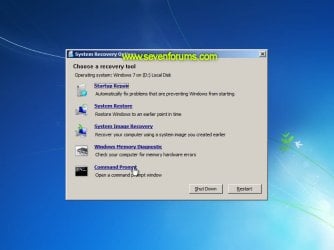
Startup Repair Infinite Loop Recovery

How to Recover from an Infinitely Looping Startup Repair Loop without Reinstalling Windows

If you've ever experienced a Startup Repair that continously loops and fails to fix the problem of not being able to load windows, even in safe mode, then you'll know that usually the only way to recover from this when System Restore does not work is to do a clean install of Windows.

Until now.

This tutorial will show you how to use the System Recovery Options provided by Windows to recover your system to a working state so that you don't have to risk losing data by performing a clean install.

   Warning
The instructions presented withing this tutorial must be followed correctly, or you can damage your Windows 7 installation even further. This tutorial is designed to help recover from a bad registry that is causing the startup repair loop. You should note that there may still be some issues remaining that cannot be fixed by manually restoring the registry.


Recovering Your System
  1. Boot to the System Recovery Options screen.
    • If Windows automatically opens Startup Repair, and subsequently fails to fix a problem, you can skip ahead to step 4 below.
  2. In the System Recovery Options screen, click Startup Repair:
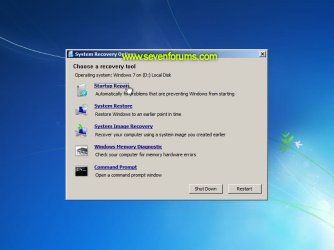
    Image05_startuprepair.jpg


  3. Windows will search for an attempt to repair startup problems:
    Image06_searching.jpg


  4. If startup problems could not be repaired, you will receive the message Windows cannot repair this computer automatically. Click View advanced options for system recovery and support:
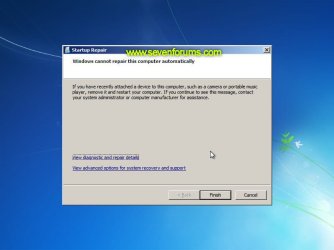
    Image07_cannotfix.jpg


  5. Click View advanced options for system recovery and support, which which bring you back to the main System Recovery Options screen.
  6. Click Command Prompt:
    Image08_clickcommand.jpg


  7. Command Prompt should open to X:, which is an internal ram disk use by System Repair:
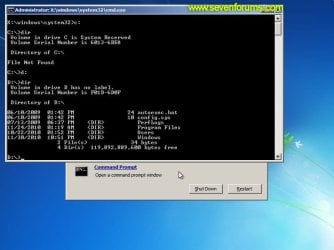
    Image10_changedrive.jpg


  8. Now you need to find your system drive. Depending on how your system is setup, this could be either C: or D:.
    • Type C: and press <ENTER>.
    • Verify that this is your system drive by typing DIR and pressing <ENTER>. If you see the Program Files, Users and Windows folders, then you have found your system drive, and can continue to step 9 below.
    • If the drive is not your system drive, repeat steps I and II above, changing the drive letter to D, E or some other letter until the system drive is located.
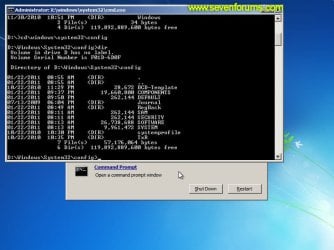
      Image11_chdir_config.jpg

  9. When you have located your Windows system drive, type CD \windows\system32\config and press <ENTER>:
  10. Type DIR and press <ENTER>, and verify that the following files and folders exist in the config folder:
    • RegBack (which is a folder)
    • DEFAULT
    • SAM
    • SECURITY
    • SOFTWARE
    • SYSTEM
      Image11_chdir_config.jpg

  11. Type MD mybackup and press <ENTER> to create a backup folder that you can use incase this procedure does not work as expected.
  12. Type copy *.* mybackup and press <ENTER>.
    • If you are prompted to overwrite existing files, press A to allow all backups to be overwritten.
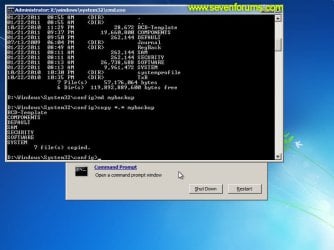
      Image12_mybackup.jpg

  13. Now you need to check if you can use the automatic Windows backups to restore your registry:
    • Type CD RegBack and press <ENTER> to go to the RegBack folder.
    • Type DIR and press <ENTER> to view the contents of the folder. All the following files must exist:
      • The DEFAULT, SAM and SECURITY files should each be about 262,000 bytes in size.
      • The SOFTWARE file should be about 26,000,000 bytes.
      • The SYSTEM file should be about 9,900,000 bytes.
      • The file sizes presented here are approximate estimations, and may vary depending on your system. If any one of them are 0 bytes, then you should stop what you're doing now and seek an alternative method of recovering your system, because Windows cannot function with a 0-byte size registry hive.
    • If the hive files listed in RegBack are ok, then proceed to step 14 of the tutorial.
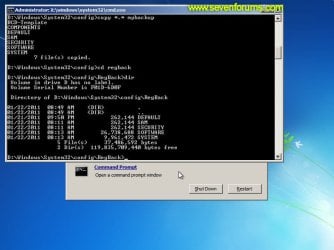
      Image13_checkregback.jpg


  14. Type copy *.* .. and press <ENTER> to copy the backup hive files to \Windows\System32\config.
    • If you are prompted to overwrite existing files, press A to allow all file to be overwritten.
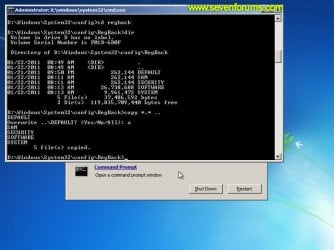
      Image14_copyregback.jpg

  15. Type exit and press <ENTER> to close the command prompt.
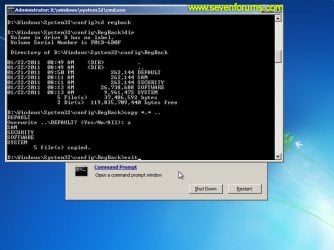
    Image15_exit.jpg


  16. Click the Restart button to reboot your computer. If all goes well, your system will boot normally.
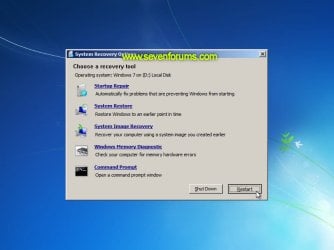
    Image16_restart.jpg
    Image17_working.jpg


Reference Information
This tutorial was made possible after learning how to manualy replace the Windows 7 Registry Hives after reading the Recovering Windows 7 Registry Hives/Files article on Microsoft Technet.


Attachments
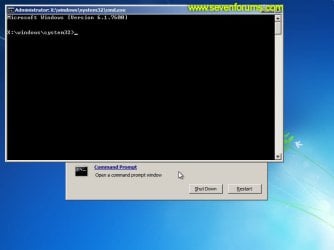
  • Image09_commandprompt.jpg
    Image09_commandprompt.jpg
    26.1 KB · Views: 373
Last edited by a moderator:
it dint work for me . i don't know what happened . i am really frightened . my exam will start from Monday and i am stuck out here
 

My Computer My Computer

At a glance

Windows 7 ultimate 32 bit
OS
Windows 7 ultimate 32 bit
Can you describe the problem ?

What have you tried to fix it?

If you tried this tutorial, exactly how far did you get?

Do you have any repair /recovery media?
 

My Computers My Computers

  • At a glance

    7 X64i5 84002x8gb 3200mhz
    Computer type
    PC/Desktop
    OS
    7 X64
    CPU
    i5 8400
    Motherboard
    gigabyte b365m ds3h
    Memory
    2x8gb 3200mhz
    Hard Drives
    various
    PSU
    pure power 11 400w cm
    Case
    Coolermaster
    Cooling
    cryorig m9i
  • At a glance

    7x64g54008gb ddr4 2400
    Computer type
    PC/Desktop
    OS
    7x64
    CPU
    g5400
    Motherboard
    ga b365m ds3h
    Memory
    8gb ddr4 2400
    PSU
    xfx pro 450w
THANKS!!!!!!!!!!!!!
 

My Computer My Computer

At a glance

Windows 7 Ultimate x64
OS
Windows 7 Ultimate x64
Most helpful tutorial ever used.

You saved me, jut wanted to show my appreciation!
Cheers!
 

My Computer My Computer

At a glance

Windows 7 Home Premium x64
OS
Windows 7 Home Premium x64
Fantastic-easy to follow even for reg novice

Can't thank you enough.....
 

My Computer My Computer

At a glance

xp, vista 32,7 32
OS
xp, vista 32,7 32
Dude I registered in the forum so to tell you, YOU SAVED MY LIFE EUHAUEUAHE! TKS:geek:
 

My Computer My Computer

At a glance

Ultimate x64
OS
Ultimate x64
infinite loop

Thanks so much for this excellent tutorial :) which saved me lots of time when trying to start win 7 with a newly cloned SSD drive, which norton ghost obviously didn't clone properly. You might consider also listing this tutorial for anyone who cannot get a cloned SSD to boot properly.
Thanks again
 

My Computer My Computer

At a glance

win 7 32 bit ultimate
Computer Manufacturer/Model Number
acer aspire one
OS
win 7 32 bit ultimate
Hi, I'm at step 13, and the sizes of my folders are all way off compared to what is described in step 13. Here are the sizes of my folders as shown in Command Prompt:

DEFAULT - 958464
SAM - 61440
SECURITY - 24576
SOFTWARE - 71118848
SYSTEM - 19513344

Ignoring this and pushing on did not get my computer out of the startup repair loop. :[ What might be the problem, here? And how might I fix it?
 

My Computer My Computer

At a glance

Windows 7 64bit
OS
Windows 7 64bit
You are simply amazing

This worked perfect :D i thought i was going to loose everything and you my legend saved my life. Thank you so much and the images really helped me to follow as i went along . Thank you once again
 

My Computer My Computer

At a glance

Windows 7 Intel Pentium x64
OS
Windows 7 Intel Pentium x64
Create an account just to show gratitudes.. Thank u so much!! Works like a charm:) just want to know what's the difference between my old system with the system from backups?? Thanks again!
 

My Computer My Computer

At a glance

Windows 7 Professional x86
OS
Windows 7 Professional x86
I followed the tutorial to a T now trying to see if the system restore will work before the startup happen. But still hasn't work yet
 

My Computer My Computer

At a glance

Windows 7 Home Preminum x64Intel(R) Core (TM) i3-2310M CPU @ 2.10GHz
Computer Manufacturer/Model Number
Sony Electronics Inc.
OS
Windows 7 Home Preminum x64
CPU
Intel(R) Core (TM) i3-2310M CPU @ 2.10GHz
infinite loop

Hi, I'm at step 13, and the sizes of my folders are all way off compared to what is described in step 13. Here are the sizes of my folders as shown in Command Prompt:

DEFAULT - 958464
SAM - 61440
SECURITY - 24576
SOFTWARE - 71118848
SYSTEM - 19513344

Ignoring this and pushing on did not get my computer out of the startup repair loop. :[ What might be the problem, here? And how might I fix it?

Hi Tranquillus,
I'm afraid I'm not an expert in this problem and I suspect I may have got lucky with the fix, but the numbers are only guides, my numbers were not even close either, and you might have better luck with a different cloning program or try re-cloning your drive, failing that you will probably have to do a fresh install.
Good luck
titusg
 

My Computer My Computer

At a glance

win 7 32 bit ultimate
Computer Manufacturer/Model Number
acer aspire one
OS
win 7 32 bit ultimate
I did the startup repair and it says everything is successfully. So when I reboot without windows 7 disk?
 

My Computer My Computer

At a glance

Windows 7 Home Preminum x64Intel(R) Core (TM) i3-2310M CPU @ 2.10GHz
Computer Manufacturer/Model Number
Sony Electronics Inc.
OS
Windows 7 Home Preminum x64
CPU
Intel(R) Core (TM) i3-2310M CPU @ 2.10GHz
I need help, i've had this problem and tried the solution posted but when i get to step 11, i cant make a MD mybackup, it just says "The request could not be performed because of an I/O device error" any help would be greatly appreciated
 

My Computer My Computer

At a glance

Windows 7 64bit
OS
Windows 7 64bit
Hello ZKhan, and welcome to Seven Forums.

If you have used the correct drive letter for your system drive in steps 8-10, then see if using step 3 in OPTION THREE of the tutorial below to run the defrag command below for the same drive letter may help. Substitute C in the command below for your drive letter.

defrag C: /R

http://www.sevenforums.com/tutorials/11733-disk-defragmenter-open-use.html

Afterwards, try again.

Hope this helps, :)
Shawn
 

My Computer My Computer

At a glance

64-bit Windows 11 Pro for WorkstationsIntel i7-8700K OC'd to 5 GHz64 GB (4x16GB) G.SKILL TridentZ RGB DDR4 3600...ASUS ROG-STRIX-GTX1080TI-O11G-GAMING
Computer type
PC/Desktop
Computer Manufacturer/Model Number
Self built custom
OS
64-bit Windows 11 Pro for Workstations
CPU
Intel i7-8700K OC'd to 5 GHz
Motherboard
ASUS ROG Maximus XI Formula Z390
Memory
64 GB (4x16GB) G.SKILL TridentZ RGB DDR4 3600 MHz
Graphics Card(s)
ASUS ROG-STRIX-GTX1080TI-O11G-GAMING
Sound Card
Integrated
Monitor(s) Displays
2 x Samsung Odyssey G7 27"
Screen Resolution
2560x1440
Hard Drives
1TB Samsung 990 PRO M.2,
4TB Samsung 990 PRO PRO M.2,
TerraMaster F8 SSD Plus NAS
PSU
Seasonic Prime Titanium 850W
Case
Thermaltake Core P3
Cooling
Corsair Hydro H115i
Keyboard
Logitech wireless K800
Mouse
Logitech MX Master 4
Internet Speed
2 Gb/s Download and 100 Mb/s Upload
Antivirus
Malwarebyte Anti-Malware Premium
Browser
Google Chrome
Other Info
Logitech Z625 speaker system,
Logitech BRIO 4K Pro webcam,
HP Color LaserJet Pro MFP M477fdn,
APC SMART-UPS RT 1000 XL - SURT1000XLI,
Galaxy S23 Plus phone
Hey Brink, thanks for replying, um just one question doing this wont make me lose all my files right? I'm horrible with this and just wanted to be cautious. But once again thanks for helping
 

My Computer My Computer

At a glance

Windows 7 64bit
OS
Windows 7 64bit
No problem. Defragging will not cause you to lose your files. :)
 

My Computer My Computer

At a glance

64-bit Windows 11 Pro for WorkstationsIntel i7-8700K OC'd to 5 GHz64 GB (4x16GB) G.SKILL TridentZ RGB DDR4 3600...ASUS ROG-STRIX-GTX1080TI-O11G-GAMING
Computer type
PC/Desktop
Computer Manufacturer/Model Number
Self built custom
OS
64-bit Windows 11 Pro for Workstations
CPU
Intel i7-8700K OC'd to 5 GHz
Motherboard
ASUS ROG Maximus XI Formula Z390
Memory
64 GB (4x16GB) G.SKILL TridentZ RGB DDR4 3600 MHz
Graphics Card(s)
ASUS ROG-STRIX-GTX1080TI-O11G-GAMING
Sound Card
Integrated
Monitor(s) Displays
2 x Samsung Odyssey G7 27"
Screen Resolution
2560x1440
Hard Drives
1TB Samsung 990 PRO M.2,
4TB Samsung 990 PRO PRO M.2,
TerraMaster F8 SSD Plus NAS
PSU
Seasonic Prime Titanium 850W
Case
Thermaltake Core P3
Cooling
Corsair Hydro H115i
Keyboard
Logitech wireless K800
Mouse
Logitech MX Master 4
Internet Speed
2 Gb/s Download and 100 Mb/s Upload
Antivirus
Malwarebyte Anti-Malware Premium
Browser
Google Chrome
Other Info
Logitech Z625 speaker system,
Logitech BRIO 4K Pro webcam,
HP Color LaserJet Pro MFP M477fdn,
APC SMART-UPS RT 1000 XL - SURT1000XLI,
Galaxy S23 Plus phone
Alright, ill try it right now, ill update on what happens, once again thanks for the help
 

My Computer My Computer

At a glance

Windows 7 64bit
OS
Windows 7 64bit
Brink it says defrag is not recognized, do i have to type in C: then the command?
 

My Computer My Computer

At a glance

Windows 7 64bit
OS
Windows 7 64bit
Yeah, type whatever drive letter is for your Windows drive at boot. It should be the same drive letter from step 8 on the first page.
 

My Computer My Computer

At a glance

64-bit Windows 11 Pro for WorkstationsIntel i7-8700K OC'd to 5 GHz64 GB (4x16GB) G.SKILL TridentZ RGB DDR4 3600...ASUS ROG-STRIX-GTX1080TI-O11G-GAMING
Computer type
PC/Desktop
Computer Manufacturer/Model Number
Self built custom
OS
64-bit Windows 11 Pro for Workstations
CPU
Intel i7-8700K OC'd to 5 GHz
Motherboard
ASUS ROG Maximus XI Formula Z390
Memory
64 GB (4x16GB) G.SKILL TridentZ RGB DDR4 3600 MHz
Graphics Card(s)
ASUS ROG-STRIX-GTX1080TI-O11G-GAMING
Sound Card
Integrated
Monitor(s) Displays
2 x Samsung Odyssey G7 27"
Screen Resolution
2560x1440
Hard Drives
1TB Samsung 990 PRO M.2,
4TB Samsung 990 PRO PRO M.2,
TerraMaster F8 SSD Plus NAS
PSU
Seasonic Prime Titanium 850W
Case
Thermaltake Core P3
Cooling
Corsair Hydro H115i
Keyboard
Logitech wireless K800
Mouse
Logitech MX Master 4
Internet Speed
2 Gb/s Download and 100 Mb/s Upload
Antivirus
Malwarebyte Anti-Malware Premium
Browser
Google Chrome
Other Info
Logitech Z625 speaker system,
Logitech BRIO 4K Pro webcam,
HP Color LaserJet Pro MFP M477fdn,
APC SMART-UPS RT 1000 XL - SURT1000XLI,
Galaxy S23 Plus phone
Back
Top