Startup Repair Infinite Loop Recovery

How to Recover from an Infinitely Looping Startup Repair Loop without Reinstalling Windows

If you've ever experienced a Startup Repair that continously loops and fails to fix the problem of not being able to load windows, even in safe mode, then you'll know that usually the only way to recover from this when System Restore does not work is to do a clean install of Windows.

Until now.

This tutorial will show you how to use the System Recovery Options provided by Windows to recover your system to a working state so that you don't have to risk losing data by performing a clean install.

   Warning
The instructions presented withing this tutorial must be followed correctly, or you can damage your Windows 7 installation even further. This tutorial is designed to help recover from a bad registry that is causing the startup repair loop. You should note that there may still be some issues remaining that cannot be fixed by manually restoring the registry.


Recovering Your System
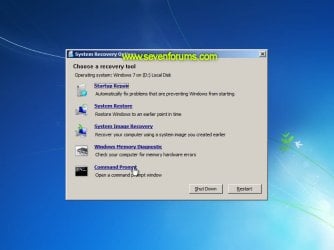
  1. Boot to the System Recovery Options screen.
    • If Windows automatically opens Startup Repair, and subsequently fails to fix a problem, you can skip ahead to step 4 below.
  2. In the System Recovery Options screen, click Startup Repair:
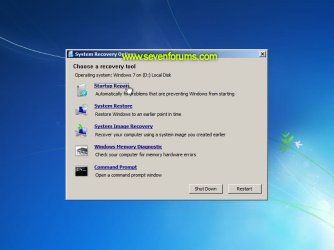
    Image05_startuprepair.jpg


  3. Windows will search for an attempt to repair startup problems:
    Image06_searching.jpg


  4. If startup problems could not be repaired, you will receive the message Windows cannot repair this computer automatically. Click View advanced options for system recovery and support:
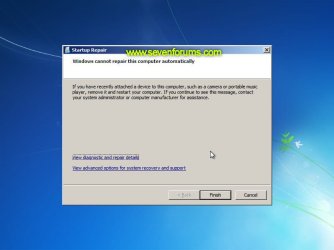
    Image07_cannotfix.jpg


  5. Click View advanced options for system recovery and support, which which bring you back to the main System Recovery Options screen.
  6. Click Command Prompt:
    Image08_clickcommand.jpg


  7. Command Prompt should open to X:, which is an internal ram disk use by System Repair:
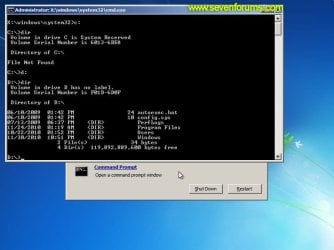
    Image10_changedrive.jpg


  8. Now you need to find your system drive. Depending on how your system is setup, this could be either C: or D:.
    • Type C: and press <ENTER>.
    • Verify that this is your system drive by typing DIR and pressing <ENTER>. If you see the Program Files, Users and Windows folders, then you have found your system drive, and can continue to step 9 below.
    • If the drive is not your system drive, repeat steps I and II above, changing the drive letter to D, E or some other letter until the system drive is located.
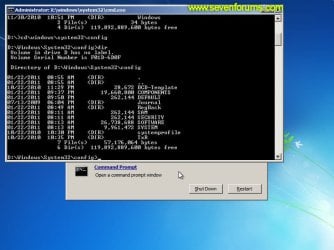
      Image11_chdir_config.jpg

  9. When you have located your Windows system drive, type CD \windows\system32\config and press <ENTER>:
  10. Type DIR and press <ENTER>, and verify that the following files and folders exist in the config folder:
    • RegBack (which is a folder)
    • DEFAULT
    • SAM
    • SECURITY
    • SOFTWARE
    • SYSTEM
      Image11_chdir_config.jpg

  11. Type MD mybackup and press <ENTER> to create a backup folder that you can use incase this procedure does not work as expected.
  12. Type copy *.* mybackup and press <ENTER>.
    • If you are prompted to overwrite existing files, press A to allow all backups to be overwritten.
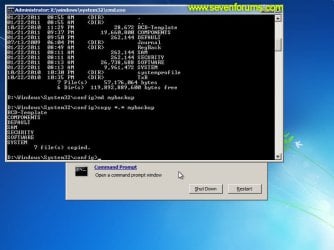
      Image12_mybackup.jpg

  13. Now you need to check if you can use the automatic Windows backups to restore your registry:
    • Type CD RegBack and press <ENTER> to go to the RegBack folder.
    • Type DIR and press <ENTER> to view the contents of the folder. All the following files must exist:
      • The DEFAULT, SAM and SECURITY files should each be about 262,000 bytes in size.
      • The SOFTWARE file should be about 26,000,000 bytes.
      • The SYSTEM file should be about 9,900,000 bytes.
      • The file sizes presented here are approximate estimations, and may vary depending on your system. If any one of them are 0 bytes, then you should stop what you're doing now and seek an alternative method of recovering your system, because Windows cannot function with a 0-byte size registry hive.
    • If the hive files listed in RegBack are ok, then proceed to step 14 of the tutorial.
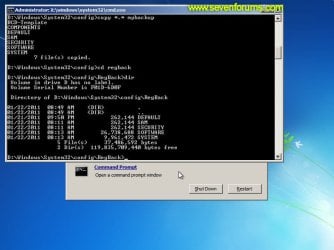
      Image13_checkregback.jpg


  14. Type copy *.* .. and press <ENTER> to copy the backup hive files to \Windows\System32\config.
    • If you are prompted to overwrite existing files, press A to allow all file to be overwritten.
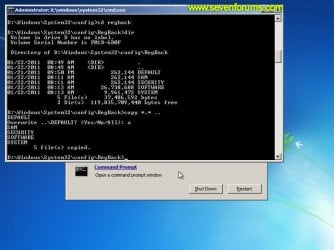
      Image14_copyregback.jpg

  15. Type exit and press <ENTER> to close the command prompt.
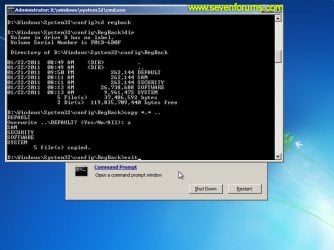
    Image15_exit.jpg


  16. Click the Restart button to reboot your computer. If all goes well, your system will boot normally.
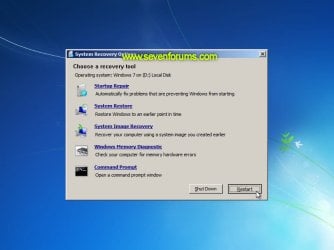
    Image16_restart.jpg
    Image17_working.jpg


Reference Information
This tutorial was made possible after learning how to manualy replace the Windows 7 Registry Hives after reading the Recovering Windows 7 Registry Hives/Files article on Microsoft Technet.


Attachments
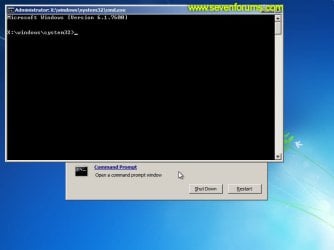
  • Image09_commandprompt.jpg
    Image09_commandprompt.jpg
    26.1 KB · Views: 373
Last edited by a moderator:
If you have shadow copies, you can replace the reg hives from there, or even the entire os.
 

My Computers My Computers

  • At a glance

    7 X64i5 84002x8gb 3200mhz
    Computer type
    PC/Desktop
    OS
    7 X64
    CPU
    i5 8400
    Motherboard
    gigabyte b365m ds3h
    Memory
    2x8gb 3200mhz
    Hard Drives
    various
    PSU
    pure power 11 400w cm
    Case
    Coolermaster
    Cooling
    cryorig m9i
  • At a glance

    7x64g54008gb ddr4 2400
    Computer type
    PC/Desktop
    OS
    7x64
    CPU
    g5400
    Motherboard
    ga b365m ds3h
    Memory
    8gb ddr4 2400
    PSU
    xfx pro 450w
I/o device error

Hi , trying this, but I can't get past md my backup because it says: The request could not be performed because of an I/O device error - Please help!
 

My Computer My Computer

At a glance

Windows 7 64 bit
Computer type
PC/Desktop
Computer Manufacturer/Model Number
Acre laptop 5945
OS
Windows 7 64 bit
did the cluser in windows 8 with a bad update to 8.1. Was about to start the linux thing to fix it when i found your tutorial which worked perfectly. YOU ROCK!
 

My Computer My Computer

At a glance

64 bit win 8 and fedora and ubuntu
Computer type
PC/Desktop
OS
64 bit win 8 and fedora and ubuntu
:D it helps me so much and it saves my money...........thank you very much...............
 

My Computer My Computer

At a glance

windows 7 ultimate 32 bitg2030
Computer type
PC/Desktop
Computer Manufacturer/Model Number
intel
OS
windows 7 ultimate 32 bit
CPU
g2030
Antivirus
avast
Browser
chrome
Awesome

Thank you.
 

My Computer My Computer

At a glance

W 7 64
Computer type
Laptop
Computer Manufacturer/Model Number
Lenovo
OS
W 7 64
Great job! Thank you.
I know nothing about computers and systems. But this was guiding very well.
 

My Computer My Computer

At a glance

64
Computer type
Laptop
Computer Manufacturer/Model Number
Ho
OS
64
Possible solution for "an I/O device error" message in stage 8

Hi,

This post is helpful but there are still alot of questions unanswered for those whose pcs don't work out like the instructions. I had a similar problem like el7, all the way back in 2011 and Flashgirl just last month. At stage 8. After typing c: and pressing <enter> I got an error message: The request could not be performed because of an I/O device error

I read the whole discussion but found that years later the problem still hasn't been resolved. It would be great if these outstanding questions could be answered.

Luckily for me I found a solution. I don't know whether this will work for others but for me it was something i just stumbled upon while trying alternatives.

1. I existed command prompt after that error.

2. I reopened command prompt and run the chkdsk /f command. It ran the whole night yesterday. In the morning the log, at the very end, showed that it wasn't able to find a windows os installed on the disk. I lost hope and shut down the pc.

3. Later that day i started up the pc and when it got to the System Recovery Options window, I opened command prompt. I run chkdsk /f c: command. This time the log showed that there weren't any problems on tge disk. I'm not an expert at these things so i'm not sure if adding the c: at the end made a difference.

4. I existed the command window and reopened it.

5. I decided to try this tutorial again, just to try my luck, and was surprised when i managed to get past stage 8. All the way to stage 13.

6. At stage 13 I, like many others, found that my files sizes where considerably different sizes from what is in the tutorial. I read through the discussion and finally found a reply from "Brink" addressing "Zkhan" saying:

The important part is that they are not zero, so you should be good to go to continue the steps.

So i went ahead and completed all the steps. It worked and the pc has been running properly for an hour now :D. I didn't expect it to since others with similar problems didn't manage to fix their pcs.

This tutorial has helped me but it would really be helpful to resolve these outstanding queries. Thanks for the help.
 

My Computer My Computer

At a glance

Windows 7 Professional 64bitIntel (R) Core(TM) i7-3630QM @2.4GHz8GB RAMNVIDIA Quadro K1000M
Computer type
Laptop
Computer Manufacturer/Model Number
HP Elitebook 8570w
OS
Windows 7 Professional 64bit
CPU
Intel (R) Core(TM) i7-3630QM @2.4GHz
Memory
8GB RAM
Graphics Card(s)
NVIDIA Quadro K1000M
Screen Resolution
1920X1080
Step 12/14 possible work around...

There was a problem with a co-workers laptop where the config directory was trashed and chkdsk was unable to fix giving 766f6c756d652e63 3f1 Unspecified error.

I managed to boot from a Win 7 Install DVD I had and got to command prompt. From there I went to <system Drive>\Windows\System32\config and attempted a DIR command which only gave me the highest level <DIR> single '.' listing. undaunted I tried to CD into RegBack and it let me even though it would not list it through the DIR command!

After this I was able to md <SystemDrive>\RegBack then copy *.* to my new folder <System Drive>\RegBack. Since it would not let me into the config folder I tried deleting/removing (RMDIR/RD) it failed here as well due to in consistent HDD meta-data. My last attempt finally worked I just used the REN/RENAME command: REN "<SystemDrive>\Windows\System32\config" "trashed" and it let me! Yay! Then I just created a new config dir under System32 (MD/MKDIR): MD "<SystemDrive>\Windows\System32\config", and finally copy would work for me Copy "<SystemDrive>\RegBack\*.*" "<SystemDrive>\Windows\System32\config" and FINALLY it would boot again and allow me to run chkdsk repairing the disk problems! Seems to be all better now!

Thank you for this Tutorial! It and other information helped me to come up with my alternate solution!
 

My Computer My Computer

At a glance

Win 7 x64 Pro, Premium, Win 8.1 x64 Premium
Computer type
PC/Desktop
OS
Win 7 x64 Pro, Premium, Win 8.1 x64 Premium
Worked for me, thank you!!

This thread has been an absolute life saver!!

Not entirely sure what happened but my PC (two year old Dell) decided that Windows was no longer genuine and kept prompting me to go to the Microsoft site and buy another version of Windows (like hell). I had even contacted Microsoft support to no avail.

I tried a few other solutions I found online (roll back Windows Update but that failed, system restore point which failed) then I ended up stuck in the start up repair/recovery loop...

After a few tears, purchase of a back up drive and some Googling I came across this page. Followed the steps and after about 2 mins my computer was back up and running again. Fixed the Windows not genuine problem and back to normal. Thanks to whoever wrote this, you have saved so many memories and a whole boat load of work. Thank you!! :D
 

My Computer My Computer

At a glance

Windows 7 Professional x64
Computer type
PC/Desktop
Computer Manufacturer/Model Number
Dell XPS 8500
OS
Windows 7 Professional x64
Don't forget to check the SATA controller in BIOS

After having a Windows 7 PC stuck in this boot loop and the fixes mentioned in this post didn't work as usual I was about to perform a backup and reinstall.

Luckily I remembered way back to when I first installed windows 7 when still in beta and I was having the same issue due to the SATA controller in the BIOS being set to IDE not AHCI (this was a common issue with migrating old XP workstations to windows 7 back in the day)

for some reason the BIOS in this new PC had reverted back to IDE?, I changed it to AHCI and it booted first go :D

Hopefully this is found by someone else and saves them a reinstall of windows if the above steps haven't worked.

Regards,
Elomaybis.
 

My Computer My Computer

At a glance

Various
Computer type
PC/Desktop
OS
Various
keyboard and mouse

hi thanks for this tutorial it worked a treat but on startup my keyboard and mouse do not respond so cannot put in password it is the same in safe mode any help would be great thanks
 

My Computer My Computer

At a glance

windows 8 64bitamd4
Computer type
Laptop
Computer Manufacturer/Model Number
acer
OS
windows 8 64bit
CPU
amd
Motherboard
new75
Memory
4
Hard Drives
1
Antivirus
microsoft
Hello Wessy, and welcome to Seven Forums.

If these are connected by USB, then double check your BIOS settings to enable any "USB at boot" type settings, and save and exit BIOS.

If you have an older PS/2 type keyboard or mouse, you will also be able to connect and use them at boot for now.
 

My Computer My Computer

At a glance

64-bit Windows 11 Pro for WorkstationsIntel i7-8700K OC'd to 5 GHz64 GB (4x16GB) G.SKILL TridentZ RGB DDR4 3600...ASUS ROG-STRIX-GTX1080TI-O11G-GAMING
Computer type
PC/Desktop
Computer Manufacturer/Model Number
Self built custom
OS
64-bit Windows 11 Pro for Workstations
CPU
Intel i7-8700K OC'd to 5 GHz
Motherboard
ASUS ROG Maximus XI Formula Z390
Memory
64 GB (4x16GB) G.SKILL TridentZ RGB DDR4 3600 MHz
Graphics Card(s)
ASUS ROG-STRIX-GTX1080TI-O11G-GAMING
Sound Card
Integrated
Monitor(s) Displays
2 x Samsung Odyssey G7 27"
Screen Resolution
2560x1440
Hard Drives
1TB Samsung 990 PRO M.2,
4TB Samsung 990 PRO PRO M.2,
TerraMaster F8 SSD Plus NAS
PSU
Seasonic Prime Titanium 850W
Case
Thermaltake Core P3
Cooling
Corsair Hydro H115i
Keyboard
Logitech wireless K800
Mouse
Logitech MX Master 4
Internet Speed
2 Gb/s Download and 100 Mb/s Upload
Antivirus
Malwarebyte Anti-Malware Premium
Browser
Google Chrome
Other Info
Logitech Z625 speaker system,
Logitech BRIO 4K Pro webcam,
HP Color LaserJet Pro MFP M477fdn,
APC SMART-UPS RT 1000 XL - SURT1000XLI,
Galaxy S23 Plus phone
thanks brink but tried ps2 keyboard and that not work either:cry:
 

My Computer My Computer

At a glance

windows 8 64bitamd4
Computer type
Laptop
Computer Manufacturer/Model Number
acer
OS
windows 8 64bit
CPU
amd
Motherboard
new75
Memory
4
Hard Drives
1
Antivirus
microsoft
Restart the computer with the PS2 keyboard connected for it to be recognized, and see if it may work then.
 

My Computer My Computer

At a glance

64-bit Windows 11 Pro for WorkstationsIntel i7-8700K OC'd to 5 GHz64 GB (4x16GB) G.SKILL TridentZ RGB DDR4 3600...ASUS ROG-STRIX-GTX1080TI-O11G-GAMING
Computer type
PC/Desktop
Computer Manufacturer/Model Number
Self built custom
OS
64-bit Windows 11 Pro for Workstations
CPU
Intel i7-8700K OC'd to 5 GHz
Motherboard
ASUS ROG Maximus XI Formula Z390
Memory
64 GB (4x16GB) G.SKILL TridentZ RGB DDR4 3600 MHz
Graphics Card(s)
ASUS ROG-STRIX-GTX1080TI-O11G-GAMING
Sound Card
Integrated
Monitor(s) Displays
2 x Samsung Odyssey G7 27"
Screen Resolution
2560x1440
Hard Drives
1TB Samsung 990 PRO M.2,
4TB Samsung 990 PRO PRO M.2,
TerraMaster F8 SSD Plus NAS
PSU
Seasonic Prime Titanium 850W
Case
Thermaltake Core P3
Cooling
Corsair Hydro H115i
Keyboard
Logitech wireless K800
Mouse
Logitech MX Master 4
Internet Speed
2 Gb/s Download and 100 Mb/s Upload
Antivirus
Malwarebyte Anti-Malware Premium
Browser
Google Chrome
Other Info
Logitech Z625 speaker system,
Logitech BRIO 4K Pro webcam,
HP Color LaserJet Pro MFP M477fdn,
APC SMART-UPS RT 1000 XL - SURT1000XLI,
Galaxy S23 Plus phone
thanks again brink but tried this no joy the keyboard and mouse do light up but no response
 

My Computer My Computer

At a glance

windows 8 64bitamd4
Computer type
Laptop
Computer Manufacturer/Model Number
acer
OS
windows 8 64bit
CPU
amd
Motherboard
new75
Memory
4
Hard Drives
1
Antivirus
microsoft
doing this but stuck plz help

Ok I've got the bsod I've done the command got to reg back up
And now saying files cannot be copied onto self

Done the copy *.* space in between both still
Saying can't copy onto its self ?
 

My Computer My Computer

At a glance

windows 7 home premium 32 bit
Computer type
Laptop
Computer Manufacturer/Model Number
dell
OS
windows 7 home premium 32 bit
Antivirus
not yet
Browser
Google
Dzomlija THANK YOU so much.

I have been working on my computer for 3 days getting advice from the 3 different forums.

I finally did a search for the "problem signature 06" and found this.

I had tried everything and couldn't fix my startup problem.

Then I found this thread and in 2 minutes I was up and running.

Almost missed it though. The first time I didn't see the .. hidden files after the copy all command.

Went back and read it again. added the .. and that easy. It started right up.

THANK YOU, THANK YOU. THANK YOU.
 

My Computer My Computer

At a glance

Windows 7 Ultimate x64I7 quad core8 gb2 MSI Nividia GTX 770s 4 gb
Computer type
PC/Desktop
Computer Manufacturer/Model Number
MSI
OS
Windows 7 Ultimate x64
CPU
I7 quad core
Motherboard
MSI Fusion (big bang)
Memory
8 gb
Graphics Card(s)
2 MSI Nividia GTX 770s 4 gb
Hard Drives
2 tb
Ok I've got the bsod I've done the command got to reg back up
And now saying files cannot be copied onto self

Done the copy *.* space in between both still
Saying can't copy onto its self ?

You probably forgot to add the two dots after copy *.* (space) DOT DOT
 

My Computer My Computer

At a glance

Windows 7 Ultimate x64I7 quad core8 gb2 MSI Nividia GTX 770s 4 gb
Computer type
PC/Desktop
Computer Manufacturer/Model Number
MSI
OS
Windows 7 Ultimate x64
CPU
I7 quad core
Motherboard
MSI Fusion (big bang)
Memory
8 gb
Graphics Card(s)
2 MSI Nividia GTX 770s 4 gb
Hard Drives
2 tb
thank you

So I just HAD to register and log in to say : Thanks for all your help from another grateful ex-sys admin who's current technique is google-ing everything.

Kindest regards
Keep up the great (and largely thankless) work.

Kal
:cry:
:confused:
:party:
:D
 

My Computer My Computer

At a glance

7 dualcore
Computer type
PC/Desktop
OS
7 dualcore
I followed that tutorial and still can't seem to bypass the system recovery. The computer I have is a custom built one and the hard drive was used before by me and it had viruses before I put it in storage becuse my gpu was blown. I'm trying to get it to start with said HD because it's all I have and desperately need this computer up and running. I can't seem to find my Win7 Disc so can't do a full restore or I'd have done so already.

How can I get this to start up properly? Pressing F8 doesn't do anything either since it just says it failed to startup recovery and restarts instantly. What is wrong?
 

My Computer My Computer

At a glance

Windows 7 64 bit
Computer type
PC/Desktop
Computer Manufacturer/Model Number
HP
OS
Windows 7 64 bit
Back
Top