Startup Repair Infinite Loop Recovery

How to Recover from an Infinitely Looping Startup Repair Loop without Reinstalling Windows

If you've ever experienced a Startup Repair that continously loops and fails to fix the problem of not being able to load windows, even in safe mode, then you'll know that usually the only way to recover from this when System Restore does not work is to do a clean install of Windows.

Until now.

This tutorial will show you how to use the System Recovery Options provided by Windows to recover your system to a working state so that you don't have to risk losing data by performing a clean install.

   Warning
The instructions presented withing this tutorial must be followed correctly, or you can damage your Windows 7 installation even further. This tutorial is designed to help recover from a bad registry that is causing the startup repair loop. You should note that there may still be some issues remaining that cannot be fixed by manually restoring the registry.


Recovering Your System
  1. Boot to the System Recovery Options screen.
    • If Windows automatically opens Startup Repair, and subsequently fails to fix a problem, you can skip ahead to step 4 below.
  2. In the System Recovery Options screen, click Startup Repair:
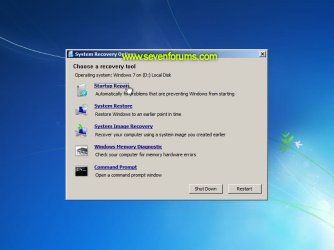
    Image05_startuprepair.jpg


  3. Windows will search for an attempt to repair startup problems:
    Image06_searching.jpg


  4. If startup problems could not be repaired, you will receive the message Windows cannot repair this computer automatically. Click View advanced options for system recovery and support:
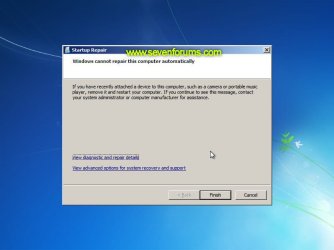
    Image07_cannotfix.jpg


  5. Click View advanced options for system recovery and support, which which bring you back to the main System Recovery Options screen.
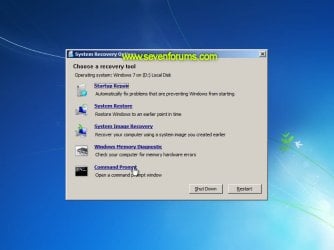
  6. Click Command Prompt:
    Image08_clickcommand.jpg


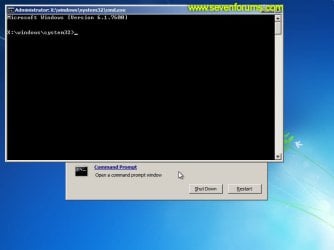
  7. Command Prompt should open to X:, which is an internal ram disk use by System Repair:
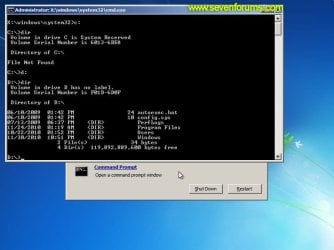
    Image10_changedrive.jpg


  8. Now you need to find your system drive. Depending on how your system is setup, this could be either C: or D:.
    • Type C: and press <ENTER>.
    • Verify that this is your system drive by typing DIR and pressing <ENTER>. If you see the Program Files, Users and Windows folders, then you have found your system drive, and can continue to step 9 below.
    • If the drive is not your system drive, repeat steps I and II above, changing the drive letter to D, E or some other letter until the system drive is located.
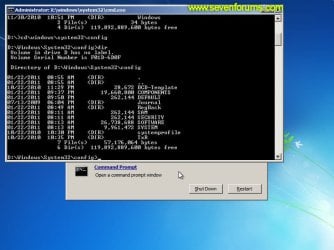
      Image11_chdir_config.jpg

  9. When you have located your Windows system drive, type CD \windows\system32\config and press <ENTER>:
  10. Type DIR and press <ENTER>, and verify that the following files and folders exist in the config folder:
    • RegBack (which is a folder)
    • DEFAULT
    • SAM
    • SECURITY
    • SOFTWARE
    • SYSTEM
      Image11_chdir_config.jpg

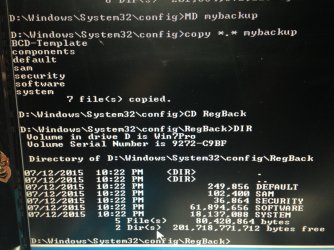
  11. Type MD mybackup and press <ENTER> to create a backup folder that you can use incase this procedure does not work as expected.
  12. Type copy *.* mybackup and press <ENTER>.
    • If you are prompted to overwrite existing files, press A to allow all backups to be overwritten.
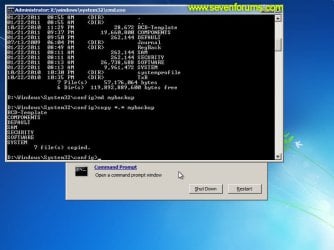
      Image12_mybackup.jpg

  13. Now you need to check if you can use the automatic Windows backups to restore your registry:
    • Type CD RegBack and press <ENTER> to go to the RegBack folder.
    • Type DIR and press <ENTER> to view the contents of the folder. All the following files must exist:
      • The DEFAULT, SAM and SECURITY files should each be about 262,000 bytes in size.
      • The SOFTWARE file should be about 26,000,000 bytes.
      • The SYSTEM file should be about 9,900,000 bytes.
      • The file sizes presented here are approximate estimations, and may vary depending on your system. If any one of them are 0 bytes, then you should stop what you're doing now and seek an alternative method of recovering your system, because Windows cannot function with a 0-byte size registry hive.
    • If the hive files listed in RegBack are ok, then proceed to step 14 of the tutorial.
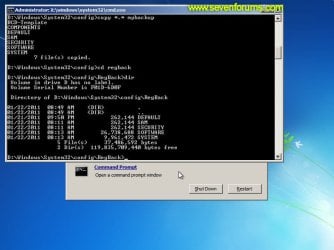
      Image13_checkregback.jpg


  14. Type copy *.* .. and press <ENTER> to copy the backup hive files to \Windows\System32\config.
    • If you are prompted to overwrite existing files, press A to allow all file to be overwritten.
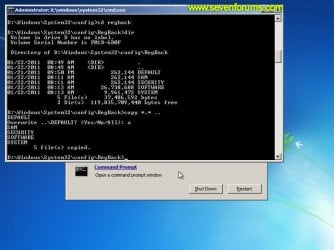
      Image14_copyregback.jpg

  15. Type exit and press <ENTER> to close the command prompt.
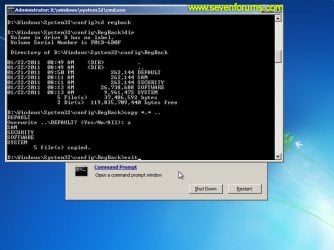
    Image15_exit.jpg


  16. Click the Restart button to reboot your computer. If all goes well, your system will boot normally.
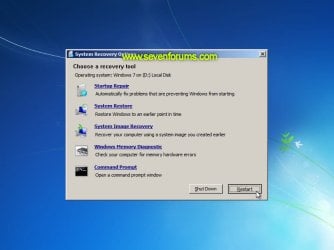
    Image16_restart.jpg
    Image17_working.jpg


Reference Information
This tutorial was made possible after learning how to manualy replace the Windows 7 Registry Hives after reading the Recovering Windows 7 Registry Hives/Files article on Microsoft Technet.


Attachments
  • Image09_commandprompt.jpg
    Image09_commandprompt.jpg
    26.1 KB · Views: 373
Last edited by a moderator:
It worked!

Joined in just to say "thanks"! I followed each step of your tutorial and everything went back to normal. The fact that complete Windows reinstallation isn't required is so nice. You saved my day, thank you!

P. S. In my case the whole problem was caused by an unfortunate BSOD which happened during Antivirus instalation.
 

My Computer My Computer

At a glance

Windows 7 ultimate x64
Computer type
PC/Desktop
OS
Windows 7 ultimate x64
Many, many thanks!!

I had the infinite loop problem and this tutorial has fixed my laptop and restored my sanity!!

THANK YOU ..... THANK YOU ..... THANK YOU
 

My Computer My Computer

At a glance

Windows 7 Home Premium 32-bit2.70 gigahertz AMD Athlon 64 X2 Dual Core4 GBATI Radeon HD 4350
Computer Manufacturer/Model Number
Dell Inc. Inspiron 546
OS
Windows 7 Home Premium 32-bit
CPU
2.70 gigahertz AMD Athlon 64 X2 Dual Core
Motherboard
Dell Inc. 0F896N A02
Memory
4 GB
Graphics Card(s)
ATI Radeon HD 4350
Sound Card
VIA High Definition Audio
Monitor(s) Displays
Acer AL2016W
Hard Drives
WDC WD6400AAKS-75A7B2 [Hard drive] (640.13 GB)
ExcelSto r Technology J81 USB Device [Hard drive] (164.69 GB)
Thanks for the excellent tutorial. BUT, I'm very sorry to report that I got stuck on step 13:
When I navigate to the regback folder, it is empty. The tutorial just says:

The file sizes presented here ... may vary depending on your system. If any one of them are 0 bytes, then you should stop what you're doing now and seek an alternative method of recovering your system, because Windows cannot function with a 0-byte size registry hive.


Please HELP -- I have been googling and experimenting for many hours -- what 'alternative methods' can I try ? Are there other restore points somewhere ? (I tried several in startup repair, none succeeded). This is a Dell Latitude E6510 Win7 Pro, MS Office Starter.

Any suggestions are welcome -- no, I don't have an install disk, yes I have backed-up user files (laptop belongs to my friend, but she bought it second-hand on my recommendation ... sigh). The Dell pre-boot diagnostics (lengthy -- quite thorough ?) indicate hardware is all ok.

Thanks for your help !
 

My Computer My Computer

At a glance

PA - Pennsylvaniai54G
Computer type
Laptop
Computer Manufacturer/Model Number
Dell e6510
OS
PA - Pennsylvania
CPU
i5
Memory
4G
Hello, I'm stuck on step 8! When I do a DIR on c:, I get file not found (just like your first screen shot on your c: drive). C: is my system drive though. It is a Crucial M4 SSD.
Any ideas?
I got stuck in this startup infinite loop after trying to flash my BIOS. The bios supposedly flashed correctly, but something when wrong upon first startup after the flash I guess. I flashed back to the previous bios, but no luck; the damage was done I guess.

Any help greatly appreciated!
Kieran
 

My Computer My Computer

At a glance

Windows 7 UltimateIntel core i5-2500k8GB Patriot Signature PC3-12400 DDR3XFX HD-685X-ZCFC Radion HD 6850 1GB
Computer type
PC/Desktop
Computer Manufacturer/Model Number
self built
OS
Windows 7 Ultimate
CPU
Intel core i5-2500k
Motherboard
Gigabyte GA-Z68XP-UD3
Memory
8GB Patriot Signature PC3-12400 DDR3
Graphics Card(s)
XFX HD-685X-ZCFC Radion HD 6850 1GB
Sound Card
On-board Realtek ALC889
Monitor(s) Displays
ASUS ASVS248HP
Screen Resolution
1920x1080
Hard Drives
Crucial 128GB M4 SSD
Samsung 1TB green something or other
PSU
Corsair TX650 650W 80Plus-Bronze
Case
Bitfenix Outlaw
Cooling
Stock
Keyboard
Some random old HP thing from an old computer.
Mouse
Some random wireless Microsoft mouse. Has a blue light.
Internet Speed
~20mbps comcast cable (they say I get 80-100mbps)
Antivirus
Windows Security Essentials
Browser
Chrome, IE11, rarely FF.
Other Info
Router = ASUS RT-N66U Gigabit 802.11n router
Also own and use a MS Surface Pro3 with 8GB ram, 256GB ssd. Love it. Not crazy about Win8.1, but overall love the Surface.
OP You are a god amongst gods

Dzomlija,

I dont normally take the time to do this, but I have been fumbling around on the interwebz trying to find a fix to this issue.

THANK YOU for knowing what you are talking about

Sincerely
Rogue from New Zealand
 

My Computer My Computer

At a glance

Win 7 64
Computer type
PC/Desktop
Computer Manufacturer/Model Number
Lenovo Y570
OS
Win 7 64
just join in to reply to this thread.... going thru this problem hour ago ,follow op's method.. since i dont have any windows repair disc and no empty disc available to burn one at that moment, i create one using usb stick (googled for the method).. followed thru the step until it gives error on step 12. after i typed "copy *.* mybackup" , it stops on 'SAM' for a couple minutes and give error "data error (cyclic redundancy check)" . googled for it again and found out i need to run the chkdsk command.. knowing it will take some time, i go thru this thread again to check if theres any other way. on page 1 post #4,

You do know doing a chkdsk normally repairs this or if you go to F8 and disable automatic restarts on system failure.

work on a help desk and this normally resolves the issue

tried the f8 method, it stopped looping ,instead give blue screen with an error "C:\Windows\System32\api-mx32.dll is either not designed to run on windows or it contains an error" . after that i boot in safe mode, go to the specified path and delete the dll, restart, and it boot like normal again. lol. after the hassle of creating the windows recovery disc.. just one simple solution -.-
 

My Computer My Computer

At a glance

Windows 7 Ultimate 64 bitAMD E2-3200 APU6GB DDR3AMD Radeon HD 6370D
Computer type
PC/Desktop
Computer Manufacturer/Model Number
Acer
OS
Windows 7 Ultimate 64 bit
CPU
AMD E2-3200 APU
Motherboard
Acer Aspire X1470
Memory
6GB DDR3
Graphics Card(s)
AMD Radeon HD 6370D
Antivirus
Kaspersky Internet Security
Browser
Google Chrome
Trying to revive a Dell Optiplex 580 - Win 7 Pro x32 stuck in the repair boot loop.
I've worked through this tutorial up to step 10. I get a "File Not Found" error when checking the /config dir. - It might be worth noting that it takes several minutes (>10) for the DIR command to run.
Confirmed user profiles and files are intact by plugging HDD into an external. Any suggestions? Kill it with fire?
 

My Computer My Computer

At a glance

Windows 7&XP Pro x64/x32
Computer type
PC/Desktop
Computer Manufacturer/Model Number
Dell
OS
Windows 7&XP Pro x64/x32
Other Possible Solution

I did everything yet still im in the loop.ive been following everthing got no error but the startup repair still appearing and I cant fix it help me please!!
 

My Computer My Computer

At a glance

windows 7 Ultimate 32bit
Computer type
PC/Desktop
OS
windows 7 Ultimate 32bit
What do you do if the files are all 0 bytes?
 

My Computer My Computer

At a glance

Windows 10 Technical PreviewIntel i5Intel Iris HD
Computer type
Laptop
Computer Manufacturer/Model Number
Apple
OS
Windows 10 Technical Preview
CPU
Intel i5
Graphics Card(s)
Intel Iris HD
File Sizes Way Different?

I am at Step #13.II and am requesting someone to take a look at my File sizes. :)

I understand that the tutorial screenshot is an estimation. This is my main 10-YO desktop. Not used much, but for everything important.

How I got here--my nVidia GF 6K series card's fan had been noisy for quite a while. Removed card & found heatsink paste was totally evaporated, fan failed. Found one in excellent condition online, but now 7 is in the endless loop of Startup Repair. Been at it for over 12 hours now.

While card was removed, monitor gave message that it was missing. When it tries to boot with new card, I see a glimpse of a message, but too fast to read.

Card replacement is exactly the same as the old one, but know sys sees it as new hardware. I don't understand why it is not recognizing it. :confused:

Here is a screenshot at Step #13.II. Should I continue, or stop & try something else? :banghead:

Thanks for the help!

RegBack7.jpg
 

My Computer My Computer

At a glance

Windows 7 Pro x64 (Upgrade, Clean Install)
Computer type
Laptop
OS
Windows 7 Pro x64 (Upgrade, Clean Install)
Anyone, please?
 

My Computer My Computer

At a glance

Windows 7 Pro x64 (Upgrade, Clean Install)
Computer type
Laptop
OS
Windows 7 Pro x64 (Upgrade, Clean Install)
Yes, you should be able to continue on to step 14 since none of these show as 0 bytes. :)
 

My Computer My Computer

At a glance

64-bit Windows 11 Pro for WorkstationsIntel i7-8700K OC'd to 5 GHz64 GB (4x16GB) G.SKILL TridentZ RGB DDR4 3600...ASUS ROG-STRIX-GTX1080TI-O11G-GAMING
Computer type
PC/Desktop
Computer Manufacturer/Model Number
Self built custom
OS
64-bit Windows 11 Pro for Workstations
CPU
Intel i7-8700K OC'd to 5 GHz
Motherboard
ASUS ROG Maximus XI Formula Z390
Memory
64 GB (4x16GB) G.SKILL TridentZ RGB DDR4 3600 MHz
Graphics Card(s)
ASUS ROG-STRIX-GTX1080TI-O11G-GAMING
Sound Card
Integrated
Monitor(s) Displays
2 x Samsung Odyssey G7 27"
Screen Resolution
2560x1440
Hard Drives
1TB Samsung 990 PRO M.2,
4TB Samsung 990 PRO PRO M.2,
TerraMaster F8 SSD Plus NAS
PSU
Seasonic Prime Titanium 850W
Case
Thermaltake Core P3
Cooling
Corsair Hydro H115i
Keyboard
Logitech wireless K800
Mouse
Logitech MX Master 4
Internet Speed
2 Gb/s Download and 100 Mb/s Upload
Antivirus
Malwarebyte Anti-Malware Premium
Browser
Google Chrome
Other Info
Logitech Z625 speaker system,
Logitech BRIO 4K Pro webcam,
HP Color LaserJet Pro MFP M477fdn,
APC SMART-UPS RT 1000 XL - SURT1000XLI,
Galaxy S23 Plus phone
Thanks, Brink, for the go-ahead! Will report back.
 

My Computer My Computer

At a glance

Windows 7 Pro x64 (Upgrade, Clean Install)
Computer type
Laptop
OS
Windows 7 Pro x64 (Upgrade, Clean Install)
OK, did not work. I am at a loss for what to try now.

I even tried using a restore point for July 9th, says it is restored, and restarted, but back to the endless loop.

I cannot stay in Safe Mode--access it and select, but then after choice, kicked out into endless loop.
 

My Computer My Computer

At a glance

Windows 7 Pro x64 (Upgrade, Clean Install)
Computer type
Laptop
OS
Windows 7 Pro x64 (Upgrade, Clean Install)
May be time to reinstall. :(
 

My Computer My Computer

At a glance

64-bit Windows 11 Pro for WorkstationsIntel i7-8700K OC'd to 5 GHz64 GB (4x16GB) G.SKILL TridentZ RGB DDR4 3600...ASUS ROG-STRIX-GTX1080TI-O11G-GAMING
Computer type
PC/Desktop
Computer Manufacturer/Model Number
Self built custom
OS
64-bit Windows 11 Pro for Workstations
CPU
Intel i7-8700K OC'd to 5 GHz
Motherboard
ASUS ROG Maximus XI Formula Z390
Memory
64 GB (4x16GB) G.SKILL TridentZ RGB DDR4 3600 MHz
Graphics Card(s)
ASUS ROG-STRIX-GTX1080TI-O11G-GAMING
Sound Card
Integrated
Monitor(s) Displays
2 x Samsung Odyssey G7 27"
Screen Resolution
2560x1440
Hard Drives
1TB Samsung 990 PRO M.2,
4TB Samsung 990 PRO PRO M.2,
TerraMaster F8 SSD Plus NAS
PSU
Seasonic Prime Titanium 850W
Case
Thermaltake Core P3
Cooling
Corsair Hydro H115i
Keyboard
Logitech wireless K800
Mouse
Logitech MX Master 4
Internet Speed
2 Gb/s Download and 100 Mb/s Upload
Antivirus
Malwarebyte Anti-Malware Premium
Browser
Google Chrome
Other Info
Logitech Z625 speaker system,
Logitech BRIO 4K Pro webcam,
HP Color LaserJet Pro MFP M477fdn,
APC SMART-UPS RT 1000 XL - SURT1000XLI,
Galaxy S23 Plus phone
:-( As in Clean Install, all over again? Or Repair?

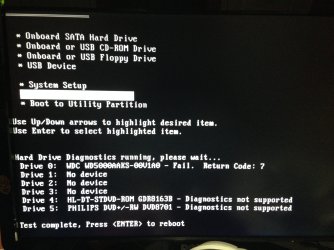
I WAS finally able to perform HD Diagnostics & got FAIL. RETURN CODE: 7 for the HDD (WD500 GB). Reading around the forum & online search, this does not necessarily mean a HD failure?

I will pull the HD & see if I can at least get all of my files off...not sure the NAS caught everything.

All this was caused just by replacing the vidcard with the exact same model?
 

Attachments

  • HDDiag.jpg
    HDDiag.jpg
    521.2 KB · Views: 1,060
Last edited:

My Computer My Computer

At a glance

Windows 7 Pro x64 (Upgrade, Clean Install)
Computer type
Laptop
OS
Windows 7 Pro x64 (Upgrade, Clean Install)
Yeah, clean install. :(
 

My Computer My Computer

At a glance

64-bit Windows 11 Pro for WorkstationsIntel i7-8700K OC'd to 5 GHz64 GB (4x16GB) G.SKILL TridentZ RGB DDR4 3600...ASUS ROG-STRIX-GTX1080TI-O11G-GAMING
Computer type
PC/Desktop
Computer Manufacturer/Model Number
Self built custom
OS
64-bit Windows 11 Pro for Workstations
CPU
Intel i7-8700K OC'd to 5 GHz
Motherboard
ASUS ROG Maximus XI Formula Z390
Memory
64 GB (4x16GB) G.SKILL TridentZ RGB DDR4 3600 MHz
Graphics Card(s)
ASUS ROG-STRIX-GTX1080TI-O11G-GAMING
Sound Card
Integrated
Monitor(s) Displays
2 x Samsung Odyssey G7 27"
Screen Resolution
2560x1440
Hard Drives
1TB Samsung 990 PRO M.2,
4TB Samsung 990 PRO PRO M.2,
TerraMaster F8 SSD Plus NAS
PSU
Seasonic Prime Titanium 850W
Case
Thermaltake Core P3
Cooling
Corsair Hydro H115i
Keyboard
Logitech wireless K800
Mouse
Logitech MX Master 4
Internet Speed
2 Gb/s Download and 100 Mb/s Upload
Antivirus
Malwarebyte Anti-Malware Premium
Browser
Google Chrome
Other Info
Logitech Z625 speaker system,
Logitech BRIO 4K Pro webcam,
HP Color LaserJet Pro MFP M477fdn,
APC SMART-UPS RT 1000 XL - SURT1000XLI,
Galaxy S23 Plus phone
Thanks, Brink...not what I wanted to hear, but kinda expected. :-(
Will get a new HD this week. :-(
Looks like SATA is now version III--will this be a problem with my old machine?

Planning on going with same I replaced with in 2008 (WD Caviar Blue 500, WD5000AAKX).
 
Last edited:

My Computer My Computer

At a glance

Windows 7 Pro x64 (Upgrade, Clean Install)
Computer type
Laptop
OS
Windows 7 Pro x64 (Upgrade, Clean Install)
Forgot to say, it is the HDD, but you knew that. I popped in an old 320 with XP on it, and everything read and ran just fine. Really needed to make sure replacement vidcard was okay.

I'm pulling files now off damaged drive--could not get to my NAS with malfunctioning drive not seen.

Thanks, again, for the help--I will report back after I get new HDD & do 7 again.
 

My Computer My Computer

At a glance

Windows 7 Pro x64 (Upgrade, Clean Install)
Computer type
Laptop
OS
Windows 7 Pro x64 (Upgrade, Clean Install)
Reporting back, as promised. Have new 1TB installed ($39 sale at MicroCenter!, was cheaper than OEM I usually buy).

Finally got everything reloaded and is working great! Thanks, again, for responding, Brink. (Won't let me Rep because said I need to spread it around, but you are the one who usually helps me.)

;)
 

My Computer My Computer

At a glance

Windows 7 Pro x64 (Upgrade, Clean Install)
Computer type
Laptop
OS
Windows 7 Pro x64 (Upgrade, Clean Install)
Back
Top