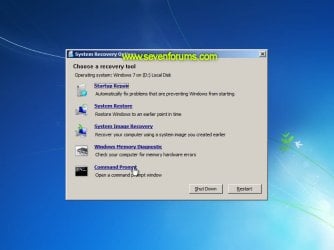
Startup Repair Infinite Loop Recovery

How to Recover from an Infinitely Looping Startup Repair Loop without Reinstalling Windows

If you've ever experienced a Startup Repair that continously loops and fails to fix the problem of not being able to load windows, even in safe mode, then you'll know that usually the only way to recover from this when System Restore does not work is to do a clean install of Windows.

Until now.

This tutorial will show you how to use the System Recovery Options provided by Windows to recover your system to a working state so that you don't have to risk losing data by performing a clean install.

   Warning
The instructions presented withing this tutorial must be followed correctly, or you can damage your Windows 7 installation even further. This tutorial is designed to help recover from a bad registry that is causing the startup repair loop. You should note that there may still be some issues remaining that cannot be fixed by manually restoring the registry.


Recovering Your System
  1. Boot to the System Recovery Options screen.
    • If Windows automatically opens Startup Repair, and subsequently fails to fix a problem, you can skip ahead to step 4 below.
  2. In the System Recovery Options screen, click Startup Repair:
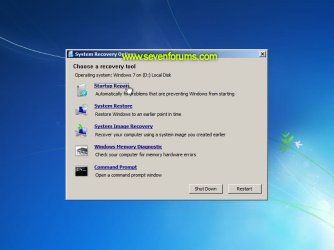
    Image05_startuprepair.jpg


  3. Windows will search for an attempt to repair startup problems:
    Image06_searching.jpg


  4. If startup problems could not be repaired, you will receive the message Windows cannot repair this computer automatically. Click View advanced options for system recovery and support:
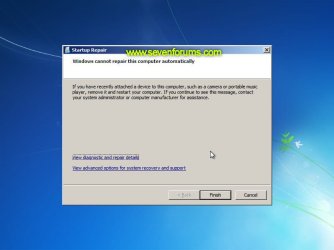
    Image07_cannotfix.jpg


  5. Click View advanced options for system recovery and support, which which bring you back to the main System Recovery Options screen.
  6. Click Command Prompt:
    Image08_clickcommand.jpg


  7. Command Prompt should open to X:, which is an internal ram disk use by System Repair:
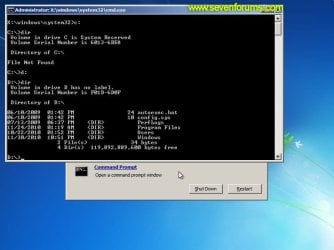
    Image10_changedrive.jpg


  8. Now you need to find your system drive. Depending on how your system is setup, this could be either C: or D:.
    • Type C: and press <ENTER>.
    • Verify that this is your system drive by typing DIR and pressing <ENTER>. If you see the Program Files, Users and Windows folders, then you have found your system drive, and can continue to step 9 below.
    • If the drive is not your system drive, repeat steps I and II above, changing the drive letter to D, E or some other letter until the system drive is located.
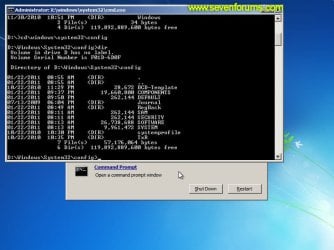
      Image11_chdir_config.jpg

  9. When you have located your Windows system drive, type CD \windows\system32\config and press <ENTER>:
  10. Type DIR and press <ENTER>, and verify that the following files and folders exist in the config folder:
    • RegBack (which is a folder)
    • DEFAULT
    • SAM
    • SECURITY
    • SOFTWARE
    • SYSTEM
      Image11_chdir_config.jpg

  11. Type MD mybackup and press <ENTER> to create a backup folder that you can use incase this procedure does not work as expected.
  12. Type copy *.* mybackup and press <ENTER>.
    • If you are prompted to overwrite existing files, press A to allow all backups to be overwritten.
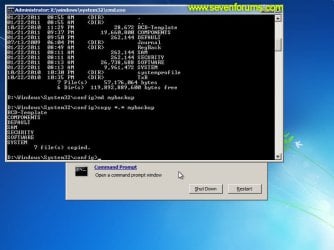
      Image12_mybackup.jpg

  13. Now you need to check if you can use the automatic Windows backups to restore your registry:
    • Type CD RegBack and press <ENTER> to go to the RegBack folder.
    • Type DIR and press <ENTER> to view the contents of the folder. All the following files must exist:
      • The DEFAULT, SAM and SECURITY files should each be about 262,000 bytes in size.
      • The SOFTWARE file should be about 26,000,000 bytes.
      • The SYSTEM file should be about 9,900,000 bytes.
      • The file sizes presented here are approximate estimations, and may vary depending on your system. If any one of them are 0 bytes, then you should stop what you're doing now and seek an alternative method of recovering your system, because Windows cannot function with a 0-byte size registry hive.
    • If the hive files listed in RegBack are ok, then proceed to step 14 of the tutorial.
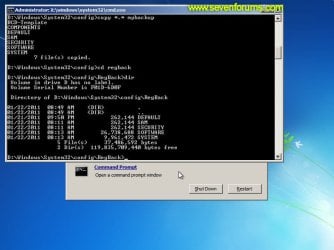
      Image13_checkregback.jpg


  14. Type copy *.* .. and press <ENTER> to copy the backup hive files to \Windows\System32\config.
    • If you are prompted to overwrite existing files, press A to allow all file to be overwritten.
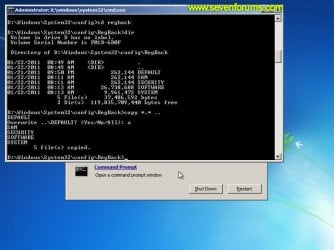
      Image14_copyregback.jpg

  15. Type exit and press <ENTER> to close the command prompt.
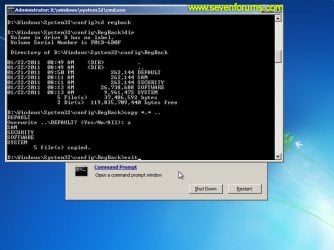
    Image15_exit.jpg


  16. Click the Restart button to reboot your computer. If all goes well, your system will boot normally.
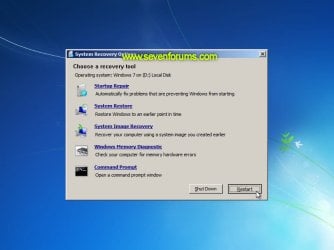
    Image16_restart.jpg
    Image17_working.jpg


Reference Information
This tutorial was made possible after learning how to manualy replace the Windows 7 Registry Hives after reading the Recovering Windows 7 Registry Hives/Files article on Microsoft Technet.


Attachments
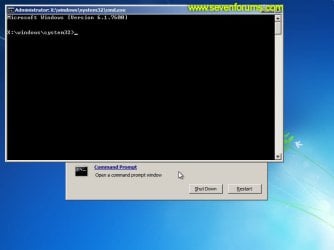
  • Image09_commandprompt.jpg
    Image09_commandprompt.jpg
    26.1 KB · Views: 373
Last edited by a moderator:
Hello !

I was locked in this boot loop on windows 8.

I upgraded to windows 10 and I still have the loop problem.

What is the problem ? I was thinking that upgrading to windows 10 would treat the problem, but no, so I guess it's not a driver problem ?

Thank you for your help.
 

My Computer My Computer

At a glance

Windows 7 64 bits
OS
Windows 7 64 bits
After I click step 5, there is no command prompt option in step 6. Only shows 2 recovery options: Startup Repair and Dell DataSafe Restore.
 

My Computer My Computer

At a glance

Windows 7 home 64
Computer type
Laptop
Computer Manufacturer/Model Number
Dell
OS
Windows 7 home 64
thanks!

just registered to tell u how awesome u are and to say thanks a lot for the simple and quick solution, you obviously know your stuff! :) so.....

Thanks!!!

You're awesome! :)


best wishes for you and yours-

take care

Nick W
 

My Computer My Computer

At a glance

7 home premium
Computer type
PC/Desktop
OS
7 home premium
Happy as a Pig in the Mud

Thanks a ton. This worked like charm for me. Well explained and links to other pages.

Thank you again :):)
 

My Computer My Computer

At a glance

Windows 10 Home 64
Computer type
Laptop
OS
Windows 10 Home 64
Omg omg omg THANK YOU!!!!! It fixed my PC when it dropped on its side! Thank you!!!!!!!!!!!!
 

My Computer My Computer

At a glance

Windows 10 64bit
Computer type
PC/Desktop
Computer Manufacturer/Model Number
HP
OS
Windows 10 64bit
:DThanks. My problem (launch startup repair infinite loop ) solved.Nice, easy to understand description even for a layman. Thank youuuuuuuuuuuuuuuu!!!!!!!!!!!!!
Sugunan
 

My Computer My Computer

At a glance

windows 7 64biti34 gb
Computer type
PC/Desktop
Computer Manufacturer/Model Number
hp
OS
windows 7 64bit
CPU
i3
Motherboard
intel
Memory
4 gb
Hard Drives
500gb
Antivirus
avast
Browser
mozila firefox
Just followed this myself and while everything looked right, I'm still stuck in the endless loop :(
 

My Computer My Computer

At a glance

New York
Computer type
PC/Desktop
OS
New York
This actually worked for me. Thankyou mate!
 

My Computer My Computer

At a glance

Windows 7 64 bitOverclocked Intel® Core™i7-4770k Quad Core (16GB KINGSTON HYPERX BEAST DUAL-DDR3 2400MHz X.3GB NVIDIA GEFORCE GTX 780 - 2 DVI, HDMI, DP -
Computer type
PC/Desktop
OS
Windows 7 64 bit
CPU
Overclocked Intel® Core™i7-4770k Quad Core (
Motherboard
ASUS® Z87-A: ATX, USB3.0, SATA6GB/S, SLi, XFIRE
Memory
16GB KINGSTON HYPERX BEAST DUAL-DDR3 2400MHz X.
Graphics Card(s)
3GB NVIDIA GEFORCE GTX 780 - 2 DVI, HDMI, DP -
Monitor(s) Displays
Asus VG248QE 24-inch 3D LED Monitor - Black (1920x1080, 8000
Hard Drives
1st Hard Disk 240GB INTEL® 520 SERIES SSD (upto 550MB/sR | 520MB/sW)

2nd Hard Disk 1TB WD CAVIAR BLACK WD1003FZEX, SATA 6 Gb/s, 64MB CACHE (7200rpm)
PSU
CORSAIR 750W RM SERIES™ MODULAR 80 PLUS® GOLD,
Case
COOLERMASTER CM STORM TROOPER - GAMING ENTHUSIAST CASE
Cooling
Corsair H80i Hydro Series High Performance. Thermal Paste
You said do not proceed if the size of software sam folders is zero. Iam getting it as zero. What to do next. I am still stuck in that loop.
 

My Computer My Computer

At a glance

Windows 7 home basic 64 bit upgraded to windo...Intel Core i3 2.3 ghzNvidia ge force with cuda
Computer type
Laptop
Computer Manufacturer/Model Number
Vaio
OS
Windows 7 home basic 64 bit upgraded to windows 10
CPU
Intel Core i3 2.3 ghz
Graphics Card(s)
Nvidia ge force with cuda
I think you need to reinstall windows as nothing is backed up
 

My Computer My Computer

At a glance

Windows 7 64 bitOverclocked Intel® Core™i7-4770k Quad Core (16GB KINGSTON HYPERX BEAST DUAL-DDR3 2400MHz X.3GB NVIDIA GEFORCE GTX 780 - 2 DVI, HDMI, DP -
Computer type
PC/Desktop
OS
Windows 7 64 bit
CPU
Overclocked Intel® Core™i7-4770k Quad Core (
Motherboard
ASUS® Z87-A: ATX, USB3.0, SATA6GB/S, SLi, XFIRE
Memory
16GB KINGSTON HYPERX BEAST DUAL-DDR3 2400MHz X.
Graphics Card(s)
3GB NVIDIA GEFORCE GTX 780 - 2 DVI, HDMI, DP -
Monitor(s) Displays
Asus VG248QE 24-inch 3D LED Monitor - Black (1920x1080, 8000
Hard Drives
1st Hard Disk 240GB INTEL® 520 SERIES SSD (upto 550MB/sR | 520MB/sW)

2nd Hard Disk 1TB WD CAVIAR BLACK WD1003FZEX, SATA 6 Gb/s, 64MB CACHE (7200rpm)
PSU
CORSAIR 750W RM SERIES™ MODULAR 80 PLUS® GOLD,
Case
COOLERMASTER CM STORM TROOPER - GAMING ENTHUSIAST CASE
Cooling
Corsair H80i Hydro Series High Performance. Thermal Paste
It's work on Windows 10 too !!!!

After an attempt of install of an "old" game (Lock On Gold) , the Starforce drivers change the C: directory to D: and i was stuck on the repair startup screen after reboot ....I discover the problem after i find and try your tutorial ( step 8 , III). All work perfectly and i came to my windows without more problems :D Thanks a lot for your fine work .
 

My Computer My Computer

At a glance

Windows10
Computer type
PC/Desktop
Computer Manufacturer/Model Number
home madegaming pc
OS
Windows10
THANK YOU!

I began troubleshooting around 10P. Unfortunately I didn't implement your solution until after 3A... groggy and hyped on Cherry Coke, I was pleased and relieved to look up and see our On-Air computer happily asking for a login! :cool:

:sleepy: Thank You!!!
 

My Computer My Computer

At a glance

Windows 7 Pro 64-bit SP1Intel Core i7 3770 @ 3.40GHz16 GB @ 800 MHz DDR3ATI AMD Radeon HD 7570
Computer type
PC/Desktop
Computer Manufacturer/Model Number
Dell Optiplex 9010
OS
Windows 7 Pro 64-bit SP1
CPU
Intel Core i7 3770 @ 3.40GHz
Motherboard
Dell (Intel Ivy Bridge Q77) 1 CPU
Memory
16 GB @ 800 MHz DDR3
Graphics Card(s)
ATI AMD Radeon HD 7570
Hard Drives
B: (Data) WDC WD10EALX
C: (OS) WDC WD1003FZEX
Antivirus
F-Secure PSB
Browser
Google Chrome, Comodo Dragon, Firefox, IE, Safari
Thank you so very much!!! This saved me so much time and aggravation. This worked on my Windows 10 setup. I miss Windows 7 so much right now. Thanks again!!!
 

My Computer My Computer

At a glance

Windows 10
Computer type
PC/Desktop
Computer Manufacturer/Model Number
Hp
OS
Windows 10
this thread is not the newest, but it helped me tremendously: i had that stupid ''Infinitely Looping'' on my WIN 7 32 computer, and could neither boot normally nor into SAFE mode. the WIN sign came up very shortly, then back into the POST screen, again and again. then the WIN REPAIR suggestions, which also did nothing.

but following your instructions above i now at least can boot into SAFE MODE without problem - but still not into the normal startup. there is no looping anymore, but i get an ''OUT OF RANGE'' on a black screen, nothing else.

any idea, any suggestion where to go from here? and also important, where could these faults come from? hardly a chance for a virus on my machine (and various checkers have found none), always fully updated WINs, no strange progs installed - and bang, there is the loop and now the OUT OF RANGE.

i am lost.

greets - henry
 

My Computer My Computer

At a glance

WIN 7 32 and 64 PROF
Computer type
PC/Desktop
OS
WIN 7 32 and 64 PROF
At step 13 I wasn't able to keep going...

On step 13 it showed 0 bytes. What Useful alternative can I use to get back in windows.
 

My Computer My Computer

At a glance

Windows 10, 64bit
Computer type
Laptop
OS
Windows 10, 64bit
First time poster. Great forum thanks. Now I have crashed from a Windows 10 infinite reboot loop. Searching in Win 10 forums led me here. I will definitely be rolling back to Win 7 when I can get an operating system to boot up again on my computer.
Toshiba P850 running an SSD with all program files and system. All my data is on an internal HDD. SSD is usually C: drive. Data is usually D: drive.

I can get a cmd prompt window and it goes to x: drive. I have done a Diskpart and can see all the drives. Problem is my C: drive now has letter D: as designation and my D: drive is designated C:
Should I be worried about this before I try your tutorial back on page 1 of this thread?
I have done a bootmgr - didn't help Mr yet.

I am an old DOS user so I remember a few of the commands.
What I want to do is be able to do is get any Windows operating system to boot up, then I will rollback using a Windows 7 system image backup I have on an external drive.

I don't have Windows 7 recovery media because this computer came pre installed with Win 7 Home Premium. I am currently working in Malaysia and any disks I might have to help will be at home in Australia.
I have used the command prompt to look at all my directories in each drive and all looks in tact. Diskpart returns a healthy status on each drive, just C: and D: reversed assignment.
Can someone point Mr to my next step please? Sorry if there are typos in this, am using my phone.
 

My Computer My Computer

At a glance

None stuck in a loopIntel core i7
Computer type
Laptop
Computer Manufacturer/Model Number
Toshiba
OS
None stuck in a loop
CPU
Intel core i7
Hard Drives
C: SSD
D: all my data
Antivirus
AVG
Browser
Chrome
I solved my problem by using the same version of Windows 7 as my computer had when I did my image backup. The drive designations had no bearing on it. I am back up and running. Thanks to the forum contributors (even though no-one actually replied specifically t me, reading the posts helped a lot)
 

My Computer My Computer

At a glance

None stuck in a loopIntel core i7
Computer type
Laptop
Computer Manufacturer/Model Number
Toshiba
OS
None stuck in a loop
CPU
Intel core i7
Hard Drives
C: SSD
D: all my data
Antivirus
AVG
Browser
Chrome
Thank you ! ! !

After trying everything I could think of, as well as following the advice of several "experts" from many other sites, I happened upon your tutorial. Thank goodness! Everyone else (including "just ask. com" and Best Buy's Geek Squad) advised me that the only alternative left was to use the system recovery disk and lose all my data. Your directions worked like a charm on my system - and I have a Windows Vista operating system. Huge relief. Thanks so much.
 

My Computer My Computer

At a glance

Michigan
Computer type
Laptop
Computer Manufacturer/Model Number
Toshiba Satellite
OS
Michigan
Antivirus
Kapersky
Browser
Vista
Hello,

My computer keeps on restarting after displaying the windows logo, can this procedure applicable to solve the issue?
Thanks.
 

My Computer My Computer

At a glance

Windows 7 Pro 32 and 64 bit
Computer type
PC/Desktop
OS
Windows 7 Pro 32 and 64 bit
i completely did the instructions above, but still.. my window doesn't open normally.. still bring me to the start up repair page
thank you guys. any other way to fix this? more power!
 

My Computer My Computer

At a glance

32 bit windows 7intel core i3
Computer type
Laptop
Computer Manufacturer/Model Number
dell
OS
32 bit windows 7
CPU
intel core i3
Antivirus
avg
Browser
chrome and mozilla
Back
Top