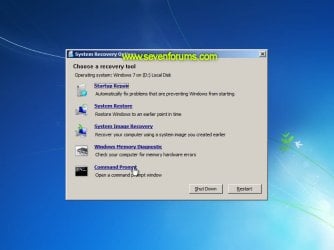
Startup Repair Infinite Loop Recovery

How to Recover from an Infinitely Looping Startup Repair Loop without Reinstalling Windows

If you've ever experienced a Startup Repair that continously loops and fails to fix the problem of not being able to load windows, even in safe mode, then you'll know that usually the only way to recover from this when System Restore does not work is to do a clean install of Windows.

Until now.

This tutorial will show you how to use the System Recovery Options provided by Windows to recover your system to a working state so that you don't have to risk losing data by performing a clean install.

   Warning
The instructions presented withing this tutorial must be followed correctly, or you can damage your Windows 7 installation even further. This tutorial is designed to help recover from a bad registry that is causing the startup repair loop. You should note that there may still be some issues remaining that cannot be fixed by manually restoring the registry.


Recovering Your System
  1. Boot to the System Recovery Options screen.
    • If Windows automatically opens Startup Repair, and subsequently fails to fix a problem, you can skip ahead to step 4 below.
  2. In the System Recovery Options screen, click Startup Repair:
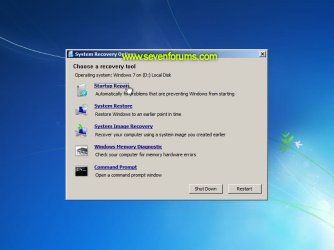
    Image05_startuprepair.jpg


  3. Windows will search for an attempt to repair startup problems:
    Image06_searching.jpg


  4. If startup problems could not be repaired, you will receive the message Windows cannot repair this computer automatically. Click View advanced options for system recovery and support:
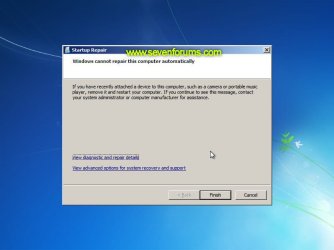
    Image07_cannotfix.jpg


  5. Click View advanced options for system recovery and support, which which bring you back to the main System Recovery Options screen.
  6. Click Command Prompt:
    Image08_clickcommand.jpg


  7. Command Prompt should open to X:, which is an internal ram disk use by System Repair:
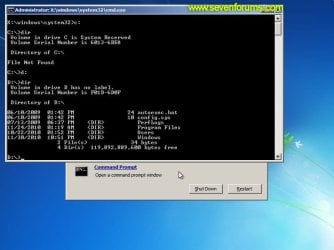
    Image10_changedrive.jpg


  8. Now you need to find your system drive. Depending on how your system is setup, this could be either C: or D:.
    • Type C: and press <ENTER>.
    • Verify that this is your system drive by typing DIR and pressing <ENTER>. If you see the Program Files, Users and Windows folders, then you have found your system drive, and can continue to step 9 below.
    • If the drive is not your system drive, repeat steps I and II above, changing the drive letter to D, E or some other letter until the system drive is located.
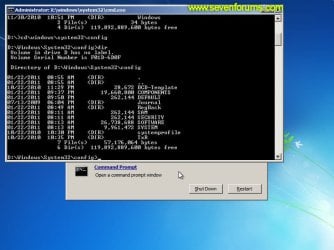
      Image11_chdir_config.jpg

  9. When you have located your Windows system drive, type CD \windows\system32\config and press <ENTER>:
  10. Type DIR and press <ENTER>, and verify that the following files and folders exist in the config folder:
    • RegBack (which is a folder)
    • DEFAULT
    • SAM
    • SECURITY
    • SOFTWARE
    • SYSTEM
      Image11_chdir_config.jpg

  11. Type MD mybackup and press <ENTER> to create a backup folder that you can use incase this procedure does not work as expected.
  12. Type copy *.* mybackup and press <ENTER>.
    • If you are prompted to overwrite existing files, press A to allow all backups to be overwritten.
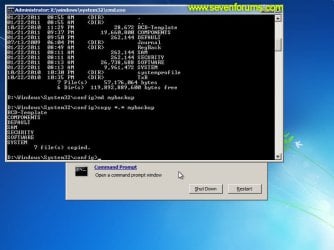
      Image12_mybackup.jpg

  13. Now you need to check if you can use the automatic Windows backups to restore your registry:
    • Type CD RegBack and press <ENTER> to go to the RegBack folder.
    • Type DIR and press <ENTER> to view the contents of the folder. All the following files must exist:
      • The DEFAULT, SAM and SECURITY files should each be about 262,000 bytes in size.
      • The SOFTWARE file should be about 26,000,000 bytes.
      • The SYSTEM file should be about 9,900,000 bytes.
      • The file sizes presented here are approximate estimations, and may vary depending on your system. If any one of them are 0 bytes, then you should stop what you're doing now and seek an alternative method of recovering your system, because Windows cannot function with a 0-byte size registry hive.
    • If the hive files listed in RegBack are ok, then proceed to step 14 of the tutorial.
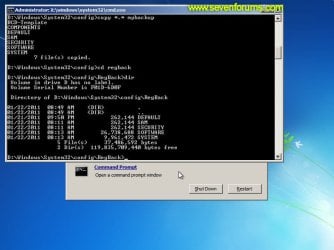
      Image13_checkregback.jpg


  14. Type copy *.* .. and press <ENTER> to copy the backup hive files to \Windows\System32\config.
    • If you are prompted to overwrite existing files, press A to allow all file to be overwritten.
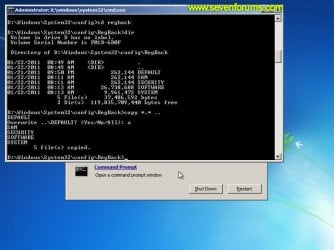
      Image14_copyregback.jpg

  15. Type exit and press <ENTER> to close the command prompt.
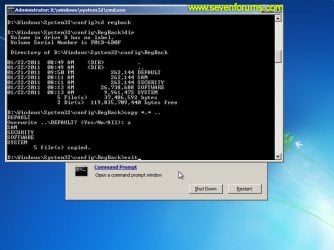
    Image15_exit.jpg


  16. Click the Restart button to reboot your computer. If all goes well, your system will boot normally.
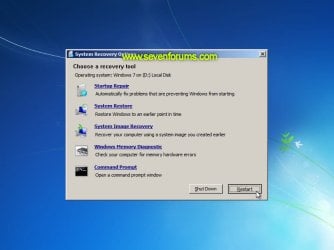
    Image16_restart.jpg
    Image17_working.jpg


Reference Information
This tutorial was made possible after learning how to manualy replace the Windows 7 Registry Hives after reading the Recovering Windows 7 Registry Hives/Files article on Microsoft Technet.


Attachments
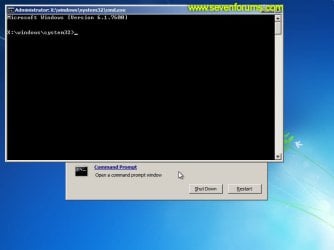
  • Image09_commandprompt.jpg
    Image09_commandprompt.jpg
    26.1 KB · Views: 373
Last edited by a moderator:
It appeared System recovery but i can't move my mouse :( and i can't do anything
 

My Computer My Computer

At a glance

Windows 7 Ultimate x64
Computer type
PC/Desktop
OS
Windows 7 Ultimate x64
Peculiar or just taking a while?

I used the tutorial and all was going well, but during copying the files at the "copy *.* mybackup" stage it seems to have got stuck at "software" and isn't producing the system file copy, nor is it displaying any error message and I can't type anything. Is it just taking a really long time, or could this be another issue entirely?
 

My Computer My Computer

At a glance

Windows 7
Computer type
Laptop
Computer Manufacturer/Model Number
Samsung
OS
Windows 7
Antivirus
AVG
Browser
Chrome
I woke up this morning to find my computer stuck in the automatic repair loop. I tried system restore. Didn't work. Tried to fix the startup options. Nada. Tried to fix the boot. Still nothing. Came across this post and in desperation, tried it, even though it was originally written for Win 7. I really didn't want to have to reinstall windows for the second time this year.

It worked.:geek:

I have never been happier to see my log on screen. Thank you, thank you, thank you! I joined this forum just to say that.:D
 

My Computer My Computer

At a glance

Windows 10AMD Ahlon II X64 635 2.90Ghz8Gb DDR3Nvidia
Computer type
PC/Desktop
Computer Manufacturer/Model Number
HP
OS
Windows 10
CPU
AMD Ahlon II X64 635 2.90Ghz
Memory
8Gb DDR3
Graphics Card(s)
Nvidia
Worked great for me - THANK YOU!

Dear Dzomlija,

(same as previous poster): joined this forum just to say THANKS! Your instructions worked perfectly on my Windows 7 Professional x64 laptop. Nothing else I tried before worked. I was about to finally succumb to Microsoft and install Windows 10 and reinstall my gazillions of software tools, but your instructions helped me to keep my beloved Win7 laptop alive for some time. You saved me a LOT of time and agony :D .

Thank you for taking the time to post these instructions (back in 2011). Very much appreciated.

Kind regards,
Porl
 

My Computer My Computer

At a glance

Windows 7 Professional x64
Computer type
PC/Desktop
OS
Windows 7 Professional x64
I used the tutorial and all was going well, but during copying the files at the "copy *.* mybackup" stage it seems to have got stuck at "software" and isn't producing the system file copy, nor is it displaying any error message and I can't type anything. Is it just taking a really long time, or could this be another issue entirely?


Lunathecomputer: make sure your disk has enough space left for the copy operation. If that is not the problem, run chkdsk on the command line to see if the disk is OK. (do chkdsk \? to see the command options).

Beyond that, I have no idea.

-Porl
 

My Computer My Computer

At a glance

Windows 7 Professional x64
Computer type
PC/Desktop
OS
Windows 7 Professional x64
Drive not ready

Thanks for the article.
When I try to open the boot drive ( C: ) it says "drive not ready". (step 8)
I am sure this is the boot drive as I unplugged all other drives first. In chkdsk it shows up as 0bytes, but as this machine is a dual boot, when I check the drive in MacOS, it shows that the drive is not 0bytes.
 

My Computer My Computer

At a glance

Windows 7 Home Premium x64Intel Core i5
Computer type
Laptop
Computer Manufacturer/Model Number
Tohsiba
OS
Windows 7 Home Premium x64
CPU
Intel Core i5
Antivirus
Microsoft Security Essentials & Malwarebytes
Browser
Google Chrome 99% of the time
Just like Caeleinn, above, I just joined this forum to say thanks for bringing my computer back from the death start loop. I first had to figure out why I couldn't do anything to even affect the loop screen. Finally realized I had to switch ports to plug in my keyboard; (computer probably couldn't load the drivers for the rear, add-on usb device which added ports.) After that I tried all options on the screen and several I read on line. Not til this blog did I find the solution. And I also am running Win10, but the process worked smoothly. I probably screwed up my computer trying to delete an old joystick driver which wasn't loading properly. This blog, published by Dzomlija certainly saved me tons of grief. I don't know why or how it worked, but it sure did! Bless you folks!!
 

My Computer My Computer

At a glance

10 64bit
Computer type
Laptop
Computer Manufacturer/Model Number
Dell
OS
10 64bit
Does this method works with Windows 10?
 

My Computer My Computer

At a glance

Windows 10 Home 64bIntel Core Solo 1.4Ghz 800Mhz FSBSamsung 4GB DDR3Intel GMA 4500MHD
Computer type
Laptop
Computer Manufacturer/Model Number
Acer Aspire 5810T8929
OS
Windows 10 Home 64b
CPU
Intel Core Solo 1.4Ghz 800Mhz FSB
Memory
Samsung 4GB DDR3
Graphics Card(s)
Intel GMA 4500MHD
Screen Resolution
1366x768
Hard Drives
Seagate Momentus XT (Hybrid HD) 750GB
Internet Speed
40 Mbs
Antivirus
Kaspersky Free Antivirus
Browser
Chrome 60.0.3112.113 (Official Build) (64-bit)
This method works easily with Windows 10. In fact it is simpler than in 7 as one of the alternatives presented on the Blue Screen of Death ( which is reporting that you are having start problems...and therewith traps you in the infinite loop ) is the option of bringing up the command prompt ( dos prompt ). So you can start from that point.
Obviously you must be judicious, as with any computer command, and type all commands exactly as instructed, noting periods and spaces precisely. That done, then magic occurs and your computer starts working!!
Good luck!
 

My Computer My Computer

At a glance

10 64bit
Computer type
Laptop
Computer Manufacturer/Model Number
Dell
OS
10 64bit
Windows cannot repair this computer automatically

Thanks for this tutorial, but could this computer be too late for for the recovery too resolve the issue? That is, after I got to step 8 and found regback directory on the system drive, the dates of the regback files were ALL more up to date than the date I noticed the repair error message. I would suspect in my case, the hives problem has now been copied to the backup files?
 

My Computer My Computer

At a glance

Windows 7 x64, Vista x64, 8.1 smartphoneIntel E8400 65W 64-bitDDR2 2 x 2GB, 1GB x 2XFX Radeon HD5750
Computer type
PC/Desktop
OS
Windows 7 x64, Vista x64, 8.1 smartphone
CPU
Intel E8400 65W 64-bit
Motherboard
Gigabyte EP45-UD3LR
Memory
DDR2 2 x 2GB, 1GB x 2
Graphics Card(s)
XFX Radeon HD5750
Sound Card
AMD High Definition Audio; Realtek High Definition Audio
Monitor(s) Displays
iiyama prolite X2377HDS
Screen Resolution
1920 x 1080
Hard Drives
500GB 7200 rpm Seagate ST3500413AS 16MB, 500GB 5400 rpm Toshiba MQ02ABF050H 32MB, 200GB 7200 rpm Seagate ST3200820AS 8MB, 2TB 7200 rpm Western Digital WD20EZRX 64MB
PSU
Enermax Liberty Modular
Case
Antec P193 Midi Tower
Keyboard
Mionix ZIBAL 60
Mouse
Razer USB 2.0 Diamondback Mouse or Huion Graphics Tablet
Browser
Internet Explorer, Lunascape, Firefox, Opera, Avast Safezone
I have an additional line after Default, Sam, Security, Software, system which is " SYSTME" with 0 bytes. Which is not appeared on the posted screenshot in your tutorial. Any help will be appreciated.
382453d1456410023-startup-repair-infinite-loop-recovery-image.jpg

I have the same problem. Can someone help me?

20170914_120237.jpg


20170914_113841.jpg
 

My Computer My Computer

At a glance

Windows 7 x64
Computer type
PC/Desktop
OS
Windows 7 x64
Help

Is my file safe? I mean I want to keep all of my files
 

My Computer My Computer

At a glance

Windows 10 64 bit
Computer type
Laptop
Computer Manufacturer/Model Number
ASUS A456UR
OS
Windows 10 64 bit
Hello AbedTh, and welcome to Seven Forums. :)

Your files will be safe while doing the steps in the tutorial. They will not be deleted.
 

My Computer My Computer

At a glance

64-bit Windows 11 Pro for WorkstationsIntel i7-8700K OC'd to 5 GHz64 GB (4x16GB) G.SKILL TridentZ RGB DDR4 3600...ASUS ROG-STRIX-GTX1080TI-O11G-GAMING
Computer type
PC/Desktop
Computer Manufacturer/Model Number
Self built custom
OS
64-bit Windows 11 Pro for Workstations
CPU
Intel i7-8700K OC'd to 5 GHz
Motherboard
ASUS ROG Maximus XI Formula Z390
Memory
64 GB (4x16GB) G.SKILL TridentZ RGB DDR4 3600 MHz
Graphics Card(s)
ASUS ROG-STRIX-GTX1080TI-O11G-GAMING
Sound Card
Integrated
Monitor(s) Displays
2 x Samsung Odyssey G7 27"
Screen Resolution
2560x1440
Hard Drives
1TB Samsung 990 PRO M.2,
4TB Samsung 990 PRO PRO M.2,
TerraMaster F8 SSD Plus NAS
PSU
Seasonic Prime Titanium 850W
Case
Thermaltake Core P3
Cooling
Corsair Hydro H115i
Keyboard
Logitech wireless K800
Mouse
Logitech MX Master 4
Internet Speed
2 Gb/s Download and 100 Mb/s Upload
Antivirus
Malwarebyte Anti-Malware Premium
Browser
Google Chrome
Other Info
Logitech Z625 speaker system,
Logitech BRIO 4K Pro webcam,
HP Color LaserJet Pro MFP M477fdn,
APC SMART-UPS RT 1000 XL - SURT1000XLI,
Galaxy S23 Plus phone
Hello Brink. Thank you for the tutorials. Hey, I'm experiencing this problem on a machine I'm working on and have gone through this tutorial however there is no change. Any other ideas? Thanks!
 

My Computer My Computer

At a glance

Windows 10 Home
Computer type
Laptop
Computer Manufacturer/Model Number
HP
OS
Windows 10 Home
Hello MsBobina, and welcome to Seven Forums. :)

You could see if doing a system restore at boot using a restore point dated before this happened may be able to fix it.

:ar: System Restore - Windows 7 Help Forums
 

My Computer My Computer

At a glance

64-bit Windows 11 Pro for WorkstationsIntel i7-8700K OC'd to 5 GHz64 GB (4x16GB) G.SKILL TridentZ RGB DDR4 3600...ASUS ROG-STRIX-GTX1080TI-O11G-GAMING
Computer type
PC/Desktop
Computer Manufacturer/Model Number
Self built custom
OS
64-bit Windows 11 Pro for Workstations
CPU
Intel i7-8700K OC'd to 5 GHz
Motherboard
ASUS ROG Maximus XI Formula Z390
Memory
64 GB (4x16GB) G.SKILL TridentZ RGB DDR4 3600 MHz
Graphics Card(s)
ASUS ROG-STRIX-GTX1080TI-O11G-GAMING
Sound Card
Integrated
Monitor(s) Displays
2 x Samsung Odyssey G7 27"
Screen Resolution
2560x1440
Hard Drives
1TB Samsung 990 PRO M.2,
4TB Samsung 990 PRO PRO M.2,
TerraMaster F8 SSD Plus NAS
PSU
Seasonic Prime Titanium 850W
Case
Thermaltake Core P3
Cooling
Corsair Hydro H115i
Keyboard
Logitech wireless K800
Mouse
Logitech MX Master 4
Internet Speed
2 Gb/s Download and 100 Mb/s Upload
Antivirus
Malwarebyte Anti-Malware Premium
Browser
Google Chrome
Other Info
Logitech Z625 speaker system,
Logitech BRIO 4K Pro webcam,
HP Color LaserJet Pro MFP M477fdn,
APC SMART-UPS RT 1000 XL - SURT1000XLI,
Galaxy S23 Plus phone
Thanks Brink. I have tried that unfortunately the restore point wasn't far enough back. I found a post here: Windows 7 Help Forums Windows 7 help and support BSOD Help and Support » BSOD: 0x0000007b (0x80786B58, 0xC0000034, 0x00000000, 0x00000000) ---sorry, I don't know how to make it a link, but those are the same stop codes/numbers (not sure what they are called) that I get. The suggestion is to remove the drive from the machine that is getting the bsod and connect it externally to another machine and make certain changes to the registry however, there are no instruction on how to get to the registry from an external drive. Would you mind telling me how to do that?
 

My Computer My Computer

At a glance

Windows 10 Home
Computer type
Laptop
Computer Manufacturer/Model Number
HP
OS
Windows 10 Home
I will following the instructions from the other post on what changes to make to the registry. I can ask how to get there too if you want. I just figured since I started here I would stay here. :o
 
Last edited:

My Computer My Computer

At a glance

Windows 10 Home
Computer type
Laptop
Computer Manufacturer/Model Number
HP
OS
Windows 10 Home
Sure, that'll be fine to ask there or create a new BSOD thread for it.
 

My Computer My Computer

At a glance

64-bit Windows 11 Pro for WorkstationsIntel i7-8700K OC'd to 5 GHz64 GB (4x16GB) G.SKILL TridentZ RGB DDR4 3600...ASUS ROG-STRIX-GTX1080TI-O11G-GAMING
Computer type
PC/Desktop
Computer Manufacturer/Model Number
Self built custom
OS
64-bit Windows 11 Pro for Workstations
CPU
Intel i7-8700K OC'd to 5 GHz
Motherboard
ASUS ROG Maximus XI Formula Z390
Memory
64 GB (4x16GB) G.SKILL TridentZ RGB DDR4 3600 MHz
Graphics Card(s)
ASUS ROG-STRIX-GTX1080TI-O11G-GAMING
Sound Card
Integrated
Monitor(s) Displays
2 x Samsung Odyssey G7 27"
Screen Resolution
2560x1440
Hard Drives
1TB Samsung 990 PRO M.2,
4TB Samsung 990 PRO PRO M.2,
TerraMaster F8 SSD Plus NAS
PSU
Seasonic Prime Titanium 850W
Case
Thermaltake Core P3
Cooling
Corsair Hydro H115i
Keyboard
Logitech wireless K800
Mouse
Logitech MX Master 4
Internet Speed
2 Gb/s Download and 100 Mb/s Upload
Antivirus
Malwarebyte Anti-Malware Premium
Browser
Google Chrome
Other Info
Logitech Z625 speaker system,
Logitech BRIO 4K Pro webcam,
HP Color LaserJet Pro MFP M477fdn,
APC SMART-UPS RT 1000 XL - SURT1000XLI,
Galaxy S23 Plus phone
okie dokie thanks.
 

My Computer My Computer

At a glance

Windows 10 Home
Computer type
Laptop
Computer Manufacturer/Model Number
HP
OS
Windows 10 Home
The only option I have to to restart my computer, it won't let me get to the command prompt. It won't even show the icon for it
 

My Computer My Computer

At a glance

Windows 7 home premium
Computer type
PC/Desktop
Computer Manufacturer/Model Number
Sony Vaio
OS
Windows 7 home premium
Back
Top