Startup repair trouble

AllofTheRobots

New member
Local time
4:51 PM
Messages
7
Hi there.

I recently made some hardware changes to my computer, and now windows will fail to boot and launch startup repair instead. Once startup repair is done it tells me it can't fix the problems and shuts the computer down. When I restart windows boots perfectly.

Is there any way I can fix this error without having to reinstall windows?

Here's the startup repair log:

----

Startup Repair diagnosis and repair log
---------------------------
Last successful boot time: ?1/?10/?2013 2:51:59 AM (GMT)
Number of repair attempts: 1

Session details
---------------------------
System Disk = \Device\Harddisk1
Windows directory = D:\Windows
AutoChk Run = 0
Number of root causes = 1

Test Performed:
---------------------------
Name: Check for updates
Result: Completed successfully. Error code = 0x0
Time taken = 0 ms

Test Performed:
---------------------------
Name: System disk test
Result: Completed successfully. Error code = 0x0
Time taken = 0 ms

Test Performed:
---------------------------
Name: Disk failure diagnosis
Result: Completed successfully. Error code = 0x0
Time taken = 281 ms

Test Performed:
---------------------------
Name: Disk metadata test
Result: Completed successfully. Error code = 0x0
Time taken = 16 ms

Test Performed:
---------------------------
Name: Target OS test
Result: Completed successfully. Error code = 0x0
Time taken = 141 ms

Test Performed:
---------------------------
Name: Volume content check
Result: Completed successfully. Error code = 0x0
Time taken = 640 ms

Test Performed:
---------------------------
Name: Boot manager diagnosis
Result: Completed successfully. Error code = 0x0
Time taken = 0 ms

Test Performed:
---------------------------
Name: System boot log diagnosis
Result: Completed successfully. Error code = 0x0
Time taken = 0 ms

Test Performed:
---------------------------
Name: Event log diagnosis
Result: Completed successfully. Error code = 0x0
Time taken = 219 ms

Test Performed:
---------------------------
Name: Internal state check
Result: Completed successfully. Error code = 0x0
Time taken = 16 ms

Test Performed:
---------------------------
Name: Boot status test
Result: Completed successfully. Error code = 0x0
Time taken = 15 ms

Test Performed:
---------------------------
Name: Setup state check
Result: Completed successfully. Error code = 0x0
Time taken = 438 ms

Test Performed:
---------------------------
Name: Registry hives test
Result: Completed successfully. Error code = 0x0
Time taken = 2703 ms

Test Performed:
---------------------------
Name: Windows boot log diagnosis
Result: Completed successfully. Error code = 0x0
Time taken = 0 ms

Test Performed:
---------------------------
Name: Bugcheck analysis
Result: Completed successfully. Error code = 0x0
Time taken = 906 ms

Test Performed:
---------------------------
Name: Access control test
Result: Completed successfully. Error code = 0x0
Time taken = 10000 ms

Test Performed:
---------------------------
Name: File system test (chkdsk)
Result: Completed successfully. Error code = 0x0
Time taken = 0 ms

Test Performed:
---------------------------
Name: Software installation log diagnosis
Result: Completed successfully. Error code = 0x0
Time taken = 0 ms

Root cause found:
---------------------------
A patch is preventing the system from starting.

Repair action: System Restore
Result: Cancelled

Repair action: System Restore
Result: Cancelled

Repair action: System files integrity check and repair
Result: Failed. Error code = 0x490
Time taken = 627922 ms

---------------------------
---------------------------
 

My Computer

OS
Windows 7 Home Premium 64bit
CPU
Core2 Duo E6600
Motherboard
ASUS P5W DH Deluxe
Memory
6 gb
Graphics Card(s)
GeForce HD 3730

My Computer

Computer type
Laptop
Computer Manufacturer/Model Number
ACER ASPIRE 5742G
OS
Microsoft Windows 7 Home Premium 64-bits 7601 Multiprocessor Free Service Pack 1
CPU
Intel(R) Core(TM) i3 CPU M 370 @ 2.40GHz
Motherboard
Acer Aspire 5742G
Memory
4,00 GB
Graphics Card(s)
ATI Mobility Radeon HD 5400 Series
Sound Card
(1) AMD High Definition Audio Device (2) Realtek High Defi
Screen Resolution
1366 x 768 x 32 bits (4294967296 colors) @ 60 Hz
Hard Drives
WDC WD5000BEVT-22ZAT0
Usually system directory is C . Your Windows directory = D:\Windows . I think this is the problem . Do You have C disk or partition and what is on it?
 

My Computer

OS
Win 7 Ult 64-bit
CPU
AMD Athlon 455 3core
Memory
6 Gb 1333Mhz
Graphics Card(s)
GForce 545 1,5Gb 192-bit
Monitor(s) Displays
LG IPS234
Hard Drives
1tb
Case
Acer Predator
Usually system directory is C . Your Windows directory = D:\Windows . I think this is the problem . Do You have C disk or partition and what is on it?
Not true! Drive letters are just.... drive letters. What drive letter a partition (or better said a volume) gets can be defined in registry. WinRE uses another registry as win7 itself of course.

There is just a recognized partition before the OS partition. Most likely "system reserved" or some RECOVER partition. Quite normal
 

My Computer

Computer type
Laptop
Computer Manufacturer/Model Number
ACER ASPIRE 5742G
OS
Microsoft Windows 7 Home Premium 64-bits 7601 Multiprocessor Free Service Pack 1
CPU
Intel(R) Core(TM) i3 CPU M 370 @ 2.40GHz
Motherboard
Acer Aspire 5742G
Memory
4,00 GB
Graphics Card(s)
ATI Mobility Radeon HD 5400 Series
Sound Card
(1) AMD High Definition Audio Device (2) Realtek High Defi
Screen Resolution
1366 x 768 x 32 bits (4294967296 colors) @ 60 Hz
Hard Drives
WDC WD5000BEVT-22ZAT0
Hello all. Thank you for your quick answers.

I ran the scan and it found some errors it couldn't correct. I have appended the CBS.log zip file.

Usually system directory is C . Your Windows directory = D:\Windows . I think this is the problem . Do You have C disk or partition and what is on it?

This also puzzles me, but it seems not to be an issue going by Kaktussoft's words. To answer you question, I don't have a partition. When windows works fine it labels itself as being on the C:\ directory.

Here's a short resume of what I did to get these problems. Hopefully it can shed a little light on what's wrong.

I had recently bought a new case and moved my hardware over in it. While doing that I decided to get rid of an old soundblaster card, and a cd-rom burner. I also added two extra hard drives. None of these hardware changes included uninstalling the devices in windows first.
During the transfer I managed to destroy my PSU. When the computer wouldn't boot at all, I cleared the CMOS on the motherboard, figuring that would do the trick.

So all in all I've really managed to stack the cards against me.
 

My Computer

OS
Windows 7 Home Premium 64bit
CPU
Core2 Duo E6600
Motherboard
ASUS P5W DH Deluxe
Memory
6 gb
Graphics Card(s)
GeForce HD 3730
Hello all. Thank you for your quick answers.

I ran the scan and it found some errors it couldn't correct. I have appended the CBS.log zip file.

Usually system directory is C . Your Windows directory = D:\Windows . I think this is the problem . Do You have C disk or partition and what is on it?

This also puzzles me, but it seems not to be an issue going by Kaktussoft's words. To answer you question, I don't have a partition. When windows works fine it labels itself as being on the C:\ directory.

Here's a short resume of what I did to get these problems. Hopefully it can shed a little light on what's wrong.

I had recently bought a new case and moved my hardware over in it. While doing that I decided to get rid of an old soundblaster card, and a cd-rom burner. I also added two extra hard drives. None of these hardware changes included uninstalling the devices in windows first.
During the transfer I managed to destroy my PSU. When the computer wouldn't boot at all, I cleared the CMOS on the motherboard, figuring that would do the trick.

So all in all I've really managed to stack the cards against me.
Are you able to boot to windows? It looks like you can because you posted CBS.zip. If you can boot to win7 open "device management" and delete all drivers related to soundblaster. A cd-rom burner uses a standard driver so isn't a problem. Also adding extra disks isn't a driver problem.

I gonna analyze CBS.log
 

My Computer

Computer type
Laptop
Computer Manufacturer/Model Number
ACER ASPIRE 5742G
OS
Microsoft Windows 7 Home Premium 64-bits 7601 Multiprocessor Free Service Pack 1
CPU
Intel(R) Core(TM) i3 CPU M 370 @ 2.40GHz
Motherboard
Acer Aspire 5742G
Memory
4,00 GB
Graphics Card(s)
ATI Mobility Radeon HD 5400 Series
Sound Card
(1) AMD High Definition Audio Device (2) Realtek High Defi
Screen Resolution
1366 x 768 x 32 bits (4294967296 colors) @ 60 Hz
Hard Drives
WDC WD5000BEVT-22ZAT0
Anytime you make major changes to your computer as you have it is a good idea to reinstall (clean) the OS. If you have more then one HDD then remove the (wires) from the original and allow the second HDD to become the new OS HDD. Once you have everything up and running then you can reconnect the original drive . . .Good Luck. . .:D
 

My Computer

Computer Manufacturer/Model Number
HP Pavilion a4302f
OS
Win 7 Pro x64, VM Win XP, Win7 Pro Sandbox, Kubuntu 11
CPU
AMD Athlon(tm) II X4 640 @ 3.0 Gbz
Memory
12GB 1066MHz DDR3 SDRAM - 2x4GB, 2x2GB
Graphics Card(s)
ATI Radeon HD 4350 HD Graphics/Audio with 512MB
Sound Card
Realtek High Definition Audio
Monitor(s) Displays
1. Dell 23" SP2307, 2. Mitsublishi 40" HDTV, Hannspree 25"
Screen Resolution
1. 2048x1152, 2. 1920-1080, 3. 1920x1200
Hard Drives
Int: 1 120 Gig SSD i
1 - 2.5" 500 USB External HDD
1 -1 Tb USB External HDD
Case
Mid Tower
Cooling
Standard Fans - 5 fans (very quiet)
Keyboard
Microsoft Wireless 2000
Mouse
Microsoft Wireless Mouse 5000
Internet Speed
10 Mbit (realistically 500 Kbit - 1.2 Mbit)
Other Info
Speakers - Bose Desktop (Excellent Sound)
1 external CD|DVD\Blue-ray Recorders/Players (Sony)
CBS.LOG has an error about Culture.dll

C:\Windows\Microsoft.NET\Framework64\v2.0.50727 does contain Culture.dll ?

It has nothing to do with problem we're talking about
 

My Computer

Computer type
Laptop
Computer Manufacturer/Model Number
ACER ASPIRE 5742G
OS
Microsoft Windows 7 Home Premium 64-bits 7601 Multiprocessor Free Service Pack 1
CPU
Intel(R) Core(TM) i3 CPU M 370 @ 2.40GHz
Motherboard
Acer Aspire 5742G
Memory
4,00 GB
Graphics Card(s)
ATI Mobility Radeon HD 5400 Series
Sound Card
(1) AMD High Definition Audio Device (2) Realtek High Defi
Screen Resolution
1366 x 768 x 32 bits (4294967296 colors) @ 60 Hz
Hard Drives
WDC WD5000BEVT-22ZAT0
why not just repair your windows 7... place win dvd and select the repair button.
i think the problem comes with your new HDD installation, others wouldn't cause such problem if they are healthy.

also check your bios setup and make sure you have proper boot priority
also i dont recommend you to install your windows in D:\ partition.
 

My Computer

OS
Windows 7 Ultimate x64
CPU
core i7.
Hello all. Thank you for your replies.

Kaktussoft

Are you able to boot to windows? It looks like you can because you posted CBS.zip. If you can boot to win7 open "device management" and delete all drivers related to soundblaster. A cd-rom burner uses a standard driver so isn't a problem. Also adding extra disks isn't a driver problem.

I am able to boot to windows after it has performed a system repair. The system repair always tells me it is unable to fix the error. Then when I restart the computer, windows boots just fine.
I couldn't find any drivers for the soundblaster in my device management. Either I must have removed those, or windows has done that for me.

CBS.LOG has an error about Culture.dll

C:\Windows\Microsoft.NET\Framework64\v2.0.50727 does contain Culture.dll ?

It has nothing to do with problem we're talking about

I found a Culture.dll in that directory. Its properties are:

Size: 27,8kb
Created: 13. July 2009
Modified: 10. June 2009
Accessed: 13. July 2009

mmkarimi

why not just repair your windows 7... place win dvd and select the repair button.
i think the problem comes with your new HDD installation, others wouldn't cause such problem if they are healthy.

also check your bios setup and make sure you have proper boot priority
also i dont recommend you to install your windows in D:\ partition.

I have tried using the repair function on the windows DVD, but it couldn't fix the problem either. I have checked the bios and the boot priority appears to be in order. I don't know why it insists on being in the D:\ directory, once windows has booted succesfully it lists itself as being on the C:\ directory.

Oddly enough the repair function on the DVD detected windows as being on the D:\ directory.


Lee
Anytime you make major changes to your computer as you have it is a good idea to reinstall (clean) the OS. If you have more then one HDD then remove the (wires) from the original and allow the second HDD to become the new OS HDD. Once you have everything up and running then you can reconnect the original drive . . .Good Luck. . .

I'd like to keep the current HDD as the one with the OS, as it has the lowest seek time. I'll keep the reinstalling option as my last resort.

gregrocker
Work through these steps for Troubleshooting Windows 7 Failure to Start which lead up to if necessary rescuiing your files to run recovery or get the superior Clean Reinstall - Factory OEM Windows 7 which may be your best option since its even better than getting a new PC.

That is a long list. I will get back to you with the results once I have gone through it. I don't understand what you mean by getting a new PC though.
 

My Computer

OS
Windows 7 Home Premium 64bit
CPU
Core2 Duo E6600
Motherboard
ASUS P5W DH Deluxe
Memory
6 gb
Graphics Card(s)
GeForce HD 3730
The drives show different letters in WinRE boot mode. The solution to unfixable errors if not repaired after 3 SFC /scannow attempts is a Repair Install

But since you can boot now, first let's take a look at your configuration

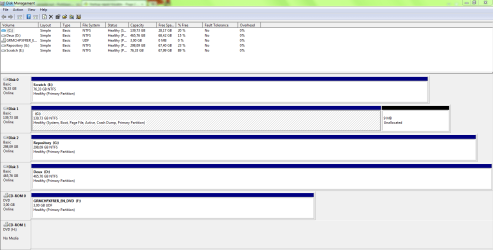
Please post back a screenshot of your maximized Disk Management drive map and listings:

1. Type Disk Management in Start :orb: Search box.
2. Open Disk Mgmt. window and maximize it.
3. Type Snipping Tool in Start Search box.
4. Open Snipping Tool, choose Rectangular Snip, click New, draw a box around full drive map and all listings.
5, Save Snip, attach using paper clip in Reply Box.

Tell us what is on each partition.
 
Hello again. Sorry for the slow reply.

Gregrocker, I have been able to boot into windows all the time, but usually I have to perform one startup repair session whenever I power the computer on after it has been turned off for some time. For instance after it has sat dormant over the night I will have to perform a startup repair session when I boot it up the first time the next day. Reboooting from windows once I have gained acces seems not to result in me having to perform more unwanted startup repair sessions. The computer has to remain turned completely off for some time for the startup repair phenomenom to occour. I hope I am making sense, because this confuses me.

The saved snip is appended.

Disk 0: Intended to be used as storage for scratch files. It is an old ATA-133 disk.
Disk 1: This is where I keep the OS and all installed programs. It is a SATA disk with very fast seek time.
Disk 2: File storage. I also keep the documents folder here. SATA disk.
Disk 3: General file storage and data backup.
CD-ROM 0 is my DVD drive.
CD-ROM 1 is a virtual drive associated with Daemon Tools.

I thought I had found the solution to my problem yesterday. Apparently with my motherboard there can be an issue with the SATA4 slot which will lead to system instability. Since I'd never had anything attached to the SATA4 slot before I thought that perhaps this was why I'd never had any trouble before.
I tried unplugging the hard disk in the SATA4 slot but it didnt help. I'd still get startup repair sessions after allowing the computer to be turned off for some time.
 

Attachments

  • Capture.PNG
    Capture.PNG
    30.2 KB · Views: 6

My Computer

OS
Windows 7 Home Premium 64bit
CPU
Core2 Duo E6600
Motherboard
ASUS P5W DH Deluxe
Memory
6 gb
Graphics Card(s)
GeForce HD 3730
Post C:\Windows\System32\LogFiles\Srt\SrtTrail.txt
Has it file date of time of last startup repair?
 

My Computer

Computer type
Laptop
Computer Manufacturer/Model Number
ACER ASPIRE 5742G
OS
Microsoft Windows 7 Home Premium 64-bits 7601 Multiprocessor Free Service Pack 1
CPU
Intel(R) Core(TM) i3 CPU M 370 @ 2.40GHz
Motherboard
Acer Aspire 5742G
Memory
4,00 GB
Graphics Card(s)
ATI Mobility Radeon HD 5400 Series
Sound Card
(1) AMD High Definition Audio Device (2) Realtek High Defi
Screen Resolution
1366 x 768 x 32 bits (4294967296 colors) @ 60 Hz
Hard Drives
WDC WD5000BEVT-22ZAT0
Hello Kaktussoft.

The log documents a startup repair that happened yesterday, January 14th.
Startup Repair diagnosis and repair log
---------------------------
Last successful boot time: ‎1/‎14/‎2013 4:33:09 PM (GMT)
Number of repair attempts: 3

The file itself was last moderated 2:51AM January 15th, this night, though that is very odd as the computer was turned off at that time.
 

My Computer

OS
Windows 7 Home Premium 64bit
CPU
Core2 Duo E6600
Motherboard
ASUS P5W DH Deluxe
Memory
6 gb
Graphics Card(s)
GeForce HD 3730
Hello Kaktussoft.

The log documents a startup repair that happened yesterday, January 14th.
Startup Repair diagnosis and repair log
---------------------------
Last successful boot time: ‎1/‎14/‎2013 4:33:09 PM (GMT)
Number of repair attempts: 3

The file itself was last moderated 2:51AM January 15th, this night, though that is very odd as the computer was turned off at that time.
It lists the GMT time!! Post the file anyway
 

My Computer

Computer type
Laptop
Computer Manufacturer/Model Number
ACER ASPIRE 5742G
OS
Microsoft Windows 7 Home Premium 64-bits 7601 Multiprocessor Free Service Pack 1
CPU
Intel(R) Core(TM) i3 CPU M 370 @ 2.40GHz
Motherboard
Acer Aspire 5742G
Memory
4,00 GB
Graphics Card(s)
ATI Mobility Radeon HD 5400 Series
Sound Card
(1) AMD High Definition Audio Device (2) Realtek High Defi
Screen Resolution
1366 x 768 x 32 bits (4294967296 colors) @ 60 Hz
Hard Drives
WDC WD5000BEVT-22ZAT0
Hello Kaktussoft. Is the GMT time an error?
 

Attachments

My Computer

OS
Windows 7 Home Premium 64bit
CPU
Core2 Duo E6600
Motherboard
ASUS P5W DH Deluxe
Memory
6 gb
Graphics Card(s)
GeForce HD 3730

My Computer

Computer type
Laptop
Computer Manufacturer/Model Number
ACER ASPIRE 5742G
OS
Microsoft Windows 7 Home Premium 64-bits 7601 Multiprocessor Free Service Pack 1
CPU
Intel(R) Core(TM) i3 CPU M 370 @ 2.40GHz
Motherboard
Acer Aspire 5742G
Memory
4,00 GB
Graphics Card(s)
ATI Mobility Radeon HD 5400 Series
Sound Card
(1) AMD High Definition Audio Device (2) Realtek High Defi
Screen Resolution
1366 x 768 x 32 bits (4294967296 colors) @ 60 Hz
Hard Drives
WDC WD5000BEVT-22ZAT0
The point is that taking the time to get a perfect Clean Reinstall is actually better than getting a new PC considering all of the crapware that comes preinstalled on them. You have the chance to get an install better than 95% of users have.

Your Disk Mgmt looks correct.

One possible cause is that one of the other HD's is interfering. For this reason I'd unplug all other HD's to see if the boot failure persists. If not, power down to plug back in each other HD one at a time to determine which is interfering.

I also wonder what would happen if you move the OS to Disk0 slot if possible.

Have you at any time run Startup Repair - Run up to 3 Separate Times with reboots, which is sometimes required to repair or rewrite the boot files completely?

You can also try running manually the bootrec commands which are demonstrated in Step 7 of Troubleshooting Windows 7 Failure to Start
 
Hello again.

I tried unplugging all the other HDs, but the problem still persisted. Once startup repair had been allowed to run and I could boot into windows I tried running startup repair 3 consecutive times. But still the problem would come back once I had let my computer be turned off for some time.

I've tried running the bootrec utility, following the 3 steps in the guide, with the result that it was virtually impossible to even get startup repair to function.
My system would freeze while trying to load the files, no matter if I ran startup repair from the HD, or from the windows DVD. For some reason once I had reset my bios setting I could boot into windows without startup repair having to do its thing.

I am unsure if this is a one-time occurence, though I'm pretty sure everything will go belly up once I start changing things in the bios.

The downside is that after I ran the bootrec utility, I no longer have the option to load startup repair from the HD, when I either press F8 during boot, or when it loads up the 'windows failed to load properly' options screen after a freeze.

I'm starting to consider just doing a reinstall of windows.
 

My Computer

OS
Windows 7 Home Premium 64bit
CPU
Core2 Duo E6600
Motherboard
ASUS P5W DH Deluxe
Memory
6 gb
Graphics Card(s)
GeForce HD 3730
Back
Top