
Startup Repair

How to Run a Startup Repair in Windows 7

   Information
Startup Repair is a system recovery tool that automates common diagnostic and repair tasks of unbootable Windows 7 installations. If the computer fails over into Windows RE because of a detected boot failure, Startup Repair launches automatically. If automatic failover to an on-disk Windows RE is not available, Startup Repair can also be launched as a manual recovery tool from a Windows RE CD/DVD.

This tutorial will show you how to run Startup Repair to allow it to scan your Windows 7 computer for a startup problem and try to fix it so your computer can start correctly.

Startup Repair is located on the System Recovery Options menu, which is on the Windows 7 installation disc. If your computer manufacturer (OEM) has preinstalled recovery options, Startup Repair might also be installed on your hard disk. If your computer does not include Startup Repair, your computer manufacturer (OEM) might have customized or replaced the tool. Check the information that came with your computer or go to the manufacturer's website.

   Note
Startup Repair Process

Startup Repair will try to repair computers that are unbootable because of the following reasons:
  • Registry corruption
  • Missing or damaged system and driver files
  • Disk metadata corruption (MBR, partition table, and boot sector)
  • File system metadata corruption
  • Installation of problematic or incompatible drivers
  • Installation of incompatible Windows service packs and patches
  • Corrupt boot configuration data
  • Bad memory and hard disk hardware (detection only)
Startup Repair will not repair unbootable systems caused by the following issues:
  • Malfunctioning firmware and other hardware components
  • Problems with clean Windows installations or Windows upgrades (for example, from Windows XP to Windows Vista)
  • Windows logon errors
  • Viruses and malicious software

After Startup Repair has run, a text log with diagnostic information and repair results is generated. The log file is located at: C:\Windows\System32\Logfiles\Srt\SrtTrail.txt


For more information, see: How Windows RE Works

   Warning
Startup Repair cannot fix hardware failures, such as a failing hard disk or incompatible memory, nor does it protect against virus attacks. Startup Repair is not designed to fix Windows installation problems. Startup Repair is not a backup tool, so it cannot help you recover personal files, such as photos or documents. To help protect your computer, back up your system and files regularly.


:note: For the updated Windows 10 tutorial, please see - Startup Repair - Run in Windows 10 - Windows 10 Tutorials

Here's How:
1. Boot to the System Recovery Options screen using your retail Windows 7 installation disk or system repair disc.

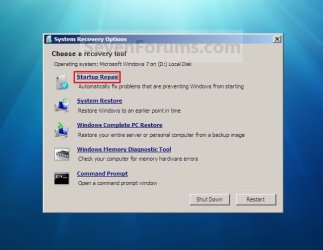
2. Select the Startup Repair option. (See screenshot below) Repair.jpg
3. Startup Repair will now scan your computer to attempt to find and fix any startup problems. (See screenshot below)
NOTE: Startup Repair might prompt you to make choices as it tries to fix the problem, and if necessary, it might restart your computer as it makes repairs. If repairs are not successful, you'll see a summary of the problem and links to contact information for support. Your computer manufacturer might include additional assistance information. Startup_Repair-1.jpg
4. If problems cannot be found, then click on Finish. (See screenshot below)
NOTE: You can click on the View diagnostic and repair details link to see a detailed summary of what Startup Repair has done. Startup_Repair-2.jpg

A) Click on the Restart button to return to the Windows 7 log on screen. (See screenshot below step 2)
   Tip
Sometimes it may take running a startup repair (3) separate times with restarting the computer after each time before it fully fixes the startup issue.


That's it,
Shawn


Last edited:
yes.

If startup repair doesn't work , scroll down thru the list it gives all the way and see what it tells you.

Thanks, it is running now, it scanned for about 13 minutes and then appeared the sign saying
"repairing disk errors, it might take over an hour"
My question was because the other tries I did, the process took way over an hour (8 to be exact) and kept doing the same, processing, so the only thing I can do is restart the computer, so then, I dont get any listing as result.

I´ll wait and hope this time the startup repair works normally, but if it keeps rolling and rolling endless, I guess I will have to shut down, and go for the custom or clean install,
that´s why I was asking if the choice in that case would be that disk

many thanks
 

My Computer

OS
windows 7 ultimate x64
Hopefully the other bad installation disk was all that was wrong, and it will work this time for you.
 

My Computer

Computer type
PC/Desktop
Computer Manufacturer/Model Number
Self built custom
OS
64-bit Windows 11 Pro for Workstations
CPU
Intel i7-8700K OC'd to 5 GHz
Motherboard
ASUS ROG Maximus XI Formula Z390
Memory
64 GB (4x16GB) G.SKILL TridentZ RGB DDR4 3600 MHz
Graphics Card(s)
ASUS ROG-STRIX-GTX1080TI-O11G-GAMING
Sound Card
Integrated
Monitor(s) Displays
2 x Samsung Odyssey G7 27"
Screen Resolution
2560x1440
Hard Drives
1TB Samsung 990 PRO M.2,
4TB Samsung 990 PRO PRO M.2,
TerraMaster F8 SSD Plus NAS
PSU
Seasonic Prime Titanium 850W
Case
Thermaltake Core P3
Cooling
Corsair Hydro H115i
Keyboard
Logitech wireless K800
Mouse
Logitech MX Master 4
Internet Speed
2 Gb/s Download and 100 Mb/s Upload
Antivirus
Malwarebyte Anti-Malware Premium
Browser
Google Chrome
Other Info
Logitech Z625 speaker system,
Logitech BRIO 4K Pro webcam,
HP Color LaserJet Pro MFP M477fdn,
APC SMART-UPS RT 1000 XL - SURT1000XLI,
Galaxy S23 Plus phone
Hopefully the other bad installation disk was all that was wrong, and it will work this time for you.

Hi guys, nothing worked, I´ll follow this on the Clean Install thread, as the story goes in that direction
 

My Computer

OS
windows 7 ultimate x64
I hope that will go smoother for you. :(
 

My Computer

Computer type
PC/Desktop
Computer Manufacturer/Model Number
Self built custom
OS
64-bit Windows 11 Pro for Workstations
CPU
Intel i7-8700K OC'd to 5 GHz
Motherboard
ASUS ROG Maximus XI Formula Z390
Memory
64 GB (4x16GB) G.SKILL TridentZ RGB DDR4 3600 MHz
Graphics Card(s)
ASUS ROG-STRIX-GTX1080TI-O11G-GAMING
Sound Card
Integrated
Monitor(s) Displays
2 x Samsung Odyssey G7 27"
Screen Resolution
2560x1440
Hard Drives
1TB Samsung 990 PRO M.2,
4TB Samsung 990 PRO PRO M.2,
TerraMaster F8 SSD Plus NAS
PSU
Seasonic Prime Titanium 850W
Case
Thermaltake Core P3
Cooling
Corsair Hydro H115i
Keyboard
Logitech wireless K800
Mouse
Logitech MX Master 4
Internet Speed
2 Gb/s Download and 100 Mb/s Upload
Antivirus
Malwarebyte Anti-Malware Premium
Browser
Google Chrome
Other Info
Logitech Z625 speaker system,
Logitech BRIO 4K Pro webcam,
HP Color LaserJet Pro MFP M477fdn,
APC SMART-UPS RT 1000 XL - SURT1000XLI,
Galaxy S23 Plus phone
i really need your help

My problem is, the start up repair option doesn't start. I have no win 7 disk and no matter what I do, I can't get the screen to go beyond compressed bootmgr. Believe me I have tried everything known to man other than taking it into the geek squad. I cannot get in......I have an HP touchsmart system
 

My Computer

OS
7

My Computer

Computer type
PC/Desktop
Computer Manufacturer/Model Number
Self built custom
OS
64-bit Windows 11 Pro for Workstations
CPU
Intel i7-8700K OC'd to 5 GHz
Motherboard
ASUS ROG Maximus XI Formula Z390
Memory
64 GB (4x16GB) G.SKILL TridentZ RGB DDR4 3600 MHz
Graphics Card(s)
ASUS ROG-STRIX-GTX1080TI-O11G-GAMING
Sound Card
Integrated
Monitor(s) Displays
2 x Samsung Odyssey G7 27"
Screen Resolution
2560x1440
Hard Drives
1TB Samsung 990 PRO M.2,
4TB Samsung 990 PRO PRO M.2,
TerraMaster F8 SSD Plus NAS
PSU
Seasonic Prime Titanium 850W
Case
Thermaltake Core P3
Cooling
Corsair Hydro H115i
Keyboard
Logitech wireless K800
Mouse
Logitech MX Master 4
Internet Speed
2 Gb/s Download and 100 Mb/s Upload
Antivirus
Malwarebyte Anti-Malware Premium
Browser
Google Chrome
Other Info
Logitech Z625 speaker system,
Logitech BRIO 4K Pro webcam,
HP Color LaserJet Pro MFP M477fdn,
APC SMART-UPS RT 1000 XL - SURT1000XLI,
Galaxy S23 Plus phone
If I do a start up repair will it replace the startup with old files.

What I mean is my disc is Windows 7 with no SP and my computer is SP1.

So all the updated files start up files will be replaced with old files?
 

My Computer

OS
Windows Server 2008 R2 Standard
Hello BlueBird, and welcome to Seven Forums.

No. A startup repair only attempts to fix the partition code, bootmgr, bcdBCD, MBR (Master Boot Record) if needed. This is what affects the bootloader to be able to boot Windows. This is not for the startup programs.

Hope this helps,
Shawn
 
Last edited:

My Computer

Computer type
PC/Desktop
Computer Manufacturer/Model Number
Self built custom
OS
64-bit Windows 11 Pro for Workstations
CPU
Intel i7-8700K OC'd to 5 GHz
Motherboard
ASUS ROG Maximus XI Formula Z390
Memory
64 GB (4x16GB) G.SKILL TridentZ RGB DDR4 3600 MHz
Graphics Card(s)
ASUS ROG-STRIX-GTX1080TI-O11G-GAMING
Sound Card
Integrated
Monitor(s) Displays
2 x Samsung Odyssey G7 27"
Screen Resolution
2560x1440
Hard Drives
1TB Samsung 990 PRO M.2,
4TB Samsung 990 PRO PRO M.2,
TerraMaster F8 SSD Plus NAS
PSU
Seasonic Prime Titanium 850W
Case
Thermaltake Core P3
Cooling
Corsair Hydro H115i
Keyboard
Logitech wireless K800
Mouse
Logitech MX Master 4
Internet Speed
2 Gb/s Download and 100 Mb/s Upload
Antivirus
Malwarebyte Anti-Malware Premium
Browser
Google Chrome
Other Info
Logitech Z625 speaker system,
Logitech BRIO 4K Pro webcam,
HP Color LaserJet Pro MFP M477fdn,
APC SMART-UPS RT 1000 XL - SURT1000XLI,
Galaxy S23 Plus phone
Hey.
First, sorry for my poor english.

Two weeks ago, my laptop couldnt start Windows 7 normally, so I created a Win 7 Repair Disk, used the "startup repair" option and it worked great. I could use my computer normally.

Yesterday, again I had problems starting Windows 7 (didnt start) and used the Repair Disk thinking that it will help me out again. This time I had no luck.

My startup repair is running (8 hours and counting) and still I have the blue block coming and going with the "trying to fix problems" below.

Should I turn it off? Meaning, is it a given that it wont solve any problem since it has been 8 hours since I started the startup repair?

Thanks!
 

My Computer

OS
Windows 7 64bit
It is not working if it has been running that long.

Try system restore to a point before you had the problem.
 

My Computers

System One System Two

  • Computer type
    PC/Desktop
    OS
    7 X64
    CPU
    i5 8400
    Motherboard
    gigabyte b365m ds3h
    Memory
    2x8gb 3200mhz
    Hard Drives
    various
    PSU
    pure power 11 400w cm
    Case
    Coolermaster
    Cooling
    cryorig m9i
  • Computer type
    PC/Desktop
    OS
    7x64
    CPU
    g5400
    Motherboard
    ga b365m ds3h
    Memory
    8gb ddr4 2400
    PSU
    xfx pro 450w
It is not working if it has been running that long.

Try system restore to a point before you had the problem.

Already tried and says there are no restore points available. So option 1 and 2 dont seem to work :(
 

My Computer

OS
Windows 7 64bit
Startup Problem

I'm facing same problem.I have window setup in my local disk (E). Plzzz tell me how can i get it from there.n my local disk (E). Plzzz tell me how can i get it from there.
 

My Computer

OS
Windows 7 Home Premium 32bit
Hello Game Rockerr, and welcome to Seven Forums.

Could you be more specific on what issue you are having?

If you click on the "System Recovery Options" link in step 1, it will help show you how to boot to it to then be able to select and do a Startup Repair. :)
 

My Computer

Computer type
PC/Desktop
Computer Manufacturer/Model Number
Self built custom
OS
64-bit Windows 11 Pro for Workstations
CPU
Intel i7-8700K OC'd to 5 GHz
Motherboard
ASUS ROG Maximus XI Formula Z390
Memory
64 GB (4x16GB) G.SKILL TridentZ RGB DDR4 3600 MHz
Graphics Card(s)
ASUS ROG-STRIX-GTX1080TI-O11G-GAMING
Sound Card
Integrated
Monitor(s) Displays
2 x Samsung Odyssey G7 27"
Screen Resolution
2560x1440
Hard Drives
1TB Samsung 990 PRO M.2,
4TB Samsung 990 PRO PRO M.2,
TerraMaster F8 SSD Plus NAS
PSU
Seasonic Prime Titanium 850W
Case
Thermaltake Core P3
Cooling
Corsair Hydro H115i
Keyboard
Logitech wireless K800
Mouse
Logitech MX Master 4
Internet Speed
2 Gb/s Download and 100 Mb/s Upload
Antivirus
Malwarebyte Anti-Malware Premium
Browser
Google Chrome
Other Info
Logitech Z625 speaker system,
Logitech BRIO 4K Pro webcam,
HP Color LaserJet Pro MFP M477fdn,
APC SMART-UPS RT 1000 XL - SURT1000XLI,
Galaxy S23 Plus phone
Last edited by a moderator:

My Computer

Computer type
Laptop
Computer Manufacturer/Model Number
SAMSUNG NP350E5X-S02rs
OS
Microsoft Windows 7 Ultimate 32-bit 7601 Multiprocessor Free Service Pack 1
CPU
Intel(R) Core(TM) i3-3110M CPU @ 2.40GHz
Motherboard
SAMSUNG ELECTRONICS CO., LTD. NP350E5X-S02RS
Memory
4,00 GB
Graphics Card(s)
(1) AMD Radeon. HD 7670M (2) Intel(R) HD Graphics 4000
Sound Card
(1) Bluetooth Audio Device (2) Realtek High Definition Aud
Monitor(s) Displays
Sasung
Screen Resolution
1366 x 768 x 32 bits (4294967296 colors) @ 60 Hz
Hard Drives
Hitachi HTS547550A9E384
PSU
220 V to 240 V at 50 Hz [230 V nominal]
Keyboard
Notebook keyboard
Mouse
Logitech m180
Internet Speed
20 mbps/0.72 mbps
Antivirus
Avast internet secyrity 8.0.1483
Browser
Firefox 19.02
Dove and Branch screen, nothing else

I have a Dell Latitude E6400. It crashed one day and I haven't been able to get back despite racking my head with the multitude of possible fixes.

Using the Windows system repair disk, I can get through that option on the boot menu, but when it gets to the loading screen of the dove and branch, there are no windows from which to select language or start system repair. It just sits there.

Using the diagnostics, I've gotten error 2000-0142
http://support.dell.com/support/topics/global.aspx/support/kcs/document?c=us&l=en&s=dhs&docid=266787#HDD
which is a HDD error. (I fear it is hardware related and I'm merely here covering my bases).

Additionally, I've used a couple different Linux usb keys and couldn't mount the drive.

Advice, sympathy, hard truth, let me hear it, thanks for your help.
 

My Computer

OS
Windows 7 32/64
The hard truth is that code means hard drive failure, which is irrevocable. So you need a new hard drive.
 

My Computer

Computer Manufacturer/Model Number
DIY
OS
Windows 7 home premium x64
CPU
AMD FX-4100 AM3+ 3.6GHz 12MB Black Edition
Motherboard
Asus M5A97 Pro
Memory
Crsair vengeance 12Gb DDR3 1600MHz CL9
Graphics Card(s)
Asus GTX 560 1GB
Sound Card
Realtek onboard
Monitor(s) Displays
Hanns G 1680x1050 native
Hard Drives
OCZ 128Gb Petrol ssd
2x500 Gb Samsung
PSU
OCZ StealthXstream II 500W
Internet Speed
8Mb or better
I encountered this error after doing a factory recovery using the discs I made when I took the computer out of the box.

The recovery seems to go well, and does initial setup... restarting a few times. But once I initiate a restart, windows fails to boot, instead giving me the boot manager page.

like most people, I don't have a windows' disc... just my recover cds since windows came pre-loaded on the computer.
 

My Computer

Computer Manufacturer/Model Number
Dell Inspiron 5010N
OS
Windows 7 Home Premium
Not sure if it's posted here. The Startup Repair log can be found

%WINDIR%\System32\LogFiles\Srt\SrtTrail.txt.

in case you forgot to check in Recovery screen.

This article will explain how to interpret them How Windows RE Works
 

My Computer

Computer Manufacturer/Model Number
Samsung NP550P5C-S02IN
OS
Windows 7 Ultimate - 64-bit | Windows 8 Pro - 64-bit
CPU
Intel® Core™ i7 Processor 3,610QM (2.30Hz, 6MB L3 Cach
Memory
8 GB
Graphics Card(s)
NVIDIA® GeForce® GT 650M 2GB Graphics, Optimus™ techno
Sound Card
SoundAlive™ JBL 3 Speakers (With sub-Woofer)
Monitor(s) Displays
39.62cm (15.6) SuperBright 300nit HD+ LED Display
Screen Resolution
1,600 x 900, Anti-Reflective
Hard Drives
1TB S-ATA II Hard Drive (5,400RPM)
Startup Repair says "This might take several minutes... Attemting Repairs... [Cancel]" but in my computer it has been running for several HOURS. If I click "Cancel" it says, "The current repair operation cannot be cancelled." Now what do I do?
 

My Computer

Computer type
Laptop
Computer Manufacturer/Model Number
Del Studio 1558
OS
Windows 7 Professional
CPU
Intel Core 4
Browser
Mozilla Firefox
Shut down the machine.
 

My Computers

System One System Two

  • Computer type
    PC/Desktop
    OS
    7 X64
    CPU
    i5 8400
    Motherboard
    gigabyte b365m ds3h
    Memory
    2x8gb 3200mhz
    Hard Drives
    various
    PSU
    pure power 11 400w cm
    Case
    Coolermaster
    Cooling
    cryorig m9i
  • Computer type
    PC/Desktop
    OS
    7x64
    CPU
    g5400
    Motherboard
    ga b365m ds3h
    Memory
    8gb ddr4 2400
    PSU
    xfx pro 450w
Back
Top