
Startup Repair

How to Run a Startup Repair in Windows 7

   Information
Startup Repair is a system recovery tool that automates common diagnostic and repair tasks of unbootable Windows 7 installations. If the computer fails over into Windows RE because of a detected boot failure, Startup Repair launches automatically. If automatic failover to an on-disk Windows RE is not available, Startup Repair can also be launched as a manual recovery tool from a Windows RE CD/DVD.

This tutorial will show you how to run Startup Repair to allow it to scan your Windows 7 computer for a startup problem and try to fix it so your computer can start correctly.

Startup Repair is located on the System Recovery Options menu, which is on the Windows 7 installation disc. If your computer manufacturer (OEM) has preinstalled recovery options, Startup Repair might also be installed on your hard disk. If your computer does not include Startup Repair, your computer manufacturer (OEM) might have customized or replaced the tool. Check the information that came with your computer or go to the manufacturer's website.

   Note
Startup Repair Process

Startup Repair will try to repair computers that are unbootable because of the following reasons:
  • Registry corruption
  • Missing or damaged system and driver files
  • Disk metadata corruption (MBR, partition table, and boot sector)
  • File system metadata corruption
  • Installation of problematic or incompatible drivers
  • Installation of incompatible Windows service packs and patches
  • Corrupt boot configuration data
  • Bad memory and hard disk hardware (detection only)
Startup Repair will not repair unbootable systems caused by the following issues:
  • Malfunctioning firmware and other hardware components
  • Problems with clean Windows installations or Windows upgrades (for example, from Windows XP to Windows Vista)
  • Windows logon errors
  • Viruses and malicious software

After Startup Repair has run, a text log with diagnostic information and repair results is generated. The log file is located at: C:\Windows\System32\Logfiles\Srt\SrtTrail.txt


For more information, see: How Windows RE Works

   Warning
Startup Repair cannot fix hardware failures, such as a failing hard disk or incompatible memory, nor does it protect against virus attacks. Startup Repair is not designed to fix Windows installation problems. Startup Repair is not a backup tool, so it cannot help you recover personal files, such as photos or documents. To help protect your computer, back up your system and files regularly.


:note: For the updated Windows 10 tutorial, please see - Startup Repair - Run in Windows 10 - Windows 10 Tutorials

Here's How:
1. Boot to the System Recovery Options screen using your retail Windows 7 installation disk or system repair disc.

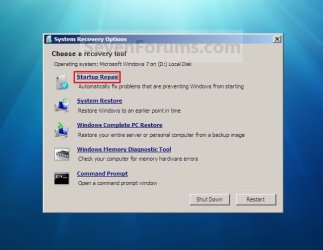
2. Select the Startup Repair option. (See screenshot below) Repair.jpg
3. Startup Repair will now scan your computer to attempt to find and fix any startup problems. (See screenshot below)
NOTE: Startup Repair might prompt you to make choices as it tries to fix the problem, and if necessary, it might restart your computer as it makes repairs. If repairs are not successful, you'll see a summary of the problem and links to contact information for support. Your computer manufacturer might include additional assistance information. Startup_Repair-1.jpg
4. If problems cannot be found, then click on Finish. (See screenshot below)
NOTE: You can click on the View diagnostic and repair details link to see a detailed summary of what Startup Repair has done. Startup_Repair-2.jpg

A) Click on the Restart button to return to the Windows 7 log on screen. (See screenshot below step 2)
   Tip
Sometimes it may take running a startup repair (3) separate times with restarting the computer after each time before it fully fixes the startup issue.


That's it,
Shawn


Last edited:
Where do I check if I have Start-up Repair on my hard drive? Would it be in my computer next to my C drive?

In additon to Jonathan's post above, see the link in step of this tutorial on the first page. It, along with the other steps in this tutorial, show you how to get to the Startup Repair option.
 

My Computer

Computer type
PC/Desktop
Computer Manufacturer/Model Number
Self built custom
OS
64-bit Windows 11 Pro for Workstations
CPU
Intel i7-8700K OC'd to 5 GHz
Motherboard
ASUS ROG Maximus XI Formula Z390
Memory
64 GB (4x16GB) G.SKILL TridentZ RGB DDR4 3600 MHz
Graphics Card(s)
ASUS ROG-STRIX-GTX1080TI-O11G-GAMING
Sound Card
Integrated
Monitor(s) Displays
2 x Samsung Odyssey G7 27"
Screen Resolution
2560x1440
Hard Drives
1TB Samsung 990 PRO M.2,
4TB Samsung 990 PRO PRO M.2,
TerraMaster F8 SSD Plus NAS
PSU
Seasonic Prime Titanium 850W
Case
Thermaltake Core P3
Cooling
Corsair Hydro H115i
Keyboard
Logitech wireless K800
Mouse
Logitech MX Master 4
Internet Speed
2 Gb/s Download and 100 Mb/s Upload
Antivirus
Malwarebyte Anti-Malware Premium
Browser
Google Chrome
Other Info
Logitech Z625 speaker system,
Logitech BRIO 4K Pro webcam,
HP Color LaserJet Pro MFP M477fdn,
APC SMART-UPS RT 1000 XL - SURT1000XLI,
Galaxy S23 Plus phone
my computer, Dell XPS M2010, does startup repair all time.. it have done it 20 times, i can't stop it.. it just does it over and over all time.. how to stop it.. ? is there any way to.. ?
would be nice to get help..

Thanks from Tmac635
 

My Computer

OS
windows 7
my computer, Dell XPS M2010, does startup repair all time.. it have done it 20 times, i can't stop it.. it just does it over and over all time.. how to stop it.. ? is there any way to.. ?
would be nice to get help..

Thanks from Tmac635
Can you tell it to startup normally?

You may also try running the repair from the installation disc.
 

My Computer

Computer Manufacturer/Model Number
Custom
OS
Windows 7 Professional x64
CPU
Intel i7 2600K OC'd @ 4620 MHz
Motherboard
Asus P8Z68-V Pro
Memory
16GB GSkill Sniper 2133 Mhz (4x4GB)
Graphics Card(s)
EVGA GeForce GTX 480 SuperClocked+
Sound Card
Realtek High Definition Audio
Monitor(s) Displays
2x Acer S273HLbmii 27"
Screen Resolution
2 x 1920x1080
Hard Drives
64GB Crucial M4 SSD

Storage: Hitachi 1TB 5400RPM, Samsung 1.5TB 5400RPM
PSU
Corsair HW Series 750w (modular)
Case
Cooler Master HAF 932 Advanced Blue Edition
Cooling
CM Hyper 212+ CPU cooler, 3x 230mm + 1x 140mm case fans
Keyboard
Logitech MK320 (wireless)
Mouse
Logitech MK320 (wireless)
Internet Speed
30 Mb/s : 2 Mb/s
my computer, Dell XPS M2010, does startup repair all time.. it have done it 20 times, i can't stop it.. it just does it over and over all time.. how to stop it.. ? is there any way to.. ?
would be nice to get help..

Thanks from Tmac635
Can you tell it to startup normally?

You may also try running the repair from the installation disc.

I did not do anything.. it began itself..
I just want to stop it..

Thanks :)
 

My Computer

OS
windows 7
Try running the startup repair from the repair disc instead. Maybe that will fix whatever issue is triggering the repairs, so they stop appearing.
 

My Computer

Computer Manufacturer/Model Number
Custom
OS
Windows 7 Professional x64
CPU
Intel i7 2600K OC'd @ 4620 MHz
Motherboard
Asus P8Z68-V Pro
Memory
16GB GSkill Sniper 2133 Mhz (4x4GB)
Graphics Card(s)
EVGA GeForce GTX 480 SuperClocked+
Sound Card
Realtek High Definition Audio
Monitor(s) Displays
2x Acer S273HLbmii 27"
Screen Resolution
2 x 1920x1080
Hard Drives
64GB Crucial M4 SSD

Storage: Hitachi 1TB 5400RPM, Samsung 1.5TB 5400RPM
PSU
Corsair HW Series 750w (modular)
Case
Cooler Master HAF 932 Advanced Blue Edition
Cooling
CM Hyper 212+ CPU cooler, 3x 230mm + 1x 140mm case fans
Keyboard
Logitech MK320 (wireless)
Mouse
Logitech MK320 (wireless)
Internet Speed
30 Mb/s : 2 Mb/s
Yeah, but how ..? It's doing startup repair all time.. I'm nnot able to insert a disk and run it..

Computer do start up, and then startup repair begins and when it's done computer shut down and when I start up next time it does the same thing, it have done it 20 times now..
 

My Computer

OS
windows 7
At this point, I would do a clean install...
 

My Computer

Computer type
PC/Desktop
Computer Manufacturer/Model Number
LENOVO K450 @3.0GHZ
OS
64-bit Windows 8.1 Pro
CPU
Core(TM) i5 CPU 4330 Haswell @ 3.20GHz
Motherboard
LENOVO
Memory
12.00 GB
Graphics Card(s)
Intel(R) HD Graphics
Sound Card
Intel HD integtrated
Monitor(s) Displays
HP 25' ISP Monitor
Screen Resolution
1900/1020
Hard Drives
(1) ST1000DM003-1CH162 (2) Generic STORAGE DEVICE USB Device (3) Generic STORAGE DEVICE USB Device
Internet Speed
100mb down/10mb up
Yeah, but how ..? It's doing startup repair all time.. I'm nnot able to insert a disk and run it..

Computer do start up, and then startup repair begins and when it's done computer shut down and when I start up next time it does the same thing, it have done it 20 times now..

If you have the Dell diagnostic tools CD, try running it.

Check your ram.
http://www.sevenforums.com/tutorials/715-memory-diagnostics-tool.html?ltr=M
Memtest86+ - Advanced Memory Diagnostic Tool

Check your HD.
http://www.sevenforums.com/tutorials/433-disk-check.html

Check with a hard drive diagnostic tools.
Hard Drive Diagnostics Tools and Utilities (Storage) - TACKtech Corp.
 

My Computer

OS
ME/XP/Vista/Win7
Help

Hey I was trying to install this one theme and this dude was helping me over team viewer and I just left for like 2 mins and when I came back he had deleted me of msn and he had deleted some of my system 32 files. I rebooted my pc hoping the startup repair would start and fix it but it didn't so I decide to put the disc into my pc and run the startup repair on there it came up with the error saying that I must unplug the media stuff from my pc and I have tried to do it 6 times and no luck. Can someone pls help me I would really appreciate it.
 
Last edited by a moderator:

My Computer

Computer Manufacturer/Model Number
windows 7
OS
Windows 7 / windows XP
CPU
Core I7
Motherboard
Asus
Memory
6GB DDR3
Graphics Card(s)
ATI radion 8850
Sound Card
n/a
Monitor(s) Displays
1920X
Hard Drives
3 1 TB
PSU
600Wat
Case
cooler master tower
Hey I was trying to install this one theme and this dude was helping me over team viewer and I just left for like 2 mins and when I came back he had deleted me of msn and he had deleted some of my system 32 files. I rebooted my pc hoping the startup repair would start and fix it but it didn't so I decide to put the disc into my pc and run the startup repair on there it came up with the error saying that I must unplug the media stuff from my pc and I have tried to do it 6 times and no luck. Can someone pls help me I would really appreciate it.
Welcome to SF!

I suggest a system restore to get to a point before the troubles.
 

My Computer

Computer Manufacturer/Model Number
Custom
OS
Windows 7 Professional x64
CPU
Intel i7 2600K OC'd @ 4620 MHz
Motherboard
Asus P8Z68-V Pro
Memory
16GB GSkill Sniper 2133 Mhz (4x4GB)
Graphics Card(s)
EVGA GeForce GTX 480 SuperClocked+
Sound Card
Realtek High Definition Audio
Monitor(s) Displays
2x Acer S273HLbmii 27"
Screen Resolution
2 x 1920x1080
Hard Drives
64GB Crucial M4 SSD

Storage: Hitachi 1TB 5400RPM, Samsung 1.5TB 5400RPM
PSU
Corsair HW Series 750w (modular)
Case
Cooler Master HAF 932 Advanced Blue Edition
Cooling
CM Hyper 212+ CPU cooler, 3x 230mm + 1x 140mm case fans
Keyboard
Logitech MK320 (wireless)
Mouse
Logitech MK320 (wireless)
Internet Speed
30 Mb/s : 2 Mb/s
I am having this same start up problem on my daughters Netbook. I have the disc but no disc drive. It goes into the start up repair and a comand window comes up behind the searching for problem window shown in the screen shot for repairs. this window that comes up is minimized and just sits there. On the top of it it says "X:\windows\system32\cmd.exe"
I have no idea what this is but I did not see it on the tutorial for the start up repair. this will be the third time I have tried running a repair. When I close the black comand window it goes into the next screen of trying to fix problems, which has so far done nothing. I am guessing I didn't let it locate any issues or something since I closed the black window. I am not sure why her netbook started doing this. Could she have gotten a virus or is this a windows 7 issue? Thank you
 

My Computer

Computer Manufacturer/Model Number
Asus Eee PC 1005HAB
OS
Windows 7
Hello Sable, and welcome to Seven Forums.

You might see if you may be able to do a system restore using a restore point dated before this issue to see if it may be able to fix this for you.

Hope this helps,
Shawn
 

My Computer

Computer type
PC/Desktop
Computer Manufacturer/Model Number
Self built custom
OS
64-bit Windows 11 Pro for Workstations
CPU
Intel i7-8700K OC'd to 5 GHz
Motherboard
ASUS ROG Maximus XI Formula Z390
Memory
64 GB (4x16GB) G.SKILL TridentZ RGB DDR4 3600 MHz
Graphics Card(s)
ASUS ROG-STRIX-GTX1080TI-O11G-GAMING
Sound Card
Integrated
Monitor(s) Displays
2 x Samsung Odyssey G7 27"
Screen Resolution
2560x1440
Hard Drives
1TB Samsung 990 PRO M.2,
4TB Samsung 990 PRO PRO M.2,
TerraMaster F8 SSD Plus NAS
PSU
Seasonic Prime Titanium 850W
Case
Thermaltake Core P3
Cooling
Corsair Hydro H115i
Keyboard
Logitech wireless K800
Mouse
Logitech MX Master 4
Internet Speed
2 Gb/s Download and 100 Mb/s Upload
Antivirus
Malwarebyte Anti-Malware Premium
Browser
Google Chrome
Other Info
Logitech Z625 speaker system,
Logitech BRIO 4K Pro webcam,
HP Color LaserJet Pro MFP M477fdn,
APC SMART-UPS RT 1000 XL - SURT1000XLI,
Galaxy S23 Plus phone
when I click system restore it comes up with to use system restore you must specify which windows installation to restore.
restart this computer, select an operating system, and the select system restore.

I have no disc drive to use the disc I got with it so I don't know what to do
 

My Computer

Computer Manufacturer/Model Number
Asus Eee PC 1005HAB
OS
Windows 7

My Computer

Computer Manufacturer/Model Number
Custom
OS
Windows 7 Professional x64
CPU
Intel i7 2600K OC'd @ 4620 MHz
Motherboard
Asus P8Z68-V Pro
Memory
16GB GSkill Sniper 2133 Mhz (4x4GB)
Graphics Card(s)
EVGA GeForce GTX 480 SuperClocked+
Sound Card
Realtek High Definition Audio
Monitor(s) Displays
2x Acer S273HLbmii 27"
Screen Resolution
2 x 1920x1080
Hard Drives
64GB Crucial M4 SSD

Storage: Hitachi 1TB 5400RPM, Samsung 1.5TB 5400RPM
PSU
Corsair HW Series 750w (modular)
Case
Cooler Master HAF 932 Advanced Blue Edition
Cooling
CM Hyper 212+ CPU cooler, 3x 230mm + 1x 140mm case fans
Keyboard
Logitech MK320 (wireless)
Mouse
Logitech MK320 (wireless)
Internet Speed
30 Mb/s : 2 Mb/s
I have no external drives of any kind as it is my daughter netbook and we didn't buy that extra stuff for her. I cannot get the computer to boot up at all, except to get to the repair screen. From there I am lost as it does pretty much nothing. It searches for hours with nothing happening. I am not a computer savy person really.

is there a way I can connect it to my desktop pc just to use the CD drive to load up the recovery cd? thanks
 

My Computer

Computer Manufacturer/Model Number
Asus Eee PC 1005HAB
OS
Windows 7
Crashed in Indonesia

Hey! Bought a small netbook, samsung, supported with Windows 7. I don't download anything or open attachments with the computer (although sometimes I get files from other travellers, like movies, or music) but not often. Anyway, so I run anti virus often.

THe other day I ran avira and then closed the computer in sleep mode as I travelled on a bus somewhere. When I opened up the computer 15 hours later, windows was frozen, and I think I remember seeing 2 avira programs open. anyway, I restarted the computer but it wouldnt really start. It took forever. I left it running and after a while a window popped up reccomending start up repair. So I went for it and it has been in start up repair for seriously....3 days. I've just been letting it run.

the browser window says 'attempting repair on damaged files, this may take an hour to complete) an hour---psha! anyway, I tried to cancel it the other day but it says its not reccomended to do that. I don't want to cause any more damage, maybe it's just going really slooowwww.

Obviously I don't have a clue about computers. And obviously noone here knows either (i'm in indonesia as the thread post suggests). I have all my files and photos on there and I don't want to lose them.

What should I do? Cancel the start up repair and try to go into safe mode? Or just cancel it and wait until I get back to medan or jakarta to have a guru check it out?? Help help!!

thanks!!!
 

My Computer

OS
windows 7
Go ahead and cancel the startup repair. If you still can't boot, try running it again.

It shouldn't take more than 30 minutes or so at the very most, and if it does, force cancel it.
 

My Computer

Computer Manufacturer/Model Number
Custom
OS
Windows 7 Professional x64
CPU
Intel i7 2600K OC'd @ 4620 MHz
Motherboard
Asus P8Z68-V Pro
Memory
16GB GSkill Sniper 2133 Mhz (4x4GB)
Graphics Card(s)
EVGA GeForce GTX 480 SuperClocked+
Sound Card
Realtek High Definition Audio
Monitor(s) Displays
2x Acer S273HLbmii 27"
Screen Resolution
2 x 1920x1080
Hard Drives
64GB Crucial M4 SSD

Storage: Hitachi 1TB 5400RPM, Samsung 1.5TB 5400RPM
PSU
Corsair HW Series 750w (modular)
Case
Cooler Master HAF 932 Advanced Blue Edition
Cooling
CM Hyper 212+ CPU cooler, 3x 230mm + 1x 140mm case fans
Keyboard
Logitech MK320 (wireless)
Mouse
Logitech MK320 (wireless)
Internet Speed
30 Mb/s : 2 Mb/s
Hi. Im using a Dell Inspiron laptop which was originally XP upgraded to windows 7 using usb so I dont have the boot to disk option. The problem i have is that it doesn't boot to windows at all. It automatically goes to the screen where it says "Repair" and "Start Windows Normally". If i pick the option to start it normally itll just go back to that screen. When I do click repair, it goes loading all files then shows a green loading bar then goes black after that and after a few seconds the mouse cursor shows up then nothing. I've tried waiting for over an hour already and still nothing. So i just press and hold down the power button for it to restart but it just goes back to that the same screen. There was one time though after restarting and choosing the "Repair" option it went to the repair screen and it was saying that its repairing disc errors and may take over an hour to complete. I waited for almost id say 2 hours and it was still on that screen so i clicked cancel and then the cp froze so i just powered it down again and up and now im back to that black screen with only the mouse cursor showing.

I've tried F8 and chose all the safe mode options but it just leads me back to the repair&startnormally screen. Ive tried selecting lastknownconfiguration, directoryservicesrestoremode, low reso vid, debuggingmode, but same result. I havent tried disable auto restart on system failure and disable driver signature enforcement cause it seems like it wont do anything and im afraid i might do something that'll exacerbates my problem. I've tried removing my terrabyte, modem, and basically everything except the mouse and keyboard and power cord but still the same result.

I've also tried f10 and chose to do windows memory diagnostics. When i choose basic and standard and after running and finishing the test it goes back to repair&normalstart screen. When i choose the extended option it always freezes at 21% part 1. So i just press down the power key again. I know it freezes because if I press capslock or any of the 3 lock keys, the lights doesn't show up/blink.

The only program I installed when this started happening was Veoh Webplayer. And I remember while watching videos/doing something else once in a while it shows on the taskbar a warning/caution bubble saying something about this file is corrupt blah blah...and if i remember correct the path/directory is on temporary files/.../...im not really sure about that part but im just trying to make it as detailed as possible and when i try to click on the bubble it just disappears so i just didnt bother doing anything. So then after turning off my cp for the night and on the next day my problem started.

Is there anyway to make my cp restore with all the problems i just stated? Without going to the repair screen since I cant even reach it nor boot to disk option? Thanks

-Aris
 

My Computer

OS
Windows 7
Hi. Im using a Dell Inspiron laptop which was originally XP upgraded to windows 7 using usb so I dont have the boot to disk option. The problem i have is that it doesn't boot to windows at all. It automatically goes to the screen where it says "Repair" and "Start Windows Normally". If i pick the option to start it normally itll just go back to that screen. When I do click repair, it goes loading all files then shows a green loading bar then goes black after that and after a few seconds the mouse cursor shows up then nothing. I've tried waiting for over an hour already and still nothing. So i just press and hold down the power button for it to restart but it just goes back to that the same screen. There was one time though after restarting and choosing the "Repair" option it went to the repair screen and it was saying that its repairing disc errors and may take over an hour to complete. I waited for almost id say 2 hours and it was still on that screen so i clicked cancel and then the cp froze so i just powered it down again and up and now im back to that black screen with only the mouse cursor showing.

I've tried F8 and chose all the safe mode options but it just leads me back to the repair&startnormally screen. Ive tried selecting lastknownconfiguration, directoryservicesrestoremode, low reso vid, debuggingmode, but same result. I havent tried disable auto restart on system failure and disable driver signature enforcement cause it seems like it wont do anything and im afraid i might do something that'll exacerbates my problem. I've tried removing my terrabyte, modem, and basically everything except the mouse and keyboard and power cord but still the same result.

I've also tried f10 and chose to do windows memory diagnostics. When i choose basic and standard and after running and finishing the test it goes back to repair&normalstart screen. When i choose the extended option it always freezes at 21% part 1. So i just press down the power key again. I know it freezes because if I press capslock or any of the 3 lock keys, the lights doesn't show up/blink.

The only program I installed when this started happening was Veoh Webplayer. And I remember while watching videos/doing something else once in a while it shows on the taskbar a warning/caution bubble saying something about this file is corrupt blah blah...and if i remember correct the path/directory is on temporary files/.../...im not really sure about that part but im just trying to make it as detailed as possible and when i try to click on the bubble it just disappears so i just didnt bother doing anything. So then after turning off my cp for the night and on the next day my problem started.

Is there anyway to make my cp restore with all the problems i just stated? Without going to the repair screen since I cant even reach it nor boot to disk option? Thanks

-Aris

You can use your USB stick to run Startup Repair, or http://www.sevenforums.com/tutorials/2083-system-repair-disc-create.html
http://www.sevenforums.com/tutorials/668-system-recovery-options.html
http://www.sevenforums.com/tutorials/700-system-restore.html?ltr=S

Check your ram.
http://www.sevenforums.com/tutorials/715-memory-diagnostics-tool.html?ltr=M
Memtest86+ - Advanced Memory Diagnostic Tool
Check your HD.
1) Boot DVD, & Press Shift+F10 (for command prompt)
2) Boot DVD, & http://www.sevenforums.com/tutorials/682-command-prompt-startup.html (for command prompt)
Open an command prompt.
In the command prompt, type chkdsk C: f/x/r/v and press Enter.

http://www.sevenforums.com/tutorials/433-disk-check.html?ltr=D
http://www.sevenforums.com/tutorials/1538-sfc-scannow-command-system-file-checker.html?ltr=S
http://www.sevenforums.com/tutorials/96938-check-disk-chkdsk-read-event-viewer-log.html

Check the hard drive with the manufacturer's diagnostic tools.
Hard Drive Diagnostics Tools and Utilities (Storage) - TACKtech Corp.
 

My Computer

OS
ME/XP/Vista/Win7
I am having trouble with my netbook (I'm writing this on my wii so excuse my spelling) it begins to start but then goes to a black screen w/ 2 options
1. run startup repair
2.start normally
if I start normally it just goes to a black screen w/ a mousepointer when I run the repair it tells me it cannot fix automatically w/ problem details (which I do not understand) and asks if I want to send info to Microsoft??? what should I do next? Thank you to all who help
 

My Computer

OS
windows 7 starter 32bit
Back
Top