
Startup Repair

How to Run a Startup Repair in Windows 7

   Information
Startup Repair is a system recovery tool that automates common diagnostic and repair tasks of unbootable Windows 7 installations. If the computer fails over into Windows RE because of a detected boot failure, Startup Repair launches automatically. If automatic failover to an on-disk Windows RE is not available, Startup Repair can also be launched as a manual recovery tool from a Windows RE CD/DVD.

This tutorial will show you how to run Startup Repair to allow it to scan your Windows 7 computer for a startup problem and try to fix it so your computer can start correctly.

Startup Repair is located on the System Recovery Options menu, which is on the Windows 7 installation disc. If your computer manufacturer (OEM) has preinstalled recovery options, Startup Repair might also be installed on your hard disk. If your computer does not include Startup Repair, your computer manufacturer (OEM) might have customized or replaced the tool. Check the information that came with your computer or go to the manufacturer's website.

   Note
Startup Repair Process

Startup Repair will try to repair computers that are unbootable because of the following reasons:
  • Registry corruption
  • Missing or damaged system and driver files
  • Disk metadata corruption (MBR, partition table, and boot sector)
  • File system metadata corruption
  • Installation of problematic or incompatible drivers
  • Installation of incompatible Windows service packs and patches
  • Corrupt boot configuration data
  • Bad memory and hard disk hardware (detection only)
Startup Repair will not repair unbootable systems caused by the following issues:
  • Malfunctioning firmware and other hardware components
  • Problems with clean Windows installations or Windows upgrades (for example, from Windows XP to Windows Vista)
  • Windows logon errors
  • Viruses and malicious software

After Startup Repair has run, a text log with diagnostic information and repair results is generated. The log file is located at: C:\Windows\System32\Logfiles\Srt\SrtTrail.txt


For more information, see: How Windows RE Works

   Warning
Startup Repair cannot fix hardware failures, such as a failing hard disk or incompatible memory, nor does it protect against virus attacks. Startup Repair is not designed to fix Windows installation problems. Startup Repair is not a backup tool, so it cannot help you recover personal files, such as photos or documents. To help protect your computer, back up your system and files regularly.


:note: For the updated Windows 10 tutorial, please see - Startup Repair - Run in Windows 10 - Windows 10 Tutorials

Here's How:
1. Boot to the System Recovery Options screen using your retail Windows 7 installation disk or system repair disc.

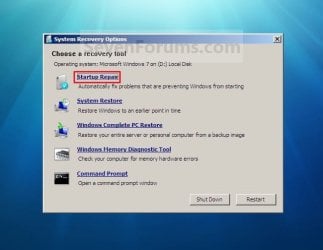
2. Select the Startup Repair option. (See screenshot below) Repair.jpg
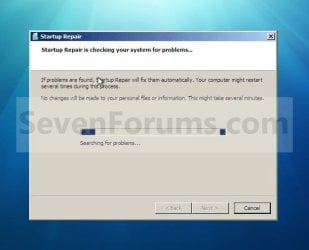
3. Startup Repair will now scan your computer to attempt to find and fix any startup problems. (See screenshot below)
NOTE: Startup Repair might prompt you to make choices as it tries to fix the problem, and if necessary, it might restart your computer as it makes repairs. If repairs are not successful, you'll see a summary of the problem and links to contact information for support. Your computer manufacturer might include additional assistance information. Startup_Repair-1.jpg
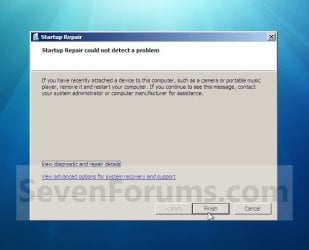
4. If problems cannot be found, then click on Finish. (See screenshot below)
NOTE: You can click on the View diagnostic and repair details link to see a detailed summary of what Startup Repair has done. Startup_Repair-2.jpg
A) Click on the Restart button to return to the Windows 7 log on screen. (See screenshot below step 2)
   Tip
Sometimes it may take running a startup repair (3) separate times with restarting the computer after each time before it fully fixes the startup issue.


That's it,
Shawn


Last edited:
Couldn't TheRepearWaits simply select the upgrade option while booted from the 7 dvd rather then waiting until booted in Windows first?

Instead of clicking on the custom install option the upgrade option would start up while booting from the dvd without Windows loaded to accomplished the same results of preserving all programs already installed as well as the files and folders.

When simply choosing the custom option to proceed from there the Windows, Program Files, and users directories will automatically be rolled up into the Windows.old folder so the only way you would actually worry about files being lost would be if the primary 7 was going onto was reformatted or needed to be for some reason.

It does sound like you saw a bad install to begin with. You can try the upgrade option for a repair install to see how that goes first. If that runs into further problems a partition wipe in order to see a new clean install would be the last option once your files are first backed up.
 

My Computers

System One System Two

  • Computer type
    PC/Desktop
    Computer Manufacturer/Model Number
    Custom builds = 2
    OS
    W7 Ultimate x64/W10 Pro x64/W11 Pro Triple Boot - Main PC W7 Remote PC Micro ATX W7 Pro x64/W11 Pro
    CPU
    AMD Phenom II X4 975 Deneb 3.6ghz - 965 2nd remote pc
    Motherboard
    Gigabyte GA-790XTA-UD4-Gigabyte GA-880GM-D2H remote pc
    Memory
    Kingston Hyper X DDR3 1600 1.5v 16gb - Hyper X Fury 8gb 2nd
    Graphics Card(s)
    MSI HD Radeon 5750 1gb - MSI HD Radeon 6450 on mini tower
    Sound Card
    Creative Labs X-Fi Xtreme Audio P - Realtek onooard 2nd case
    Monitor(s) Displays
    ASUS VW199T-P 19" HP 2082a Main-HP 2082a 20" remote pc
    Screen Resolution
    Asus 1440x900 - HP 1600x900
    Hard Drives
    WD Black 1TB HD per OS W7, W10, and pending W11 presently on 500gb OS Drive - Pending Triple 1TB HDs for Spanned Storage/backup volume
    Single 2TB external USB enclosure, single 1TB System 7 Host/Boot drive, Pending 8TB external HD for system image b
    PSU
    Corsair 750TX - primary / Corsair CX600 - second
    Case
    Antec 900-2 - SSD compatible / NZXT Vulcan mini tower
    Cooling
    Zalman CNPS9900A
    Keyboard
    AZIO L70 Backlit Letters Gaming - ONN Cordless/USB
    Mouse
    MSI DS200 Programmable, Logitech Cordless
    Internet Speed
    30mbps upgrade - primary hard wired - mini tower usb WiFi
    Antivirus
    GFI VIPRE Internet Security 2014 on W7 2016 beta on W10,
    Browser
    Cyberfox, WaterFox 64bit FF variants, FireFox x64, Pale Moon
    Other Info
    Accomdata fan cooled usb 2.0 PIDE/Sata II, III external enclosure.
    Sambient usb/eSata PATA/Sata II, III external enclosure.
  • Computer type
    PC/Desktop
    System Manufacturer/Model Number
    CUSTOM ASSEMBLY
    OS
    W7 Pro x64/W11 Pro
    CPU
    AMD Deneb 3.6ghz - 965
    Motherboard
    Gigabyte GA-880GM-D2H remote pc
    Memory
    Kingston Hyper X Fury 8gb
    Graphics Card(s)
    MSI HD Radeon 6450 DVI Output
    Sound Card
    Realtek onooard Creative or Other separate PENDING
    Monitor(s) Displays
    VIZIO 32" LCD TV Separate LCD Pending
    Screen Resolution
    1600x1080
    Hard Drives
    WD 500GB OS Host/Boot WD Green 1TB Storage/Backup
    PSU
    Corsair 600W - THERMALTAKE 600W spare case
    Case
    NZXT Vulcan mini tower
    Cooling
    Twin 120mm Top Fans - 240mm Side Cover
    Keyboard
    ONN Cordless/USB Logitech Cordless
    Mouse
    ONN USB/Cordless - Logitech Cordless
    Internet Speed
    DSL 5G
    Browser
    MS Edge, FireFox, WaterFox x64, FireFox Nightly
    Other Info
    OS Testing-Remote Access to Main TeamViewer
Hello Night Hawk,

If he had a older OS or older version of Windows 7 install, he may be able to do that option. However, since it is the same version as the one installed, he can only do a upgrade from within the running Windows 7 instead to save his current files. :(
 

My Computer

Computer type
PC/Desktop
Computer Manufacturer/Model Number
Self built custom
OS
64-bit Windows 11 Pro for Workstations
CPU
Intel i7-8700K OC'd to 5 GHz
Motherboard
ASUS ROG Maximus XI Formula Z390
Memory
64 GB (4x16GB) G.SKILL TridentZ RGB DDR4 3600 MHz
Graphics Card(s)
ASUS ROG-STRIX-GTX1080TI-O11G-GAMING
Sound Card
Integrated
Monitor(s) Displays
2 x Samsung Odyssey G7 27"
Screen Resolution
2560x1440
Hard Drives
1TB Samsung 990 PRO M.2,
4TB Samsung 990 PRO PRO M.2,
TerraMaster F8 SSD Plus NAS
PSU
Seasonic Prime Titanium 850W
Case
Thermaltake Core P3
Cooling
Corsair Hydro H115i
Keyboard
Logitech wireless K800
Mouse
Logitech MX Master 4
Internet Speed
2 Gb/s Download and 100 Mb/s Upload
Antivirus
Malwarebyte Anti-Malware Premium
Browser
Google Chrome
Other Info
Logitech Z625 speaker system,
Logitech BRIO 4K Pro webcam,
HP Color LaserJet Pro MFP M477fdn,
APC SMART-UPS RT 1000 XL - SURT1000XLI,
Galaxy S23 Plus phone
I'll have to try that here with the 32bit RC since you know I already saw some excellent results trying the repair install on a couple of occasions while booted in the RCs.

If TheReaperWaits is able to get up in Windows and start up the installer to see this done it will take about 50 minutes or so depending on how many programs and how large those are to complete. But that can save on the hours of starting off all over with the possible loss of various files! That certainly would stink! :cry:

The best thing now will be backing things up to be on the safe side if things don't work out and a fresh install is necessary.
 
Last edited by a moderator:

My Computers

System One System Two

  • Computer type
    PC/Desktop
    Computer Manufacturer/Model Number
    Custom builds = 2
    OS
    W7 Ultimate x64/W10 Pro x64/W11 Pro Triple Boot - Main PC W7 Remote PC Micro ATX W7 Pro x64/W11 Pro
    CPU
    AMD Phenom II X4 975 Deneb 3.6ghz - 965 2nd remote pc
    Motherboard
    Gigabyte GA-790XTA-UD4-Gigabyte GA-880GM-D2H remote pc
    Memory
    Kingston Hyper X DDR3 1600 1.5v 16gb - Hyper X Fury 8gb 2nd
    Graphics Card(s)
    MSI HD Radeon 5750 1gb - MSI HD Radeon 6450 on mini tower
    Sound Card
    Creative Labs X-Fi Xtreme Audio P - Realtek onooard 2nd case
    Monitor(s) Displays
    ASUS VW199T-P 19" HP 2082a Main-HP 2082a 20" remote pc
    Screen Resolution
    Asus 1440x900 - HP 1600x900
    Hard Drives
    WD Black 1TB HD per OS W7, W10, and pending W11 presently on 500gb OS Drive - Pending Triple 1TB HDs for Spanned Storage/backup volume
    Single 2TB external USB enclosure, single 1TB System 7 Host/Boot drive, Pending 8TB external HD for system image b
    PSU
    Corsair 750TX - primary / Corsair CX600 - second
    Case
    Antec 900-2 - SSD compatible / NZXT Vulcan mini tower
    Cooling
    Zalman CNPS9900A
    Keyboard
    AZIO L70 Backlit Letters Gaming - ONN Cordless/USB
    Mouse
    MSI DS200 Programmable, Logitech Cordless
    Internet Speed
    30mbps upgrade - primary hard wired - mini tower usb WiFi
    Antivirus
    GFI VIPRE Internet Security 2014 on W7 2016 beta on W10,
    Browser
    Cyberfox, WaterFox 64bit FF variants, FireFox x64, Pale Moon
    Other Info
    Accomdata fan cooled usb 2.0 PIDE/Sata II, III external enclosure.
    Sambient usb/eSata PATA/Sata II, III external enclosure.
  • Computer type
    PC/Desktop
    System Manufacturer/Model Number
    CUSTOM ASSEMBLY
    OS
    W7 Pro x64/W11 Pro
    CPU
    AMD Deneb 3.6ghz - 965
    Motherboard
    Gigabyte GA-880GM-D2H remote pc
    Memory
    Kingston Hyper X Fury 8gb
    Graphics Card(s)
    MSI HD Radeon 6450 DVI Output
    Sound Card
    Realtek onooard Creative or Other separate PENDING
    Monitor(s) Displays
    VIZIO 32" LCD TV Separate LCD Pending
    Screen Resolution
    1600x1080
    Hard Drives
    WD 500GB OS Host/Boot WD Green 1TB Storage/Backup
    PSU
    Corsair 600W - THERMALTAKE 600W spare case
    Case
    NZXT Vulcan mini tower
    Cooling
    Twin 120mm Top Fans - 240mm Side Cover
    Keyboard
    ONN Cordless/USB Logitech Cordless
    Mouse
    ONN USB/Cordless - Logitech Cordless
    Internet Speed
    DSL 5G
    Browser
    MS Edge, FireFox, WaterFox x64, FireFox Nightly
    Other Info
    OS Testing-Remote Access to Main TeamViewer
Hi dudes I have wiped off windows seven and have done a fresh install. It would not boot into windows at all. All seams to be running well again, I do back up my data every week and I should of done before I moved the computer.

The system would'nt boot at all as some of the boot files where corrupt which is why I was trying to repair the install.
 
Last edited by a moderator:

My Computer

OS
Windows 7 64 bit
CPU
Intel core 2 quad Q6600
Motherboard
Msi P7n Diamond
Memory
6Gb (2x2gb + 2x1gb) DDR2 800 Corsair XMS2
Graphics Card(s)
2x XFX 260GTX's
Sound Card
X-Fi soundblaster
Monitor(s) Displays
LGV23
Screen Resolution
1920x1080
Hard Drives
2x Western digital Raptor 74Gb Raid0
Seagate barracuda 7200.10 750Gb
PSU
Antec EA 650W
Case
Antec 900
Cooling
Coolermaster V8
Keyboard
Cheap Microsoft
Mouse
Microsoft Intellimouse explorer 3.0
Internet Speed
Slowwwwww
Sorry about the typo earlier! :o and the need to see 7 installed all over again. The repair install does generally work out however and can save quite a bit of time installing everything else fresh along with Windows.
 

My Computers

System One System Two

  • Computer type
    PC/Desktop
    Computer Manufacturer/Model Number
    Custom builds = 2
    OS
    W7 Ultimate x64/W10 Pro x64/W11 Pro Triple Boot - Main PC W7 Remote PC Micro ATX W7 Pro x64/W11 Pro
    CPU
    AMD Phenom II X4 975 Deneb 3.6ghz - 965 2nd remote pc
    Motherboard
    Gigabyte GA-790XTA-UD4-Gigabyte GA-880GM-D2H remote pc
    Memory
    Kingston Hyper X DDR3 1600 1.5v 16gb - Hyper X Fury 8gb 2nd
    Graphics Card(s)
    MSI HD Radeon 5750 1gb - MSI HD Radeon 6450 on mini tower
    Sound Card
    Creative Labs X-Fi Xtreme Audio P - Realtek onooard 2nd case
    Monitor(s) Displays
    ASUS VW199T-P 19" HP 2082a Main-HP 2082a 20" remote pc
    Screen Resolution
    Asus 1440x900 - HP 1600x900
    Hard Drives
    WD Black 1TB HD per OS W7, W10, and pending W11 presently on 500gb OS Drive - Pending Triple 1TB HDs for Spanned Storage/backup volume
    Single 2TB external USB enclosure, single 1TB System 7 Host/Boot drive, Pending 8TB external HD for system image b
    PSU
    Corsair 750TX - primary / Corsair CX600 - second
    Case
    Antec 900-2 - SSD compatible / NZXT Vulcan mini tower
    Cooling
    Zalman CNPS9900A
    Keyboard
    AZIO L70 Backlit Letters Gaming - ONN Cordless/USB
    Mouse
    MSI DS200 Programmable, Logitech Cordless
    Internet Speed
    30mbps upgrade - primary hard wired - mini tower usb WiFi
    Antivirus
    GFI VIPRE Internet Security 2014 on W7 2016 beta on W10,
    Browser
    Cyberfox, WaterFox 64bit FF variants, FireFox x64, Pale Moon
    Other Info
    Accomdata fan cooled usb 2.0 PIDE/Sata II, III external enclosure.
    Sambient usb/eSata PATA/Sata II, III external enclosure.
  • Computer type
    PC/Desktop
    System Manufacturer/Model Number
    CUSTOM ASSEMBLY
    OS
    W7 Pro x64/W11 Pro
    CPU
    AMD Deneb 3.6ghz - 965
    Motherboard
    Gigabyte GA-880GM-D2H remote pc
    Memory
    Kingston Hyper X Fury 8gb
    Graphics Card(s)
    MSI HD Radeon 6450 DVI Output
    Sound Card
    Realtek onooard Creative or Other separate PENDING
    Monitor(s) Displays
    VIZIO 32" LCD TV Separate LCD Pending
    Screen Resolution
    1600x1080
    Hard Drives
    WD 500GB OS Host/Boot WD Green 1TB Storage/Backup
    PSU
    Corsair 600W - THERMALTAKE 600W spare case
    Case
    NZXT Vulcan mini tower
    Cooling
    Twin 120mm Top Fans - 240mm Side Cover
    Keyboard
    ONN Cordless/USB Logitech Cordless
    Mouse
    ONN USB/Cordless - Logitech Cordless
    Internet Speed
    DSL 5G
    Browser
    MS Edge, FireFox, WaterFox x64, FireFox Nightly
    Other Info
    OS Testing-Remote Access to Main TeamViewer
cannot detect windows 7 installation

I accidentally overwrote the boot sector on my Windows 7 install, and when i try to use the startup repair, it cannot detect any previous installations to repair.
 

My Computer

OS
Windows 7
CPU
Intel Q9650 3.00 Ghz 12 Mb cache
Motherboard
Gigabit GA-EP45-UD3r
Memory
4 GB DDR2 Corsair 800 mhz
Graphics Card(s)
ATI Radeon HD 3870 x2 Sapphire
Monitor(s) Displays
Acer 22" widescreen Gateway 17"
Hard Drives
Western Digital Caviar 250GB
Seagate 500GB Barricuda x4 RAID 1+0
PSU
Hiper R-Type 580 Watt Modular PSU
Case
Thermaltake Armor
Cooling
Stock Air
Keyboard
Logitech G15
Internet Speed
Several
Welcome to Seven Forums Peaches941 ..

Limneos has written a step by step tutorial on using BCDEDIT, Windows 7's boot manager ... See it -=> Here
 

My Computer

Computer type
PC/Desktop
Computer Manufacturer/Model Number
LENOVO K450 @3.0GHZ
OS
64-bit Windows 8.1 Pro
CPU
Core(TM) i5 CPU 4330 Haswell @ 3.20GHz
Motherboard
LENOVO
Memory
12.00 GB
Graphics Card(s)
Intel(R) HD Graphics
Sound Card
Intel HD integtrated
Monitor(s) Displays
HP 25' ISP Monitor
Screen Resolution
1900/1020
Hard Drives
(1) ST1000DM003-1CH162 (2) Generic STORAGE DEVICE USB Device (3) Generic STORAGE DEVICE USB Device
Internet Speed
100mb down/10mb up
Shawn, can you include that it might take 3 runs for it to work?
 

My Computer

Computer Manufacturer/Model Number
Custom
OS
Windows 7 Professional x64
CPU
Intel i7 2600K OC'd @ 4620 MHz
Motherboard
Asus P8Z68-V Pro
Memory
16GB GSkill Sniper 2133 Mhz (4x4GB)
Graphics Card(s)
EVGA GeForce GTX 480 SuperClocked+
Sound Card
Realtek High Definition Audio
Monitor(s) Displays
2x Acer S273HLbmii 27"
Screen Resolution
2 x 1920x1080
Hard Drives
64GB Crucial M4 SSD

Storage: Hitachi 1TB 5400RPM, Samsung 1.5TB 5400RPM
PSU
Corsair HW Series 750w (modular)
Case
Cooler Master HAF 932 Advanced Blue Edition
Cooling
CM Hyper 212+ CPU cooler, 3x 230mm + 1x 140mm case fans
Keyboard
Logitech MK320 (wireless)
Mouse
Logitech MK320 (wireless)
Internet Speed
30 Mb/s : 2 Mb/s
Done. :)
 

My Computer

Computer type
PC/Desktop
Computer Manufacturer/Model Number
Self built custom
OS
64-bit Windows 11 Pro for Workstations
CPU
Intel i7-8700K OC'd to 5 GHz
Motherboard
ASUS ROG Maximus XI Formula Z390
Memory
64 GB (4x16GB) G.SKILL TridentZ RGB DDR4 3600 MHz
Graphics Card(s)
ASUS ROG-STRIX-GTX1080TI-O11G-GAMING
Sound Card
Integrated
Monitor(s) Displays
2 x Samsung Odyssey G7 27"
Screen Resolution
2560x1440
Hard Drives
1TB Samsung 990 PRO M.2,
4TB Samsung 990 PRO PRO M.2,
TerraMaster F8 SSD Plus NAS
PSU
Seasonic Prime Titanium 850W
Case
Thermaltake Core P3
Cooling
Corsair Hydro H115i
Keyboard
Logitech wireless K800
Mouse
Logitech MX Master 4
Internet Speed
2 Gb/s Download and 100 Mb/s Upload
Antivirus
Malwarebyte Anti-Malware Premium
Browser
Google Chrome
Other Info
Logitech Z625 speaker system,
Logitech BRIO 4K Pro webcam,
HP Color LaserJet Pro MFP M477fdn,
APC SMART-UPS RT 1000 XL - SURT1000XLI,
Galaxy S23 Plus phone
Turning off External Hard Drive during reboot helped

I had the same issue after upgrading to Windows 7. When I finally turned off the external hard drive, it seemed to do the trick and the system was able to boot properly.
 

My Computer

OS
windows 7
My laptop has done this twice now. For me it happaned when I was putting the laptop to sleep mode, but I noticed I forgot something so I woke it up right away and when it came back online the battery icon dropped to 0% and then the PC blue screened, and restarted. It tried to start back up and does the whole "you didn't shutdown right do you wanna try normal or safe mode". So I hit normal it shows the Win7 logo flying in and right at they start to appear it will blue screen and restart. Then when it starts up it brings up that option to repair.

If I try to repair it fails. But if I turn the computer off all the way (holding power button). And wait a min or so when I start back up and go into the repair it will show up and tell me that i can repair before the screen you showed. I just click continue it takes like 5+min of repairing then it will restart (with the prompt saying it finished).

I will then start up normal without any problems.
 

My Computer

OS
Windows 7 Pro (32bit) & Windows 7 Home Premium (64bit)
My laptop has done this twice now. For me it happaned when I was putting the laptop to sleep mode, but I noticed I forgot something so I woke it up right away and when it came back online the battery icon dropped to 0% and then the PC blue screened, and restarted. It tried to start back up and does the whole "you didn't shutdown right do you wanna try normal or safe mode". So I hit normal it shows the Win7 logo flying in and right at they start to appear it will blue screen and restart. Then when it starts up it brings up that option to repair.

If I try to repair it fails. But if I turn the computer off all the way (holding power button). And wait a min or so when I start back up and go into the repair it will show up and tell me that i can repair before the screen you showed. I just click continue it takes like 5+min of repairing then it will restart (with the prompt saying it finished).

I will then start up normal without any problems.
Welcome!

If I were you, I would run a test on your hard drive using the tools released by the manufacturer. For example, to test a Seagate drive, you would use their SeaTools.

If you need help finding them, let me know, and I would be glad to find them for you. If you don't know what hard drive you have, follow the link in my signature for downloading Speccy.
 

My Computer

Computer Manufacturer/Model Number
Custom
OS
Windows 7 Professional x64
CPU
Intel i7 2600K OC'd @ 4620 MHz
Motherboard
Asus P8Z68-V Pro
Memory
16GB GSkill Sniper 2133 Mhz (4x4GB)
Graphics Card(s)
EVGA GeForce GTX 480 SuperClocked+
Sound Card
Realtek High Definition Audio
Monitor(s) Displays
2x Acer S273HLbmii 27"
Screen Resolution
2 x 1920x1080
Hard Drives
64GB Crucial M4 SSD

Storage: Hitachi 1TB 5400RPM, Samsung 1.5TB 5400RPM
PSU
Corsair HW Series 750w (modular)
Case
Cooler Master HAF 932 Advanced Blue Edition
Cooling
CM Hyper 212+ CPU cooler, 3x 230mm + 1x 140mm case fans
Keyboard
Logitech MK320 (wireless)
Mouse
Logitech MK320 (wireless)
Internet Speed
30 Mb/s : 2 Mb/s
I have the Acer AS5738DG

It looks like its a Western Digital. Device Manager shows "WD WDC".
 

My Computer

OS
Windows 7 Pro (32bit) & Windows 7 Home Premium (64bit)
I had a very similar problem and on reboot there are only two choices > Go to Repair Windows (Recommended) OR start Windows. (Running Windows 7 Home Premium). The Start Windows gets as far as the Windows flag forming and going to start Windows but never makes it. The Repair option goes into something similar to "Safe" mode font. Takes an incredibly long time to come up with first question which asks for Keyboard type - US is the only option. Goes away again for ages then asks to identify the operating system (which is blank) and therefore gives choice to install drivers for hard disk. This again goes away and, after waiting around 3/4 hour I decided it was time to go to bed.
I have have the DVD for Windows 7 Home Premium which is a full copy with a reinstall option. Am I left in the same position as The ReaperWaits?
This problem started last night and I wonder if it was caused by a visit and install of some clip-art for my wife. I do have anti virus and firewall running.

Mitch1945
 

My Computer

Computer Manufacturer/Model Number
Acer Aspire 5920G
OS
Windows 7 Home Premium
Memory
2GB
Monitor(s) Displays
Laptop
Hard Drives
160Gb
Hello Mitch, and welcome to Seven Forums.

Are you able to boot from your Windows 7 installation disc into the System Recovery Options (Method Two) to try a startup repair instead?
 

My Computer

Computer type
PC/Desktop
Computer Manufacturer/Model Number
Self built custom
OS
64-bit Windows 11 Pro for Workstations
CPU
Intel i7-8700K OC'd to 5 GHz
Motherboard
ASUS ROG Maximus XI Formula Z390
Memory
64 GB (4x16GB) G.SKILL TridentZ RGB DDR4 3600 MHz
Graphics Card(s)
ASUS ROG-STRIX-GTX1080TI-O11G-GAMING
Sound Card
Integrated
Monitor(s) Displays
2 x Samsung Odyssey G7 27"
Screen Resolution
2560x1440
Hard Drives
1TB Samsung 990 PRO M.2,
4TB Samsung 990 PRO PRO M.2,
TerraMaster F8 SSD Plus NAS
PSU
Seasonic Prime Titanium 850W
Case
Thermaltake Core P3
Cooling
Corsair Hydro H115i
Keyboard
Logitech wireless K800
Mouse
Logitech MX Master 4
Internet Speed
2 Gb/s Download and 100 Mb/s Upload
Antivirus
Malwarebyte Anti-Malware Premium
Browser
Google Chrome
Other Info
Logitech Z625 speaker system,
Logitech BRIO 4K Pro webcam,
HP Color LaserJet Pro MFP M477fdn,
APC SMART-UPS RT 1000 XL - SURT1000XLI,
Galaxy S23 Plus phone
Start Up Repair

Thanks Brink.
I did manage to get some action from the Windows 7 Installation DVD but the final result was not happy. It did several tests but seemed to have a problem on the final one (or reported one. I begin to suspect a disk corruption in a vital area like where it boots. I was so frustrated last night after spending a hunk of the night going backwards and forwards answering questions as they appeared and at the end failed.
I will try again tonight hopefully and document the results.
I am beginning to fear that I will have to do a clean install of Windows 7 and I don't really want to lose a lot of data. Fortunately most of my user data I have on Drive D, a partition of the main drive. If I have to clean install I guess I will need to re-format the disk and I bet I can't restrict that to the "C:" partition!

Will get back after tonight's effort.:cry:

Cheers
 

My Computer

Computer Manufacturer/Model Number
Acer Aspire 5920G
OS
Windows 7 Home Premium
Memory
2GB
Monitor(s) Displays
Laptop
Hard Drives
160Gb
When I try to start up my computer it goes to screen that is titled Windows Error Recovery and gives me the choice to either go to startup repair or to start windows normally. When I choose to start normally it goes fine but after a while it goes to a blue screen with white writing on it for a split second then returns to the Windows Error Recovery screen. When I select to go to startup repair it goes to the repair screen background, but nothing comes up, I'm still able to move the mouse though. I have a Dell Inspiron 17 with windows 7. Help!
 

My Computer

OS
Windows 7
Hello Pokeack, and welcome to Seven Forums.

You might consider selecting the System Restore option instead to do a system restore using a restore point dated before you had this problem to hopefully be able to fix it for you.

Hope this helps,
Shawn
 

My Computer

Computer type
PC/Desktop
Computer Manufacturer/Model Number
Self built custom
OS
64-bit Windows 11 Pro for Workstations
CPU
Intel i7-8700K OC'd to 5 GHz
Motherboard
ASUS ROG Maximus XI Formula Z390
Memory
64 GB (4x16GB) G.SKILL TridentZ RGB DDR4 3600 MHz
Graphics Card(s)
ASUS ROG-STRIX-GTX1080TI-O11G-GAMING
Sound Card
Integrated
Monitor(s) Displays
2 x Samsung Odyssey G7 27"
Screen Resolution
2560x1440
Hard Drives
1TB Samsung 990 PRO M.2,
4TB Samsung 990 PRO PRO M.2,
TerraMaster F8 SSD Plus NAS
PSU
Seasonic Prime Titanium 850W
Case
Thermaltake Core P3
Cooling
Corsair Hydro H115i
Keyboard
Logitech wireless K800
Mouse
Logitech MX Master 4
Internet Speed
2 Gb/s Download and 100 Mb/s Upload
Antivirus
Malwarebyte Anti-Malware Premium
Browser
Google Chrome
Other Info
Logitech Z625 speaker system,
Logitech BRIO 4K Pro webcam,
HP Color LaserJet Pro MFP M477fdn,
APC SMART-UPS RT 1000 XL - SURT1000XLI,
Galaxy S23 Plus phone
Where do I check if I have Start-up Repair on my hard drive? Would it be in my computer next to my C drive?
 

My Computer

OS
Vista
Where do I check if I have Start-up Repair on my hard drive? Would it be in my computer next to my C drive?
Startup Repair is a tool found on the installation and repair disc. It is also built into Windows, but you cannot run it unless you have a startup error.
 

My Computer

Computer Manufacturer/Model Number
Custom
OS
Windows 7 Professional x64
CPU
Intel i7 2600K OC'd @ 4620 MHz
Motherboard
Asus P8Z68-V Pro
Memory
16GB GSkill Sniper 2133 Mhz (4x4GB)
Graphics Card(s)
EVGA GeForce GTX 480 SuperClocked+
Sound Card
Realtek High Definition Audio
Monitor(s) Displays
2x Acer S273HLbmii 27"
Screen Resolution
2 x 1920x1080
Hard Drives
64GB Crucial M4 SSD

Storage: Hitachi 1TB 5400RPM, Samsung 1.5TB 5400RPM
PSU
Corsair HW Series 750w (modular)
Case
Cooler Master HAF 932 Advanced Blue Edition
Cooling
CM Hyper 212+ CPU cooler, 3x 230mm + 1x 140mm case fans
Keyboard
Logitech MK320 (wireless)
Mouse
Logitech MK320 (wireless)
Internet Speed
30 Mb/s : 2 Mb/s
Back
Top