Solved Startup & Shutdown; Different Systems By Network

ZMan

New member
Member
VIP
Local time
12:13 PM
Messages
225
I was trying to find a way to turn off all computer systems that my co-worker leave on at night as well as boot them up before they get here so the system can be ready for the work day. Also, I was trying to see if there was something with a schedule so that I can use so that when holidays comes up the system wouldn't turn on. I been looking around but didn't find anything that would work. I have Windows 7 SP1 workstations. Would like to manage from 2008 GPO (Group Policy) server.

Thanks if you can help.
Zak
 

My Computer

OS
windows 7 professional x32
Since you are using group policy I am assuming that the server is a domain controller?

   Note
I am currently using Windows Server 2012 however please be assured that the steps are the same for 2008 and 2008 R2


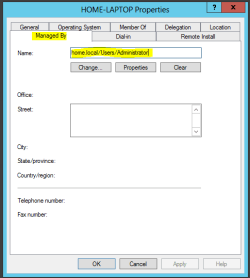
Before you can remote shutdown and reboot a machine you need to take control of the machines under Active Directory. To do so, right click on the machine you wish to take control of and then click on properties

Now click on the 'Managed By' tab and change the ownership to the user account that will be running the commands. If you are running the command from the server side then I would recommend setting the Administrator account as the manager.
manageby.PNG

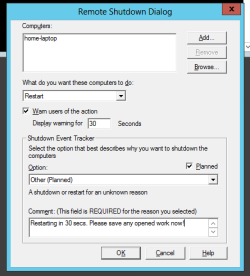
Once that is done, go to an elevated command prompt and type the following exactly:

Code:
shutdown.exe -i

You should then be see a remote shutdown dialog box. Enter the computer names (Must be hostnames, IP addresses will not work so please make sure the relevant DNS records are available for each device.), shutdown or restart and then put a short message that would be displayed to the user if any are logged in.
remoteshutdown.PNG


   Note
If you get access denied then you need to ensure that the Windows Management Instrumentation program is allowed on a domain network on the computers personal firewall.

__________________________________________________

As for start-up, this is slightly more difficult and motherboard dependent. You need to ensure that wake on LAN is enabled in the BIOS on all the machines before executing a startup otherwise the machines won't turn on.

There isn't a native application in Windows server or client OS that allows Wake on LAN and personally I would strongly advise against it since in production it doesn't work as nicely as it sounds and you can end up with multiple machines turned on and the others turned off etc... Unless you have custom cases which require it I see no harm in allowing the user to turn the machine on. If you wanted it so that the machines stay turned off overnight then you could possibly run a batch file from the server which ran the remote shutdown command at certain intervals (task scheduler) but I haven't done so myself and I would need to try it out before I recommend such thing.


Hope This helps,
Josh :)
 

My Computer

Computer type
PC/Desktop
Computer Manufacturer/Model Number
Custom Built
OS
Windows 7 Professional x64 SP1 ; Windows Server 2012 R2 Standard
CPU
Intel Core i5 2400 @ 3.10GHz
Motherboard
Foxconn H67MP-S/-V/H67MP
Memory
8.0GB DDR3 @ 665MHz (2GBx4)
Graphics Card(s)
AMD Radeon HD 6870
Sound Card
Realtek High Definition Audio
Monitor(s) Displays
AOC 2243W & SMB1930NW
Screen Resolution
1440x900 & 1920x1080
Hard Drives
977GB Seagate ST31000524AS ATA Drive (SATA)
250GB WD iSCSI attached Drive
PSU
750W Gaming PSU
Case
Novatech Night
Cooling
Fan
Keyboard
Dell Standard PS/2 Keyboard
Mouse
R.A.T 07 Gaming Mouse
Internet Speed
Download: 10 Mbps Ping: 30ms Upload: 0.81 Mbps
Browser
Google Chrome
Other Info
Optiarc DVD RW AD-5260S ATA Device
Thanks for the help!
 

My Computer

OS
windows 7 professional x32
No worries, Glad I could help

Josh :)
 

My Computer

Computer type
PC/Desktop
Computer Manufacturer/Model Number
Custom Built
OS
Windows 7 Professional x64 SP1 ; Windows Server 2012 R2 Standard
CPU
Intel Core i5 2400 @ 3.10GHz
Motherboard
Foxconn H67MP-S/-V/H67MP
Memory
8.0GB DDR3 @ 665MHz (2GBx4)
Graphics Card(s)
AMD Radeon HD 6870
Sound Card
Realtek High Definition Audio
Monitor(s) Displays
AOC 2243W & SMB1930NW
Screen Resolution
1440x900 & 1920x1080
Hard Drives
977GB Seagate ST31000524AS ATA Drive (SATA)
250GB WD iSCSI attached Drive
PSU
750W Gaming PSU
Case
Novatech Night
Cooling
Fan
Keyboard
Dell Standard PS/2 Keyboard
Mouse
R.A.T 07 Gaming Mouse
Internet Speed
Download: 10 Mbps Ping: 30ms Upload: 0.81 Mbps
Browser
Google Chrome
Other Info
Optiarc DVD RW AD-5260S ATA Device
Back
Top
