Since you are using group policy I am assuming that the server is a domain controller?
Note
I am currently using Windows Server 2012 however please be assured that the steps are the same for 2008 and 2008 R2
Before you can remote shutdown and reboot a machine you need to take control of the machines under Active Directory. To do so, right click on the machine you wish to take control of and then click on properties
Now click on the '
Managed By' tab and change the ownership to the user account that will be running the commands. If you are running the command from the server side then I would recommend setting the Administrator account as the manager.
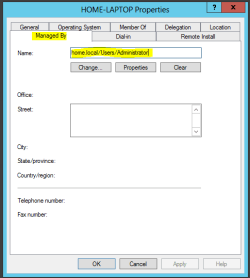
Once that is done, go to an elevated command prompt and type the following exactly:
You should then be see a remote shutdown dialog box. Enter the computer names (Must be hostnames, IP addresses will not work so please make sure the relevant DNS records are available for each device.), shutdown or restart and then put a short message that would be displayed to the user if any are logged in.
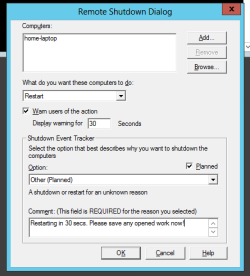
Note
If you get access denied then you need to ensure that the Windows Management Instrumentation program is allowed on a domain network on the computers personal firewall.
__________________________________________________
As for start-up, this is slightly more difficult and motherboard dependent. You need to ensure that wake on LAN is enabled in the BIOS on all the machines before executing a startup otherwise the machines won't turn on.
There isn't a native application in Windows server or client OS that allows Wake on LAN and personally I would strongly advise against it since in production it doesn't work as nicely as it sounds and you can end up with multiple machines turned on and the others turned off etc... Unless you have custom cases which require it I see no harm in allowing the user to turn the machine on. If you wanted it so that the machines stay turned off overnight then you could possibly run a batch file from the server which ran the remote shutdown command at certain intervals (task scheduler) but I haven't done so myself and I would need to try it out before I recommend such thing.
Hope This helps,
Josh




