Startup Sound - Change in Windows 7

How to Change the Windows 7 Startup Sound

   Information
This will show you how to change the Windows 7 startup sound, not the "Windows Logon" sound, to any WAV file of your choice.

You must be logged in as an administrator to be able to do the steps in this tutorial.

   Note
If you run a sfc /scannow command, then you will lose all changes made to the system file in the tutorial below since it and all other system files will be restored back to default by the command.
   Warning
Making a mistake while modifying system files can render your Windows 7 installation unusable. To be safe, you should create a restore point before doing this tutorial in case you need to do a system restore at boot using the restore point to undo any mistakes that may be made.
   Tip
If you like, here are the Startup Sounds from previous Windows releases.

Windows History: logos, bootscreens, startup sounds etc | Redmond Pie


OPTION ONE

To Change Startup Sound in Windows 7 using "Startup Sound Changer"

1. If you have not already, download the StartupSoundChanger.zip file for the free Startup Sound Changer program at the link below, and save it to your desktop.
NOTE: You will need to click on the grey download button at the program's site below. WinAero: Downloads / Software / Startup Sound Changer - change your Windows startup

download.png
2. Open the ZIP file, and extract (drag and drop) the StartupSoundChanger.exe to your desktop.

3. Run the StartupSoundChanger.exe file, and click on Yes when prompted by UAC.
NOTE: This is a standalone .exe file that does not install anything on your computer.

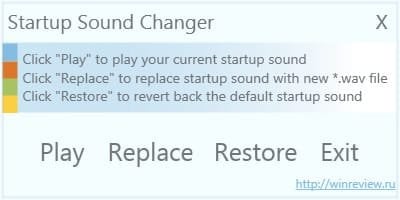
4. With "Startup Sound Changer" you can set a .wav file to replace the startup sound, play current startup sound, and restore the default startup sound. (see screenshot below) ssc.jpg


OPTION TWO

To Manually Change Startup Sound in Windows 7

1. Do step 2 or 3 below for what you would like to do.

2. To Restore Default Startup Sound in Windows 7

   Note
If you lost your backup or didn't create one, then here's a copy of the default startup sound .wav file that you could use to restore it with using step 3 below.


Download


A) Copy the default backup imageres_original.dll file (step 3O below) to your desktop.

B) Right click on the imageres_original.dll file and click on Rename.

C) Rename it to imageres.dll and press enter.

D) Repeat steps 3Q to 3X below to restore this file.
3. To Change Startup Sound in Windows 7 A) In Windows Explorer, navigate to C:\Windows\System32\imageres.dll. (see screenshot below) Step1.jpg
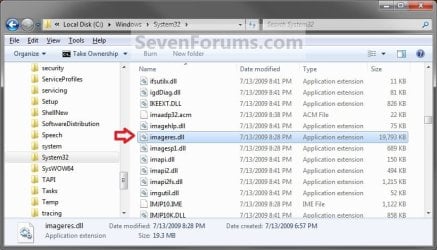
B) Right click on the imageres.dll file, and click on Copy. (see screenshot above)

C) Right click on your desktop, and click on Paste.

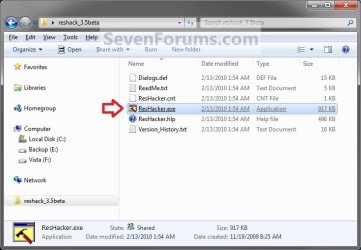
D) If you have not already, then download and install Resource Hacker.

E) Right click on the Resource Hacker shortcut in Start Menu - All Programs, then click on Run as administrator. (see screenshot below) Start_Menu.jpg
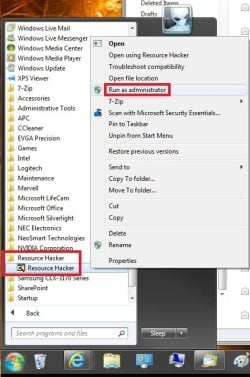
F) If prompted by UAC, then click on Yes.

G) In Resource Hacker, click on File and Open. (see screenshot below) Step4.jpg
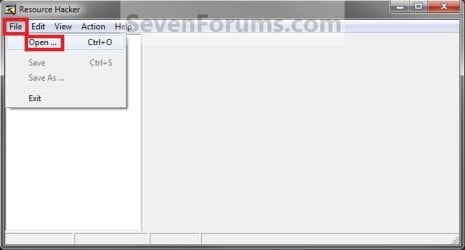
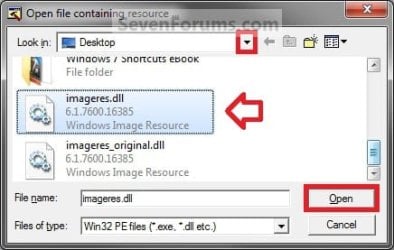
H) Navigate to and select the imageres.dll file copy on your desktop, and click on Open. (see screenshot below) Step5.jpg
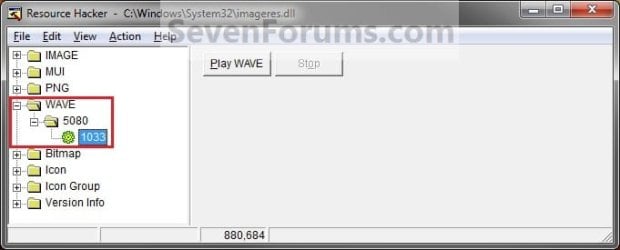
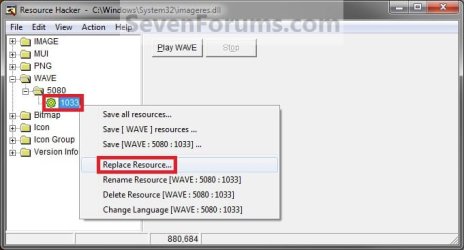
I) In the left pane of Resource Hacker, expand WAVE, and 5080, to 1033. (see screenshot below)
NOTE: If 5080 and 1033 is named something else, then that is fine as long as they are still under WAVE. Just substitute what you have instead in the steps below. You can click on the Play WAVE button to hear what the current startup sound is. Step6.jpg
J) Right click on 1033 and click on Replace Resource. (see screenshot below) Step7.jpg
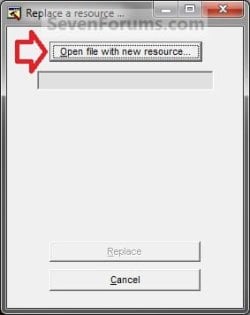
K) Click on Open file with new resource. (see screenshot below) Step8.jpg
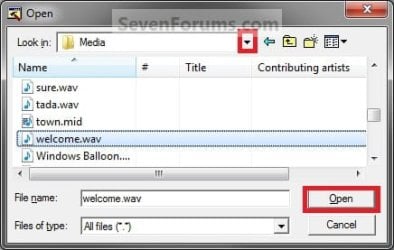
L) Navigate to and select the .wav file that you want for the startup sound, and click on Open. (see screenshot below)
NOTE: This .wav file must be unblocked and remain at this same location. For example, move or copy the .wav into the C:\Windows\Media. If you move or delete this .wav file, the startup sound will no longer play it. Step9.jpg
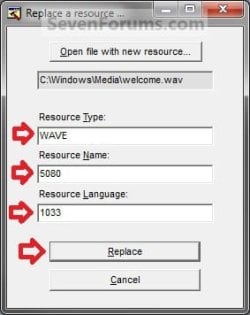
M) Under Resource Type, type WAVE. Under Resource Name, type 5080. Under Resource Language, type 1033. Click on the Replace button. (see screenshots below) Step10A.jpg
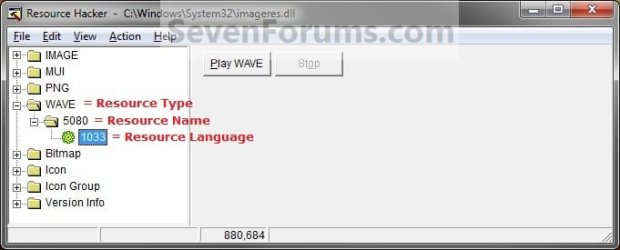
Step10B.jpg

N) Click on File and Save, then close Resource Hacker. (see screenshot below)
NOTE: You can click on the Play WAVE button first to hear and verify what the current startup sound is set as in this file. Step11.jpg
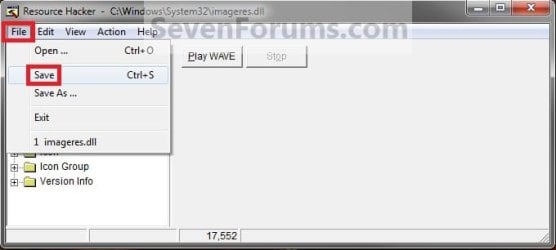
O) On your desktop, Move and Save the imageres_original.dll file to another safe location of your choice as a backup.

   Warning
THIS IS YOUR ONLY BACKUP OF THE ORIGINAL IMAGERES.DLL FILE WITH THE DEFAULT STARTUP SOUND.


P) Check to make sure that the Play Windows Startup sound is checked in Sound so that it is turned on. (see screenshot below) Sounds.jpg
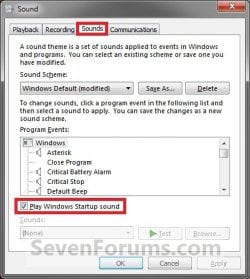
Q) Restart the computer and boot into the System Recovery Options (WinRE) screen, then select the Command Prompt option and press enter.
NOTE: If you do not have a retail Windows 7 installation disc, then you can create a System Repair Disc to use to boot to the System Recovery Screen instead. System_Recovery_Options.jpg
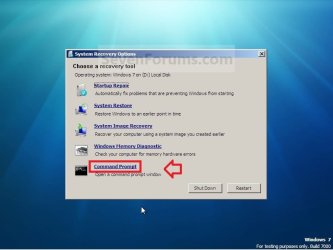
R) In the command prompt, type diskpart and press enter. (see screenshot below step 3V)

S) In the command prompt, type list volume and press enter. (see screenshot below step 3V)

T) Make note of what the drive letter is for your Windows 7 partition or drive. (see screenshot below step 3V)
NOTE: The Windows drive is not always C at boot. For example, mine is listed as D here. Look at the volume name and size to help you determine which letter is the one that you have Windows 7 installed on.

U) In the command prompt, type exit and press enter. (see screenshot below step 3V)

V) In the command prompt, type the command below and press enter. (see screenshot below)
NOTE: Substitute D in the command below with the drive letter you have listed in step 3T for your Windows 7, and substitute username in the command below with your user account name.

Code:
COPY /V /Y "[B][COLOR=red]D[/COLOR][/B]:\Users\[B][COLOR=red]username[/COLOR][/B]\Desktop\imageres.dll" "[B][COLOR=red]D[/COLOR][/B]:\Windows\System32"
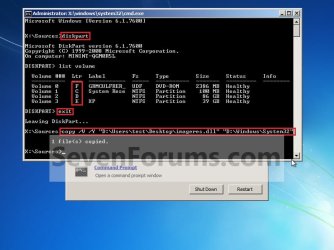
Command.jpg
W) Close the command prompt, and click on the Restart button. (see screenshot above)

X) As Windows 7 restarts, you will hear your new startup sound.

   Tip
If you ever wanted to change the startup sound again anytime after the first time you did this tutorial, you would only need to replace the .wav file at the exact same location in step 3L in Windows Explorer with a different .wav file that you want to use now instead, then rename the new .wav file with the exact same name as the old .wav file. No other steps would be required.

That's it,
Shawn


Attachments

Last edited:
This was kind of interestingly easy. I was going to do all that with Windows Virtual PC and all, but I decided to boot into Windows that's on the VHD. I went to the system32 folder and found the imageres.dll and took ownership of that from my Take Ownership context menu entry. Then I took ownership of my modified imageres.dll on my Desktop and simply copy and pasted it into system32 and it worked just fine! I now have my pretty startup sound! :D
 

My Computer My Computer

At a glance

Windows 7 Ultimate x64AMD Athlon 240 II @ 2.8-4.004 ghzSuperTalent 4gb DDR3ATI Radeon 3000HD
Computer Manufacturer/Model Number
ASUS
OS
Windows 7 Ultimate x64
CPU
AMD Athlon 240 II @ 2.8-4.004 ghz
Motherboard
M4A78LT-M LE
Memory
SuperTalent 4gb DDR3
Graphics Card(s)
ATI Radeon 3000HD
Screen Resolution
1440*900
Case
Re-modded Dell Dimension 4550
Cooling
Vantec 92mm Tornado x2
Other Info
It looks pretty.
Here's a pickler, how does one change the startup sound for a 7 installation on a virtual hard drive file that doesn't have the Startup Repair options?
...or you could just use Unlocker to directly rename/copy etc. imageres.dll. Worked for me.
 

My Computer My Computer

At a glance

Windows 7 Professional x64Core2Quad Q96504GBSapphire 5670
OS
Windows 7 Professional x64
CPU
Core2Quad Q9650
Motherboard
Asus P5K Premium WIFI-AP
Memory
4GB
Graphics Card(s)
Sapphire 5670
Sound Card
Onboard
This was kind of interestingly easy. I was going to do all that with Windows Virtual PC and all, but I decided to boot into Windows that's on the VHD. I went to the system32 folder and found the imageres.dll and took ownership of that from my Take Ownership context menu entry. Then I took ownership of my modified imageres.dll on my Desktop and simply copy and pasted it into system32 and it worked just fine! I now have my pretty startup sound! :D

Even better. :party:
 

My Computer My Computer

At a glance

64-bit Windows 11 Pro for WorkstationsIntel i7-8700K OC'd to 5 GHz64 GB (4x16GB) G.SKILL TridentZ RGB DDR4 3600...ASUS ROG-STRIX-GTX1080TI-O11G-GAMING
Computer type
PC/Desktop
Computer Manufacturer/Model Number
Self built custom
OS
64-bit Windows 11 Pro for Workstations
CPU
Intel i7-8700K OC'd to 5 GHz
Motherboard
ASUS ROG Maximus XI Formula Z390
Memory
64 GB (4x16GB) G.SKILL TridentZ RGB DDR4 3600 MHz
Graphics Card(s)
ASUS ROG-STRIX-GTX1080TI-O11G-GAMING
Sound Card
Integrated
Monitor(s) Displays
2 x Samsung Odyssey G7 27"
Screen Resolution
2560x1440
Hard Drives
1TB Samsung 990 PRO M.2,
4TB Samsung 990 PRO PRO M.2,
TerraMaster F8 SSD Plus NAS
PSU
Seasonic Prime Titanium 850W
Case
Thermaltake Core P3
Cooling
Corsair Hydro H115i
Keyboard
Logitech wireless K800
Mouse
Logitech MX Master 4
Internet Speed
2 Gb/s Download and 100 Mb/s Upload
Antivirus
Malwarebyte Anti-Malware Premium
Browser
Google Chrome
Other Info
Logitech Z625 speaker system,
Logitech BRIO 4K Pro webcam,
HP Color LaserJet Pro MFP M477fdn,
APC SMART-UPS RT 1000 XL - SURT1000XLI,
Galaxy S23 Plus phone
I was booted live with another OS installed on a flash drive when simply swapping out the modified imageres.dll file for the original without fuss. Since a copy of the original was already tucked away for safe keeping I could then try various alternative methods.

You first have to have the new version with the new sound already set to go however before anything like this will work since the Resource Hacker tool only works while in Windows. If your VM lacks integrated components as I've run into on prior occasions trying temp installs of 7 RCs then retail on the VPC for example the Gladinet CloudDesktop option to upload the file from host to VM by way of the Windows Live SkyDrive gets the modified imageres.dll file over to the VHD where you can then work with it. It's certainly much easier when you can copy&paste directly however.
 

My Computers My Computers

  • At a glance

    W7 Ultimate x64/W10 Pro x64/W11 Pro Triple Bo...AMD Phenom II X4 975 Deneb 3.6ghz - 965 2nd r...Kingston Hyper X DDR3 1600 1.5v 16gb - Hyper ...MSI HD Radeon 5750 1gb - MSI HD Radeon 6450 o...
    Computer type
    PC/Desktop
    Computer Manufacturer/Model Number
    Custom builds = 2
    OS
    W7 Ultimate x64/W10 Pro x64/W11 Pro Triple Boot - Main PC W7 Remote PC Micro ATX W7 Pro x64/W11 Pro
    CPU
    AMD Phenom II X4 975 Deneb 3.6ghz - 965 2nd remote pc
    Motherboard
    Gigabyte GA-790XTA-UD4-Gigabyte GA-880GM-D2H remote pc
    Memory
    Kingston Hyper X DDR3 1600 1.5v 16gb - Hyper X Fury 8gb 2nd
    Graphics Card(s)
    MSI HD Radeon 5750 1gb - MSI HD Radeon 6450 on mini tower
    Sound Card
    Creative Labs X-Fi Xtreme Audio P - Realtek onooard 2nd case
    Monitor(s) Displays
    ASUS VW199T-P 19" HP 2082a Main-HP 2082a 20" remote pc
    Screen Resolution
    Asus 1440x900 - HP 1600x900
    Hard Drives
    WD Black 1TB HD per OS W7, W10, and pending W11 presently on 500gb OS Drive - Pending Triple 1TB HDs for Spanned Storage/backup volume
    Single 2TB external USB enclosure, single 1TB System 7 Host/Boot drive, Pending 8TB external HD for system image b
    PSU
    Corsair 750TX - primary / Corsair CX600 - second
    Case
    Antec 900-2 - SSD compatible / NZXT Vulcan mini tower
    Cooling
    Zalman CNPS9900A
    Keyboard
    AZIO L70 Backlit Letters Gaming - ONN Cordless/USB
    Mouse
    MSI DS200 Programmable, Logitech Cordless
    Internet Speed
    30mbps upgrade - primary hard wired - mini tower usb WiFi
    Antivirus
    GFI VIPRE Internet Security 2014 on W7 2016 beta on W10,
    Browser
    Cyberfox, WaterFox 64bit FF variants, FireFox x64, Pale Moon
    Other Info
    Accomdata fan cooled usb 2.0 PIDE/Sata II, III external enclosure.
    Sambient usb/eSata PATA/Sata II, III external enclosure.
  • At a glance

    W7 Pro x64/W11 ProAMD Deneb 3.6ghz - 965Kingston Hyper X Fury 8gbMSI HD Radeon 6450 DVI Output
    Computer type
    PC/Desktop
    System Manufacturer/Model Number
    CUSTOM ASSEMBLY
    OS
    W7 Pro x64/W11 Pro
    CPU
    AMD Deneb 3.6ghz - 965
    Motherboard
    Gigabyte GA-880GM-D2H remote pc
    Memory
    Kingston Hyper X Fury 8gb
    Graphics Card(s)
    MSI HD Radeon 6450 DVI Output
    Sound Card
    Realtek onooard Creative or Other separate PENDING
    Monitor(s) Displays
    VIZIO 32" LCD TV Separate LCD Pending
    Screen Resolution
    1600x1080
    Hard Drives
    WD 500GB OS Host/Boot WD Green 1TB Storage/Backup
    PSU
    Corsair 600W - THERMALTAKE 600W spare case
    Case
    NZXT Vulcan mini tower
    Cooling
    Twin 120mm Top Fans - 240mm Side Cover
    Keyboard
    ONN Cordless/USB Logitech Cordless
    Mouse
    ONN USB/Cordless - Logitech Cordless
    Internet Speed
    DSL 5G
    Browser
    MS Edge, FireFox, WaterFox x64, FireFox Nightly
    Other Info
    OS Testing-Remote Access to Main TeamViewer
This may sound like a dumb question, but wouldn't just replacing the file C:\Windows\Media\Windows Startup.wav with a different WAV file of the same file name work? If not, why?

I was feeling a bit nostalgic last night and got the idea of changing my Win7 startup sound to the Win95 sound. :p

By the way, any previous vista beta testers out there? I have my startup sound with a sound from a beta build of vista, there's some doubt that it's an actual sound, but it's elegant either way!

I came across this page Windows History: logos, bootscreens, startup sounds etc | Redmond Pie which lists this as one of the Vista beta startup sounds that didn't make the final RTM version: http://redmondpie.com/downloadscenter/startup sounds/Windows Vista Beta.mp3
 

My Computer My Computer

At a glance

Windows 7 Professional x64Core i7-4790K Devil's Canyon Quad Core 4.0 GHzG.SKILL Ripjaws X Series 32 GB DDR3-1866 (4x ...EVGA (nVIDIA) GTX 960 4 GB GDDR5
Computer type
PC/Desktop
Computer Manufacturer/Model Number
Custom-built PC workstation
OS
Windows 7 Professional x64
CPU
Core i7-4790K Devil's Canyon Quad Core 4.0 GHz
Motherboard
ASUS Z97-E/USB3.1 ATX
Memory
G.SKILL Ripjaws X Series 32 GB DDR3-1866 (4x 8GB)
Graphics Card(s)
EVGA (nVIDIA) GTX 960 4 GB GDDR5
Sound Card
on-board
Monitor(s) Displays
2x Dell Ultrasharp 24" U2415
Screen Resolution
2x 1920x1200
Hard Drives
Crucial MX200 500GB 2.5" SSD SATA III 6 GB/sec
PSU
Rosewill Glacier 700M 700-watt
Case
Fractal Design Define R4 Silent PC mid-tower
Cooling
OEM PSU cooler, 3x 140mm case fans (2 intake, 1 exhaust)
Keyboard
Logitech
Mouse
Logitech
Internet Speed
100+ Mbps
Antivirus
BitDefender
Browser
Firefox/Chrome
Hello Patrick,

I wish it was that simple to just replace that file with one with the same name, but it just doesn't work. I don't have a why other than it just doesn't though. :(

However, you could still use the method in the tutorial to use one of those sounds (.wav file) if you like.
 
Last edited:

My Computer My Computer

At a glance

64-bit Windows 11 Pro for WorkstationsIntel i7-8700K OC'd to 5 GHz64 GB (4x16GB) G.SKILL TridentZ RGB DDR4 3600...ASUS ROG-STRIX-GTX1080TI-O11G-GAMING
Computer type
PC/Desktop
Computer Manufacturer/Model Number
Self built custom
OS
64-bit Windows 11 Pro for Workstations
CPU
Intel i7-8700K OC'd to 5 GHz
Motherboard
ASUS ROG Maximus XI Formula Z390
Memory
64 GB (4x16GB) G.SKILL TridentZ RGB DDR4 3600 MHz
Graphics Card(s)
ASUS ROG-STRIX-GTX1080TI-O11G-GAMING
Sound Card
Integrated
Monitor(s) Displays
2 x Samsung Odyssey G7 27"
Screen Resolution
2560x1440
Hard Drives
1TB Samsung 990 PRO M.2,
4TB Samsung 990 PRO PRO M.2,
TerraMaster F8 SSD Plus NAS
PSU
Seasonic Prime Titanium 850W
Case
Thermaltake Core P3
Cooling
Corsair Hydro H115i
Keyboard
Logitech wireless K800
Mouse
Logitech MX Master 4
Internet Speed
2 Gb/s Download and 100 Mb/s Upload
Antivirus
Malwarebyte Anti-Malware Premium
Browser
Google Chrome
Other Info
Logitech Z625 speaker system,
Logitech BRIO 4K Pro webcam,
HP Color LaserJet Pro MFP M477fdn,
APC SMART-UPS RT 1000 XL - SURT1000XLI,
Galaxy S23 Plus phone
This may sound like a dumb question, but wouldn't just replacing the file C:\Windows\Media\Windows Startup.wav with a different WAV file of the same file name work? If not, why?

I was feeling a bit nostalgic last night and got the idea of changing my Win7 startup sound to the Win95 sound. :p

By the way, any previous vista beta testers out there? I have my startup sound with a sound from a beta build of vista, there's some doubt that it's an actual sound, but it's elegant either way!

I came across this page Windows History: logos, bootscreens, startup sounds etc | Redmond Pie which lists this as one of the Vista beta startup sounds that didn't make the final RTM version: http://redmondpie.com/downloadscenter/startup sounds/Windows Vista Beta.mp3

Oh my goodness I am outraged! That is the best startup sound to any Windows operating system ever released! Oh well! At least I have it for my system and other systems running 7 and also on my Windows 8 Developer Build. :) Hopefully Microsoft realizes something and make an actual new sound scheme that sounds at least as good as that.

On a side note, I bet my sound scheme that I have is probably from a vista beta build. Which is also the best sounding scheme ever!
 

My Computer My Computer

At a glance

Windows 7 Ultimate x64AMD Athlon 240 II @ 2.8-4.004 ghzSuperTalent 4gb DDR3ATI Radeon 3000HD
Computer Manufacturer/Model Number
ASUS
OS
Windows 7 Ultimate x64
CPU
AMD Athlon 240 II @ 2.8-4.004 ghz
Motherboard
M4A78LT-M LE
Memory
SuperTalent 4gb DDR3
Graphics Card(s)
ATI Radeon 3000HD
Screen Resolution
1440*900
Case
Re-modded Dell Dimension 4550
Cooling
Vantec 92mm Tornado x2
Other Info
It looks pretty.
If I assign any sounds I prefer my own custom soound scheme here! :D I made sure the new startup sound was an "ear catcher" for sure.
 

My Computers My Computers

  • At a glance

    W7 Ultimate x64/W10 Pro x64/W11 Pro Triple Bo...AMD Phenom II X4 975 Deneb 3.6ghz - 965 2nd r...Kingston Hyper X DDR3 1600 1.5v 16gb - Hyper ...MSI HD Radeon 5750 1gb - MSI HD Radeon 6450 o...
    Computer type
    PC/Desktop
    Computer Manufacturer/Model Number
    Custom builds = 2
    OS
    W7 Ultimate x64/W10 Pro x64/W11 Pro Triple Boot - Main PC W7 Remote PC Micro ATX W7 Pro x64/W11 Pro
    CPU
    AMD Phenom II X4 975 Deneb 3.6ghz - 965 2nd remote pc
    Motherboard
    Gigabyte GA-790XTA-UD4-Gigabyte GA-880GM-D2H remote pc
    Memory
    Kingston Hyper X DDR3 1600 1.5v 16gb - Hyper X Fury 8gb 2nd
    Graphics Card(s)
    MSI HD Radeon 5750 1gb - MSI HD Radeon 6450 on mini tower
    Sound Card
    Creative Labs X-Fi Xtreme Audio P - Realtek onooard 2nd case
    Monitor(s) Displays
    ASUS VW199T-P 19" HP 2082a Main-HP 2082a 20" remote pc
    Screen Resolution
    Asus 1440x900 - HP 1600x900
    Hard Drives
    WD Black 1TB HD per OS W7, W10, and pending W11 presently on 500gb OS Drive - Pending Triple 1TB HDs for Spanned Storage/backup volume
    Single 2TB external USB enclosure, single 1TB System 7 Host/Boot drive, Pending 8TB external HD for system image b
    PSU
    Corsair 750TX - primary / Corsair CX600 - second
    Case
    Antec 900-2 - SSD compatible / NZXT Vulcan mini tower
    Cooling
    Zalman CNPS9900A
    Keyboard
    AZIO L70 Backlit Letters Gaming - ONN Cordless/USB
    Mouse
    MSI DS200 Programmable, Logitech Cordless
    Internet Speed
    30mbps upgrade - primary hard wired - mini tower usb WiFi
    Antivirus
    GFI VIPRE Internet Security 2014 on W7 2016 beta on W10,
    Browser
    Cyberfox, WaterFox 64bit FF variants, FireFox x64, Pale Moon
    Other Info
    Accomdata fan cooled usb 2.0 PIDE/Sata II, III external enclosure.
    Sambient usb/eSata PATA/Sata II, III external enclosure.
  • At a glance

    W7 Pro x64/W11 ProAMD Deneb 3.6ghz - 965Kingston Hyper X Fury 8gbMSI HD Radeon 6450 DVI Output
    Computer type
    PC/Desktop
    System Manufacturer/Model Number
    CUSTOM ASSEMBLY
    OS
    W7 Pro x64/W11 Pro
    CPU
    AMD Deneb 3.6ghz - 965
    Motherboard
    Gigabyte GA-880GM-D2H remote pc
    Memory
    Kingston Hyper X Fury 8gb
    Graphics Card(s)
    MSI HD Radeon 6450 DVI Output
    Sound Card
    Realtek onooard Creative or Other separate PENDING
    Monitor(s) Displays
    VIZIO 32" LCD TV Separate LCD Pending
    Screen Resolution
    1600x1080
    Hard Drives
    WD 500GB OS Host/Boot WD Green 1TB Storage/Backup
    PSU
    Corsair 600W - THERMALTAKE 600W spare case
    Case
    NZXT Vulcan mini tower
    Cooling
    Twin 120mm Top Fans - 240mm Side Cover
    Keyboard
    ONN Cordless/USB Logitech Cordless
    Mouse
    ONN USB/Cordless - Logitech Cordless
    Internet Speed
    DSL 5G
    Browser
    MS Edge, FireFox, WaterFox x64, FireFox Nightly
    Other Info
    OS Testing-Remote Access to Main TeamViewer
does it work with mp3 files aswell?
 

My Computer My Computer

At a glance

windows 7 Home Premium 64bit.
OS
windows 7 Home Premium 64bit.
Hello Mr. Steaze,

Sorry, but no. Only with .wav files. :(
 

My Computer My Computer

At a glance

64-bit Windows 11 Pro for WorkstationsIntel i7-8700K OC'd to 5 GHz64 GB (4x16GB) G.SKILL TridentZ RGB DDR4 3600...ASUS ROG-STRIX-GTX1080TI-O11G-GAMING
Computer type
PC/Desktop
Computer Manufacturer/Model Number
Self built custom
OS
64-bit Windows 11 Pro for Workstations
CPU
Intel i7-8700K OC'd to 5 GHz
Motherboard
ASUS ROG Maximus XI Formula Z390
Memory
64 GB (4x16GB) G.SKILL TridentZ RGB DDR4 3600 MHz
Graphics Card(s)
ASUS ROG-STRIX-GTX1080TI-O11G-GAMING
Sound Card
Integrated
Monitor(s) Displays
2 x Samsung Odyssey G7 27"
Screen Resolution
2560x1440
Hard Drives
1TB Samsung 990 PRO M.2,
4TB Samsung 990 PRO PRO M.2,
TerraMaster F8 SSD Plus NAS
PSU
Seasonic Prime Titanium 850W
Case
Thermaltake Core P3
Cooling
Corsair Hydro H115i
Keyboard
Logitech wireless K800
Mouse
Logitech MX Master 4
Internet Speed
2 Gb/s Download and 100 Mb/s Upload
Antivirus
Malwarebyte Anti-Malware Premium
Browser
Google Chrome
Other Info
Logitech Z625 speaker system,
Logitech BRIO 4K Pro webcam,
HP Color LaserJet Pro MFP M477fdn,
APC SMART-UPS RT 1000 XL - SURT1000XLI,
Galaxy S23 Plus phone
A size limit has yet to be determined, but you can go ahead and try it to see if it works or not. However, whatever method that site used to convert the .mp3 to .wav may not work for this either.

If it doesn't work, you can easily change it back to the default sound, or use another .wav file though.
 

My Computer My Computer

At a glance

64-bit Windows 11 Pro for WorkstationsIntel i7-8700K OC'd to 5 GHz64 GB (4x16GB) G.SKILL TridentZ RGB DDR4 3600...ASUS ROG-STRIX-GTX1080TI-O11G-GAMING
Computer type
PC/Desktop
Computer Manufacturer/Model Number
Self built custom
OS
64-bit Windows 11 Pro for Workstations
CPU
Intel i7-8700K OC'd to 5 GHz
Motherboard
ASUS ROG Maximus XI Formula Z390
Memory
64 GB (4x16GB) G.SKILL TridentZ RGB DDR4 3600 MHz
Graphics Card(s)
ASUS ROG-STRIX-GTX1080TI-O11G-GAMING
Sound Card
Integrated
Monitor(s) Displays
2 x Samsung Odyssey G7 27"
Screen Resolution
2560x1440
Hard Drives
1TB Samsung 990 PRO M.2,
4TB Samsung 990 PRO PRO M.2,
TerraMaster F8 SSD Plus NAS
PSU
Seasonic Prime Titanium 850W
Case
Thermaltake Core P3
Cooling
Corsair Hydro H115i
Keyboard
Logitech wireless K800
Mouse
Logitech MX Master 4
Internet Speed
2 Gb/s Download and 100 Mb/s Upload
Antivirus
Malwarebyte Anti-Malware Premium
Browser
Google Chrome
Other Info
Logitech Z625 speaker system,
Logitech BRIO 4K Pro webcam,
HP Color LaserJet Pro MFP M477fdn,
APC SMART-UPS RT 1000 XL - SURT1000XLI,
Galaxy S23 Plus phone
If it doesn't work, you can easily change it back to the default sound, or use another .wav file though.

how would i change it to default?
 

My Computer My Computer

At a glance

windows 7 Home Premium 64bit.
OS
windows 7 Home Premium 64bit.
Doing Option Two in the tutorial will restore the startup sound back to the default one. :)
 

My Computer My Computer

At a glance

64-bit Windows 11 Pro for WorkstationsIntel i7-8700K OC'd to 5 GHz64 GB (4x16GB) G.SKILL TridentZ RGB DDR4 3600...ASUS ROG-STRIX-GTX1080TI-O11G-GAMING
Computer type
PC/Desktop
Computer Manufacturer/Model Number
Self built custom
OS
64-bit Windows 11 Pro for Workstations
CPU
Intel i7-8700K OC'd to 5 GHz
Motherboard
ASUS ROG Maximus XI Formula Z390
Memory
64 GB (4x16GB) G.SKILL TridentZ RGB DDR4 3600 MHz
Graphics Card(s)
ASUS ROG-STRIX-GTX1080TI-O11G-GAMING
Sound Card
Integrated
Monitor(s) Displays
2 x Samsung Odyssey G7 27"
Screen Resolution
2560x1440
Hard Drives
1TB Samsung 990 PRO M.2,
4TB Samsung 990 PRO PRO M.2,
TerraMaster F8 SSD Plus NAS
PSU
Seasonic Prime Titanium 850W
Case
Thermaltake Core P3
Cooling
Corsair Hydro H115i
Keyboard
Logitech wireless K800
Mouse
Logitech MX Master 4
Internet Speed
2 Gb/s Download and 100 Mb/s Upload
Antivirus
Malwarebyte Anti-Malware Premium
Browser
Google Chrome
Other Info
Logitech Z625 speaker system,
Logitech BRIO 4K Pro webcam,
HP Color LaserJet Pro MFP M477fdn,
APC SMART-UPS RT 1000 XL - SURT1000XLI,
Galaxy S23 Plus phone
I would first look at the average size of the wav files default in Windows but have been using one that lasts approximately 30 seconds or so. I found that something like a cell phone would be able to use a full song for example for a ring tone while the best startup sounds to avoid any possible delays with sound and other startups in Windows would be one with a short duration. Experimentation to establish any limit on length however would be a thought on this as Shawn pointed out. :)
 

My Computers My Computers

  • At a glance

    W7 Ultimate x64/W10 Pro x64/W11 Pro Triple Bo...AMD Phenom II X4 975 Deneb 3.6ghz - 965 2nd r...Kingston Hyper X DDR3 1600 1.5v 16gb - Hyper ...MSI HD Radeon 5750 1gb - MSI HD Radeon 6450 o...
    Computer type
    PC/Desktop
    Computer Manufacturer/Model Number
    Custom builds = 2
    OS
    W7 Ultimate x64/W10 Pro x64/W11 Pro Triple Boot - Main PC W7 Remote PC Micro ATX W7 Pro x64/W11 Pro
    CPU
    AMD Phenom II X4 975 Deneb 3.6ghz - 965 2nd remote pc
    Motherboard
    Gigabyte GA-790XTA-UD4-Gigabyte GA-880GM-D2H remote pc
    Memory
    Kingston Hyper X DDR3 1600 1.5v 16gb - Hyper X Fury 8gb 2nd
    Graphics Card(s)
    MSI HD Radeon 5750 1gb - MSI HD Radeon 6450 on mini tower
    Sound Card
    Creative Labs X-Fi Xtreme Audio P - Realtek onooard 2nd case
    Monitor(s) Displays
    ASUS VW199T-P 19" HP 2082a Main-HP 2082a 20" remote pc
    Screen Resolution
    Asus 1440x900 - HP 1600x900
    Hard Drives
    WD Black 1TB HD per OS W7, W10, and pending W11 presently on 500gb OS Drive - Pending Triple 1TB HDs for Spanned Storage/backup volume
    Single 2TB external USB enclosure, single 1TB System 7 Host/Boot drive, Pending 8TB external HD for system image b
    PSU
    Corsair 750TX - primary / Corsair CX600 - second
    Case
    Antec 900-2 - SSD compatible / NZXT Vulcan mini tower
    Cooling
    Zalman CNPS9900A
    Keyboard
    AZIO L70 Backlit Letters Gaming - ONN Cordless/USB
    Mouse
    MSI DS200 Programmable, Logitech Cordless
    Internet Speed
    30mbps upgrade - primary hard wired - mini tower usb WiFi
    Antivirus
    GFI VIPRE Internet Security 2014 on W7 2016 beta on W10,
    Browser
    Cyberfox, WaterFox 64bit FF variants, FireFox x64, Pale Moon
    Other Info
    Accomdata fan cooled usb 2.0 PIDE/Sata II, III external enclosure.
    Sambient usb/eSata PATA/Sata II, III external enclosure.
  • At a glance

    W7 Pro x64/W11 ProAMD Deneb 3.6ghz - 965Kingston Hyper X Fury 8gbMSI HD Radeon 6450 DVI Output
    Computer type
    PC/Desktop
    System Manufacturer/Model Number
    CUSTOM ASSEMBLY
    OS
    W7 Pro x64/W11 Pro
    CPU
    AMD Deneb 3.6ghz - 965
    Motherboard
    Gigabyte GA-880GM-D2H remote pc
    Memory
    Kingston Hyper X Fury 8gb
    Graphics Card(s)
    MSI HD Radeon 6450 DVI Output
    Sound Card
    Realtek onooard Creative or Other separate PENDING
    Monitor(s) Displays
    VIZIO 32" LCD TV Separate LCD Pending
    Screen Resolution
    1600x1080
    Hard Drives
    WD 500GB OS Host/Boot WD Green 1TB Storage/Backup
    PSU
    Corsair 600W - THERMALTAKE 600W spare case
    Case
    NZXT Vulcan mini tower
    Cooling
    Twin 120mm Top Fans - 240mm Side Cover
    Keyboard
    ONN Cordless/USB Logitech Cordless
    Mouse
    ONN USB/Cordless - Logitech Cordless
    Internet Speed
    DSL 5G
    Browser
    MS Edge, FireFox, WaterFox x64, FireFox Nightly
    Other Info
    OS Testing-Remote Access to Main TeamViewer
I have a problem here...
When I start-up my computer, there is no sound that plays and I'm pretty sure that I followed all the steps...
Also, my Windows Login sound doesn't play, even though it currently is set to play. My log off sound plays though.
 

My Computer My Computer

At a glance

Windows 7 Home Premium 64-bit
OS
Windows 7 Home Premium 64-bit
Hello Tech, and welcome to Seven Forums.

What type of sound file are you using? If you would, could you upload a copy of it for me to test on my system to see if it may be part of the issue or not?

For now, double check through all the steps to see if you may have missed one or made a mistake somewhere since there are a quite a few.
 

My Computer My Computer

At a glance

64-bit Windows 11 Pro for WorkstationsIntel i7-8700K OC'd to 5 GHz64 GB (4x16GB) G.SKILL TridentZ RGB DDR4 3600...ASUS ROG-STRIX-GTX1080TI-O11G-GAMING
Computer type
PC/Desktop
Computer Manufacturer/Model Number
Self built custom
OS
64-bit Windows 11 Pro for Workstations
CPU
Intel i7-8700K OC'd to 5 GHz
Motherboard
ASUS ROG Maximus XI Formula Z390
Memory
64 GB (4x16GB) G.SKILL TridentZ RGB DDR4 3600 MHz
Graphics Card(s)
ASUS ROG-STRIX-GTX1080TI-O11G-GAMING
Sound Card
Integrated
Monitor(s) Displays
2 x Samsung Odyssey G7 27"
Screen Resolution
2560x1440
Hard Drives
1TB Samsung 990 PRO M.2,
4TB Samsung 990 PRO PRO M.2,
TerraMaster F8 SSD Plus NAS
PSU
Seasonic Prime Titanium 850W
Case
Thermaltake Core P3
Cooling
Corsair Hydro H115i
Keyboard
Logitech wireless K800
Mouse
Logitech MX Master 4
Internet Speed
2 Gb/s Download and 100 Mb/s Upload
Antivirus
Malwarebyte Anti-Malware Premium
Browser
Google Chrome
Other Info
Logitech Z625 speaker system,
Logitech BRIO 4K Pro webcam,
HP Color LaserJet Pro MFP M477fdn,
APC SMART-UPS RT 1000 XL - SURT1000XLI,
Galaxy S23 Plus phone
Thank You!
The file is located in C:\Windows\Media and it is a .wav file.

And I tried to upload the file but I received this error message...

"Your submission could not be processed because a security token was missing.
If this occurred unexpectedly, please inform the administrator and describe the action you performed before you received this error."
 

My Computer My Computer

At a glance

Windows 7 Home Premium 64-bit
OS
Windows 7 Home Premium 64-bit
You might ZIP the .wav file, and upload the ZIP instead to see if you are able to then.
 

My Computer My Computer

At a glance

64-bit Windows 11 Pro for WorkstationsIntel i7-8700K OC'd to 5 GHz64 GB (4x16GB) G.SKILL TridentZ RGB DDR4 3600...ASUS ROG-STRIX-GTX1080TI-O11G-GAMING
Computer type
PC/Desktop
Computer Manufacturer/Model Number
Self built custom
OS
64-bit Windows 11 Pro for Workstations
CPU
Intel i7-8700K OC'd to 5 GHz
Motherboard
ASUS ROG Maximus XI Formula Z390
Memory
64 GB (4x16GB) G.SKILL TridentZ RGB DDR4 3600 MHz
Graphics Card(s)
ASUS ROG-STRIX-GTX1080TI-O11G-GAMING
Sound Card
Integrated
Monitor(s) Displays
2 x Samsung Odyssey G7 27"
Screen Resolution
2560x1440
Hard Drives
1TB Samsung 990 PRO M.2,
4TB Samsung 990 PRO PRO M.2,
TerraMaster F8 SSD Plus NAS
PSU
Seasonic Prime Titanium 850W
Case
Thermaltake Core P3
Cooling
Corsair Hydro H115i
Keyboard
Logitech wireless K800
Mouse
Logitech MX Master 4
Internet Speed
2 Gb/s Download and 100 Mb/s Upload
Antivirus
Malwarebyte Anti-Malware Premium
Browser
Google Chrome
Other Info
Logitech Z625 speaker system,
Logitech BRIO 4K Pro webcam,
HP Color LaserJet Pro MFP M477fdn,
APC SMART-UPS RT 1000 XL - SURT1000XLI,
Galaxy S23 Plus phone
Okay uhmmm... I have another problem

It seems that the file is 14MB when zipped.
 

My Computer My Computer

At a glance

Windows 7 Home Premium 64-bit
OS
Windows 7 Home Premium 64-bit
Back
Top