
Sorry. This post has been massive and I sometimes miss stuff. I try not to though. I wanted to wipe it out completely to get the residual data off it. I have learnt some lessons from what you have told me. I learnt how to read the disk numbers from Disk management, removed the external drives and then executed.
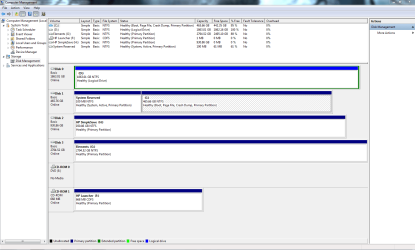
Obviously the wrong way going on the final result. Anyway I discovered the disk in disk management as a blank slate and I ended using Acronis disk director to fix and format.
It not that I wasn't following your instructions as per above. I didn't know that you had sent a message with instruction. At this point I fixed the way I could work out how.
All good, now I think. I hope my work is done
Tell me what you think
Thanks
Obviously the wrong way going on the final result. Anyway I discovered the disk in disk management as a blank slate and I ended using Acronis disk director to fix and format.
It not that I wasn't following your instructions as per above. I didn't know that you had sent a message with instruction. At this point I fixed the way I could work out how.
All good, now I think. I hope my work is done
Tell me what you think
Thanks
Attachments
Last edited:
My Computer
- Computer type
- PC/Desktop
- Computer Manufacturer/Model Number
- Custom Build
- OS
- Windows 7 64bit
- CPU
- intel I7 960 Quad Core 3.2
- Motherboard
- Gigabyte x58a-ud5
- Memory
- 10 Gig
- Graphics Card(s)
- nvidia gforce 750TI
- Monitor(s) Displays
- Asus LCD
- Hard Drives
- Seagate 1TB Sata 3 HDD
- PSU
- 850W
- Case
- Storm Enforcer
- Cooling
- 200mm fans front/top Thermtake lownoise CPU fan and Heatsink
- Antivirus
- Norton


