
Solved Startup Strange

Sorry. This post has been massive and I sometimes miss stuff. I try not to though. I wanted to wipe it out completely to get the residual data off it. I have learnt some lessons from what you have told me. I learnt how to read the disk numbers from Disk management, removed the external drives and then executed.

Obviously the wrong way going on the final result. Anyway I discovered the disk in disk management as a blank slate and I ended using Acronis disk director to fix and format.

It not that I wasn't following your instructions as per above. I didn't know that you had sent a message with instruction. At this point I fixed the way I could work out how.

All good, now I think. I hope my work is done

Tell me what you think

Thanks
 

Attachments
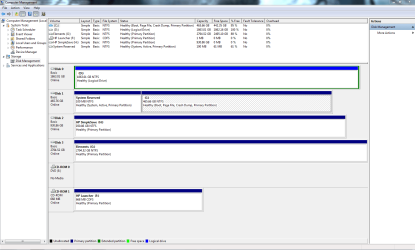
  • Capture.PNG
    Capture.PNG
    43.9 KB · Views: 13
Last edited:

My Computer

Computer type
PC/Desktop
Computer Manufacturer/Model Number
Custom Build
OS
Windows 7 64bit
CPU
intel I7 960 Quad Core 3.2
Motherboard
Gigabyte x58a-ud5
Memory
10 Gig
Graphics Card(s)
nvidia gforce 750TI
Monitor(s) Displays
Asus LCD
Hard Drives
Seagate 1TB Sata 3 HDD
PSU
850W
Case
Storm Enforcer
Cooling
200mm fans front/top Thermtake lownoise CPU fan and Heatsink
Antivirus
Norton
The reason I said to post back a PW boot CD snap of what you had done is because if you'd wiped the Logical data partition it could have been undeleted using PW Partition Recovery Wizard. But now since you apparently repartitioned over it the Wizard cannot work correctly. So chalk one up to not following clearly-stated steps again.

You're good to go.
 
Like I said I didnt know I had instructions to follow. My mate had just arrived back from holiday and Here I am deleting drives. Here I am the big expert saying now we are going to use the clean command it is really good. Next thing you know the drive is nowhere to be seen. Hes Like shaking his head. You have to laugh

Look it has been eventful at times, Ive learnt some things. Now his computer is good. I wish I could get paid to do this sort of stuff for a day job.

Well I'd have to be a little better at it lol

Thanks again.
 

My Computer

Computer type
PC/Desktop
Computer Manufacturer/Model Number
Custom Build
OS
Windows 7 64bit
CPU
intel I7 960 Quad Core 3.2
Motherboard
Gigabyte x58a-ud5
Memory
10 Gig
Graphics Card(s)
nvidia gforce 750TI
Monitor(s) Displays
Asus LCD
Hard Drives
Seagate 1TB Sata 3 HDD
PSU
850W
Case
Storm Enforcer
Cooling
200mm fans front/top Thermtake lownoise CPU fan and Heatsink
Antivirus
Norton
It wouldn't be as much fun if we had to do this and get paid. :p
 

My Computer

Computer type
PC/Desktop
Computer Manufacturer/Model Number
Home Built Desktop By DataTech
OS
Windows 7 Ultimate X64 SP1
CPU
Intel i5-2550K, Differing ~4.4-4.8GHz No built in GPU
Motherboard
ASUS P8Z68-V PRO/GEN3
Memory
16GB G.Skill Sniper 1866MHz @ 2133MHz 2x8GB
Graphics Card(s)
ASUS GTX650TIB-DC2OC-2GD5, (650TI Boost)
Sound Card
Onboard Realtek 5-1
Monitor(s) Displays
Samsung P2570HD
Screen Resolution
1920x1080
Hard Drives
Samsung 840 Pro 256GB SSD for OS, 500GB Seagate Constellation (Enterprise drive) for Data
PSU
Corsair HX650W
Case
Inwin Dragon Rider
Cooling
Hyper 212 EVO w/two Noctua fans, push-pull, @1300 RPM
Keyboard
E-Z Eyes, bright yellow keys with large characters
Mouse
steelseries SENSEI Laser Pro Gaming
Internet Speed
48-51Mbs Mbs down, 11 Mbs up Xfinity Cable
Antivirus
Norton Internet Security 2013
Browser
IE 10, Opera, Pale Moon if needed
Other Info
4 case fans, LG BluRay-RE, ASUS DVD-RW, Mr. Fusion power supply, 1.21 gigawatts.
I cant do any more at this time. My mate is back and using it now. It seems to be running well.

Thanks Guys
 

My Computer

Computer type
PC/Desktop
Computer Manufacturer/Model Number
Custom Build
OS
Windows 7 64bit
CPU
intel I7 960 Quad Core 3.2
Motherboard
Gigabyte x58a-ud5
Memory
10 Gig
Graphics Card(s)
nvidia gforce 750TI
Monitor(s) Displays
Asus LCD
Hard Drives
Seagate 1TB Sata 3 HDD
PSU
850W
Case
Storm Enforcer
Cooling
200mm fans front/top Thermtake lownoise CPU fan and Heatsink
Antivirus
Norton
Howdy back again.

One small question. Is there any difference between formatting a drive with windows tools or aftermarket software like Acronis disk director.

The reason I ask is because when I yesterday went to the newly formatted logical drive and tried to open the only folder on it at the moment there was like a 10 second lag before it opened. Just wondering if this could be problem or just a little glitch. I only tried it once and then forgot about it.

Thanks
 

My Computer

Computer type
PC/Desktop
Computer Manufacturer/Model Number
Custom Build
OS
Windows 7 64bit
CPU
intel I7 960 Quad Core 3.2
Motherboard
Gigabyte x58a-ud5
Memory
10 Gig
Graphics Card(s)
nvidia gforce 750TI
Monitor(s) Displays
Asus LCD
Hard Drives
Seagate 1TB Sata 3 HDD
PSU
850W
Case
Storm Enforcer
Cooling
200mm fans front/top Thermtake lownoise CPU fan and Heatsink
Antivirus
Norton
Use Disk Mgmt for anything it can do, then for anything more advanced use Partition Wizard
bootable CD. We can help you with any partitioning if you'll post back a screenshot and what you want to do.

Work through the Troubleshooting Steps for Windows 7 to familarize yourself with reading the logs, utilizing system resources, alway running a Clean Boot, the best tools and practices. This should help you smooth out any problems, along with these steps to Optimize Windows 7 - Windows 7 Forums especially editing Visual effects of any animation, sliding, fading, dragging intact or selection rectangle.

Win7 should always be instantaneous on adequate hardware with a perfect install.
 
Back
Top