
Solved Static IP Address won't stay set

lehnerus2000

New member
Guru
Gold Member
VIP
Local time
7:46 AM
Messages
4,058
Location
Adelaide
This has probably come up before, but I didn't notice any threads that seemed related.

I've been looking into some minor glitches in my W7 install (calculator & chkdsk).

I noticed that my static IP address vanished!
W7 has always had "flaky" network behaviour, so I wasn't concerned (just annoyed).

I reset the details and Windows demanded that I restart.
I restarted and checked the settings and the static IP address had vanished again.
I repeated this several times (with the same result each time).

The static address was present a couple of weeks ago (I took a screenshot to add to my records).

Someone is "hammering" our wireless router trying to get in, so I've run a malware scan (clean).
I've also run "sfc /scannow".
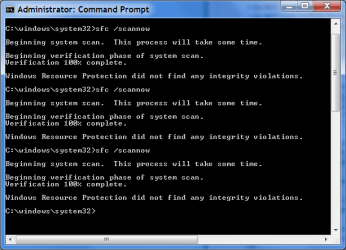
SFC.png
I was thinking about reinstalling my operating systems anyway (I need to resize some partitions).
Does anyone have any other suggestions?
 

My Computer My Computer

Computer type
PC/Desktop
Computer Manufacturer/Model Number
n/a
OS
W7 Ultimate SP1, LM19.2 MATE, W10 Home 1703, W10 Pro 1703 VM, #All 64 bit
CPU
AMD Phenom II x6 1100T, 3.3 GHz
Motherboard
ASUS M4A88T-M/USB3 (AM3)
Memory
12GB DDR3 1333 G-Skill (4GB x 2), G-Skill (2GB x 2)
Graphics Card(s)
NVIDIA GeForce GTX 660
Sound Card
Realtek?
Monitor(s) Displays
Samsung S23B350
Screen Resolution
1920x1080
Hard Drives
WD Green 2TB (SATA), WD Green 3TB (SATA), WD Blue 4TB (SATA), WD Blue 6TB (SATA)
PSU
Cooler Master
Case
Antec GX300 Tower
Cooling
3x Antec TRICOOL 120mm Fans
Mouse
Wired Optical
Internet Speed
DSL
Antivirus
Avast
Browser
Pale Moon (64 bit)
Other Info
2018-12-27 Upgraded HDDs
2015-12-10 Upgraded case, graphics card, storage
2015-08-15 Upgraded motherboard & RAM
2015-07-15 Upgraded LM17.1 to LM17.2
The only thing that might cause the static IP to vanish is that the static IP was not entered correctly.

I'd have to see the static IP page from Windows with all the numbers entered.
 

My Computer My Computer

Computer type
PC/Desktop
Computer Manufacturer/Model Number
Home built
OS
Windows 7 Ult, Windows 8.1 Pro,
CPU
Q9650-4.275GHz, E8600 4.5GHz, E6750-3.8GHz
Motherboard
Evga 780i FTW
Memory
G.Skill PC2 9600 1200Mhz 5 5 5 15 2T
Graphics Card(s)
GTX480
Sound Card
Asus Xonar D2
Monitor(s) Displays
HannsG
Screen Resolution
1680X1050
Hard Drives
GSkill Phoenix Pro 120GB SSD
PSU
ThermalTake Toughpower 1000Watt modular
Case
ThermalTake XaserV
Cooling
Xigmatek S1283
Keyboard
Logitech G15
Mouse
Logitech G9
Internet Speed
T1
Thanks chev65

The only thing that might cause the static IP to vanish is that the static IP was not entered correctly.

I'd have to see the static IP page from Windows with all the numbers entered.

I've been setting static IP addresses for years. :)
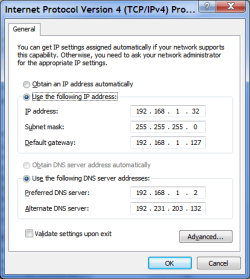
Here's a screenshot (I've been using these settings for years).
Network Settings W7 (12-08-09).png
The screenshot is from a week before I installed the last set of Windows Updates.
I had a problem with 1 of the Windows Updates last month (KB2647753).
Maybe something broke.

From my post on another site:
That update wouldn't install properly on my PC (W7 Ultimate 64 bit).
It appears in the Update History (successful).
It doesn't appear in the Installed Updates.

Windows Update kept offering it to me (for several hours).
It seems to have given up now though.
happy.gif
I'll reimage (or reinstall) my W7 partition.
 
Last edited:

My Computer My Computer

Computer type
PC/Desktop
Computer Manufacturer/Model Number
n/a
OS
W7 Ultimate SP1, LM19.2 MATE, W10 Home 1703, W10 Pro 1703 VM, #All 64 bit
CPU
AMD Phenom II x6 1100T, 3.3 GHz
Motherboard
ASUS M4A88T-M/USB3 (AM3)
Memory
12GB DDR3 1333 G-Skill (4GB x 2), G-Skill (2GB x 2)
Graphics Card(s)
NVIDIA GeForce GTX 660
Sound Card
Realtek?
Monitor(s) Displays
Samsung S23B350
Screen Resolution
1920x1080
Hard Drives
WD Green 2TB (SATA), WD Green 3TB (SATA), WD Blue 4TB (SATA), WD Blue 6TB (SATA)
PSU
Cooler Master
Case
Antec GX300 Tower
Cooling
3x Antec TRICOOL 120mm Fans
Mouse
Wired Optical
Internet Speed
DSL
Antivirus
Avast
Browser
Pale Moon (64 bit)
Other Info
2018-12-27 Upgraded HDDs
2015-12-10 Upgraded case, graphics card, storage
2015-08-15 Upgraded motherboard & RAM
2015-07-15 Upgraded LM17.1 to LM17.2
I'm confused with you DNS IP settings. The 192.168.1.2 IP set as your first DNS server, is this a DNS server address or does it refer to something else because it looks more like a default gateway or an address on the LAN.
 

My Computer My Computer

Computer type
PC/Desktop
Computer Manufacturer/Model Number
Home built
OS
Windows 7 Ult, Windows 8.1 Pro,
CPU
Q9650-4.275GHz, E8600 4.5GHz, E6750-3.8GHz
Motherboard
Evga 780i FTW
Memory
G.Skill PC2 9600 1200Mhz 5 5 5 15 2T
Graphics Card(s)
GTX480
Sound Card
Asus Xonar D2
Monitor(s) Displays
HannsG
Screen Resolution
1680X1050
Hard Drives
GSkill Phoenix Pro 120GB SSD
PSU
ThermalTake Toughpower 1000Watt modular
Case
ThermalTake XaserV
Cooling
Xigmatek S1283
Keyboard
Logitech G15
Mouse
Logitech G9
Internet Speed
T1
I'm confused with you DNS IP settings. The 192.168.1.2 IP set as your first DNS server, is this a DNS server address or does it refer to something else because it looks more like a default gateway or an address on the LAN.

My friend's set up a DNS server on his Arch Linux PC.
The second number is our ISP's DNS server.

Update
Something was broken (thanks a lot sfc :sarc:).
I should have realised when Windows kept demanding restarts (after I set my network details).

I reinstalled my operating systems over the past few days (a 3 or 4 hour job, which took an entire day, due to weird SNAFUs).
I can now set my details, they stay set and no restarts were demanded. :)
 
Last edited:

My Computer My Computer

Computer type
PC/Desktop
Computer Manufacturer/Model Number
n/a
OS
W7 Ultimate SP1, LM19.2 MATE, W10 Home 1703, W10 Pro 1703 VM, #All 64 bit
CPU
AMD Phenom II x6 1100T, 3.3 GHz
Motherboard
ASUS M4A88T-M/USB3 (AM3)
Memory
12GB DDR3 1333 G-Skill (4GB x 2), G-Skill (2GB x 2)
Graphics Card(s)
NVIDIA GeForce GTX 660
Sound Card
Realtek?
Monitor(s) Displays
Samsung S23B350
Screen Resolution
1920x1080
Hard Drives
WD Green 2TB (SATA), WD Green 3TB (SATA), WD Blue 4TB (SATA), WD Blue 6TB (SATA)
PSU
Cooler Master
Case
Antec GX300 Tower
Cooling
3x Antec TRICOOL 120mm Fans
Mouse
Wired Optical
Internet Speed
DSL
Antivirus
Avast
Browser
Pale Moon (64 bit)
Other Info
2018-12-27 Upgraded HDDs
2015-12-10 Upgraded case, graphics card, storage
2015-08-15 Upgraded motherboard & RAM
2015-07-15 Upgraded LM17.1 to LM17.2
Back
Top