stealth internet activity

AndyH W7f

New member
Local time
5:16 PM
Messages
22
64 bit Windows 7 home premium

Every now and then there is considerable activity whenever the modem is connected, even though I am doing nothing, even if the browser is not running. I need to know how to find out what is using the connection.

I have automatic updates turned off for everything I know about. I initiate software updates when I am certain I don't need or want to do anything else with the computer. I don't want anything of any sort communicating without explicit instructions to do so.

This dial-up line is slow at the best of times. Sometimes, like today, something unknown will begin downloading hundreds of thousand, even millions of bytes. I don't know what it is, I don't know how to stop it except to disconnect. The competition for bandwidth makes it very hard to get my work done. There must be some way to tell what is being downloaded and what it is that is doing the downloading.
 

My Computer

OS
Win 7 Home Premium 64 bit
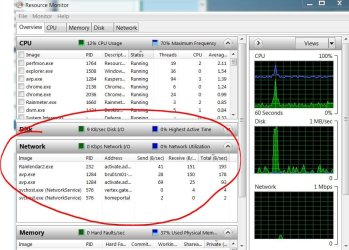
try windows resource monitor: simple type resource into your startmenu searchbox, and chose resource monitor from thre list of search results, and wait a few seconds for entries to appear in the network section of the program.

resmon.JPG
 

My Computer

Computer Manufacturer/Model Number
mickey megabyte 1234
OS
ultimate 64 sp1
CPU
i5 2500K [email protected]
Motherboard
MSI P67A-GD53
Memory
8 gigs GSkill Ripjaws 1600
Graphics Card(s)
amd hd6950
Sound Card
creative x-fi gamer
Monitor(s) Displays
samsung 24"
Screen Resolution
1920x1080
Hard Drives
ocz vertex 2e 60 gig, samsung f3 1tb, buffalo 2tb ext
PSU
antec 550
Case
antec three hundred
Cooling
i'm a cooling fan
Keyboard
saitek eclipse ii
Mouse
logitech g3
Internet Speed
about 4 Mbps
Other Info
i love win7
Thanks for the wireless activity pointer but dial-up through a land line is my only connection.

I was able to use the resource monitor to find out the process using up my internet connection (I’m communicating this from another, non-Win7 computer). From there it gets pretty confusing. It is svchost.exe(netsvcs), but that label apparently covers a large host of sins. This seems to be a problem many people have experienced; there are many and varied possible solutions offered, usually requiring tinkering with a lot of OS defaults.

One expressed possibility is that it is a legitimate part of the OS. However, in this case it being used for something initiated by Microsoft to do something I never requested and I don’t want. MS will continue, no matter that it makes my computer unuseable by me. Is this true? If so, will I ever get my computer back? How?

The other major side is that svchost.exe(netsvcs) seems to be a favorite for virus attacks, trojans, rootkits, and other malicious software of all sorts and origins. There are instructions for identifying and stopping the current processing via resource monitor, but that, by report, frequently seems to be only temporary. The problem often soon starts up again under a somewhat different label, PID, or whatever.

The claim has been made that there should be one, and only one, file named svchost.exe, and it lives in C:\Windows\System32. Any others should be removed. I’m not sure that there is a claim that the one and only legitimate svchost.exe will necessarily be free of malicious activity and cannot be controlled by something else intent on causing wailing and gnashing of teeth.

While it seem reasonable there should be only one such application, reason cannot be taken for granted. Via Search, I find four, each in a different location on the C drive. Is there any possibility of getting a definitive answer about how many (and which) are legitimate?

There are various on-line services offering to “fix” svchost.exe. Some are promonitely displayed on this page. If there isn’t an unexcruciating way I can do it myself, paying someone else is an option. The question then becomes, can I get the current problem taken care of without acquiring another problem(s)? Is there a service that can be trusted to just do this one thing and not attach something else to my system?

Is there a way to stop this from happening again if I get it fixed?
 

My Computer

OS
Win 7 Home Premium 64 bit
Back
Top