
You are using an out of date browser. It may not display this or other websites correctly.
You should upgrade or use an alternative browser.
You should upgrade or use an alternative browser.
Steam on Windows 7
- Thread starter Yoshi
- Start date
yeah it tends to time me out a lot on cs:s, not tried it on TF2 yet.
Kept having to delete my clientregistry.blog and starting again.
Kept having to delete my clientregistry.blog and starting again.
My Computer
- OS
- Win7 7201 x64
- CPU
- E8400 @ 3.4ghz (don't need it at 3.6 all the time)
- Motherboard
- Asus P5KC
- Memory
- Corsair 4GB Kit (2x2GB) DDR2 800MHz/PC2-6400 XMS2
- Graphics Card(s)
- HD 3870 OC Edition
- Sound Card
- Soundblaster X-Fi XtremeGamer
- Monitor(s) Displays
- Samsung 930BF
- Screen Resolution
- 1280 x 1024
- Hard Drives
- Seagate 250gb 7200RPM SATA
Hitachi 1TB 7200RPM SATA
- PSU
- Toughpower 750w
- Case
- Lian Li PC-A17B
- Cooling
- Arctic Cooling Freezer 7 Pro
- Keyboard
- Logitech media keyboard elite
- Mouse
- Logitech MX518

Anyone got issues when running games on steam that it closes for no apparent reason when playing online games, and then later kicks you off the game for not being logged in?
I did have issues with TF2 randomly crashing but I installed a fresh copy of steam into a new location and it solved most major issues...
Steam has been really buggy for the last two years and it doesn't matter if your using XP, Vista or Windows 7 because they all have the same glitches and problems regardless of the OS your using and they dont seem capable of solving the problems anytime soon....I have multiple bug reports open with 5 different issues for over the last 18months and they still cant figure out whats wrong

They need to stop using the System security token and start using an administrator token because they can solve a majority of the issues but untill they stop supporting XP every version of Vista and Windows 7 will just have non-stop issues
Copy this URL into Internet Explorer and press enter to force steam to run a System Assessment

steam://support/?Issues=*
If you have issues viewing the report then find this file and open it with your web browser.....
file:///C:/Users/username/AppData/Local/Temp/results.html
rockerdoofus
New member
- Local time
- 6:23 PM
- Messages
- 2
I got this bug where i delete the files out of the garrysmod folder to generate the old files and remove all of the mods and addons but after i delete the files and restart the game, it loads all the files like i didn't delete them. Any ideas why this is happening?
My Computer
- OS
- windows 7
turn off steam cloud then do it. then reboot and restart cloud.
My Computer
- OS
- Win 7 ultimate 64 7100
- CPU
- i7 920
- Motherboard
- MSI 58x Pro-E
- Memory
- 6gigs OCZ trichannel
- Graphics Card(s)
- ATI 4890
- Other Info
- Running at 3.8 Ghz with EIST lowering voltages and multiplier as needed.
Copy this URL into Internet Explorer and press enter to force steam to run a System Assessment
steam://support/?Issues=*
If you have issues viewing the report then find this file and open it with your web browser.....
file:///C:/Users/username/AppData/Local/Temp/results.html
You sir, rule. Your fixes worked perfectly and now I can play TF2!
(Made this accout to say thanx!)
My Computer
- OS
- Windows 7

I've tried to install both Empire Total War and Call of Duty Modern Warfare, which require Steam. However, when its been installed, it goes to the "Updating Steam" window. Stays there for a while then comes up with the error:
"Steam.exe (main exception): Unable to load library Steam.dll"
I'm running Windows 7 Ultimate 64-bit. And am connected to the internet.
I have previously installed Empire on correctly and played it, but reinstalled Windows so lost everything.
Any solutions?
"Steam.exe (main exception): Unable to load library Steam.dll"
I'm running Windows 7 Ultimate 64-bit. And am connected to the internet.
I have previously installed Empire on correctly and played it, but reinstalled Windows so lost everything.
Any solutions?
My Computer
- OS
- Windows 7

Have a look here - https://support.steampowered.com/kb_article.php?ref=5688-IFHZ-2170. And make sure all you drivers are updated.
Also, it would be very helpful to you to post your system specs. This way we may be able to provide more info on your issue(s)
Thanks.
Also, it would be very helpful to you to post your system specs. This way we may be able to provide more info on your issue(s)
Thanks.
My Computer
- Computer type
- PC/Desktop
- Computer Manufacturer/Model Number
- Custom built by me.
- OS
- Windows 10 Pro
- CPU
- Intel Core i7-4770K (3.5Ghz)
- Motherboard
- Gigabyte G1 Sniper 5 (F10 Bios)
- Memory
- 32 gig Corsair Dominator Platinum (4x8Gig)
- Graphics Card(s)
- Sapphire Tri-X R9 Fury
- Sound Card
- Soundblaster ZXR
- Monitor(s) Displays
- NEC PA242W 24" LCD Monitor
- Screen Resolution
- 1920 x 1200
- Hard Drives
- Primary - Samsung 850 Pro (512gig), Samsung 840 Pro (256gig), 2TB WD Caviar Black.
- PSU
- EVGA Supernova 1000 G2
- Case
- Cooler Master HAF X
- Cooling
- Corsair H100i with Corsair Air Series SP120 Quiet Fans
- Keyboard
- Logitech Wireless Wave
- Mouse
- Logitech Performance MX
- Internet Speed
- High Speed Cable
- Antivirus
- Norton Security
- Browser
- IE11
- Other Info
- Memory Timings - 1866MHz @ 9-9-9-27-1T @ 1.5 volts
Do you have your routers firewall enabled by any chance?
Even after manually adding all the ports to it's filter - the only way I could connect to steam was disable the routers firewall completely.
Even after manually adding all the ports to it's filter - the only way I could connect to steam was disable the routers firewall completely.
My Computer
- Computer type
- PC/Desktop
- Computer Manufacturer/Model Number
- Systems by SmartEyeball
- OS
- 8 Pro x64
- CPU
- i7 3770K 4.6GHz
- Motherboard
- ASUS P8Z77 WS
- Memory
- 16GB G.Skill Trident X 2666mhz
- Graphics Card(s)
- x2 EVGA 780 Ti Superclocked SLI
- Sound Card
- SB X-FI Surround 5.1 PRO USB / ATH-AD900 Headphones
- Monitor(s) Displays
- x3 Dell U2410 / 58" Samsung
- Screen Resolution
- 5760*1200/ 1920*1200
- Hard Drives
- 2x Intel 520 240GB (RAID 0) * 2x WD Caviar Blacks 2TB (RAID 0) * 2TB WD Caviar Black * Sony Optirac DVD
- PSU
- Silverstone Strider Evolution 1200W
- Case
- Thermaltake Level 10 GT Snow Edition
- Cooling
- Noctua NH-D14
- Keyboard
- Topre Realforce // Ducky Shine MX Black // Filco Ninja TKL
- Mouse
- Thermaltake Theron (Highly Recommended) + Razer Imperator
- Antivirus
- MSE
- Browser
- IE, FF, WaterFox
- Other Info
- GT Extreme V2 Sim Racing Cockpit + 40" LCD and K/B Mouse stand ▼
Fanatec CSR Elite Wheel + Clubsport V1 Pedals + CSR shifter/7G-H ▼Saitek X52 Pro ▼ TrackIR 5 Pro
Buttkicker v2 Seat Rumbler with Dedicated 5.1 and Sub Woofer attached to frame ▼
=
Bloody Big Grin
Connection Problems??? - Steam - Troubleshooting Network Connectivity
My Computer
- Computer type
- PC/Desktop
- Computer Manufacturer/Model Number
- Custom built by me.
- OS
- Windows 10 Pro
- CPU
- Intel Core i7-4770K (3.5Ghz)
- Motherboard
- Gigabyte G1 Sniper 5 (F10 Bios)
- Memory
- 32 gig Corsair Dominator Platinum (4x8Gig)
- Graphics Card(s)
- Sapphire Tri-X R9 Fury
- Sound Card
- Soundblaster ZXR
- Monitor(s) Displays
- NEC PA242W 24" LCD Monitor
- Screen Resolution
- 1920 x 1200
- Hard Drives
- Primary - Samsung 850 Pro (512gig), Samsung 840 Pro (256gig), 2TB WD Caviar Black.
- PSU
- EVGA Supernova 1000 G2
- Case
- Cooler Master HAF X
- Cooling
- Corsair H100i with Corsair Air Series SP120 Quiet Fans
- Keyboard
- Logitech Wireless Wave
- Mouse
- Logitech Performance MX
- Internet Speed
- High Speed Cable
- Antivirus
- Norton Security
- Browser
- IE11
- Other Info
- Memory Timings - 1866MHz @ 9-9-9-27-1T @ 1.5 volts
Sorry, I'm a noob in some of this stuff, but where does one check for the router's firewall?
Well that would depend on the router you have, if you have one. You would need to check your instructions or owner's manual for this info.
In the meantime... https://support.steampowered.com/kb_article.php?ref=2198-AGHC-7226
My Computer
- Computer type
- PC/Desktop
- Computer Manufacturer/Model Number
- Custom built by me.
- OS
- Windows 10 Pro
- CPU
- Intel Core i7-4770K (3.5Ghz)
- Motherboard
- Gigabyte G1 Sniper 5 (F10 Bios)
- Memory
- 32 gig Corsair Dominator Platinum (4x8Gig)
- Graphics Card(s)
- Sapphire Tri-X R9 Fury
- Sound Card
- Soundblaster ZXR
- Monitor(s) Displays
- NEC PA242W 24" LCD Monitor
- Screen Resolution
- 1920 x 1200
- Hard Drives
- Primary - Samsung 850 Pro (512gig), Samsung 840 Pro (256gig), 2TB WD Caviar Black.
- PSU
- EVGA Supernova 1000 G2
- Case
- Cooler Master HAF X
- Cooling
- Corsair H100i with Corsair Air Series SP120 Quiet Fans
- Keyboard
- Logitech Wireless Wave
- Mouse
- Logitech Performance MX
- Internet Speed
- High Speed Cable
- Antivirus
- Norton Security
- Browser
- IE11
- Other Info
- Memory Timings - 1866MHz @ 9-9-9-27-1T @ 1.5 volts
Yes, I also found exactly this page, this is my problem! Mine comes up with that exact error:
Crash: Steam.exe (main exception): Unable to load library Steam.dll
Thanx, I'll look through this all.
It could also be my connection. I'm using a WAN mini port, vpn device type.
Crash: Steam.exe (main exception): Unable to load library Steam.dll
Thanx, I'll look through this all.
It could also be my connection. I'm using a WAN mini port, vpn device type.
My Computer
- OS
- Windows 7
Also check to see that Windows firewall isn't blocking you.
Control Panel, Windows Firewall - click "Allow a program or feature through Windows Firewall" and that anyting STEAM is not un-checked. ie if you have a box without a checkmark, the item is blocked.
Good luck.
Control Panel, Windows Firewall - click "Allow a program or feature through Windows Firewall" and that anyting STEAM is not un-checked. ie if you have a box without a checkmark, the item is blocked.
Good luck.
My Computer
- Computer type
- PC/Desktop
- Computer Manufacturer/Model Number
- Custom built by me.
- OS
- Windows 10 Pro
- CPU
- Intel Core i7-4770K (3.5Ghz)
- Motherboard
- Gigabyte G1 Sniper 5 (F10 Bios)
- Memory
- 32 gig Corsair Dominator Platinum (4x8Gig)
- Graphics Card(s)
- Sapphire Tri-X R9 Fury
- Sound Card
- Soundblaster ZXR
- Monitor(s) Displays
- NEC PA242W 24" LCD Monitor
- Screen Resolution
- 1920 x 1200
- Hard Drives
- Primary - Samsung 850 Pro (512gig), Samsung 840 Pro (256gig), 2TB WD Caviar Black.
- PSU
- EVGA Supernova 1000 G2
- Case
- Cooler Master HAF X
- Cooling
- Corsair H100i with Corsair Air Series SP120 Quiet Fans
- Keyboard
- Logitech Wireless Wave
- Mouse
- Logitech Performance MX
- Internet Speed
- High Speed Cable
- Antivirus
- Norton Security
- Browser
- IE11
- Other Info
- Memory Timings - 1866MHz @ 9-9-9-27-1T @ 1.5 volts
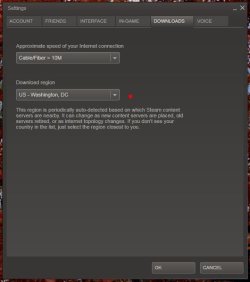
Someone posed a while back that changing the "Download region" fixed download/connection problems. Might give that a try.
My Computer
- Computer type
- PC/Desktop
- Computer Manufacturer/Model Number
- Custom built by me.
- OS
- Windows 10 Pro
- CPU
- Intel Core i7-4770K (3.5Ghz)
- Motherboard
- Gigabyte G1 Sniper 5 (F10 Bios)
- Memory
- 32 gig Corsair Dominator Platinum (4x8Gig)
- Graphics Card(s)
- Sapphire Tri-X R9 Fury
- Sound Card
- Soundblaster ZXR
- Monitor(s) Displays
- NEC PA242W 24" LCD Monitor
- Screen Resolution
- 1920 x 1200
- Hard Drives
- Primary - Samsung 850 Pro (512gig), Samsung 840 Pro (256gig), 2TB WD Caviar Black.
- PSU
- EVGA Supernova 1000 G2
- Case
- Cooler Master HAF X
- Cooling
- Corsair H100i with Corsair Air Series SP120 Quiet Fans
- Keyboard
- Logitech Wireless Wave
- Mouse
- Logitech Performance MX
- Internet Speed
- High Speed Cable
- Antivirus
- Norton Security
- Browser
- IE11
- Other Info
- Memory Timings - 1866MHz @ 9-9-9-27-1T @ 1.5 volts


