Sticky Note Application gone

ThatDuckGuy

New member
Local time
11:08 PM
Messages
9
Location
California
I recently noticed that the default sticky note app that comes in Win 7 has just vanished. Seriously, there is no trace of it anymore. Anyone know where it's default location is and has anyone else had this happen to them?
 

My Computer

OS
Windows 7 Ultimate 64 Bit
CPU
Phenom II x4 955
Motherboard
ASUS M4A79XTD EVO
Memory
4GB G-Skill DDR3 1600
Graphics Card(s)
XFX HD5770 1GB and XFX 9600GT for Physx
Sound Card
Integrated
Monitor(s) Displays
HYUNDAI X224W Black 22"
Screen Resolution
1680x1050
Hard Drives
Samsung F3 1TB
PSU
OCZ ModXStream Pro 700W
Case
NZXT M59 case with 2 extra 120mm Blue LED Fans
Cooling
Cooler Master Hyper 212+
Keyboard
Microsoft Digital Media Pro
Mouse
Razer Habu
Just do a search using the Start button and it will find it. :)
 

My Computer

Computer Manufacturer/Model Number
Dilithium Computers/Engineering (Myself) Star date 42.739285.5432.9
OS
Win7 Ultimate x64 on Desktop / Win7 Ultimate x86 on laptop / Win7 x86 Starter on Netbook
CPU
AMD Phenom 965 X4 3.4Ghz cpu Black Edition
Motherboard
Gigabyte 790XT
Memory
12 Gb DDR3
Graphics Card(s)
Nvidea Gforce GTX 470
Sound Card
Onboard Realtek hi-fi
Monitor(s) Displays
Lg 3D led 23"
Screen Resolution
1920x1080
Hard Drives
Loads maxstore sata 1 & 2/ loads of partitions + 1Tb Hitachi sata 2. 256Gb Crucial ssd.
PSU
OCZ 700W GameXstream
Case
Artec 10000
Cooling
On board + many case fans
Keyboard
Logitech wireless K350
Mouse
Inferno gaming mouse
Internet Speed
Talk talk. 10Mb
Other Info
My PC was hand built with matchsticks. xbox 360 controller. Printers,fax.........
Hello ThatDuckGuy,

It should be located at C:\Windows\system32\StikyNot.exe by default.

The shorcut in the Start menu is located at All Programs, Accessories, Sticky Notes.

If it is not at these locations, then check to make sure that you have not turned off Tablet PC Components in Windows Features.

Hope this helps,
Shawn
 

My Computer

Computer type
PC/Desktop
Computer Manufacturer/Model Number
Self built custom
OS
64-bit Windows 11 Pro for Workstations
CPU
Intel i7-8700K OC'd to 5 GHz
Motherboard
ASUS ROG Maximus XI Formula Z390
Memory
64 GB (4x16GB) G.SKILL TridentZ RGB DDR4 3600 MHz
Graphics Card(s)
ASUS ROG-STRIX-GTX1080TI-O11G-GAMING
Sound Card
Integrated
Monitor(s) Displays
2 x Samsung Odyssey G7 27"
Screen Resolution
2560x1440
Hard Drives
1TB Samsung 990 PRO M.2,
4TB Samsung 990 PRO PRO M.2,
TerraMaster F8 SSD Plus NAS
PSU
Seasonic Prime Titanium 850W
Case
Thermaltake Core P3
Cooling
Corsair Hydro H115i
Keyboard
Logitech wireless K800
Mouse
Logitech MX Master 4
Internet Speed
2 Gb/s Download and 100 Mb/s Upload
Antivirus
Malwarebyte Anti-Malware Premium
Browser
Google Chrome
Other Info
Logitech Z625 speaker system,
Logitech BRIO 4K Pro webcam,
HP Color LaserJet Pro MFP M477fdn,
APC SMART-UPS RT 1000 XL - SURT1000XLI,
Galaxy S23 Plus phone
Thanks for the replies guys and I tried what you have told me but still nothing.

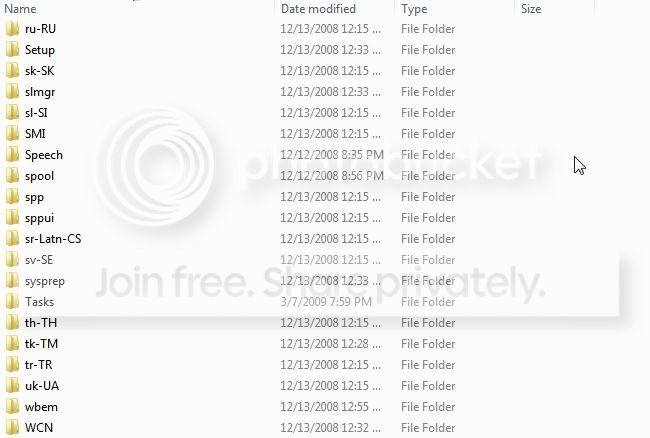
Here is a screenshot of when I check for the file location.

ScreenShot002.jpg


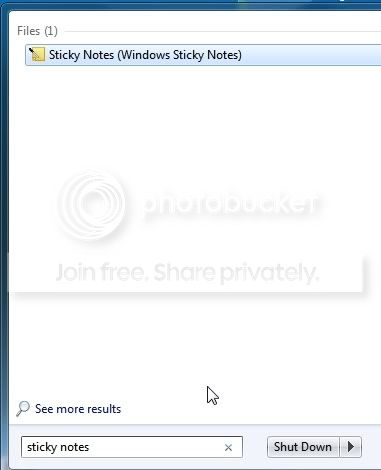
As you can see it is missing the file location for some reason. Also when I search this is the result:

ScreenShot003.jpg


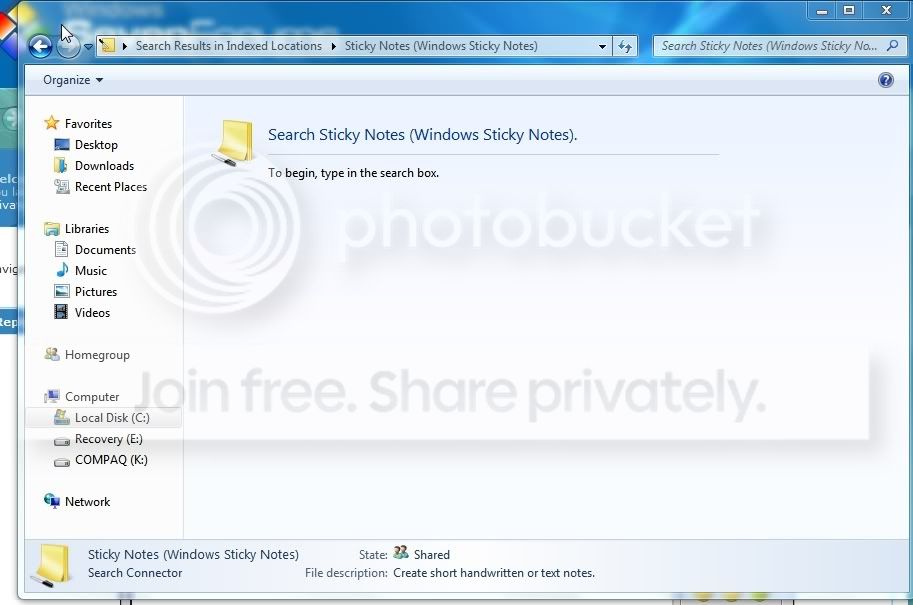
But after clicking it this is what it brings me to:

ScreenShot005.jpg


So strangely it looks like the actual application is gone but remnants from it are still here. Lastly it isn't in the accessories folder in the program menu.

ScreenShot006.jpg


If you guys have any other advice I'd love to hear it.
 

My Computer

OS
Windows 7 Ultimate 64 Bit
CPU
Phenom II x4 955
Motherboard
ASUS M4A79XTD EVO
Memory
4GB G-Skill DDR3 1600
Graphics Card(s)
XFX HD5770 1GB and XFX 9600GT for Physx
Sound Card
Integrated
Monitor(s) Displays
HYUNDAI X224W Black 22"
Screen Resolution
1680x1050
Hard Drives
Samsung F3 1TB
PSU
OCZ ModXStream Pro 700W
Case
NZXT M59 case with 2 extra 120mm Blue LED Fans
Cooling
Cooler Master Hyper 212+
Keyboard
Microsoft Digital Media Pro
Mouse
Razer Habu

My Computer

Computer type
PC/Desktop
Computer Manufacturer/Model Number
Self built custom
OS
64-bit Windows 11 Pro for Workstations
CPU
Intel i7-8700K OC'd to 5 GHz
Motherboard
ASUS ROG Maximus XI Formula Z390
Memory
64 GB (4x16GB) G.SKILL TridentZ RGB DDR4 3600 MHz
Graphics Card(s)
ASUS ROG-STRIX-GTX1080TI-O11G-GAMING
Sound Card
Integrated
Monitor(s) Displays
2 x Samsung Odyssey G7 27"
Screen Resolution
2560x1440
Hard Drives
1TB Samsung 990 PRO M.2,
4TB Samsung 990 PRO PRO M.2,
TerraMaster F8 SSD Plus NAS
PSU
Seasonic Prime Titanium 850W
Case
Thermaltake Core P3
Cooling
Corsair Hydro H115i
Keyboard
Logitech wireless K800
Mouse
Logitech MX Master 4
Internet Speed
2 Gb/s Download and 100 Mb/s Upload
Antivirus
Malwarebyte Anti-Malware Premium
Browser
Google Chrome
Other Info
Logitech Z625 speaker system,
Logitech BRIO 4K Pro webcam,
HP Color LaserJet Pro MFP M477fdn,
APC SMART-UPS RT 1000 XL - SURT1000XLI,
Galaxy S23 Plus phone
After checking that it is currently selected in the checklist.

ScreenShot004.jpg
 

My Computer

OS
Windows 7 Ultimate 64 Bit
CPU
Phenom II x4 955
Motherboard
ASUS M4A79XTD EVO
Memory
4GB G-Skill DDR3 1600
Graphics Card(s)
XFX HD5770 1GB and XFX 9600GT for Physx
Sound Card
Integrated
Monitor(s) Displays
HYUNDAI X224W Black 22"
Screen Resolution
1680x1050
Hard Drives
Samsung F3 1TB
PSU
OCZ ModXStream Pro 700W
Case
NZXT M59 case with 2 extra 120mm Blue LED Fans
Cooling
Cooler Master Hyper 212+
Keyboard
Microsoft Digital Media Pro
Mouse
Razer Habu
Hi ThatDuckGuy,

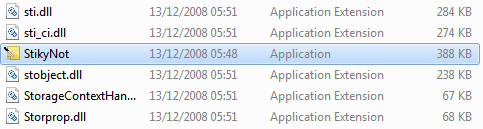
Recheck the C:\Windows\System32 folder. Your image just shows some of the sub-folders in this location. If you scroll further down, you will see a long list of files. Scroll down until you see this:
Capture.PNG
The highlighted file is the one you require.
 

My Computer

Computer type
PC/Desktop
Computer Manufacturer/Model Number
Dwarf Dwf/11/2012 r09/2013
OS
Windows 8.1 Pro RTM x64
CPU
Intel Core-i5-3570K 4-core @ 3.4GHz (Ivy Bridge) (OC 4.4GHz)
Motherboard
ASRock Z77 Extreme4-M
Memory
4 x 4GB DDR3-1600 Corsair Vengeance CMZ8GX3M2A1600C9B (16GB)
Graphics Card(s)
MSI GeForce GTX770 Gaming OC 2GB
Sound Card
Realtek High Definition on board solution (ALC 898)
Monitor(s) Displays
ViewSonic VA1912w Widescreen (VGA)
Screen Resolution
1440x900
Hard Drives
OCZ Agility 3 SSD 120GB SATA III x2 (RAID 0)
Samsung HD501LJ 500GB SATA II x2
Hitachi HDS721010CLA332 1TB SATA II
Iomega 1.5TB Ext USB 2.0
WD 2.0TB Ext USB 3.0
PSU
XFX Pro Series 850W Semi-Modular
Case
Gigabyte IF233
Cooling
1 x 120mm Front Inlet 1 x 120mm Rear Exhaust
Keyboard
Microsoft Comfort Curve Keyboard 3000 (USB)
Mouse
Microsoft Comfort Mouse 3000 for Business (USB)
Internet Speed
NetGear DG834Gv3 ADSL Modem/Router (Ethernet) ~4.0 Mb/s (O2)
Antivirus
Avast! 8.0.1497
Browser
IE 11
Other Info
Optical Drive: HL-DT-ST BD-RE BH10LS30 SATA Bluray
Lexmark S305 Printer/Scanner/Copier (USB)
WEI Score: 8.1/8.1/8.5/8.5/8.25
Asus Eee PC 1011PX Netbook (Windows 7 x86 Starter)
Hi ThatDuckGuy,

Recheck the C:\Windows\System32 folder. Your image just shows some of the sub-folders in this location. If you scroll further down, you will see a long list of files. Scroll down until you see this:
View attachment 5642
The highlighted file is the one you require.
Hah. There it is! Thanks I got it, now I'll just make a new shortcut for it on the dektop. :D
 

My Computer

OS
Windows 7 Ultimate 64 Bit
CPU
Phenom II x4 955
Motherboard
ASUS M4A79XTD EVO
Memory
4GB G-Skill DDR3 1600
Graphics Card(s)
XFX HD5770 1GB and XFX 9600GT for Physx
Sound Card
Integrated
Monitor(s) Displays
HYUNDAI X224W Black 22"
Screen Resolution
1680x1050
Hard Drives
Samsung F3 1TB
PSU
OCZ ModXStream Pro 700W
Case
NZXT M59 case with 2 extra 120mm Blue LED Fans
Cooling
Cooler Master Hyper 212+
Keyboard
Microsoft Digital Media Pro
Mouse
Razer Habu
Just right click it and pin it to your choice (taskbar -Start menu)
 

My Computer

Computer Manufacturer/Model Number
Three desktops and one laptop with good specs..
OS
Vista and now 7 in 32 and 64 bit.
I can't resist,So that was a STICKY situation resolved.:D
 

My Computer

Computer Manufacturer/Model Number
Self Build 64bit
OS
Vista Ult64, Win7600
CPU
Intel Core 2 Quad Q6600 @ 2400 MHz 64bit OS
Motherboard
Asus P5E3 Deluxe WiFi @p 64 bit OS
Memory
4096 MB DDR3-SDRAM
Graphics Card(s)
ATI Radeon HD 3870 Series x2 Crossfired
Sound Card
Realtek on board
Monitor(s) Displays
Samsung SyncMaster - 23 inches
Screen Resolution
1680x1050 pixels at 60 Hz in True Colors
Hard Drives
Hitachi (250 GB)/Samsung 750 GB. /Barracuda 160 GB.
My Book 1 TB external..
PSU
Cooler Master 1000w
Case
Cooler Master Cosmos 1000.
Cooling
Fans and fresh air,
Keyboard
Wireless
Mouse
Wireless
Internet Speed
Never fast enough
Other Info
I use a Magnum.
I'm happy to hear that you got it sorted ThatDuckGuy. :)
 

My Computer

Computer type
PC/Desktop
Computer Manufacturer/Model Number
Self built custom
OS
64-bit Windows 11 Pro for Workstations
CPU
Intel i7-8700K OC'd to 5 GHz
Motherboard
ASUS ROG Maximus XI Formula Z390
Memory
64 GB (4x16GB) G.SKILL TridentZ RGB DDR4 3600 MHz
Graphics Card(s)
ASUS ROG-STRIX-GTX1080TI-O11G-GAMING
Sound Card
Integrated
Monitor(s) Displays
2 x Samsung Odyssey G7 27"
Screen Resolution
2560x1440
Hard Drives
1TB Samsung 990 PRO M.2,
4TB Samsung 990 PRO PRO M.2,
TerraMaster F8 SSD Plus NAS
PSU
Seasonic Prime Titanium 850W
Case
Thermaltake Core P3
Cooling
Corsair Hydro H115i
Keyboard
Logitech wireless K800
Mouse
Logitech MX Master 4
Internet Speed
2 Gb/s Download and 100 Mb/s Upload
Antivirus
Malwarebyte Anti-Malware Premium
Browser
Google Chrome
Other Info
Logitech Z625 speaker system,
Logitech BRIO 4K Pro webcam,
HP Color LaserJet Pro MFP M477fdn,
APC SMART-UPS RT 1000 XL - SURT1000XLI,
Galaxy S23 Plus phone
Hi

I'm new to this forum. I was reading this thread and I have all the same problems with sticky notes going missing from my laptop. I checked the System32 folder with no luck. I don't know where to go to check my tablet PC settings (no results when I search from the start menu). please help me

Sal
 

My Computer

Computer Manufacturer/Model Number
Acer Aspire 5532
OS
Windows 7
CPU
AMD Athlon 1.6 GHz
Memory
3 GB
Graphics Card(s)
ATI Radeon HD3200
Hard Drives
160 GB
Hello Sal, and welcome to Seven Forums.

Check using the details in post #3 in this thread at the Windows Features link to see if that may be able to help you. :)

Hope this helps,
Shawn
 

My Computer

Computer type
PC/Desktop
Computer Manufacturer/Model Number
Self built custom
OS
64-bit Windows 11 Pro for Workstations
CPU
Intel i7-8700K OC'd to 5 GHz
Motherboard
ASUS ROG Maximus XI Formula Z390
Memory
64 GB (4x16GB) G.SKILL TridentZ RGB DDR4 3600 MHz
Graphics Card(s)
ASUS ROG-STRIX-GTX1080TI-O11G-GAMING
Sound Card
Integrated
Monitor(s) Displays
2 x Samsung Odyssey G7 27"
Screen Resolution
2560x1440
Hard Drives
1TB Samsung 990 PRO M.2,
4TB Samsung 990 PRO PRO M.2,
TerraMaster F8 SSD Plus NAS
PSU
Seasonic Prime Titanium 850W
Case
Thermaltake Core P3
Cooling
Corsair Hydro H115i
Keyboard
Logitech wireless K800
Mouse
Logitech MX Master 4
Internet Speed
2 Gb/s Download and 100 Mb/s Upload
Antivirus
Malwarebyte Anti-Malware Premium
Browser
Google Chrome
Other Info
Logitech Z625 speaker system,
Logitech BRIO 4K Pro webcam,
HP Color LaserJet Pro MFP M477fdn,
APC SMART-UPS RT 1000 XL - SURT1000XLI,
Galaxy S23 Plus phone
I checked and confirmed that the tablet PC is on and doubled checked the system32 folder. still no luck
 

My Computer

Computer Manufacturer/Model Number
Acer Aspire 5532
OS
Windows 7
CPU
AMD Athlon 1.6 GHz
Memory
3 GB
Graphics Card(s)
ATI Radeon HD3200
Hard Drives
160 GB
Sal,

As a test, uncheck Tablet PC in Windows Features, click OK, then check Tablet PC, and click OK to see if toggling it off an on may reset it for you.
 
Last edited:

My Computer

Computer type
PC/Desktop
Computer Manufacturer/Model Number
Self built custom
OS
64-bit Windows 11 Pro for Workstations
CPU
Intel i7-8700K OC'd to 5 GHz
Motherboard
ASUS ROG Maximus XI Formula Z390
Memory
64 GB (4x16GB) G.SKILL TridentZ RGB DDR4 3600 MHz
Graphics Card(s)
ASUS ROG-STRIX-GTX1080TI-O11G-GAMING
Sound Card
Integrated
Monitor(s) Displays
2 x Samsung Odyssey G7 27"
Screen Resolution
2560x1440
Hard Drives
1TB Samsung 990 PRO M.2,
4TB Samsung 990 PRO PRO M.2,
TerraMaster F8 SSD Plus NAS
PSU
Seasonic Prime Titanium 850W
Case
Thermaltake Core P3
Cooling
Corsair Hydro H115i
Keyboard
Logitech wireless K800
Mouse
Logitech MX Master 4
Internet Speed
2 Gb/s Download and 100 Mb/s Upload
Antivirus
Malwarebyte Anti-Malware Premium
Browser
Google Chrome
Other Info
Logitech Z625 speaker system,
Logitech BRIO 4K Pro webcam,
HP Color LaserJet Pro MFP M477fdn,
APC SMART-UPS RT 1000 XL - SURT1000XLI,
Galaxy S23 Plus phone
Ok I turned off the Tablet PC, restarted the computer, turned on the tablet PC, and once again restarted the computer. checked the entire system 32 folder and still no luck.. if I do a search for the sticky notes through the star menu all that appears is a old note but I can't open it...
 

My Computer

Computer Manufacturer/Model Number
Acer Aspire 5532
OS
Windows 7
CPU
AMD Athlon 1.6 GHz
Memory
3 GB
Graphics Card(s)
ATI Radeon HD3200
Hard Drives
160 GB
put this in the system32 folder
 
Last edited:

My Computer

Computer Manufacturer/Model Number
Gateway/NV7923u & NV79C52u Laptops
OS
windows 7 professional & ultimate 64bit laptops
CPU
2.27 boost to 2.53 & 2.53 boost to 2.80
Motherboard
Mobile Intel® HM55 Express Chipset ???
Memory
4GB
Graphics Card(s)
Intel® Graphics Media Accelerator HD
Sound Card
realtek High-definition audio support
Monitor(s) Displays
17.3 " HD 1600 x 900
Hard Drives
hatachi Travelstar 5400 500GB & west digital 500GB
Internet Speed
35MB fios
Back
Top