
Sticky Notes - Change Color

How to Change the Color of a Sticky Note in Windows 7 and Windows 8

   Information
Sticky Notes allows you to type and leave a Post-it type note on your desktop until deleted.

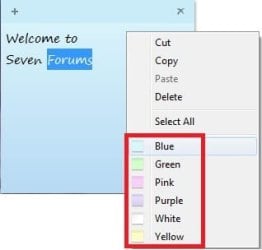
This tutorial will show you how to change the color of a new or existing Sticky Note to be either Blue, Green, Pink, Purple, White, or Yellow in Windows 7 and Windows 8.

Sticky Notes is not available in the Windows 7 Starter and Home Basic editions.


Here's How: 1. Right click on a blank space in the Sticky Note (StikyNot.exe) that you want to change the color of, and select the color that you want it to be. (See screenshot below) Color.jpg
That's it,
Shawn


Last edited:
uht!

Where the hell is the RED????
Just kidding, :D I did feel like an idiot when I couldnt figure out how to change the color!
Thanks for the post!
 

My Computer

OS
Windows 7 64-bit RC1
LOL, your welcome Myndmelt, and welcome to Seven Forums.

Yeah, it would be nice to have an option for custom colors. :)

Shawn
 

My Computer

Computer type
PC/Desktop
Computer Manufacturer/Model Number
Self built custom
OS
64-bit Windows 11 Pro for Workstations
CPU
Intel i7-8700K OC'd to 5 GHz
Motherboard
ASUS ROG Maximus XI Formula Z390
Memory
64 GB (4x16GB) G.SKILL TridentZ RGB DDR4 3600 MHz
Graphics Card(s)
ASUS ROG-STRIX-GTX1080TI-O11G-GAMING
Sound Card
Integrated
Monitor(s) Displays
2 x Samsung Odyssey G7 27"
Screen Resolution
2560x1440
Hard Drives
1TB Samsung 990 PRO M.2,
4TB Samsung 990 PRO PRO M.2,
TerraMaster F8 SSD Plus NAS
PSU
Seasonic Prime Titanium 850W
Case
Thermaltake Core P3
Cooling
Corsair Hydro H115i
Keyboard
Logitech wireless K800
Mouse
Logitech MX Master 4
Internet Speed
2 Gb/s Download and 100 Mb/s Upload
Antivirus
Malwarebyte Anti-Malware Premium
Browser
Google Chrome
Other Info
Logitech Z625 speaker system,
Logitech BRIO 4K Pro webcam,
HP Color LaserJet Pro MFP M477fdn,
APC SMART-UPS RT 1000 XL - SURT1000XLI,
Galaxy S23 Plus phone
Yeah a color picker and even the option to put in the RGB values, that would be sweet. I think they could also let you picky a sticky note theme. I know I could imagine a nice little glassy 'gloss' sticky note on my desktop. :geek:
 

My Computer

OS
Windows 7 64-bit RC1
has someone found any trick/addon/tool to change the colors in RGB mode or to add more colors?
 
Last edited:

My Computer

Computer Manufacturer/Model Number
Custom
OS
Windows 7 Ultimate (32 bits)
CPU
Intel Core2 Duo E7200 2.53GHz 3MB
Motherboard
Intel DG31PR
Memory
4GB (2x2) DDR2 333MHz Kingston
Graphics Card(s)
NVIDIA GeForce 9500 GT 512MB
Sound Card
Creative Sound Blaster X-Fi Xtreme Music
Monitor(s) Displays
24" SyncMaster T240HD
Screen Resolution
24" 1920x1200
Hard Drives
Hitachi Deskstar P7K500 500GB SATA-300
Keyboard
Microsoft Natural Wireless Ergonomic Keyboard 7000
Mouse
Microsoft Natural Wireless Laser Mouse 7000
Internet Speed
1024 Kbps Downstream and 512 Kbps Upstream
Other Info
Genius Eye 110 Instant Video WebCam / Creative 7.1 Inspire P7800 Speaker System
Can other colours be added? Like orange, or red. Just a thought.
 

My Computer

Computer type
Laptop
Computer Manufacturer/Model Number
HP
OS
Windows 7 Home Premium 64-bit Operating System
Hello Zaydie, and welcome to Seven Forums.

You could also type the text in any format and color you like in WordPad (C:\Windows\write.exe), then be able to copy and paste it from WordPad into a Sticky Note keeping the same format and color.

In addition, the free program Stickies has a lot features.

Hope this helps, :)
Shawb
 

My Computer

Computer type
PC/Desktop
Computer Manufacturer/Model Number
Self built custom
OS
64-bit Windows 11 Pro for Workstations
CPU
Intel i7-8700K OC'd to 5 GHz
Motherboard
ASUS ROG Maximus XI Formula Z390
Memory
64 GB (4x16GB) G.SKILL TridentZ RGB DDR4 3600 MHz
Graphics Card(s)
ASUS ROG-STRIX-GTX1080TI-O11G-GAMING
Sound Card
Integrated
Monitor(s) Displays
2 x Samsung Odyssey G7 27"
Screen Resolution
2560x1440
Hard Drives
1TB Samsung 990 PRO M.2,
4TB Samsung 990 PRO PRO M.2,
TerraMaster F8 SSD Plus NAS
PSU
Seasonic Prime Titanium 850W
Case
Thermaltake Core P3
Cooling
Corsair Hydro H115i
Keyboard
Logitech wireless K800
Mouse
Logitech MX Master 4
Internet Speed
2 Gb/s Download and 100 Mb/s Upload
Antivirus
Malwarebyte Anti-Malware Premium
Browser
Google Chrome
Other Info
Logitech Z625 speaker system,
Logitech BRIO 4K Pro webcam,
HP Color LaserJet Pro MFP M477fdn,
APC SMART-UPS RT 1000 XL - SURT1000XLI,
Galaxy S23 Plus phone
ahahaha thanks a lot :D this was way too complicated to figure out by myself :D :D
 

My Computer

Computer type
PC/Desktop
Computer Manufacturer/Model Number
Sony Vaio VPCSB4M9E
OS
Windows 7 Professional 64 bit (German)
CPU
Intel® Core™ i3-2350M Prozessor
Memory
6 GB
Graphics Card(s)
Intel® HD Graphics 3000 AMD Radeon® HD 6470M
Antivirus
Avast! Free
Browser
Torch
Hello, I've silly question, does by default the canvas/text area of sticky note on classic theme, follow the window colour of the text area? is that by design? and why?
Take example on the attachment.
Sticky Notes White.PNG

Any advice appreciated
 

My Computer

Computer type
Laptop
Computer Manufacturer/Model Number
ASUS A43SV-VX072D | Custom Build CPU
OS
Windows 7 Ultimate x64
CPU
i7-2670QM
Motherboard
ASUS MotherBoard (ASUS A43SV Mobo American Megatrends)
Memory
16GB Crossair Value
Graphics Card(s)
GT540M NVidia 1GB
Sound Card
Realtek
Monitor(s) Displays
LG and BOC
Screen Resolution
1366x768
Hard Drives
SAMSUNG EVO 860 MZ-76P1T0BW 1TB
-------------- DEPRECATED -------------
HGST 7200rpm TRAVELSTAR 1TB
WD Blue 5400rpm 750GB
Cooling
taffware external Cooler
Keyboard
Logitec MK220
Mouse
Prolink without any specific number
Internet Speed
1mbps(small one :v)
Antivirus
AVAST PREMIER
Browser
Chrome
Back
Top