Sticky Notes - Change Default Font

How to Change the Default Font in Sticky Notes in Windows 7 and Windows 8

   Information
This tutorial will show you how to change the default font in Sticky Notes in Windows 7 and Windows 8.


   Warning
Copy the StikyNot.exe.mui to your desktop to edit


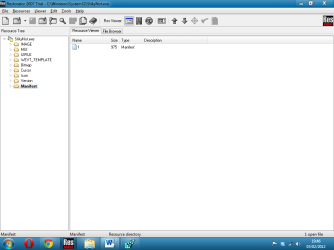
Use a resource hacker (I used Restorator 2007). Any resource hacker should do. Open up the StikyNot.exe.mui file from C:\Windows\System32\en-US extracted 3080.xml file.
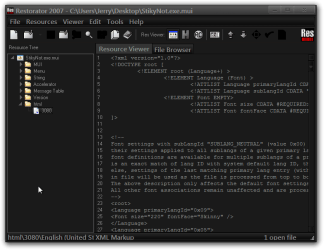
Restorator 2007 - CUsersJerryDesktopStikyNot.exe.mui.png

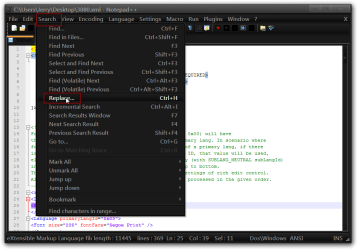
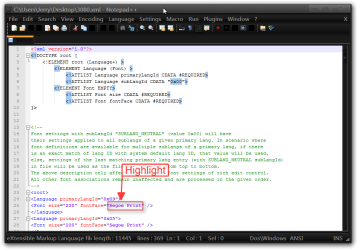
Open it with Notepad++, then highlight Segoe Print.
1.png
Go to Search then Replace.
2.png
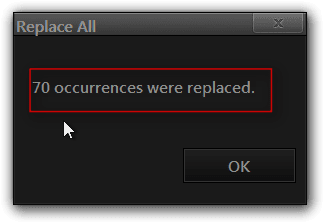
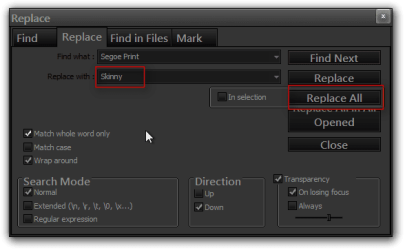
A Window will open up, and then type in the font of your choice. Click on Replace All. You will get a window telling you how many times it replaced it. I get 70.
3.png4.png
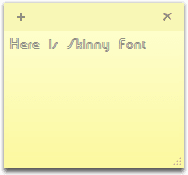
Save the 3080.xml file in Notepad ++. Import/Replace the 3080.xml file back into StikyNot.exe.mui. with a resource hacker, save it. Then go to C:\Windows\System32\en-US\StikyNot.exe.mui take ownership give yourself permission and rename it to StikyNot.exe.bak.mui. Then replace the StikyNot.exe.mui with the one you just edited.
Sticky Note2.png

Jerry


Last edited by a moderator:
Where did you get the .mui from? I could only find the .exe?

1.png2.png
 

My Computer

Computer type
PC/Desktop
Computer Manufacturer/Model Number
Novatech iRush Pro
OS
Windows 7 Ultimate SP1 - 64 Bit
CPU
Intel Core i5 2500k
Motherboard
Foxconn H67M-S/H67M-V/H67
Memory
2x4GB DDR3 1333Hz
Graphics Card(s)
Ati Radeon 6770
Sound Card
None
Monitor(s) Displays
Samsung S22B150
Screen Resolution
1920x1080
Hard Drives
2x500GB
PSU
500W
Cooling
Fan
Keyboard
HP KU0316
Mouse
Wireless Logitech M185
Internet Speed
20MB/s
Antivirus
Avast Free
Browser
Google Chrome
Other Info
Logitech M185 Mouse
KU-M316 Keyboard

My Computer

Computer type
Laptop
Computer Manufacturer/Model Number
Sager NP9170
OS
Win 7 Pro x64 / Win 10 Pro
CPU
Intel(R) Core(TM) i7-3630QM CPU @ 2.40GHz
Motherboard
CLEVO P170EM
Memory
12 GB
Graphics Card(s)
(1) Intel(R) HD Graphics 4000 (2) NVIDIA GeForce GTX 675M
Sound Card
(1) Realtek High Definition Audio (2) Intel(R) Display Aud
Monitor(s) Displays
17.3
Screen Resolution
1920x1080
Hard Drives
(1) Samsung 860 EVO 500GB(OS) (1) Samsung 860 EVO 500GB(Data)
Keyboard
Backlite
Antivirus
MSE, Malwarebytes Pro
Browser
Firefox
Other Info
DESKTOP: Custom-built.
OS: Win 10 Pro x64.
CASE: Rosewill R5.
CPU: Intel I5 4670K CPU @ 3.40GHz.
CPU COOLER: Cool Master Hyper 212 EVO.
MOTHERBOARD: Asus Z87-A.
MEMORY: Kingston HyperX 2x4 GB.
GPU: Nvidia Geforce 650 TI.
PSU: Corsair TX750.
DRIVES: (1) Samsung 840 120 GB SSD (2) Western Digital blue 500 GB 7200 RPM.
How do I replace the modified 3080.xml back to StikyNot.exe.mui, dragging into Restorator doesn't work. And I can't edit directly from it (copy on Desktop).
 

My Computer

Computer type
PC/Desktop
Computer Manufacturer/Model Number
Novatech iRush Pro
OS
Windows 7 Ultimate SP1 - 64 Bit
CPU
Intel Core i5 2500k
Motherboard
Foxconn H67M-S/H67M-V/H67
Memory
2x4GB DDR3 1333Hz
Graphics Card(s)
Ati Radeon 6770
Sound Card
None
Monitor(s) Displays
Samsung S22B150
Screen Resolution
1920x1080
Hard Drives
2x500GB
PSU
500W
Cooling
Fan
Keyboard
HP KU0316
Mouse
Wireless Logitech M185
Internet Speed
20MB/s
Antivirus
Avast Free
Browser
Google Chrome
Other Info
Logitech M185 Mouse
KU-M316 Keyboard
How do I replace the modified 3080.xml back to StikyNot.exe.mui, dragging into Restorator doesn't work. And I can't edit directly from it (copy on Desktop).
That's how I do it by dragging and dropping back into place I don't know why yours isn't working.
Jerry
 

My Computer

Computer type
Laptop
Computer Manufacturer/Model Number
Sager NP9170
OS
Win 7 Pro x64 / Win 10 Pro
CPU
Intel(R) Core(TM) i7-3630QM CPU @ 2.40GHz
Motherboard
CLEVO P170EM
Memory
12 GB
Graphics Card(s)
(1) Intel(R) HD Graphics 4000 (2) NVIDIA GeForce GTX 675M
Sound Card
(1) Realtek High Definition Audio (2) Intel(R) Display Aud
Monitor(s) Displays
17.3
Screen Resolution
1920x1080
Hard Drives
(1) Samsung 860 EVO 500GB(OS) (1) Samsung 860 EVO 500GB(Data)
Keyboard
Backlite
Antivirus
MSE, Malwarebytes Pro
Browser
Firefox
Other Info
DESKTOP: Custom-built.
OS: Win 10 Pro x64.
CASE: Rosewill R5.
CPU: Intel I5 4670K CPU @ 3.40GHz.
CPU COOLER: Cool Master Hyper 212 EVO.
MOTHERBOARD: Asus Z87-A.
MEMORY: Kingston HyperX 2x4 GB.
GPU: Nvidia Geforce 650 TI.
PSU: Corsair TX750.
DRIVES: (1) Samsung 840 120 GB SSD (2) Western Digital blue 500 GB 7200 RPM.
How do I replace the modified 3080.xml back to StikyNot.exe.mui, dragging into Restorator doesn't work. And I can't edit directly from it (copy on Desktop).

Done job. When you drag back the 3080.xml file, be sure to drag it to the folder, not on the space below the html folder. It should be dragged directly into the folder so that the folder is highlighted while you are dragging the xml file.

And for 64 bit the mui file is located below:
C:\Windows\winsxs\amd64_microsoft-windows-stickynotes.resources_31bf3856ad364e35_6.1.7600.16385_en-us_567f6e855a658d02
 

My Computer

OS
Windows 7 Ultimate 64 bit
Where do I find StickyNot.exe.mui and 3080.xml? I don't see them in System 32. Is it because I have sticky notes open? Do we have to edit anything in syswow64 if you're using 64-bit?
 

My Computer

OS
Windows 7 Home Premium x64
CPU
Intel i7-2600K
Motherboard
ASUS Sabertooth Z77
Memory
G.SKILL Ripjaws (16 GB Total)
Graphics Card(s)
EVGA GeForce GTX 560 Ti
Monitor(s) Displays
ASUS
Screen Resolution
1920x1080 (2 Monitors)
Hard Drives
Hitachi GST Deskstar 2 TB (HDD)
Samsung 840 Pro 256 GB (SSD)
PSU
SeaSonic X Series X650 Gold
Case
Antec DF 85
Keyboard
Microsoft SideWinder X4
Mouse
MadCatz M.M.O. 7 & Logitech G35
Internet Speed
50 down
Antivirus
Avast Free, SuperAntiSpyware Free, Malwarebytes Free
Browser
Mozilla Firefox
Also note that you can open and browse/modify EXE/DLL files in Visual Studio, if you have that. I was able to the same in VS2012.
 

My Computer

Computer type
Laptop
Computer Manufacturer/Model Number
Lenovo Thinkpad
OS
Windows 7 Enterprise 64-bit SP1
Browser
Chrome, IE10, FireFox
Back
Top