
You are using an out of date browser. It may not display this or other websites correctly.
You should upgrade or use an alternative browser.
You should upgrade or use an alternative browser.
Still no sound
- Thread starter isaiah40
- Start date

zigzag3143
New member
- Local time
- 6:13 PM
- Messages
- 27,140
I have reinstalled adobe flash player and there is
still no sound. When I watch a youtube video or anything else.
Only in itunes is there any sound.
In order to help we need your system specs and OS.
My Computer
- Computer Manufacturer/Model Number
- HP Pavillion dv-7 1005 Tx
- OS
- Win 8 Release candidate 8400
- Memory
- 4 gigs
- Graphics Card(s)
- Nvidia 9600M
- Sound Card
- HD built-in
- Monitor(s) Displays
- 17" Wxga
- Screen Resolution
- 1440x900
- Cooling
- none
- Internet Speed
- 45Mb down 5Mb up

Download and run Speccy - System Information - Free Download , which will tell you all your specifications. You can either post a screen shot or however you want to transfer the information 
My Computer
- Computer Manufacturer/Model Number
- Pugh Technologies
- OS
- W7 Professional x64
- CPU
- AMD Athlon II X3 445 Rana 3.10 GHz
- Motherboard
- MSI 870A-G54
- Memory
- PNY XLR DDR3 1600 4x2GB
- Graphics Card(s)
- NVIDIA GeForce GTS 450 (fermi) 1GB GDDR5
- Sound Card
- Realtek ALC892 onboard
- Monitor(s) Displays
- ASUS VE205t, Viewsonic VX2035WM
- Screen Resolution
- 1600x900, 1600x1050
- Hard Drives
- 977GB Hitachi Hitachi HDS721010CLA332
244GB Western Digital WDC WD2500AAJS-65B4A0
488GB Western Digital WDC WD5000AAJS-00A8B0
488GB Western Digital WDC WD5000AAKS-00UU3A0
- PSU
- Antec EarthWatts EA650 650W
- Case
- ThermalTake Armor A90 Mid Tower
- Cooling
- 3x 120mm in, 1x 120mm & 200mm out, self built hydro-cooler
- Keyboard
- Logitec 55
- Mouse
- Razer Deathadder
- Internet Speed
- 20 Mbps D/L, 9 Mbps U/L
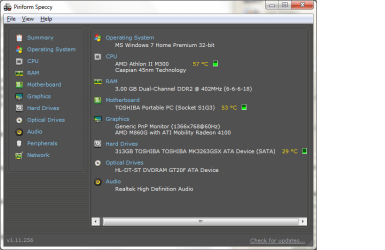
Did windows 7 come originally on the machine?
My Computer
- Computer Manufacturer/Model Number
- Pugh Technologies
- OS
- W7 Professional x64
- CPU
- AMD Athlon II X3 445 Rana 3.10 GHz
- Motherboard
- MSI 870A-G54
- Memory
- PNY XLR DDR3 1600 4x2GB
- Graphics Card(s)
- NVIDIA GeForce GTS 450 (fermi) 1GB GDDR5
- Sound Card
- Realtek ALC892 onboard
- Monitor(s) Displays
- ASUS VE205t, Viewsonic VX2035WM
- Screen Resolution
- 1600x900, 1600x1050
- Hard Drives
- 977GB Hitachi Hitachi HDS721010CLA332
244GB Western Digital WDC WD2500AAJS-65B4A0
488GB Western Digital WDC WD5000AAJS-00A8B0
488GB Western Digital WDC WD5000AAKS-00UU3A0
- PSU
- Antec EarthWatts EA650 650W
- Case
- ThermalTake Armor A90 Mid Tower
- Cooling
- 3x 120mm in, 1x 120mm & 200mm out, self built hydro-cooler
- Keyboard
- Logitec 55
- Mouse
- Razer Deathadder
- Internet Speed
- 20 Mbps D/L, 9 Mbps U/L
My Computer
- Computer Manufacturer/Model Number
- Custom Build
- OS
- windows 7 ultimate x64
- CPU
- AMD Phenom II x6 1090T
- Motherboard
- Gigabyte GA-MA770T
- Memory
- 12gb
- Graphics Card(s)
- Radeon HD 4770
- Sound Card
- Onboard MB
- Monitor(s) Displays
- 27" Asus LCD
- Screen Resolution
- Huge
- Hard Drives
- WD 1TB STA 3.0
- PSU
- Cooler MastereXtreme Power RS550
- Case
- Unknown
- Cooling
- Arctic Cooling Freezer Pro
- Keyboard
- Standard PS2
- Mouse
- USB Optical Mouse
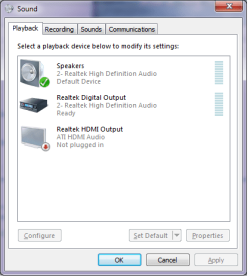
Well, if you only see the speakers, then it should work. ITunes probably has its own volume control, did you check the volume control when you try to play other sounds?
My Computer
- Computer Manufacturer/Model Number
- Custom Build
- OS
- windows 7 ultimate x64
- CPU
- AMD Phenom II x6 1090T
- Motherboard
- Gigabyte GA-MA770T
- Memory
- 12gb
- Graphics Card(s)
- Radeon HD 4770
- Sound Card
- Onboard MB
- Monitor(s) Displays
- 27" Asus LCD
- Screen Resolution
- Huge
- Hard Drives
- WD 1TB STA 3.0
- PSU
- Cooler MastereXtreme Power RS550
- Case
- Unknown
- Cooling
- Arctic Cooling Freezer Pro
- Keyboard
- Standard PS2
- Mouse
- USB Optical Mouse
Yes, I have checked the volume control when I play other sounds. It is way high and there is no sound.
I have tried everything I can think of to try and fix it. Nothing has worked. I am getting frusterated.
PLEASE HELP!!!!!!!!!!!
I have tried everything I can think of to try and fix it. Nothing has worked. I am getting frusterated.
PLEASE HELP!!!!!!!!!!!
My Computer
- OS
- I do not know
Similar threads
- Replies
- 1
- Views
- 9K

