Stop Remote Shutdown

HalesowenTechie

New member
Local time
6:13 PM
Messages
13
Hi there,

I work for a college in the IT department and my knowledge is lacking in the remote shutdown area and is being exploited by my fellow workers.

The computers are connected to a domain and our computers are named via the tag number of the machine and we do not use roaming profiles. I know how to send a shutdown request, but I don't know how to stop it.

Can someone please help?
 

My Computer

Computer type
PC/Desktop
OS
Windows 7 Professional x86
Hi HalesowenTechie and welcome to Seven Forums.

Is someone sending out a command to remote shutdown a pc/pc's?

I will need more info on this.

Is it just one pc or all pc's?
 

My Computer

Computer type
PC/Desktop
Computer Manufacturer/Model Number
Dell / Lenovo g550
OS
Windows 7 Ultimate 64-bit
CPU
Intel Core 2 Duo E6550 @2.33GHz
Motherboard
foxconn g33m02
Memory
4GB DDR"
Graphics Card(s)
NVIDIA GeForce 8600 GS
Hard Drives
HDD 1 = 150GB
HDD 2 = 1.5TB
PSU
450W
Cooling
Stock fan
Internet Speed
12Mb
Antivirus
AVG Internet Security
Yes, they are using CMD to do it or on their wirless devices ie iPhone

Just mine in the office, they are doing it as a prank tbh *lol* I just want to know how to stop it.
 

My Computer

Computer type
PC/Desktop
OS
Windows 7 Professional x86
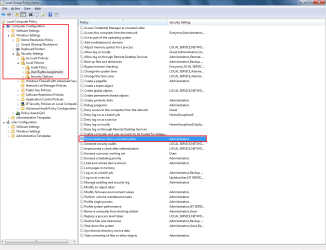
You can go to the computer and go to this: You can disable this in the Local/Domain Security Policy.

Local Policies -> User Rights Assignment -> Shutdown the System.

This will stop anyone if you remove every user from this.
 

My Computer

Computer type
PC/Desktop
Computer Manufacturer/Model Number
Dell / Lenovo g550
OS
Windows 7 Ultimate 64-bit
CPU
Intel Core 2 Duo E6550 @2.33GHz
Motherboard
foxconn g33m02
Memory
4GB DDR"
Graphics Card(s)
NVIDIA GeForce 8600 GS
Hard Drives
HDD 1 = 150GB
HDD 2 = 1.5TB
PSU
450W
Cooling
Stock fan
Internet Speed
12Mb
Antivirus
AVG Internet Security
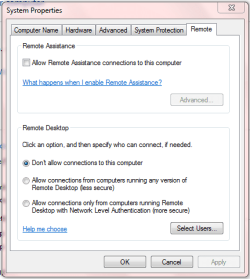
Have you tried setting up the Remote connections like this:

Capture.PNG
 

My Computer

Computer type
PC/Desktop
Computer Manufacturer/Model Number
Golden Mk. I.4
OS
Windows 10 Pro x64 ; Xubuntu x64
CPU
Intel i7 860 @ 2.80 GHz O/C'ed to 4.0GHz
Motherboard
Gigabyte P55A-UD3R Rev.1. Award BIOS F13
Memory
16GB Corsair Vengance DDR3 @ 661 MHz Dual Channel (9-9-9-24)
Graphics Card(s)
EVGA NVidia GTX 560 1024MB
Sound Card
Realtek Integrated
Monitor(s) Displays
Dual Samsung SyncMaster 2494HS
Screen Resolution
1920*1080 and 1920*1080
Hard Drives
1*Samsung 840 EVO 120GB SSD;
1*OCZ Vertex 2 60GB SSD;
2*Samsung F3 SpinPoint 1TB in RAID0;
1*Samsung F1 SpinPoint 1TB;
2*Western Digital 1TB External USB 3.0
1*Western Digital 500GB External USB 3.0
1*Seagate 500GB External USB 2.0
PSU
Thermaltake ToughPower QFan 750W
Case
Thermaltake Element S VK60001W2Z
Cooling
Corsair H60 Water Cooling, 2*230mm and 2*80mm case fans
Keyboard
Logitech G110
Mouse
Logitech MX518
You can go to the computer and go to this: You can disable this in the Local/Domain Security Policy.

Local Policies -> User Rights Assignment -> Shutdown the System.

This will stop anyone if you remove every user from this.

Unfortunately that didn't work.

It's my Staff machine which is what I am using in the techie office. I have access to AD n' such on in order to resolve issues and I need to be able to remote into my computer from other accounts if necessary to resolve account issues.

Because I don't know how to stop their remote shutdown commands via CMD they are doing it as a prank and I have no idea to stop it. I have tried removing the users on the local shutdown policy but that didn't work. Would I be correct in assuming that it is because the group policies are applied through AD?!? Just to note, that the group policies are infact applied through AD here.
 

My Computer

Computer type
PC/Desktop
OS
Windows 7 Professional x86
Ok well they would need administrator password to do this so?
 

My Computer

Computer type
PC/Desktop
Computer Manufacturer/Model Number
Dell / Lenovo g550
OS
Windows 7 Ultimate 64-bit
CPU
Intel Core 2 Duo E6550 @2.33GHz
Motherboard
foxconn g33m02
Memory
4GB DDR"
Graphics Card(s)
NVIDIA GeForce 8600 GS
Hard Drives
HDD 1 = 150GB
HDD 2 = 1.5TB
PSU
450W
Cooling
Stock fan
Internet Speed
12Mb
Antivirus
AVG Internet Security
Well yes, it is the other techies in the office in my team, playing this prank. We all have admin rights to do our job.
 

My Computer

Computer type
PC/Desktop
OS
Windows 7 Professional x86

My Computer

Computer type
PC/Desktop
Computer Manufacturer/Model Number
Dell / Lenovo g550
OS
Windows 7 Ultimate 64-bit
CPU
Intel Core 2 Duo E6550 @2.33GHz
Motherboard
foxconn g33m02
Memory
4GB DDR"
Graphics Card(s)
NVIDIA GeForce 8600 GS
Hard Drives
HDD 1 = 150GB
HDD 2 = 1.5TB
PSU
450W
Cooling
Stock fan
Internet Speed
12Mb
Antivirus
AVG Internet Security
They aren't doing this on my machine because i'm already on it...they are remotely shutting down from CMD on their computer to mine. Or would that guide prevent that?!?
 

My Computer

Computer type
PC/Desktop
OS
Windows 7 Professional x86
I do lock my computer on a regular basis btw when I am out of the office. They don't use my machine to remotely shutdown my machine.
 

My Computer

Computer type
PC/Desktop
OS
Windows 7 Professional x86
At the end of the guide you need to look at never mind the start menu part.

It's very hard to do when there on the same level as you. But i should work.
 

My Computer

Computer type
PC/Desktop
Computer Manufacturer/Model Number
Dell / Lenovo g550
OS
Windows 7 Ultimate 64-bit
CPU
Intel Core 2 Duo E6550 @2.33GHz
Motherboard
foxconn g33m02
Memory
4GB DDR"
Graphics Card(s)
NVIDIA GeForce 8600 GS
Hard Drives
HDD 1 = 150GB
HDD 2 = 1.5TB
PSU
450W
Cooling
Stock fan
Internet Speed
12Mb
Antivirus
AVG Internet Security
They have just been giving me clues I just don't know what I am doing wrong in order to stop it. I have created a BAT file and they said something about adding a task to the event viewer...which I have done but that isn't working :S
 

My Computer

Computer type
PC/Desktop
OS
Windows 7 Professional x86

My Computer

Computer type
PC/Desktop
Computer Manufacturer/Model Number
Dell / Lenovo g550
OS
Windows 7 Ultimate 64-bit
CPU
Intel Core 2 Duo E6550 @2.33GHz
Motherboard
foxconn g33m02
Memory
4GB DDR"
Graphics Card(s)
NVIDIA GeForce 8600 GS
Hard Drives
HDD 1 = 150GB
HDD 2 = 1.5TB
PSU
450W
Cooling
Stock fan
Internet Speed
12Mb
Antivirus
AVG Internet Security
Ok, so I have found the event in event viewer and attatched a task to runt the "shutdown -a" command when the command is issued. It executes fine, but then they did it again and it executed, but shut down anyway. I asked them to do it again, only this time give me 30 seconds and when I typed in "shutdown -a" it said "access denied."

Somewhere down the line, I have disabled something when I first tried to stop them doing it. I have gone back over to the Local Policies and put the access rights back in. I just can't remember if there is anything else I have removed in order to try and stop them...any Ideas?!?
 

My Computer

Computer type
PC/Desktop
OS
Windows 7 Professional x86
Did you try that program I gave you?
 

My Computer

Computer type
PC/Desktop
Computer Manufacturer/Model Number
Dell / Lenovo g550
OS
Windows 7 Ultimate 64-bit
CPU
Intel Core 2 Duo E6550 @2.33GHz
Motherboard
foxconn g33m02
Memory
4GB DDR"
Graphics Card(s)
NVIDIA GeForce 8600 GS
Hard Drives
HDD 1 = 150GB
HDD 2 = 1.5TB
PSU
450W
Cooling
Stock fan
Internet Speed
12Mb
Antivirus
AVG Internet Security
Ok this is my last option

Take the administrator out of this and it SHOULD work :)
 

Attachments

  • Untitled.png
    Untitled.png
    152.1 KB · Views: 10

My Computer

Computer type
PC/Desktop
Computer Manufacturer/Model Number
Dell / Lenovo g550
OS
Windows 7 Ultimate 64-bit
CPU
Intel Core 2 Duo E6550 @2.33GHz
Motherboard
foxconn g33m02
Memory
4GB DDR"
Graphics Card(s)
NVIDIA GeForce 8600 GS
Hard Drives
HDD 1 = 150GB
HDD 2 = 1.5TB
PSU
450W
Cooling
Stock fan
Internet Speed
12Mb
Antivirus
AVG Internet Security
I got it working the way I said above, the only problem being that the bat didn't execute because I have removed permissions somewhere and I cannot remember how. When I type in CMD "shutdown -a" it says "Access Denied" I know I have removed something but I cannot remember what.
 

My Computer

Computer type
PC/Desktop
OS
Windows 7 Professional x86
Re-Check here: Local Policies -> User Rights Assignment -> Shutdown the System
 

Attachments

  • Untitled.png
    Untitled.png
    253.2 KB · Views: 7

My Computer

Computer type
PC/Desktop
Computer Manufacturer/Model Number
Dell / Lenovo g550
OS
Windows 7 Ultimate 64-bit
CPU
Intel Core 2 Duo E6550 @2.33GHz
Motherboard
foxconn g33m02
Memory
4GB DDR"
Graphics Card(s)
NVIDIA GeForce 8600 GS
Hard Drives
HDD 1 = 150GB
HDD 2 = 1.5TB
PSU
450W
Cooling
Stock fan
Internet Speed
12Mb
Antivirus
AVG Internet Security
Also the .bat file will only work if they give you time. If they send a command with no time, you wont have time to get the bat file open :)
 

My Computer

Computer type
PC/Desktop
Computer Manufacturer/Model Number
Dell / Lenovo g550
OS
Windows 7 Ultimate 64-bit
CPU
Intel Core 2 Duo E6550 @2.33GHz
Motherboard
foxconn g33m02
Memory
4GB DDR"
Graphics Card(s)
NVIDIA GeForce 8600 GS
Hard Drives
HDD 1 = 150GB
HDD 2 = 1.5TB
PSU
450W
Cooling
Stock fan
Internet Speed
12Mb
Antivirus
AVG Internet Security
Back
Top