Storage USB devices driver issue

polux220

New member
Local time
2:49 PM
Messages
5
Hi all,
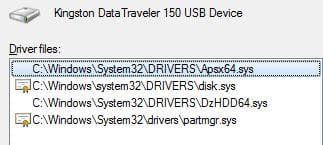
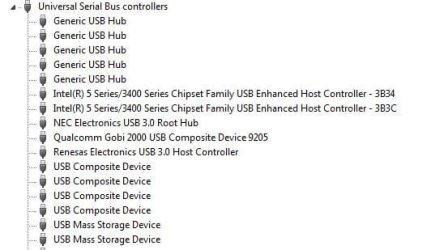
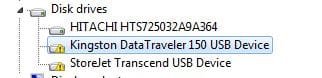
Since 2 weeks I have a strange USB storage driver issue.
Notice that it works perfectly before (as usual before not work :-))
This issue occurs with all my USB storages devices (Disk, Key) from a lot of different manufacturer (transcend, Kingston,...).

The symptom ==> see USB1, USB2 and USB3.jpg uploaded files
DriverMax not show an USB driver update.

sfc /scannow = no integrity violation

I have Windows 7 Pro 64 bits on a lenovo W510.

A new idea will be appreciate.

Tks.
 

Attachments
  • USB1.jpg
    USB1.jpg
    6.3 KB · Views: 969
  • USB2.jpg
    USB2.jpg
    15.5 KB · Views: 9
  • USB3.jpg
    USB3.jpg
    10.7 KB · Views: 970
  • USB4.jpg
    USB4.jpg
    24 KB · Views: 14
Last edited:

My Computer My Computer

OS
windows 7 Pro 64 Bits
Hi all,
Since 2 weeks I have a strange USB storage driver issue.
Notice that it works perfectly before (as usual before not work :-))
This issue occurs with all my USB storages devices (Disk, Key) from a lot of different manufacturer (transcend, Kingston,...).

The symptom ==> see USB1, USB2 and USB3.jpg uploaded files
DriverMax not show an USB driver update.

sfc /scannow = no integrity violation

I have Windows 7 Pro 64 bits on a lenovo W510.

A new idea will be appreciate.

Tks.
Hello polux and welcome to the forum

Have a look at this; Solution to USB error code found, just need help finishing it. - Tech Support Guy Forums

I hope this helps please post back about how you get on
 

My Computer My Computer

Computer Manufacturer/Model Number
Something I threw together
OS
Windows 7 Ultimate x64
CPU
Intel Core i7-2600K
Motherboard
Asus P8P67
Memory
16 GB G Skill F3-10666 CL9D-4GBRL
Graphics Card(s)
ATI Radeon HD 6870
Sound Card
ATI Radeon HDMI / Realtek ALC892
Monitor(s) Displays
2 x 22" standard monitors / LG32LC56v TV to watch films
Screen Resolution
1920 x1080
Hard Drives
2 x OCZ Vertex2 111.79GB
3 x Samsung103SJ
1 x Samsung103UJ
1 x WD3200BEVT
1 x Hitachi5K320-160
PSU
Thermaltake Toughpower Cable Management 750W
Case
Antec 300
Cooling
Noctua NH-U12P SE2 and 5 120mm Case fans
Keyboard
Microsoft Comfort Curve Keyboard 2000
Mouse
Hama M3110 / Logitech M305
Internet Speed
16000
Other Info
I have also used Fedora, Suse, Ubuntu Linux
And all other Windows from 95 to date except ME
Hi,
Thanks for the try but I tried this ==>
Change "start" value to 2 on HKEY_LOCAL_MACHINE/SYSTEM/CurrentControlSet/Services/USBSTOR

Nothing change, issue always occurred.

others ideas ?
 

My Computer My Computer

OS
windows 7 Pro 64 Bits
Hi,
Thanks for the try but I tried this ==>
Change "start" value to 2 on HKEY_LOCAL_MACHINE/SYSTEM/CurrentControlSet/Services/USBSTOR

Nothing change, issue always occurred.

others ideas ?
You could try the fixit here; [FONT=&quot]http://support.microsoft.com/kb/310123

[/FONT]
[FONT=&quot]Code 32 [/FONT][FONT=&quot][/FONT]
[FONT=&quot]A driver (service) for this device has been disabled. An alternate driver may be providing this functionality. (Code 32)[/FONT]
[FONT=&quot]Cause[/FONT][FONT=&quot]

The start type for this driver is set to disabled in the registry.

Recommended resolutions

Reinstall the driver for this device. If this does not work, you might have to change the device start type parameter in the registry.

Uninstall and reinstall the driver

Uninstall the driver from Device Manager, and then scan for new hardware to install the driver again.

You may be prompted to provide the path of the driver. Windows may have the driver built-in, or may still have the driver files installed from the last time that you set up the device. However, sometimes, it will open the New Hardware Wizard which may ask for the driver. If you are asked for the driver and you do not have it, you can try to download the latest driver from the hardware vendor’s Web site.[/FONT]
[FONT=&quot]1. [/FONT][FONT=&quot]On the device Properties dialog box, click the Driver tab, and then click Uninstall. [/FONT][FONT=&quot]Follow the instructions.[/FONT]
[FONT=&quot]2. [/FONT][FONT=&quot]Restart your computer.[/FONT]
[FONT=&quot]3. [/FONT][FONT=&quot]Open Device Manager, click Action, and then click Scan for hardware changes. [/FONT][FONT=&quot]Follow the instructions.[/FONT]
 
Last edited:

My Computer My Computer

Computer Manufacturer/Model Number
Something I threw together
OS
Windows 7 Ultimate x64
CPU
Intel Core i7-2600K
Motherboard
Asus P8P67
Memory
16 GB G Skill F3-10666 CL9D-4GBRL
Graphics Card(s)
ATI Radeon HD 6870
Sound Card
ATI Radeon HDMI / Realtek ALC892
Monitor(s) Displays
2 x 22" standard monitors / LG32LC56v TV to watch films
Screen Resolution
1920 x1080
Hard Drives
2 x OCZ Vertex2 111.79GB
3 x Samsung103SJ
1 x Samsung103UJ
1 x WD3200BEVT
1 x Hitachi5K320-160
PSU
Thermaltake Toughpower Cable Management 750W
Case
Antec 300
Cooling
Noctua NH-U12P SE2 and 5 120mm Case fans
Keyboard
Microsoft Comfort Curve Keyboard 2000
Mouse
Hama M3110 / Logitech M305
Internet Speed
16000
Other Info
I have also used Fedora, Suse, Ubuntu Linux
And all other Windows from 95 to date except ME
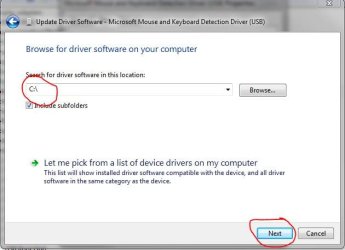
I had an issue like this a few months ago. The only workaround I found was to manually update the driver for each usb device I have and pointing the driver search to the top level of the C:\ drive. Ultimately I ended up re installing Windows, but it worked in a pinch.
 

Attachments

  • Capture.JPG
    Capture.JPG
    34.3 KB · Views: 8

My Computer My Computer

Computer Manufacturer/Model Number
Samsung Chronos 7
OS
windows 7 Pro 64Bit
CPU
2.2 GHz Intel Core i7-2675QM
Memory
8GB
Graphics Card(s)
Intel HD Graphics 3000/Radeon HD 6490M
Sound Card
Realtek High Definition Audio
Monitor(s) Displays
Built in LCD and external Dell 22 inch LCD
Screen Resolution
1600x900
Hard Drives
1 TB HDD
Internet Speed
20 MBPS Down 1500 KBPS Up
Hi,
Also already try :-)
Just take care that I searched a solution during 2 weeks and nothing...even if Google is already my friend :-)
This is why I posted here ...

Tks a lot
 

My Computer My Computer

OS
windows 7 Pro 64 Bits

My Computer My Computer

Computer Manufacturer/Model Number
Something I threw together
OS
Windows 7 Ultimate x64
CPU
Intel Core i7-2600K
Motherboard
Asus P8P67
Memory
16 GB G Skill F3-10666 CL9D-4GBRL
Graphics Card(s)
ATI Radeon HD 6870
Sound Card
ATI Radeon HDMI / Realtek ALC892
Monitor(s) Displays
2 x 22" standard monitors / LG32LC56v TV to watch films
Screen Resolution
1920 x1080
Hard Drives
2 x OCZ Vertex2 111.79GB
3 x Samsung103SJ
1 x Samsung103UJ
1 x WD3200BEVT
1 x Hitachi5K320-160
PSU
Thermaltake Toughpower Cable Management 750W
Case
Antec 300
Cooling
Noctua NH-U12P SE2 and 5 120mm Case fans
Keyboard
Microsoft Comfort Curve Keyboard 2000
Mouse
Hama M3110 / Logitech M305
Internet Speed
16000
Other Info
I have also used Fedora, Suse, Ubuntu Linux
And all other Windows from 95 to date except ME
Hi,
I hoped to find another way to resolve my issue than do a repair install.
But thanks anyway for your help...
I will let you know if I found something else...
 

My Computer My Computer

OS
windows 7 Pro 64 Bits
Hi all,
issue resolved, unfortunately a repair is the only solution.


tks
have fun :-)
 

My Computer My Computer

OS
windows 7 Pro 64 Bits

My Computer My Computer

Computer Manufacturer/Model Number
Something I threw together
OS
Windows 7 Ultimate x64
CPU
Intel Core i7-2600K
Motherboard
Asus P8P67
Memory
16 GB G Skill F3-10666 CL9D-4GBRL
Graphics Card(s)
ATI Radeon HD 6870
Sound Card
ATI Radeon HDMI / Realtek ALC892
Monitor(s) Displays
2 x 22" standard monitors / LG32LC56v TV to watch films
Screen Resolution
1920 x1080
Hard Drives
2 x OCZ Vertex2 111.79GB
3 x Samsung103SJ
1 x Samsung103UJ
1 x WD3200BEVT
1 x Hitachi5K320-160
PSU
Thermaltake Toughpower Cable Management 750W
Case
Antec 300
Cooling
Noctua NH-U12P SE2 and 5 120mm Case fans
Keyboard
Microsoft Comfort Curve Keyboard 2000
Mouse
Hama M3110 / Logitech M305
Internet Speed
16000
Other Info
I have also used Fedora, Suse, Ubuntu Linux
And all other Windows from 95 to date except ME
Back
Top