I have many accounts in many different sites. Read to not use same password on same site for obvious reasons. I have all my username/passwords on my computer in a microsoft office sheet and also on my usb as well. Obviously if i lose it, thats very bad b/c it has the site and the password in it.
First off, how does one lock a document? I know when someone sent me an adobe document, i couldnt open it without entering a passport that they told me. So basically whenever i try to open the same document that is saved on computer, it requires the password. Can someone tell me how i would be able to do this for word documents? I have openoffice by the way and not microsoft word on this computer.
Also is there a place to store it online? I heard someone mention keepass. I downloaded it but not sure how it really works. So basically you only need to remember 1 password right? Then when you access it, you have all the password for each site you have on it? How does one even put the password in keepass? You suppose to type it manually or transfer a document to it such as an openoffice or microsoft word or wordpad or excel sheet on it because im not sure how that works. Also is keepass very safe? Thus if someone hacks your acct, then they would have all the passwords. So would it be good idea to just put passwords in it but dont put the actual site to it and just recall which password is which site when you see all the password if that makes sense?
Try Lastpass instead. It will not only store your passwords securely, it will store them in an ever accessible cloud for all your computers. But be warned if you forget your master password for Lastpass, you lose all your passwords. Lastpass cannot recover your data without your master password.
Oh and you can setup two-factor authentication with Lastpass making it even more secure.
My Computer
At a glance
Windows 10 Pro (x64)Intel Core i7-3930K (3.2GHz - 4.5GHz)4x Samsung 4GB PC3-12800 DDR3 (16GB 1600MHz)Nvidia Geforce GTX 690
Computer type
PC/Desktop
Computer Manufacturer/Model Number
Alienware Aurora ALX R4
OS
Windows 10 Pro (x64)
CPU
Intel Core i7-3930K (3.2GHz - 4.5GHz)
Motherboard
Alienware Aurora-R4 x79
Memory
4x Samsung 4GB PC3-12800 DDR3 (16GB 1600MHz)
Graphics Card(s)
Nvidia Geforce GTX 690
Sound Card
SteelSeries Siberia Elite
Monitor(s) Displays
Dell UltraSharp U3011
Screen Resolution
2560x1600
Hard Drives
Samsung 850 Pro 256 GB, Seagate 1TB Desktop Hybrid HDD, 2x Western Digital 4TB Green HDD
PSU
875W Some Dell PSU <.<
Case
Alienware Aurora ALX
Cooling
Custom Liquid Cooling (EK CPU & GPU blocks) dual EK 480RAD
Keyboard
Logitech G710+ Mechanical
Mouse
Logitech G700s
Internet Speed
Verizon Fios (50 mbps average)
Other Info
Server: Intel NUC D54250WYK: i5-4250U, 16GB, 256 GB mSATA, Windows Server 2012 R2
If no one accesses your PC, there is not much to worry about. If they do, you can have the normal password to access your Profile. Even if someone breaks your Profile Password, you can store your list of Website Passwords under three layers of Folders and they will be pretty well hidden. That is what I do.
My Computer
At a glance
Windows 7 Home Premium 32-Bit - Build 7600 SP1Intel Core i3-2120 3.30GhzKingston 4 GB DDR3 1333 mhzAMD Radeon HD6670
Computer type
PC/Desktop
Computer Manufacturer/Model Number
Custom Build
OS
Windows 7 Home Premium 32-Bit - Build 7600 SP1
CPU
Intel Core i3-2120 3.30Ghz
Motherboard
Asus P8Z68-V LX Intel Z68 Socket H2 ATX
Memory
Kingston 4 GB DDR3 1333 mhz
Graphics Card(s)
AMD Radeon HD6670
Sound Card
Sound Blaster Audigy SE 24-Bit
Monitor(s) Displays
Asus VE228
Screen Resolution
1440 X 900
Hard Drives
OCZ Vertex 3 120 GB Sata 3 SSD ==
Kingston SH103/S3 120 G Hyper X 120 GB SSD ==
Western Digital 500 GB Caviar Green 7200 RPM ==
PSU
Corsair CX600M == 600 Watt
Case
NZXT Apollo - Silver with Clear Side Panel
Cooling
Three 120 mm Fans
Keyboard
Microsoft Natural 4000
Mouse
Microsoft Custom Optical 3000
Internet Speed
AT&T Fiber Optic Wireless Network
Antivirus
Microsoft Security Essentials
Browser
Chrome
Other Info
120 mm Blue LED Fan -- Three Blue LED Lazer Light Sticks
Try Lastpass instead. It will not only store your passwords securely, it will store them in an ever accessible cloud for all your computers. But be warned if you forget your master password for Lastpass, you lose all your passwords. Lastpass cannot recover your data without your master password.
Oh and you can setup two-factor authentication with Lastpass making it even more secure.
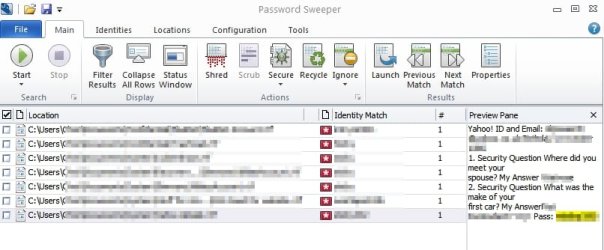
Well it's just my opinion but if software can recover your passwords from files then any user with access to your PC can recover them hidden or not - unless they're encrypted.
I guess the bottom line is that if you can view/ recover passwords using forensics tools then so can malware - potentially - if it manages to sneak onto your system undetected.
My Computer
At a glance
Microsoft Windows 7 Home Premium 64-bit 7601 ...AMD C-60 APU with Radeon(tm) HD Graphics4.00 GBAMD Radeon HD 6290 Graphics
Computer type
Laptop
Computer Manufacturer/Model Number
ASUS
OS
Microsoft Windows 7 Home Premium 64-bit 7601 Multiprocessor Free Service Pack 1
CPU
AMD C-60 APU with Radeon(tm) HD Graphics
Motherboard
ASUSTeK COMPUTER INC. X501U
Memory
4.00 GB
Graphics Card(s)
AMD Radeon HD 6290 Graphics
Sound Card
(1) AMD High Definition Audio Device (2) Realtek High Defi
Spend a little time playing with Keepass and I think you can pick it up. I use it with thousands of passwords (I have many clients I maintain) and it works great. It is easily searchable and you can create groups etc to set it up how you like.
You can get started by importing your current passwords in either csv or xml formats File Formats - KeePass
I've never considered this a safe way to store important info, so I've not kept up on to lock a document. You could encrypt the document using the Operating System or a 3rd party tool, but you are better off using a tool (like KeePass) that was designed for the task at hand. KeePass is a mature product and it takes care of security issues that you and I don't understand.
Yes, but keeping it (your document or your KeePass database file) out of the hands of others is now back in your hands. You would need to stay educated on the issues related to cloud storage security.
~~~
...How does one even put the password in keepass? You suppose to type it manually or transfer a document to it such as an openoffice or microsoft word or wordpad or excel sheet on it because im not sure how that works.
~~~
You can type it all in or import your existing info. cyberSAR provided info on importing... but I would consider typing it in and taking this opportunity to change the password for your important accounts. Humans are not very good at picking random passwords. KeePass can create better passwords for you.
I started using KeePass many years ago and I too found it hard to figure out the first steps to do to get started. For this post, I had a hard time finding a video that stuck with the simple steps of getting started. Most videos dealt with advanced features or using KeePass along with browser plugins.
See if this video helps you:
I'm not associated with or recommending the company mentioned in the video.
In the video she shows right clicking on an entry and selecting various actions from the context menu. You can also open a URL by double clicking on that URL area for the entry of interest. Double clicking does not show up well in a video - so maybe that is why she opted for the slower right-click method. You can also Double click on the password area for an entry and the password will be copied to the Windows clipboard. Then (as shown in the video) you paste it into the browser field of interest.
There is some risk involved in using the Windows clipboard, so KeePass (by default) clears the clipboard after a few seconds. There is an option to have KeePass clear the clipboard info after once paste operation has occurred, but if your computer is infected with an app that is recording your clipboard operations and your antivirus app has not detected that - then you have bigger problems than how long info stays in the OS clipboard.
I tend to copy/paste the password first, then copy/paste the user ID. The password is in the clipboard the least amount of time. There are 3rd party apps that pass info to browser fields without using the OS clipboard, but then you have to research and stay informed about any security related issues with those apps.
A perfectly good question ---- that is hard to answer. I could just say, "Yes, KeePass is safe". But I'm not sure how or why that would satisfy you. I could provide links to papers/blogs/videos about why it is safe, but the info gets deep into terms and concepts that most people would not understand. It is possible to break into a KeePass database and (according to this website) it is possible to do so in a reasonable amount of time using regular computers (not super computers). The info on that website does not disclose how to get into the KeePass database - so I hope that I'm still within the forum's rules.
I will still use KeePass and accept the slight risk that someone wants into the file.
~~~
...Thus if someone hacks your acct, then they would have all the passwords. So would it be good idea to just put passwords in it but dont put the actual site to it and just recall which password is which site when you see all the password if that makes sense?
~~~
That sounds like a good plan, but I have too many accounts/websites/things to remember.
logicearth mentioned Lastpass and even with its security flaws/weaknesses, Lastpass is still a good option - if you are careful. I've not used Lastpass, but I'm not sure that is would work for me. I use KeePass to track info that is not related to the internet. The note section for each KeePass entry is a good place to keep info like the date/name of the person that I spoke to when renewing contracts. I can record order confirmation codes, pricing offers or anything else that I need to.
Edit: I'll add a note from my experience using software to generate passwords. As shown in the video, you can let KeePass (or Lastpass) create passwords for you and they can be long passwords because you don't need to remember them. However, some websites (and applications) will accept the long passwords and silently only use some of the characters. In other words, let's say that you let the software create a password that is 15 characters long. You go to the website's interface for changing passwords and paste in your new 15 character password. Everything appears to have worked. There were not errors during the password change process and the website makes no mention of the number of password character allowed. But when you test logging on, it fails.
[I had run into this before with VNC password. The UltraVNC password change interface accepts "long" passwords but only uses the first 8 characters. But when it comes time to actually use the password, the UltraVNC interface accepts more than 8 characters - then fails to authenticate you. Once you know about the 8 character limit, you can simply use the first 8 characters of the password.]
I figured that the same sort of thing was happening with the website. If I could contact a human and find out the password character limit, I could just change my KeePass info to match that limit. I called, but the human would not tell me the character limit! They would only reset the password. Experimentation determined the limit to be 12 characters... then I closed the account.
I'm curious what flaws and weaknesses are those? If syncing to the cloud is what you are referring to, then no that is not an issue. Even if the Lastpass servers are compromised your data is not. Everything is done locally on your machine all you send to Lastpass is an encrypted blob of data. Your password is never even transmitted to Lastpass. Thus if you forget your password for any reason, Lastpass CANNOT recover your data.
Now unless you know a way to break AES-256 encryption with PBKDF2 then please tell us. (Outside of brute forcing weak passwords, that is a given.)
Not to mention with Lastpass you can even setup two factor authentication improving security.
My Computer
At a glance
Windows 10 Pro (x64)Intel Core i7-3930K (3.2GHz - 4.5GHz)4x Samsung 4GB PC3-12800 DDR3 (16GB 1600MHz)Nvidia Geforce GTX 690
Computer type
PC/Desktop
Computer Manufacturer/Model Number
Alienware Aurora ALX R4
OS
Windows 10 Pro (x64)
CPU
Intel Core i7-3930K (3.2GHz - 4.5GHz)
Motherboard
Alienware Aurora-R4 x79
Memory
4x Samsung 4GB PC3-12800 DDR3 (16GB 1600MHz)
Graphics Card(s)
Nvidia Geforce GTX 690
Sound Card
SteelSeries Siberia Elite
Monitor(s) Displays
Dell UltraSharp U3011
Screen Resolution
2560x1600
Hard Drives
Samsung 850 Pro 256 GB, Seagate 1TB Desktop Hybrid HDD, 2x Western Digital 4TB Green HDD
PSU
875W Some Dell PSU <.<
Case
Alienware Aurora ALX
Cooling
Custom Liquid Cooling (EK CPU & GPU blocks) dual EK 480RAD
Keyboard
Logitech G710+ Mechanical
Mouse
Logitech G700s
Internet Speed
Verizon Fios (50 mbps average)
Other Info
Server: Intel NUC D54250WYK: i5-4250U, 16GB, 256 GB mSATA, Windows Server 2012 R2
I'm curious what flaws and weaknesses are those? If syncing to the cloud is what you are referring to, then no that is not an issue. Even if the Lastpass servers are compromised your data is not. Everything is done locally on your machine all you send to Lastpass is an encrypted blob of data. Your password is never even transmitted to Lastpass. Thus if you forget your password for any reason, Lastpass CANNOT recover your data.
Now unless you know a way to break AES-256 encryption with PBKDF2 then please tell us. (Outside of brute forcing weak passwords, that is a given.)
Not to mention with Lastpass you can even setup two factor authentication improving security.
Google seemed to find articles mentioning several flaws. I did not read about each one to see how likely the flaw is to be exploited (i.e. how many unlikely things must fall into place before an exploit can be successful).
Here are two old (and hopefully fixed) flaws that I came across:
LastPass Bookmarklet Attack. Figure 4 illustrates
how a malicious web application evil.com can steal
Alice’s credential for dropbox.com. When Alice vis-
its the attacker’s site evil.com and clicks her LastPass
bookmarklet, the attacker uses any of a number of hijack
techniques [1, 8] (e.g., Function.toSource) and ex-
tracts both h and _LASTPASS_RAND. Then, the attacker
imitates Step 6 from Figure 3 (as Step 2 here) by writ-
ing a <script> tag with src set to lastpass.com/
bml.php?u=dropbox.com and adding the parameters
rh (any string of length 64), r (any number), and h (from
the bookmarklet).
The downloaded script, which runs on the at-
tacker’s page, includes all the information needed
to decrypt credential for dropbox.com (notably,
key_rand_encrypted). Again, the attacker uses the
JavaScript hijack technique to extract out the encrypted
credential and decrypts them with the _LASTPASS_RAND
value stolen earlier. The attacker can repeat the attack to
steal all of Alice’s credentials, violating the confidential-
ity of the credential database.
In August 2013, a security researcher at UC Berkeley, Zhiwei Li, contacted us to responsibly disclose novel vulnerabilities with the LastPass bookmarklets (actively used by less than 1% of the user base) and One Time Passwords (OTPs).
The weakness in LastPass that I mentioned stems from using a web browser as part of password management. That seems like an dangerous app to try and keep so many accounts secure. I'm not the only person to hold that opinion - but I would still suggest that people use LastPass vs. using one weak password everywhere.
Can you tell me if LastPass lends itself to keeping passwords for say UltraVNC connections? Would I just create an entry that does not really link to a website? Can LastPass organize entries by folders? Thanks for your time.
Sorry for the lateness of this reply, been busy. Anyways all of those flaws pointed out clearly have been fixed according to your own links. Tho that last one is a flaw in the operating system, in this case Android, I don't see the relevance.
If you wanted to know, Lastpass does not use the browsers to manage passwords, it merely uses the browser's interface. The browser extensions interact with a separate binary.
As for the other question, you can put whatever you want in Lastpass from secure notes, profiles, pre defined form auto complete. And yes. You can organize everything in folders.
And your passwords do not need to link to a website.
My Computer
At a glance
Windows 10 Pro (x64)Intel Core i7-3930K (3.2GHz - 4.5GHz)4x Samsung 4GB PC3-12800 DDR3 (16GB 1600MHz)Nvidia Geforce GTX 690
Computer type
PC/Desktop
Computer Manufacturer/Model Number
Alienware Aurora ALX R4
OS
Windows 10 Pro (x64)
CPU
Intel Core i7-3930K (3.2GHz - 4.5GHz)
Motherboard
Alienware Aurora-R4 x79
Memory
4x Samsung 4GB PC3-12800 DDR3 (16GB 1600MHz)
Graphics Card(s)
Nvidia Geforce GTX 690
Sound Card
SteelSeries Siberia Elite
Monitor(s) Displays
Dell UltraSharp U3011
Screen Resolution
2560x1600
Hard Drives
Samsung 850 Pro 256 GB, Seagate 1TB Desktop Hybrid HDD, 2x Western Digital 4TB Green HDD
PSU
875W Some Dell PSU <.<
Case
Alienware Aurora ALX
Cooling
Custom Liquid Cooling (EK CPU & GPU blocks) dual EK 480RAD
Keyboard
Logitech G710+ Mechanical
Mouse
Logitech G700s
Internet Speed
Verizon Fios (50 mbps average)
Other Info
Server: Intel NUC D54250WYK: i5-4250U, 16GB, 256 GB mSATA, Windows Server 2012 R2
I will make this clear. I don't care what you use to secure your passwords. I recommend Lastpass because the folks behind it take security seriously, they are up front and open with every issue. They dont wait weeks to fix it.
My Computer
At a glance
Windows 10 Pro (x64)Intel Core i7-3930K (3.2GHz - 4.5GHz)4x Samsung 4GB PC3-12800 DDR3 (16GB 1600MHz)Nvidia Geforce GTX 690
Computer type
PC/Desktop
Computer Manufacturer/Model Number
Alienware Aurora ALX R4
OS
Windows 10 Pro (x64)
CPU
Intel Core i7-3930K (3.2GHz - 4.5GHz)
Motherboard
Alienware Aurora-R4 x79
Memory
4x Samsung 4GB PC3-12800 DDR3 (16GB 1600MHz)
Graphics Card(s)
Nvidia Geforce GTX 690
Sound Card
SteelSeries Siberia Elite
Monitor(s) Displays
Dell UltraSharp U3011
Screen Resolution
2560x1600
Hard Drives
Samsung 850 Pro 256 GB, Seagate 1TB Desktop Hybrid HDD, 2x Western Digital 4TB Green HDD
PSU
875W Some Dell PSU <.<
Case
Alienware Aurora ALX
Cooling
Custom Liquid Cooling (EK CPU & GPU blocks) dual EK 480RAD
Keyboard
Logitech G710+ Mechanical
Mouse
Logitech G700s
Internet Speed
Verizon Fios (50 mbps average)
Other Info
Server: Intel NUC D54250WYK: i5-4250U, 16GB, 256 GB mSATA, Windows Server 2012 R2
I just use Winrar to rar the doc with all my passwords and use a password to open the rar file and it's very hard to crack a rar file and I only have to remember 1 password. For added security I hide the rar file in a picture so for anyone looking they won't even know it's there
My Computer
At a glance
Windows 7 Ultimate x64Q6600 3.1ghzKingston DDR2 6400 8GBGigabyte Radeon HD 6850 1GB 256-Bit
To add a PW to a spread sheet click on save as and then look for the password option. I am not using windows right now but on office 2011 you have to hit options first. Winrar is also good for adding a second layer of encryption but there are also various databases as mentioned here that store and encrypt passwords. If you use firefox you can also have firefox save your passwords and even add a master password which would be required before the browser would access your passwords however FF cannot save the passwords for all websites.
Hey all. So you are saying just have the password saved to lastpass and thats all i should need then right? Thus my original idea was to have passwords typed into an openoffice file and save it. I basically open it up everytime i log into sites b/c i dont recall the password for each site. Then i have the same openoffice word document saved to a usb flash drive.
So you are saying don't keep any passwords in laptop or usb in case you lose it right? And thus that isn't safe b/c if someone uses your laptop then they could open the openoffice word document up then see stuff like okay this is your bank password, this is your yahoo password etc?
But what about the added security of a password where you can't open a document without a password. Wouldn't that work? And if so how do you do this? I receive document from my acct its in adobe where i can't open it without the last few digits of my social security number. But theres a way to actuallly open this adobe file if someone else uses my computer but doesn't know the password to this?
Would like to know if i could add this security to an openoffice document whether its an excel or word sheet. I dont have microsoft office, just microsoft word.
Also about lastpass. Well what happens if u dont have your laptop then? You would go to another computer then download lastpass on it and then type in username/password and then open your lastpass acct there? Could u access lastpass on a mobile device such as an iphone or android phone? But you first have to download the program first right?
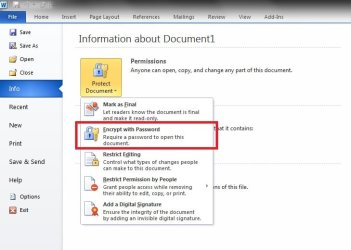
In Excel 2010 (2013 is the same, can't remember for previous versions of Excel) click on File > Protect Workbook > Encrypt With Password. That's how I protect my database containing my passwords, product keys etc.
Word is exactly the same.
My Computer
At a glance
W7 Pro x64 SP1 | W10 Pro IP x64 | W8.1 Pro x6...i7-4790k @ 4GHz (4.4GHz Boost)16GB DDR3 Kingston HyperX Fury @ 1600MHz CL 9...EVGA GTX 980 Classified
Computer type
PC/Desktop
Computer Manufacturer/Model Number
Custom Build
OS
W7 Pro x64 SP1 | W10 Pro IP x64 | W8.1 Pro x64 VM | Linux Mint VM
Well using password protected spreadsheets is okay for passwords for stuff where security doesn't matter too much. If you're storing passwords for anything that could give access to online banking or identity theft then it might be wise to read the last paragraph of the last paragraph of this article:
I remember finding evidence around two years ago that my entire documents folder had been zipped and uploaded to "who knows where?" by some clever hacker exploiting an unpatched vulnerability in windows.
Last edited:
My Computer
At a glance
Microsoft Windows 7 Home Premium 64-bit 7601 ...AMD C-60 APU with Radeon(tm) HD Graphics4.00 GBAMD Radeon HD 6290 Graphics
Computer type
Laptop
Computer Manufacturer/Model Number
ASUS
OS
Microsoft Windows 7 Home Premium 64-bit 7601 Multiprocessor Free Service Pack 1
CPU
AMD C-60 APU with Radeon(tm) HD Graphics
Motherboard
ASUSTeK COMPUTER INC. X501U
Memory
4.00 GB
Graphics Card(s)
AMD Radeon HD 6290 Graphics
Sound Card
(1) AMD High Definition Audio Device (2) Realtek High Defi
If you don't have passwords on your computer they can't be hacked. Sounds to simple.
Yes my passwords are on a Rolodex in my desk. The hackers would have to kill me to get them.
Of course I wouldn't need the passwords any more at that point.
Any information that I consider important enough I keep on a external storage device in my control.
I keep this little thought in my mind.
If it's on a computing device it's hackable. It just has to be worth the effort to someone.
My Computer
At a glance
Windows 10 Pro. 64/ version 1709 Windows 7 Pr...Intel i7-6800K @ 4.3Corsair Platinum 16 gig @2400EVGA GTX 1070 OC
Computer type
PC/Desktop
Computer Manufacturer/Model Number
Home made Desktop
OS
Windows 10 Pro. 64/ version 1709 Windows 7 Pro/64
CPU
Intel i7-6800K @ 4.3
Motherboard
ASUS X-99 Deluxe II
Memory
Corsair Platinum 16 gig @2400
Graphics Card(s)
EVGA GTX 1070 OC
Monitor(s) Displays
Asus 27" LED LCD/VE278Q
Screen Resolution
1920-1080 or 1280-720 HDMI
Hard Drives
INTEL SSD 730-240 Gb Sata 3.0/
PSU
EVGA Platium 1200W
Case
Phanteks Luxe Tempered Glass 8 fans/ one radiator
Cooling
XSPC/ Water Cooled CPU
Keyboard
Das 4 Professional
Mouse
Logitech M705/MX Anywhere 2-S
Internet Speed
100 mbits
Antivirus
Microsoft Security Essentials/ Malwarebytes Premium 3.0/ SAS
Browser
I.E. 11 default/Firefox/ ISP Time Warner Cable/Spectrum
Other Info
LG BluRay Burner/
Sound system-KLipsch-THX/
Icy Dock ssd Hot Swap bays.